/




Год: 2005




Текст
Release Copy
Pag
e
1
of
71
Lizardtech DjVu Reference
DjVu v3
Document Date:
November
2005
From:
Lizardtech, a Celartem Company
Status of Standard:
R
ele
as
e
d
1
Introduction
Although the Internet has given us a worldwide infrastructure on which to build the
universal library, much
of the world knowledge, history, and literature is still trapped on
paper in the basements of the world's traditional libraries. Many libraries and content
owners are in the process of digitizing their collections. While many such efforts involve
the pains
taking process of converting paper documents to computer
-
friendly form, such
as
SGML
based formats, the high cost of such conversions limits their extent. Scanning
documents
and distributing the resulting images electronically is not only considerably
chea
per, but also more faithful to the original document because it preserves its visual
aspect.
Despite the quickly improving speed of network connections and computers, the number
of scanned document images accessible on the Web today is relatively small. T
here are
several reasons for this.
The first reason is the relatively high cost of scanning anything else but unbound sheets
in black and white. This problem is slowly going away with the appearance of fast and
low
-
cost color scanners with sheet feeders.
The second reason is that long
-
established image compression standards and file formats
have proved inadequate for distributing scanned documents at high resolution,
particularly color documents. Not only are the file sizes and download times impractical,
the decoding and rendering times are also prohibitive. A typical magazine page scanned
in color at 100 dpi in JPEG would typically occupy 100 KB to 200
KB,
but the text
would be hardly readable: insufficient for screen viewing and totally unacceptable for
printing. The same page at 300 dpi would have sufficient quality for viewing and printing,
but the file size would be 300 KB to 1000 KB at best, which is impractical for remote
access. Another major problem is that a fully decoded 300 dpi color images of
a letter
-
size page occupies 24 MB of memory
and easily causes disk swapping.
The third reason is that digital documents are more than just a collection of individual
page images. Pages
in a scanned document
have a natural serial order. Special provision
m
ust be made to ensure that flipping pages be instantaneous and effortless so as to
maintain a good user experience. Even more important, most existing document formats
force users to download the entire document first before displaying a chosen page.
Howev
er, users often want to jump to individual pages of the document without waiting
for the entire document to download. Efficient browsing requires efficient random page
access, fast sequential page flipping, and quick rendering. This can be achieved with a
combination of advanced compression, pre
-
fetching, pre
-
decoding, caching, and
progressive rendering. DjVu decomposes each page into multiple components (text,
R
elease Copy
Page
2
of
71
backgrounds, images, libraries of common shapes...) that may be shared by several pages
and downl
oaded on demand.
This allows a suitably designed DjVu
-
viewing application
to
to handle on
-
demand downloading, pre
-
fetching, decoding, caching, and progressive
rendering of the page images.
2
Document Organization
This document describes the DjVu File Format
. It is written “from top down” providing
first a high
-
level understan
d
ing of the featu
res and techniques used in DjVu
(see
Overview
)
, then a mid
-
level view at the IFF85 level
(see
Component pieces
)
, and finally
a
very detailed decription of the underlyin
g algorithms and and byte
-
by
-
byte makeup of
DjVu files
(see
Low
-
leve
l
chunk structure
and the Appendices)
.
3
Overview
This section describes the DjVu file format at a high level: how DjVu
uses
the Mixed
Raster Content model
, how images are composed into doc
uments and the non
-
raster data
that such documents can also contain.
3.1
DjVu Images
The princip
al
imaging model used in DjVu is the “Mixed Raster Content”
(MRC)
model
described in
ITU
-
T Recommendation T.44,
ISO/IEC 16485
. In this model, an image
is
decompose
d into foreground and background
layers.
To select whether a particular pixel
comes from the foreground or background a bitonal
“selection” or “mask” layer
is
provided
. These three layers are compressed separately using techniques which are
optimized for
each type of data.
The foreground and background layers are compressed using a wavelete
-
based continous
-
tone image compression technique known as IW44.
The mask layer is compressed using a bitonal image compression technique that takes
advantage of repeti
tions of nearly identical shapes on the
page
(such as characters) to
efficiently compress text images.
A DjVu image need not contain all three layers and alternative compression techniques
are available for each layer.
3.2
DjVu
Documents
DjVu Documents can be
single
-
or multi
-
page. Each page consists of a DjVu image as
described above (photo, bitonal or an MRC
-
based
composition).
Such a page, by itself is
a valid DjVu Document. Multipage Documents can take either of two forms: Bundled or
Indirect.
3.2.1
Bundled m
ulti
-
page
documents
Bundled multi
-
page
DjVu
document uses a single file to represent the entire document.
This single file contains all the
page
s as well as ancillary information (e.g. the
page
directory, data shared by several
page
s, thumbnails, etc.). Us
ing a single file format is
very convenient for storing documents or for sending email attachments.
R
elease Copy
Page
3
of
71
3.2.2
Indirect multi
-
page
documents
There are problems inherent to storing multiple pages in a single file. A viewer may not
be able to utilize a byte
-
serving
mechanism such that that available in HTTP1.1.
Therefore any request for any page of such a file will necessarily result in the entire
document being transmitted. Furthermore,
a reasonable work pattern is
to read
the first
few pages
(perhaps a Table of C
ontents) and then navigate to
a page much further into
the document
.
However, in such a file, data for page 100 can not be viewed until after
data for pages 1
-
99 have been downloaded.
Indirect multipage documents address these problems. Such a
document i
s composed of
several files. The main file is named the index file. You can
view
document using the
URL
of the index file, just like you do with a bundled multi
-
page
document.
However, the
index file is very small. It simply contains the document directory
and the
URLs
of
secondary files containing the
page
data. When you
view
an indirect multi
-
page
document, the
viewer
only
needs to download the files corresponding to
the
page
s you
are viewing.
3.3
Non
-
r
aster
Data
3.3.1
Annotations
Every
DjVu
image optionally inclu
des
several different kinds of annotations
.
These
annotations are
often used to define hyper
-
links to other document
page
s or to arbitrary
web
page
s.
They
can also be used for other purposes such as setting the initial viewing
mode of a
page
and
defining h
ighlighted zones
.
3.3.2
Hidden text
Every
DjVu
image optionally includes a hidden text layer that associated graphical
features with the corresponding text. The hidden text layer is usually generated by
running
Optical
Character Recognition software. This textua
l information provides for
indexing
DjVu
documents and copying/pasting text from
DjVu
page
images.
3.3.3
Thumbnails
DjVu
documents sometimes contain pre
-
computed
page
thumbnails. These allow a
viewer to display a graphical representation of many pages
by dow
nloading a very small
“thumbnail” file instead of the actual pages themselves.
4
What’s new in DjVu File Format
Since the last update to the file format documentation,
Reference 1
, the file format has
been extended to include
Multipage formats. DjVu docume
nts can span more than one page. There are
two multipage formats available: bundled (single file) and indirect (separate files
for each page; see
DjVu Documents
and
Multipage Documents
)
R
elease Copy
Page
4
of
71
Annotations. Both initial viewing parameters (background color, ini
tial zoom)
and overlayed annotations (hyperlinks, text boxes) can be specified either at the
document level (“shared”) or at the page level. See
Annotation Chunk.
Hidden Text. Text and the associated layout information can be stored as with
each image.
This allows documents to be searched and indexed. See
Text Chunk.
Document Outline. A heirarchical outline can be specified at the document level.
This allows the document to contain present an integrated outline for overview
and navigation. See
Docume
nt Outline Chunk
.
Colorized JB2. A palettized extension is provided for the bitonal encoder. See
Foreground Color JB2 Chunk
.
5
Acknowledgements
This work is significantly based on
Reference 1
and the summary of file format changes
described in the DjVuLib
re project maintained by Leon Bottou and others.
6
References
6.1
DjVu 2
The DjVu File Format specification that was originally released by AT&T in 1999.
http://www.djvuzone.org/djvu/djvu/djvuspec/001.djvu
6.2
IFF
EA IFF 85 format, Electronic Arts' public domain IFF
standard for Interchange File
Format, released in January, 1985.
http://www.dcs.ed.ac.uk/home/mxr/gfx/2d/IFF.txt
6.3
JPEG
JPEG File Interchange Format, Version 1.02 (ISO DIS 10918
-
1, JPEG JFIF). The
specification is located at http://www.w3.org/Graphics/JPEG
/jfif.txt.
6.4
Tiff
http://partners.adobe.com/public/developer/en/tiff/TIFF6.pdf.
6.5
G4
ITU
-
T (CCITT) T.6. Facsimile Coding Schemes and Coding Control Functions for
Group 4 Facsimile Apparatus
6.6
UTF8
All text in DjVu files is Unicode encoded using the UTF8 encoding
.
http://www.unicode.org/versions/Unicode4.0.0/ch03.pdf
R
elease Copy
Page
5
of
71
6.7
DjVuLibre
An open source reference implementation of this file format specification is available at
http://sourceforge.net/projects/djvu/
. Through
out
this specification, there are numerous
references to source files in this implementation.
7
Component pieces (IFF chunks) of DjVu documents
and images
This section describes the Dj
Vu file format at a middle level. This includes types of
chunks which can go into various types of documents but not a detailed layout of the
contents of those chunks.
DjVu documents are IFF85 files (see reference 2 for details). The IFF85 structure
prov
ides a hierarchy of containers which hold various types of information in a DjVu file.
The
containers are called “chunks.” How the chunk is used (what it holds) can be
determined by its “chunk type”
or “chunk id.”
For example, the
list of files contained
in a
multipage document is
held in the “DIRM” (“directory”) chunk, annotations are held in a
“ANTz” chunk.
“FORM” chunks are composite (contain other chunks). The
ir
specific use is exposed by
a secondary chunk ID. For example a single page consists of s
everal different chunks all
contained within a single “FORM:DJVU” chunk. A multipage document consists of
several pages (and other chunks) all contained in a “FORM:DJVM” chunk.
This section discusses the
various kinds of DjVu documents and the correspondi
ng
chunks of which they consist.
7.1
Single Page Documents
A
Single Page Document
is
composed of a single "FORM:DJVU" composite chunk. This
composite chunk always begins with one “INFO” chunk describing the image size,
resolution and related information (see
D
ocument Info Chunk
).
The document containts
exactly one DjVu Image whose content varies as described below.
7.1.1
Photo DjVu Image
Photo DjVu Image files are best used for encoding photographic images in colors or in
shades of gray. The data compression model
relies on the IW44 wavelet representation.
This format is designed such that the IW44 decoder is able to quickly perform
progressive rendering of any image segment using only a small amount of memory. One
or more additional "BG44" chunks
contain
the ima
ge data encoded with the IW44
representation. The image size specified in the "INFO" chunk and the image size
specified in the IW44 data must be equal.
7.1.2
Bi
-
level DjVu Image
Bilevel DjVu Image files are used to compress black and white images representing
text
and simple drawings. The JB2 data compression model uses the soft pattern matching
technique, which essentially consists of encoding each character by descri
bing how it
R
elease Copy
Page
6
of
71
differs from a well
-
chosen already
-
encoded character.
A
“Sjbz” chunk contains t
he
bilevel data encoded with the JB2 representation (see appendix 2). The image size
specified in the “INFO” chunk and the image size specified in the JB2 data must be equal.
7.1.3
Compound DjVu Image
Compound DjVu Files are an extremely efficient way to compr
ess high resolution
Compound document images containing both pictures and text, such as a page of a
magazine. Compound DjVu Files represent the document images using two layers. The
background layer
is used for encoding the pictures and the paper texture
.
The
foreground layer
is used for encoding the text and the drawings. Additional chunks
hold the components of either the foreground or the background layers.
The main component of the foreground layer is a bilevel image named the
foreground
mask
. The pi
xel size of the foreground mask is equal to the size of the DjVu image. It
contains a black
-
on
-
white representation of the text and the drawings. This image is
encoded by a “Sjbz” chunk using the JB2 representation. There may also be a companion
chunk “
Djbz” containing a
shape dictionary
that defines bilevel shapes referenced by the
“Sjbz” chunk.
7.1.3.1
Foreground Encoding
The foreground colors can be encoded according to two models:
The foreground colors may be encoded using a small color image, the
foregroun
d color
image
, encoded as a single “FG44” chunk using the IW44 representation (see
IW44Image.h). Such compound DjVu
images are
rendered by painting the foreground
color image on top of the background color image using the foreground mask as a stencil.
The pixel size of the foreground color image is computed by rounding up the quotient of
the mask size by an integer sub
-
sampling factor ranging from 1 to 12. Most Compound
DjVu Images use a foreground color sub
-
sampling factor of 12. Smaller sub
-
sampling
factors produce very slightly better images.
The foreground colors may be encoded by specifying one solid color per object described
by the JB2 encoded mask. These
JB2 colors
are color
-
quantized and stored in a single
“FGbz” chunk (see section 6.3.10). S
uch compound DjVu images are rendered by
painting each foreground object on top of the background color image using the solid
color specified by the “FGbz” chunk.
7.1.3.2
Background Encoding
The background layer is a color image,
the background color image
encoded
by an
arbitrary number of “BG44” chunks containing successive IW44 refinements (see
appendix 1). The size of this image is computed by rounding up the quotient of the mask
size by an integer sub
-
sampling factor ranging from 1 to 12. Most Compound DjVu
I
mages use a background sub
-
sampling factor equal to 3. Smaller sub
-
sampling factors
are adequate for images with a very rich paper texture. Larger sub
-
sampling factors are
adequate for images containing no pictures.
R
elease Copy
Page
7
of
71
There are no ordering or interleaving
constraints on these chunks except that (a) the
“INFO” chunk must appear first, and (b) the successive “BG44” refinements must appear
with their natural order. The chunk order simply affects the progressive rendering of
DjVu images on a web browser.
7.1.3.3
Alt
ernative encodings
Besides the JB2 and IW44 encoding schemes, the DjVu format supports alternative
encoding methods for its components.
The foreground mask may be represented by a single “Smmr” chunk instead of “Sjbz”.
The “Smmr” chunk contains a bilev
el image encoded with the Fax
-
G4/MMR method.
Although the resulting files are typically six times larger, this capability can be useful
when DjVu is used as a front
-
end for fax machines and scanners with embedded Fax
-
G4/MMR capabilities.
The background c
olor image may be represented by a single “BGjp” chunk instead of
several “BG44” chunks. The “BGjp” chunk contains a JPEG encoded color image (see
JPEGDecoder.cpp). The resulting files are significantly larger and lack the progressivity
of the usual DjVu
files. This is useful because some scanners have embedded JPEG
capabilities.
The foreground color image may be represented by a single “FGjp” chunk instead of a
single “FG44” chunk. This is useful because some scanners have embedded JPEG
capabilities.
7.1.3.4
A
nnotations and Textual Information
All types of DjVu images may contain annotation chunks. Annotation chunks are used to
describe hyperlinks, to specify more
viewer settings (page background, initial zoom, etc)
,
and to hold metadata information. Annotati
ons are contained in “ANT
a”
or “ANTz”
chunks.
All types of DjVu image files may also contain a computer readable description of the
text appearing on the page. This information is contained by either a “TXTa” chunk or
“TXTz” chunk.
7.2
Multipage Documents
A multipage document is composed of a “FORM:DJVM” whose first chunk is a “DIRM”
chunk containing the
document directory
. This directory lists all component files
composing the given document, helps to access every component file and identify the
pages of
the document.
In a
bundled
multipage file, the component files are stored immediately after the “DIRM”
chunk, within the “FORM:DJVM” composite chunk.
In an
indirect
multipage file, the component files are stored in different files whose URLs
are composed
using information stored in the “DIRM” chunk.
R
elease Copy
Page
8
of
71
7.2.1
Component files
A multipage DjVu document
necessar
il
y
reference
s
other FORM (composite) chunks.
Specifically
Each page is
single page document (
FORM:DJVU chunk
).
Embedd
ed thumbnails
(if any)
are contained in
one or more
FORM:THUM
chunk
s
Shared annotations
(if any)
and shape
dictionaries
(if any)
are contained in one or
more
FORM:DJVI chunk
s
.
Each
of these composite chunks (FORM:DJVU, FORM:THUM, FORM:DJVI)
is a well
-
formed IFF bytestre
am
in its own right and
ca
n be held in a separate disk file. In the
context of a multipage
–
either bundled or indirect
–
document, we refer to these
composite chunks as
component files
.
7.2.2
Including shared information
In many cases, efficiencies can be achieved by sharing JB2 shape
definitions and/or
annotations across pages. To facilitate this, a
ny DjVu image file contained in a multipage
file may contain an “INCL” chunk containing the ID of a shared component file. The
decoder processes the chunks contained in the shared componen
t file as if the DjVu
image file contained them.
All relevant pages include this shared component file.
Although they appear in several pages, these shared shapes are encoded only once in the
document.
A shared component file is composed of a single “F
ORM:DJVI” potentially containing
any information otherwise allowed in a DjVu image file (except for the “INFO” chunk of
course).
8
Low
-
level chunk structure and definition
This section describes the DjVu file format at a low level. This includes the binary
layout of the IFF85 wrapper and, of course, the layout of each contained chunk.
8.1
Header
The first four bytes of a DjVu file are 0x41 0x54 0x26 0x54. This preamble is not part of
the EA IFF 85 format, but it is required in order to identify DjVu files.
8.2
DjVu
File structure
8.2.1
IFF Wrapper
An IFF file consists of a number of chunks.
Each chunk is laid out in 3 fields:
BYTE*4
Chunk ID. Describes the use of the chunk. The strings that identify
the types of chunks used in DjVu are listed below.
INT32
Length (MSB fi
rst). The length of the Data
R
elease Copy
Page
9
of
71
BYTE[length]
The data to be contained.
A chunk whose type is not recognized by the application is to be ignored. In the IFF
format, chunks may be nested: a chunk may contain other chunks as part of its data. In
the DjVu form
at, there is only one chunk at the outermost nesting level, a FORM chunk.
All other chunks appear within the FORM chunk, sequentially, with no nesting.
Each chunk, including those nested within another chunk, must begin on an even byte
boundary; that is,
the number of bytes in the file before the beginning of the chunk must
be an even integer. If necessary to ensure that a chunk begins on a even byte boundary, a
single padding byte whose value is 0x00 is placed before a chunk.
Example:
0000000: 41
54 26
54
AT
&T
; magic described
in 8.1
000000
4
: 46
4f 52
4d FORM
; chunkID = FORM
000000
8
: 00
00 68
a6 ..h¦
; (0xA668 = 26790, length of this FORM chunk)
000000
b
:
444a 5655
DJVU
; first four bytes of
contained
data
. Since this is a
a FORM
chunk , this
starts wi
th
the subidentifier. This is a FORM:DJVU chunk, a single page
document.
8.2.2
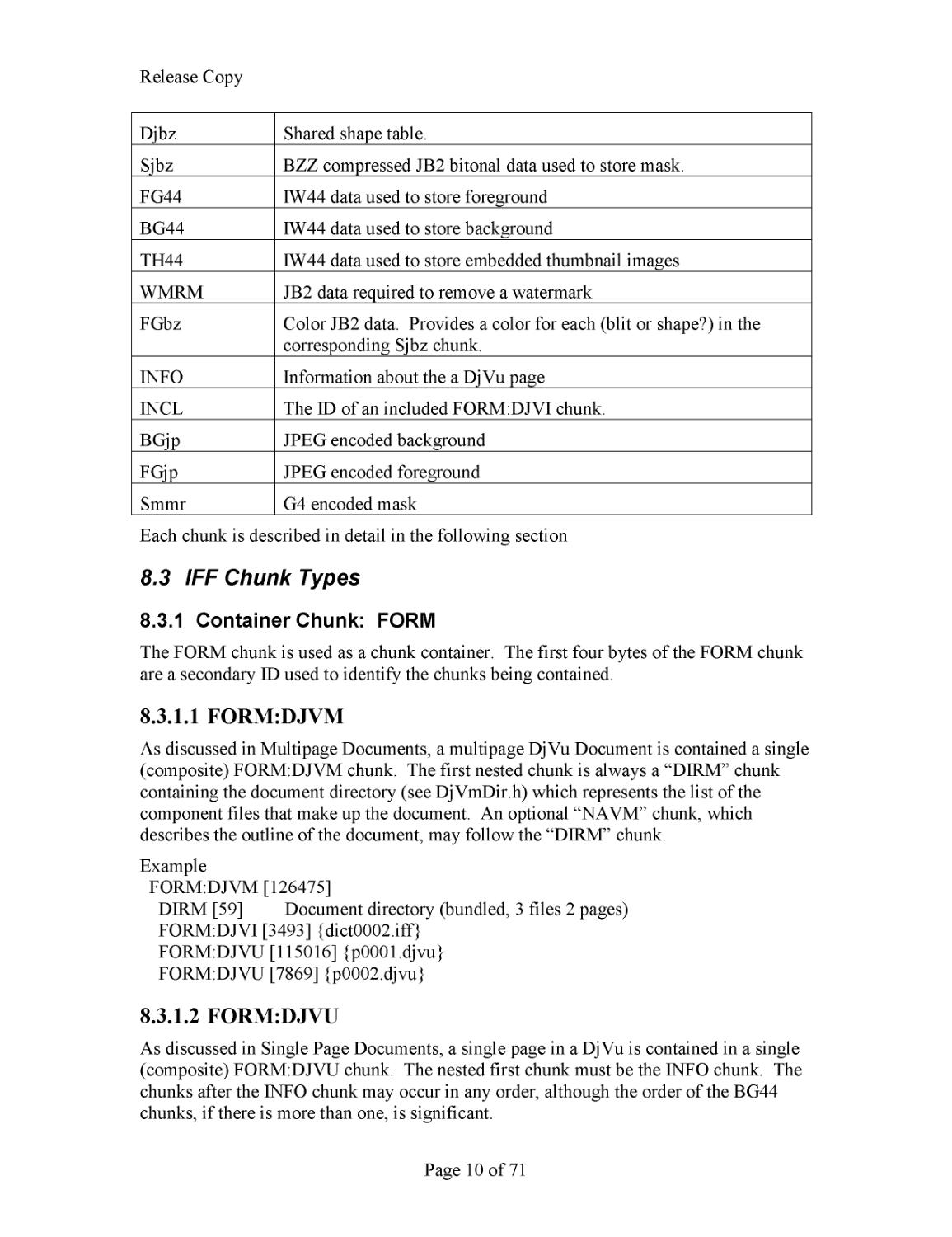
Chunk Summary
The chunks used in the DjVu file format
are summarized in Table 1
.
Table
1
. Chunk Summary
Chunk ID
Usage
FORM
The composite chunk. The first
four data bytes of the FORM chunk
are a secondary identifier. Such chunks are referred to as
FORM:
XXXX
where “
XXXX
” stands for the secondary identifier.
FORM:DJVM
A multipage DjVu document. Composite chunk that contains the
DIRM chunk, possibly shared/in
cluded chunks and subsequent
FORM:DJVU chunks which make up a multipage document
FORM:DJVU
A DjVu Page / single page DjVu document.
Composite chunk that
contains the chunks which make up a page in a djvu document
FORM:DJVI
A “shared” DjVu file which is
included via the INCL chunk. Shared
annotations, shared shape dictionary.
FORM:THUM
Composite chunk that contains the TH44 chunks which are the
embedded thumbnails
DIRM
Page name information for multi
-
page documents
NAVM
Bookmark information
ANTa, AN
Tz
Annotations including both initial view settings and overlaid
hyperlinks, text boxes, etc.
TXTa, TXTz
Unicode Text and layout information
R
elease Copy
Page
10
of
71
Djbz
Shared shape table.
Sjbz
BZZ compressed JB2 bitonal data used to store mask.
FG44
IW44 data used to store
foreground
BG44
IW44 data used to store background
TH44
IW44 data used to store embedded thumbnail images
WMRM
JB2 data required to remove a watermark
FGbz
Color JB2 data. Provides a color for each (blit or shape?) in the
corresponding Sjbz chunk.
IN
FO
Information about the a DjVu page
INCL
The ID of an included FORM:DJVI chunk.
BGjp
JPEG encoded background
F
Gjp
JPEG encoded foreground
Smmr
G4 encoded mask
Each chunk is described in detail in the following section
8.3
IFF Chunk Types
8.3.1
Container Chunk:
FORM
The FORM chunk is used as a chunk container. The first four bytes of the FORM chunk
are a secondary ID used to identify the chunks being contained.
8.3.1.1
FORM:DJVM
As discussed in Multipage Documents, a multipage DjVu Document is contained a single
(com
posite) FORM:DJVM chunk.
The first nested chunk is always a “DIRM” chunk
containing the document directory (see DjVmDir.h) which represents the list of the
component files that make up the document. An optional “NAVM” chunk, which
describes the outline o
f the docume
nt, may follow the “DIRM” chunk.
Example
FORM:DJVM [126475]
DIRM [59] Document directory (bundled, 3 files 2 pages)
FORM:DJVI [3493] {dict0002.iff}
FORM:DJVU [115016] {p0001.djvu}
FORM:DJVU [7869] {p0002.djvu}
8.3.1.2
FORM:DJV
U
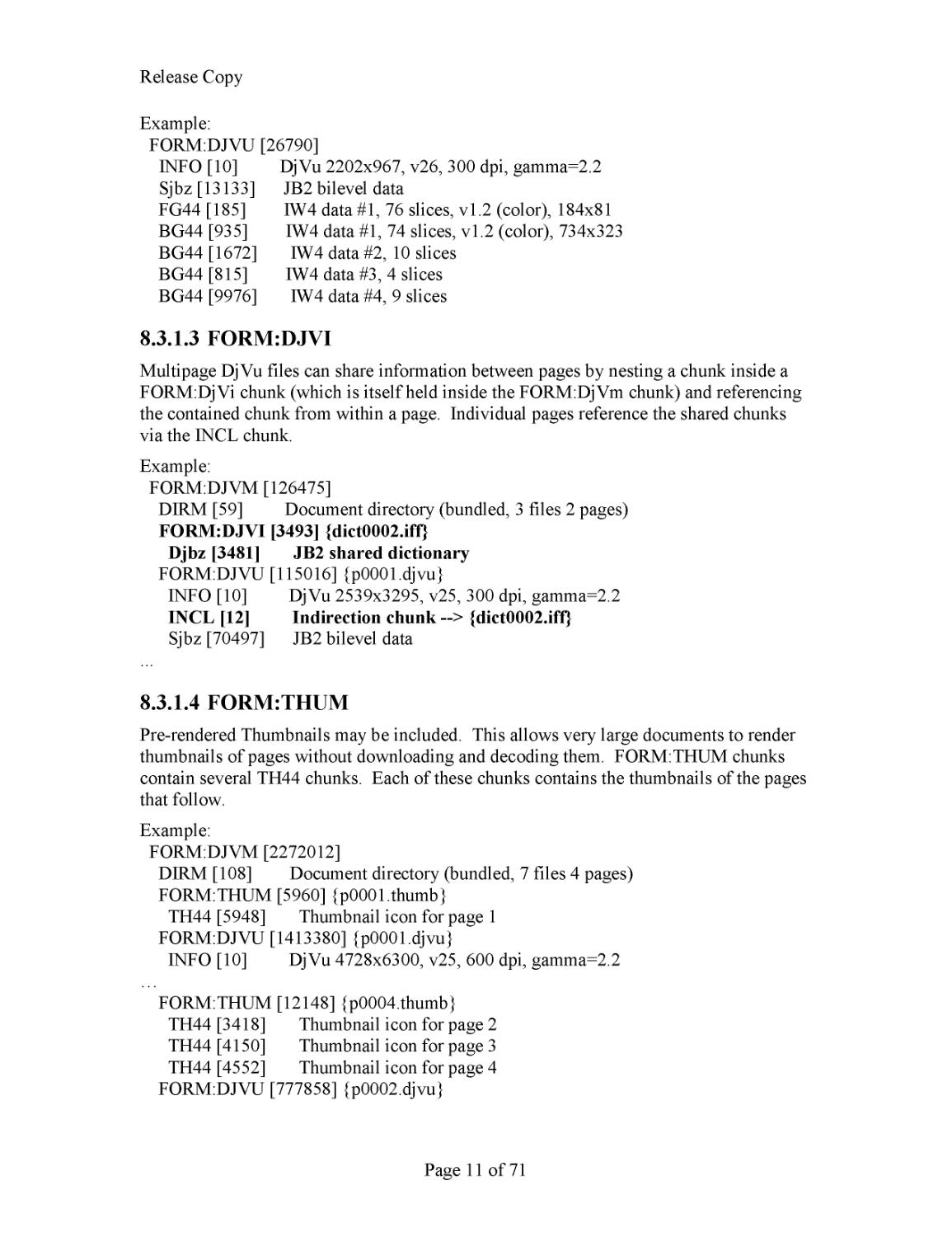
As discussed in Single Page Documents, a single page in a DjVu is contained in a single
(composite) FORM:DJVU chunk. The nested first chunk must be the INFO chunk. The
chunks after the INFO chunk may occur in any order, although the order of the BG44
c
hunks, if there is more than one, is significant.
R
elease Copy
Page
11
of
71
Example:
FORM:DJVU [26790]
INFO [10] DjVu 2202x967, v26, 300 dpi, gamma=2.2
Sjbz [13133] JB2 bilevel data
FG44 [185] IW4 data #1, 76 slices, v1.2 (color), 184x81
BG44 [
935] IW4 data #1, 74 slices, v1.2 (color), 734x323
BG44 [1672] IW4 data #2, 10 slices
BG44 [815] IW4 data #3, 4 slices
BG44 [9976] IW4 data #4, 9 slices
8.3.1.3
FORM:
DJVI
Multipage DjVu files can share information between page
s by
nesting a chunk
in
side
a
FORM:
DjVi chunk (which is itself held inside the FORM:DjVm chunk) and referencing
the contained chunk from within a page.
Individual pages reference the shared chunks
via the INCL chunk.
Example:
FORM:DJVM [126475]
DIRM
[59] Document directory (bundled, 3 files 2 pages)
FORM:DJVI [3493] {dict0002.iff}
Djbz [3481] JB2 shared dictionary
FORM:DJVU [115016] {p0001.djvu}
INFO [10] DjVu 2539x3295, v25, 300 dpi, gamma=2.2
INCL [12
] Indirection chunk
--
> {dict0002.iff}
Sjbz [70497] JB2 bilevel data
...
8.3.1.4
FORM:THUM
Pre
-
rendered Thumbnails may be included. This allows very large documents to render
thumbnails of pages without downloading and decoding them. FORM:THUM
chunks
contain several TH44 chunks. Each of these chunks contain
s
the thumbnails of the pages
that follow.
Example:
FORM:DJVM [2272012]
DIRM [108] Document directory (bundled, 7 files 4 pages)
FORM:THUM [5960] {p0001.thumb}
TH44 [5
948] Thumbnail icon for page 1
FORM:DJVU [1413380] {p0001.djvu}
INFO [10] DjVu 4728x6300, v25, 600 dpi, gamma=2.2
…
FORM:THUM [12148] {p0004.thumb}
TH44 [3418] Thumbnail icon for page 2
TH44 [4150] Thumbn
ail icon for page 3
TH44 [4552] Thumbnail icon for page 4
FORM:DJVU [777858] {p0002.djvu}
R
elease Copy
Page
12
of
71
…
8.3.2
Directory Chunk: DIRM
As described in Multipage Docu
ments, a multipage document will contain
“component
files”
such as individual pages (FORM:DJVU
) or shared annotations (FORM:DJVI).
The first contained chunk in a FORM:DJVM composite chunk is the DIRM chunk
containing the
document directory
.
It contains information the decoder will nee
d to
access the component files (see
Multipage Documents
).
8.3.2.1
Unenc
oded data
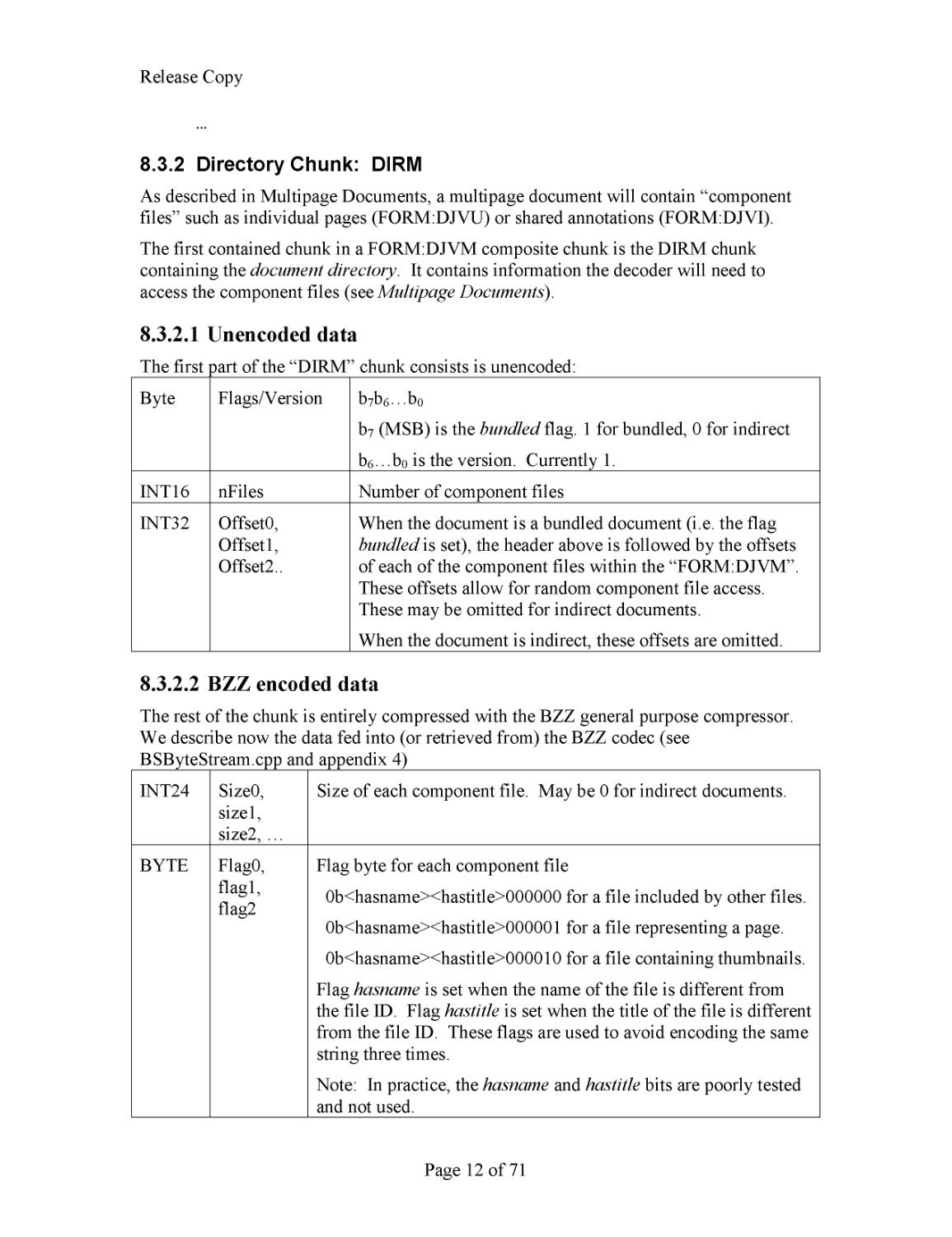
The first part of the
“DIRM” chunk
consists is unencoded:
Byte
Flags/Version
b
7
b
6
…b
0
b
7
(MSB)
is the
bundled
flag. 1 for bundled, 0 for indirect
b
6
…b
0
is the version. Currently 1.
INT16
nFiles
Number of component files
INT32
Offset0
,
Offset1,
Offset2..
When the document is a bundled document (i.e. the flag
bundled
is set), the header above is followed by the offsets
of each of the component files within the “FORM:DJVM”.
These offsets allow for random component file access.
These ma
y be omitted for indirect documents.
When the document is indirect, these offsets are
omitted
.
8.3.2.2
BZZ encoded data
The rest of the chunk is entirely compressed with the BZZ general purpose compressor.
We describe now the data fed into (or retrieved from) th
e BZZ codec (see
BS
ByteStream.cpp and appendix 4)
INT24
Size0,
size1,
size2, …
Size of each component file
. May be 0 for indirect documents.
BYTE
Flag0,
flag1,
flag2
Flag byte for each component file
0b<hasname><hastitle>000000 for a file included by o
ther files.
0b<hasname><hastitle>000001 for a file representing a page.
0b<hasname><hastitle>000010 for a file containing thumbnails.
Flag
hasname
is set when the name of the file is different from
the file ID. Flag
hastitle
is set when the title of t
he file is different
from the file ID. These flags are used to avoid encoding the same
string three times.
Note: In practice,
the
hasname
and
hastitle
bits are poorly tested
and not used.
R
elease Copy
Page
13
of
71
ZSTR
ID0,
Name0,
Title0,
ID1,
Name1,
Title1, …
There are one to
three zero
-
terminated strings per component file.
The first string contains the ID of the component file. If
hasname
is set then there is a second string which contains the name of the
component file
(in the case of an indirect file, this is the disk
fi
lename)
. If
hastitle
is set, then there is a third string which
contains the name of the component
(for display … for example
alternate page numberings in the Forward, or Preface).
Note: ID0 in practice, ID0 is the only string used and in the case
of ind
irect files, is the same as the disk filename of the component
file.
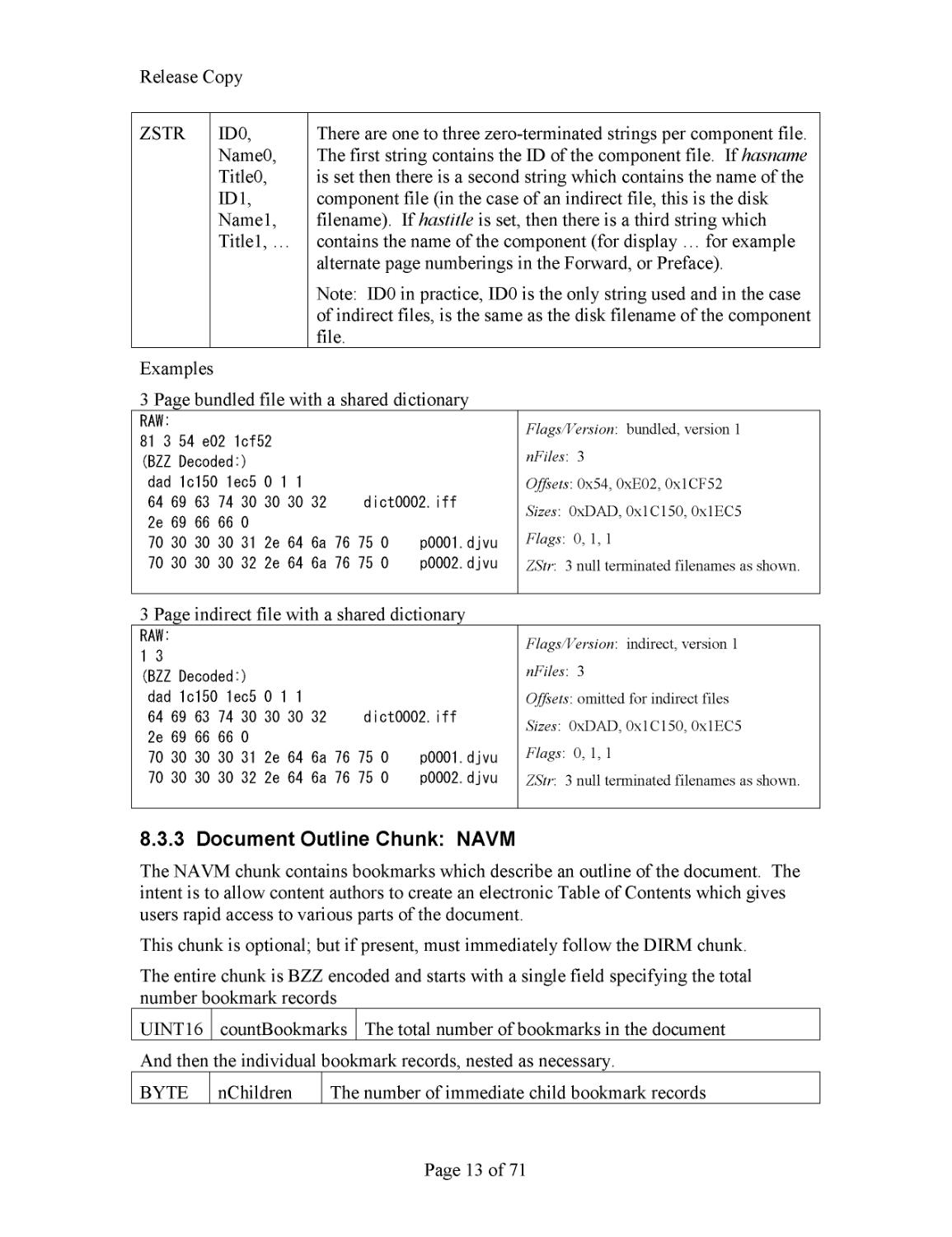
Examples
3 Page bundled file with a shared dictionary
RAW:
81 3 54 e02 1cf52
(BZZ
De
coded:)
dad 1c150 1ec5 0 1 1
64 69 63 74 30 30 30 32
dict0002.iff
2e 69 66 66 0
70 30 30 30 31 2e
64 6a 76 75 0
p0001.djvu
70 30 30 30 32 2e 64 6a 76 75 0
p0002.djvu
Flags
/Version
: bundled, version 1
nFiles
: 3
Offsets
: 0x54, 0xE02, 0x1CF52
Sizes
: 0xDAD, 0x1C150, 0x1EC5
Flags
: 0, 1, 1
ZStr
: 3 null terminated filenames as shown.
3 Page indirect
file with a shared dictionary
RAW:
1 3
(BZZ
De
coded:)
dad 1c150 1ec5 0 1 1
64 69 63 74 30 30 30 32
dict0002.iff
2e 69 66 66 0
70 30 30 30 31 2e 64 6a 76 75 0
p0001.djvu
70 30 30 30 32 2e 64 6a 76 75 0
p0002.djvu
Flags
/Version
: indirect, version 1
nF
iles
: 3
Offsets
: omitted for indirect files
Sizes
: 0xDAD, 0x1C150, 0x1EC5
Flags
: 0, 1, 1
ZStr
: 3 null terminated filenames as shown.
8.3.3
Document Outline Chunk: NAVM
The NAVM chunk contains bookmarks which describe
an
outline of the document. The
inten
t is to allow content authors to create an electronic Table of Contents which gives
users rapid access to various parts of the document.
This chunk is optional; but if present, must immediately follow the DIRM chunk.
The entire chunk is BZZ encoded and
sta
rts with
a single field specifying the
total
number bookmark records
UINT16
count
Bookmarks
The total number of bookmarks in the document
And then the individual
bookmark
records
, nested as necessary
.
BYTE
nChildren
The number of immediate child bookmark r
ecords
R
elease Copy
Page
14
of
71
INT24
nDesc
size of description text
UTF8
sDesc
the description text.
INT24
nURL
S
ize of the URL text
UTF8
sURL
the URL text. This may (and typically does) use the syntax
described for t
he URLs in the Annotation chunk (and similarly,
is not URL
-
encoded)
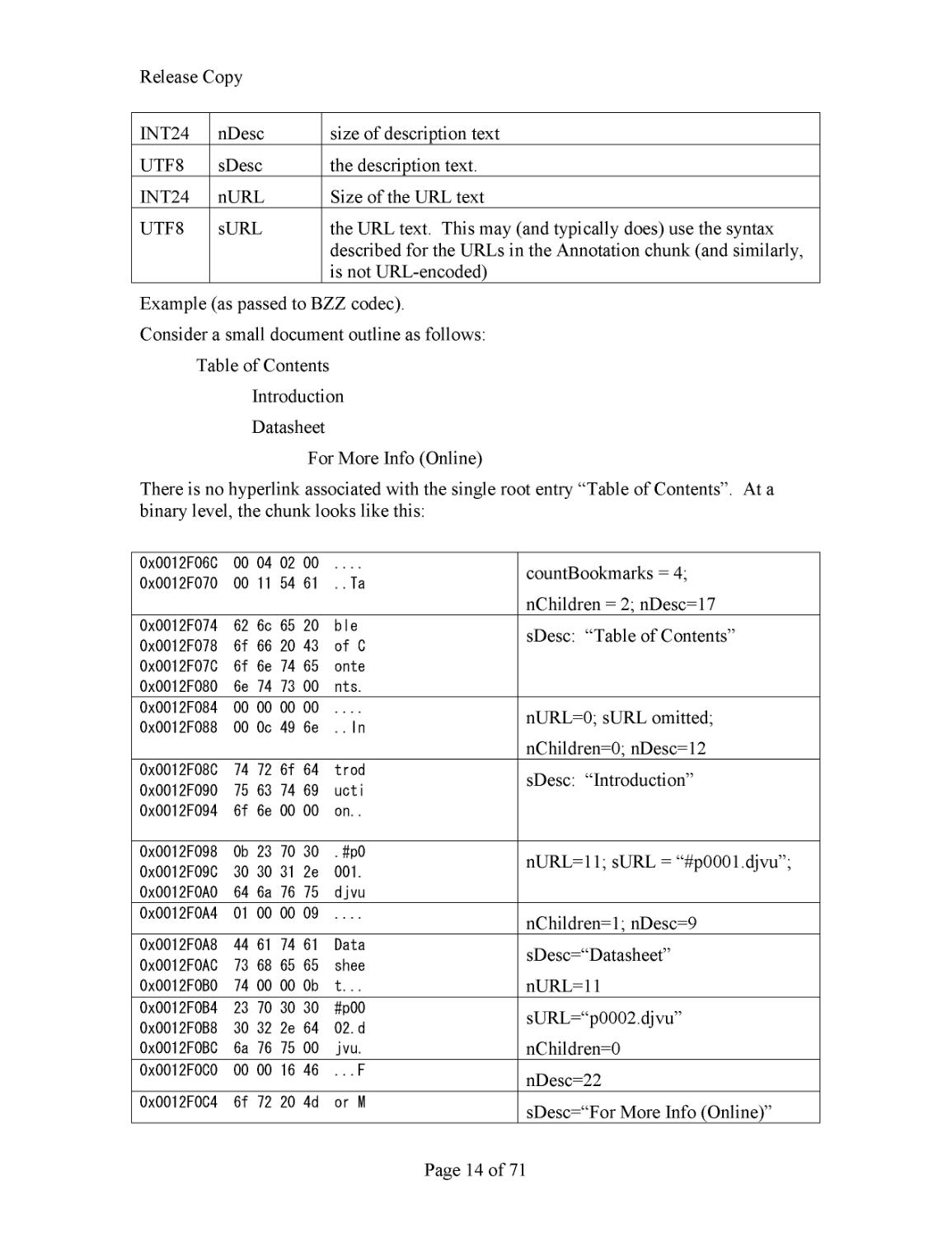
Example (as passed to BZZ codec)
.
Consider a small
document outline
as follows:
Table of Contents
Intro
duction
Datasheet
For More Info
(Online)
There is no hyperlink associated with the single root entry “Table of Contents”. At a
binar
y level, the chunk looks like this:
0x0012F06C 00 04 02 00 ....
0x0012F070 00 11 54 61 ..Ta
countBookmarks = 4;
nChildren = 2; nDesc=17
0x0012F074 62 6c 65 20 ble
0x0012F078 6f 66 20 43 of C
0x0012F07C 6f 6e 74 65 onte
0x0012F080 6e 74 73 00
nts.
sDesc: “Table of Contents”
0x0012F084 00 00 00 00 ....
0x0012F088 00 0c 49 6e ..In
nURL=0; sURL omitted;
nChildren=0; nDesc=12
0x0012F08C 74 72 6f 64 trod
0x0012F090 75 63 74 69 ucti
0x0012F094 6f 6e 00 00 on..
sDesc: “Introduction”
0x0012F098 0b 23 70 30 .#p0
0x0012F09C 30 30 31 2e 001.
0x0012F0A0 64 6a 76 75 djvu
nURL=11; sURL = “#p0001.djvu”;
0x0012F0A4 01 00 00 09 ....
nChildren=1; nDesc=9
0x0012F0A8 44 61 74 61 Data
0x0012F0AC 73 68 65 65 shee
0x0012F0B0 74 00 00
0b t...
sDesc=
“
Datasheet”
nURL=11
0x0012F0B4 23 70 30 30 #p00
0x0012F0B8 30 32 2e 64 02.d
0x0012F0BC 6a 76 75 00 jvu.
sURL=
“
p0002.djvu”
nChildren=0
0x0012F0C0 00 00 16 46 ...F
nDesc=22
0x0012F0C4 6f 72 20 4d or M
sDesc=
“
For More Info
(Online)”
R
elease Copy
Page
15
of
71
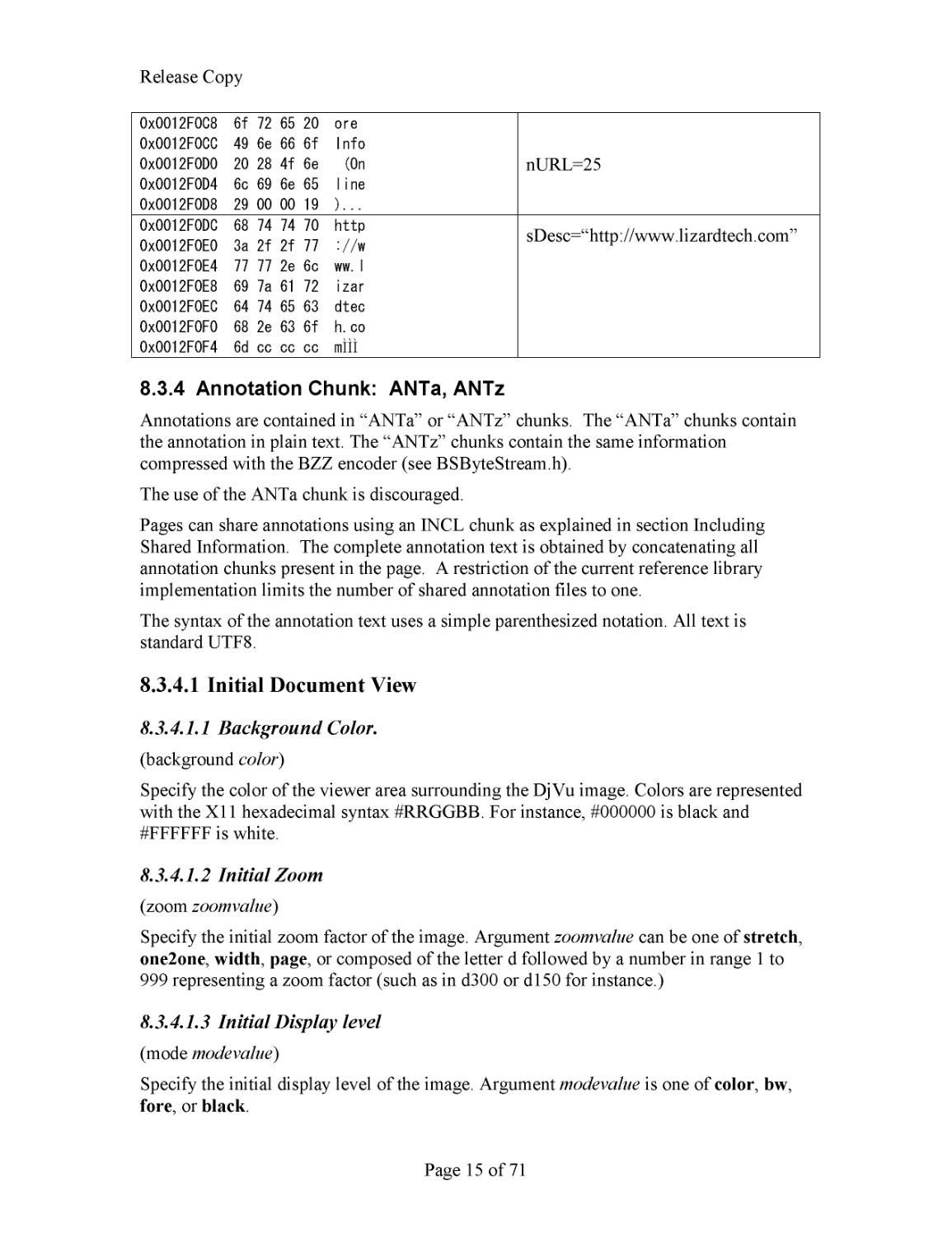
0x0012F0C8 6f 72 65 20 ore
0x0012F0CC 49 6e 66 6f Info
0x0012F0D0 20 28 4f 6e (On
0x0012F0D4 6c 69 6e 65 line
0x0012F0D8 29 00 00 19 )...
nURL=25
0x0012F0DC
68 74 74 70 http
0x0012F0E0
3a 2f 2f 77 ://w
0x0012F0E4
77 77 2e 6c ww.l
0x0
012F0E8
69 7a 61 72 izar
0x0012F0EC
64 74 65 63 dtec
0x0012F0F0
68 2e 63 6f h.co
0x0012F0F4
6d cc cc cc m
ÌÌÌ
sDesc=
“
http://www.lizardtech.com”
8.3.4
Annotation Chunk: ANTa, ANTz
Annotations are contained in “ANTa” or “ANTz” chunks. The “ANTa” chunks
contain
the annotation in plain text. The “ANTz” chunks contain the same information
compressed with the BZZ encoder (see BSByteStream.h).
The use of the ANTa chunk is discouraged.
Pages can share annotations using an INCL chunk as explained in section Inc
luding
Shared Information.
The complete annotation text is obtained by concatenating all
annotation chunks present in the page. A restriction of the current reference library
implementation limits the number of shared annotation files to one.
The syntax
of the annotation text uses a simple parenthesized notation.
All text is
standard UTF8.
8.3.4.1
Initial Document View
8.3.4.1.1
Background Color.
(background
color
)
Specify the color of the viewer area surrounding the DjVu image. Colors are represented
with the X11 hexade
cimal syntax #RRGGBB. For instance, #000000
is black and
#FFFFFF is white.
8.3.4.1.2
Initial Zoom
(zoom
zoomvalue
)
Specify the initial zoom factor of the image. Argument
zoomvalue
can be one of
stretch
,
one2one
,
width
,
page
, or composed of the letter d followed by
a number in range 1 to
999 representing a zoom factor (such as in d300 or d150 for instance.)
8.3.4.1.3
Initial Display level
(mode
modevalue
)
Specify the initial display
level
of the image. Argument
modevalue
is one of
color
,
bw
,
fore
, or
black
.
R
elease Copy
Page
16
of
71
8.3.4.1.4
Alignment
(align
horzalign vertalign)
Specify how the image should be aligned on the viewer surface. By default the image is
located in the center. Argument
horzalign
can be one of
left
,
center
, or
right
. Argument
vertalign
can be one of
top
,
center
, or
bottom
.
Example (
Typical Shared Annotation)
(background #FFFFFF ) (zoom page ) (mode bw ) (align center default )
8.3.4.2
Maparea (o
verprinted annotations
)
(maparea
url
comment
area
...)
A “Maparea annotation” d
efine
s
an
overprinted annotation
(one that is drawn on top of
the ren
dered image). These annotations are used to draw Lines, Text boxes, Highlight
areas with optional hyperlinking capability. The
area
parameter distinguishes among
several different
forms
of mapareas. For convenience, we will sometimes refer to “
rect
mapa
reas” when we mean “mapareas whose
area
attribute is
rect
” and similarly “
line
mapareas”, etc.
A note about escape sequences
. The only currently
-
accepted escape sequence is for a
single quote:
\
”. All other string characters are written in UTF8 (ascii
-
c
ompatible).
Specifically, where needed, spaces, ampersands (“&”), backslashes (“
\
”) and parentheses
(“(“, “)”) are written directly. Erroneous and unrecognized constructs are silently
ignored.
8.3.4.2.1
url
Argument
url
takes either of these forms
href
(
url
href
target
)
href
can be an arbitrary
URL
or can be c
omposed of the hash character (#
) followed by
either a component file identifier or a page number. Page numbers may be prefixed with
an optional sign to represent a page displacement. For instance the s
trings #
-
1 and #+1
can be used to access the p
revious page and the next page.
href
is not URL
-
encoded.
target
is a string representing the target frame for the hyper
-
link, as defined by the
HTML
anchor tag
<A>
8.3.4.2.2
comment
Argument
comment
is a string that mig
ht be displayed by the viewer when the user
moves the mouse over the
maparea
.
8.3.4.2.3
area
Argument
area
defines the shape and the location of the
maparea
. The following forms
are recognized:
R
elease Copy
Page
17
of
71
(
rect
xmin ymin width height
)
// defines a rectangle
(
oval
xmin ymin w
idth height
)
// defines an oval
(
text
xmin ymin width height
)
// defines a text box
(
poly
x0 y0 x1 y1
... )
// defines a polygon
(
line
x0 y0 x1 y1
)
// defines a line with optional arrow head
All parameters are numbers representing coordinates. Coord
inates are measured in pixels
and have their origin at the
bottom left corner of the
rotated
(
this for historical reasons;
see
Document Info Chunk
) page
.
8.3.4.2.3.1
Miscellaneous parameters
The remaining expressions in the maparea list
concern
the visual effect
s
asso
ciated with
the
maprea annotation
.
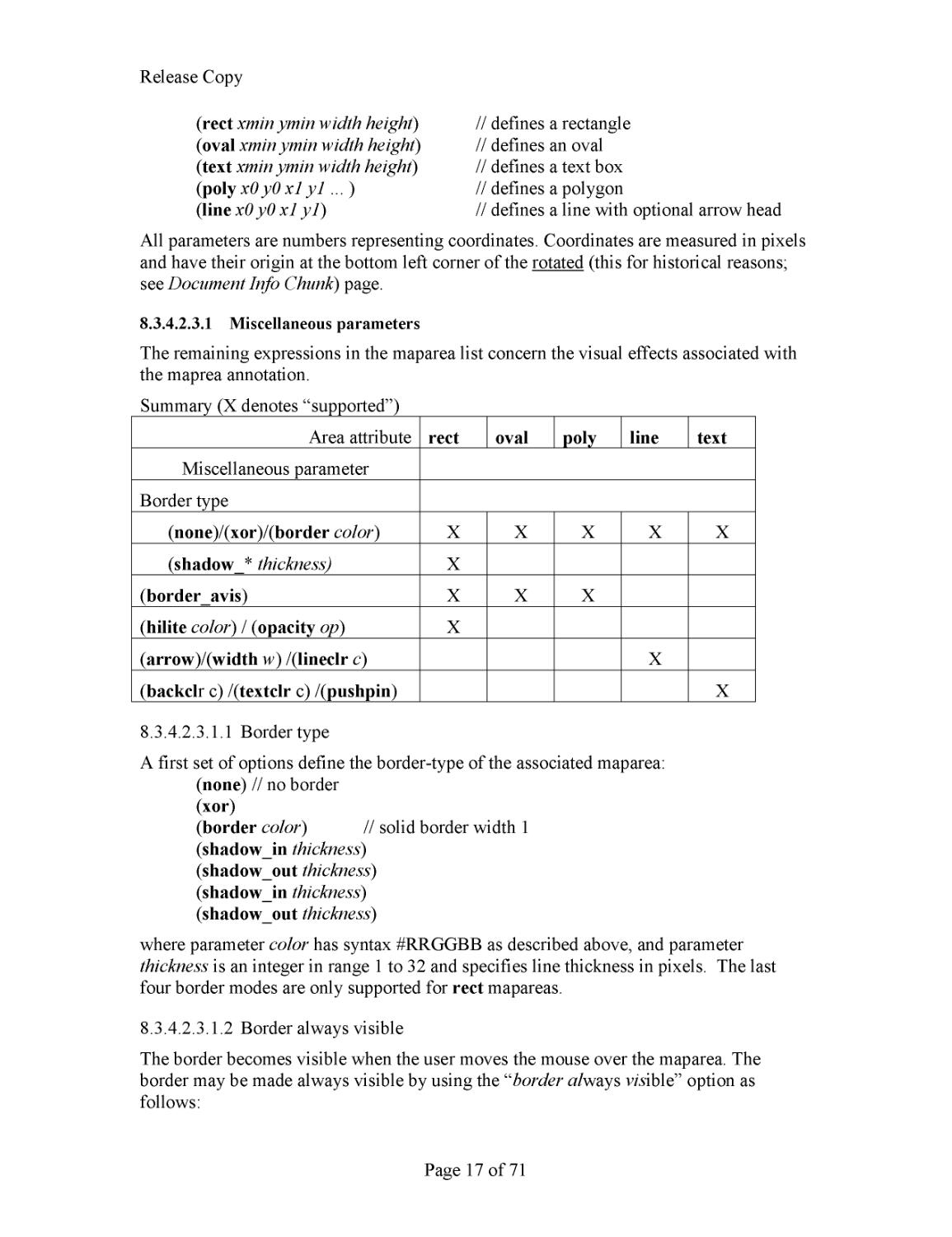
Summary
(X denotes “supported”)
Area attribute
rect
oval
poly
l
ine
t
ext
Miscellaneous parameter
Border type
(
none
)/(
xor
)/(
border
color
)
X
X
X
X
X
(
shadow_
*
thickness)
X
(
border_avis
)
X
X
X
(
hilite
color
) / (
opacity
op
)
X
(
arrow
)/(
width
w
) /(
lineclr
c
)
X
(
backcl
r c) /(
textclr
c) /(
pushpin
)
X
8.3.4.2.3.1.1
Border type
A first set of options define the border
-
type of the
associated
maparea
:
(
none
)
// no border
(
xor
)
(
border
color
)
// solid border width 1
(
sha
dow_in
thickness
)
(
shadow_out
thickness
)
(
shadow_
in
thickness
)
(
shadow_out
thickness
)
where parameter
color
has syntax #RRGGBB as described above, and parameter
thickness
is an integer in range 1 to 32
and specifies line thickness in pixels
. The last
fou
r border modes are only supported for
rect
mapareas
.
8.3.4.2.3.1.2
Border always visible
The border becomes visible when the user moves the mouse over the
maparea
. The
border may be made always visible by using the
“
border
al
ways
vis
ible” option as
follows:
R
elease Copy
Page
18
of
71
(
border_
avi
s
)
8.3.4.2.3.1.3
Highlight color and opacity
The following options may be used with
rect
mapareas
. The complete area will be
highlighted using the specified color at the specified opacity (0
-
100, default of 50).
(
hilite
color
)
(
opacity
op
)
8.3.4.2.3.1.4
Line and Text parameters
The
following options may be used with
line
mapareas
to specify an optional ending
arrow, the line width and color:
(
arrow
)
---
default (not present) means “no ending arrow”
(
width
w
)
---
default (not present) means
w
== 1
(
lineclr
color
)
---
default (
not present) means
color
==black
The following options may be used with
text
map
areas:
(
backclr
bkcolor
)
---
default (not present) means
transparent
(
textclr
txtcolor
)
---
default (not present) means
black
(
pushpin
)
---
not default (not present) means “n
ot push pin”
If any border type non
-
“none” is specified, the border is drawn “solid”, (as if “(color c)”
were specified).
Where
bkcolor
specifies the background text color
txtcolor
specifies the text color
pushpin
specifies that the text box is collapsib
le
. This allows the text box to expand into
view when needed but not obscure the image otherwise..
Example
s
(typical page
-
level annotation):
(maparea "http://www.lizardtech.com/" "Here is a rectangular hyperlink"
(rect 543 2859 408 183 ) (xor ) )
(ma
parea "http://www.lizardtech.com/" "Here is an oval hyperlink"
(oval 1068 2853 429 195 ) (xor )
(maparea "" "Here is a text box"(text 1635 2775 423 216 )
(pushpin ) (backclr #FFFF80 ) (border #000000 ) )
(maparea "" "Arrow" (line 591 3207 1512
3138 ) (arrow ) (none ) )
8.3.4.3
Printed
h
eaders and footers
User
-
specified strings may be added to printed output.
(
<
phead
|
pfoot
>
position_string1
,
position_string2
, …)
Where position_string is of the form: <
left
|
center
|
right
>::<string>
Example
(phead "left::
Sept 20, 2005
" "right::
Today’s Menu
" ) (pfoot "center::
Chez Dominique
" )
R
elease Copy
Page
19
of
71
8.3.5
Text Chunk: TXTa, TXTz
Text is
contained in “TXTa” or “TXTz” chunks. The “TXTa” chunks contain the text
unencoded. The “ANTz” chunks contain the same information compressed with t
he BZZ
encoder (see BSByteStream.h).
The use of the TXTa chunk is discouraged.
The chunk begins
with
the UTF8
-
encoded text of the page
:
INT24
lenText
size of the text string
in bytes
UTF8
strText
UTF8 encoded string
BYTE
Version
Version is currently 1
[Implemenation
Note]
. The text may
optionally
contain separators
between text blocks
corresponding to
various zones. These may be simple CR/LF and <space>
, terminating
NULL,
or the more arcane
cases such as VT (vertical tab, ascii 0xB) GS (group separat
or,
0x1D),
RS (
record
separator
0x1E
)
and
US (unit separator
0x1F
)
,. Such separators can
have a significant impact on searching and exporting implementations. Decoding
applications should be prepared to address this.
Following this
is a
list
of 0 or mor
e zones
which define the bounding rectangles of the
text above.
Zones may contain heirachically smaller zones (e.g. columns contain regions,
words contain characters)
and zones at the same hierarchical level should not overlap.
Zones are listed in readin
g order with parents prece
eding children.
Each Zone is record
is 17 bytes long and
comprised of the following
8
fields.
BYTE
Ztype
Zone Type (see below)
INT16
X
Unsigned
two
-
byte integer.
X component of the
zone’s offset
from a preceeding zone
. See belo
w
INT16
Y
Unsigned two
-
byte integer.
Y
component of the zone’s offset
from a preceeding zone. See below
INT16
Width
Unsigned
two
-
byte integer.
Width of the zone
, offset by 32768.
INT16
Height
Unsigned
two
-
byte integer.
Height of the zone, offset b
y
32768.
INT16
offText
Not used.
Must be
0.
INT24
lenText
Text length
. The number of characters n this zone.
INT24
nChildren
Number of child zones
Zone Type can be any of Page (1), Column (2), Region (3), Paragraph (4), Line (5),
Word (6), Character
(7).
X, y width
and
height are sixteen bit
un
signed integers
which encode a potentially
negative value by adding an offset of 32768 (0x8000). To recover the actual value
subtract
0x8000.
Coordinates are unrotated (see
Document
Info Chunk
).
R
elease Copy
Page
20
of
71
X and Y identi
fy the
zone’s
displacement from either the zone’s preceeding sibling (if
any) or the zone’s parent. Depending on the context, the coordinate system and the
portion of the zone being located vary.
There are three cases to consider:
The zone is the fir
st c
ontained zone of a parent (
e.g. the first Word in a Line). In
such a case, we measure from the parent’s upper left corner to the zone’s upper
left corner. X to right and Y down.
The zone is the second or
subsequent Page
,
Para
graph
or a
Line
contained in a
parent
(e.g. second Line
in a Paragraph
). In such a case, we again measure from
the previous Lower Left corner to the zone’s upper left.
X to the right and Y
d
own.
The zone i
s the second or subs
equent Column, Word or Character contained in a
parent (e.g. second Word in a Line). In such a case, we measure from the
previous Lower Right corner to the zone’s lower left. X to the right and Y up.
See also file DjVuText.cp
p and DjVuAnno.cpp in DjVuLibre.
Example (as passed to BZZ codec).
Consider
the
the following simple DjVu Image with 4 paragraphs of text as shown below
.
Child
Parent
R
elease Copy
Page
21
of
71
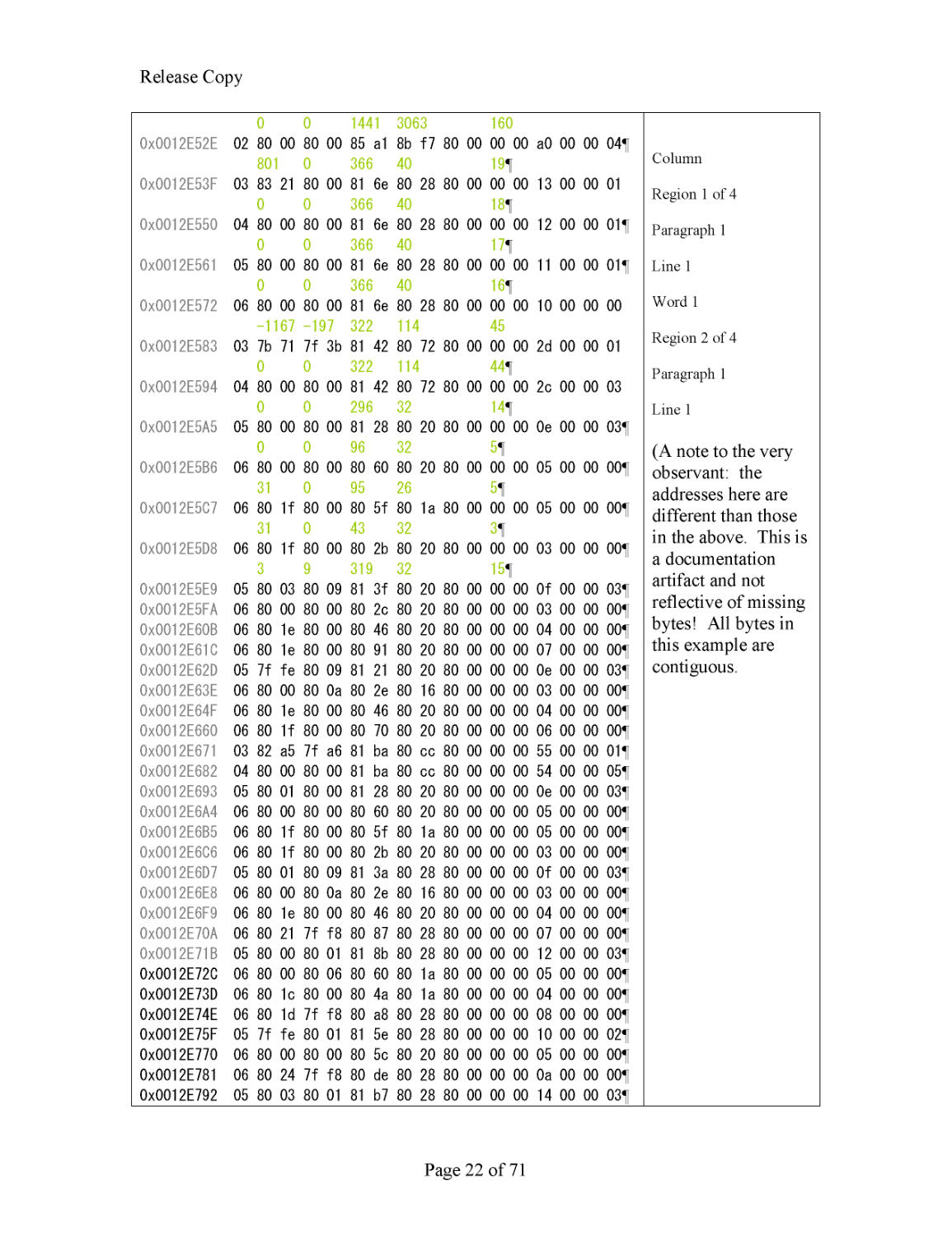
At a binary level, the chunk looks like this:
0x0012F078
00 00 a1 74 65 78 74 65 ..
¡
t
exte
0x0012F080
78 61 6d 70 6c 65 2e 74 xample.t
0x0012F088
78 74 20 0a 1f 1d 54 68 xt ...Th
0x0012F090
69 73 20 74 65 78 74 20 is text
0x0012F098
69 73 20 0a 69 6e 20 74 is .in t
0x0012F0A0
68 65 20 63 6f 6c 75 6d he colum
0x0012F0A8
6e 20 0a
6f 6e 20 74 68 n .on th
0x0012F0B0
65 20 6c 65 66 74 2e 20 e left.
0x0012F0B8
0a 1f 1d 54 68 69 73 20 ...This
0x0012F0C0
74 65 78 74 20 69 73 20 text is
0x0012F0C8
0a 6f 6e 20 74 68 65 20 .on the
0x0012F0D0
72 69 67 68 74 2e 20 0a right. .
0
x0012F0D8
4d 6f 73 74 20 4f 43 52 Most OCR
0x0012F0E0
20 45 6e 67 69 6e 65 73 Engines
0x0012F0E8
20 0a 77 69 6c 6c 20 63 .will c
0x0012F0F0
6f 72 72 65 63 74 6c 79 orrectly
0x0012F0F8
20 0a 67 72 6f 75 70 20 .group
0x0012F100
69 74 20 74 6f
67 65 74 it toget
0x0012F108
68 65 72 2e 20 0a 1f 1d her. ...
0x0012F110
50 61 67 65 20 31 20 0a Page 1 .
0x0012F118
1f 1d 0b 00 01 01 81 21 ......
!
lenText
= 0xA1 (
161
bytes)
strText
(as shown).
Note the presence of
LF (0x0A), US
(0x1F) and RS (
0x1D) embedded
within the text. These optional, non
-
printable characters are often used to
partition text layout regions (e.g.
columns, side
-
blocks, etc
)
Note also
that
the string starts at
0x12F07B (following
lenText
),
extends 161 bytes and ends at
12F1
1
B (terminating NULL)
T X Y W H 0 Len nChild
289 118
1441 3063 161

0x0012E51D
01 81 21 80 76 85 a1 8b f7 80 00 00 00 a1 00 00 01

Page Zone
Image
Page
and
Column
Regions and
Paragraphs in
Green. Inside
Paragraphs are
Lines, Word and
Characters (not
shown)
R
elease Copy
Page
22
of
71
0
0
1441 3063
160
0x0012E52E
02 8
0 00 80 00 85 a1 8b f7 80 00 00 00 a0 00 00 04

801
0
366
40
19

0x0012E53F
03 83 21 80 00 81 6e 80 28 80 00 00 00 13 00 00 01
0
0
366
40
18

0x0012E550
04 80 00 80 00 81 6e 80 28 80 00 00
00 12 00 00 01

0
0
366
40
17

0x0012E561
05 80 00 80 00 81 6e 80 28 80 00 00 00 11 00 00 01

0
0
366
40
16

0x0012E572
06 80 00 80 00 81 6e 80 28 80 00 00 00 10 0
0 00 00
-
1167
-
197
322 114
45
0x0012E583
03 7b 71 7f 3b 81 42 80 72 80 00 00 00 2d 00 00 01
0 0
322 114
44

0x0012E594
04 80 00 80 00 81 4
2 80 72 80 00 00 00 2c 00 00 03
0 0
296 32
14

0x0012E5A5
05 80 00 80 00 81 28 80 20 80 00 00 00 0e 00 00 03

0 0
96 32
5

0x0012E5B6
06 80 00 80 00 80 60 80 20 80 00 00 00 05 00 00 00

31 0
95 26
5

0x0012E5C7
06 80 1f 80 00 80
5f 80 1a 80 00 00 00 05 00 00 00

31 0
43 32
3

0x0012E5D8
06 80 1f 80 00 80 2b 80 20 80 00 00 00 03 00 00 00

3 9
319 32
15

0x0012E5E9
05 80 03 80 09 81 3f 80 20 80 00 00 00 0f 00 00 0
3

0x0012E5FA
06 80 00 80 00 80 2c 80 20 80 00 00 00 03 00 00 00

0x0012E60B
06 80 1e 80 00 80 46 80 20 80 00 00 00 04 00 00 00

0x0012E61C
06 80 1e 80 00 80 91 80 20 80 00 00 00 07 00 00 00

0x0012E62D
05 7f fe 80 09 81 21 80 20 80 00 00 00 0e 00 00 0
3

0x0012E63E
06 80 00 80 0a 80 2e 80 16 80 00 00 00 03 00 00 00

0x0012E64F
06 80 1e 80 00 80 46 80 20 80 00 00 00 04 00 00 00

0x0012E660
06 80 1f 80 00 80 70 80 20 80 00 00 00 06 00 00 00

0x0012E671
03
82 a5 7f a6 81 ba 80 cc 80 00 00 00 55 00 00 0
1

0x0012E682
04 80 00 80 00 81 ba 80 cc 80 00 00 00 54 00 00 05

0x0012E693
05 80 01 80 00 81 28 80 20 80 00 00 00 0e 00 00 03

0x0012E6A4
06 80 00 80 00 80 60 80 20 80 00 00 00 05 00 00 00

0x0012E6B5
06 80 1f 80 00 80 5f 80 1a 80 00 00 00 05 00 00 0
0

0x0012E6C6
06 80 1f 80 00 80 2b 80 20 80 00 00 00 03 00 00 00

0x0012E6D7
05 80 01 80 09 81 3a 80 28 80 00 00 00 0f 00 00 03

0x0012E6E8
06 80 00 80 0a 80 2e 80 16 80 00 00 00 03 00 00 00

0x0012E6F9
06 80 1e 80 00 80 46 80 20 80 00 00 00 04 00 00 0
0

0x0012E70A
06 80 21 7f f8 80 87 80 28 80 00 00 00 07 00 00 00

0x0012E71B
05 80 00 80 01 81 8b 80 28 80 00 00 00 12 00 00 03

0x0012E72C 06 80 00 80 06 80 60 80 1a 80 00 00 00 05 00 00 00

0x0012E73D 06 80 1c 80 00 80 4a 80 1a 80 00 00 00 04 00 00 0
0

0x0012E74E 06 80 1d 7f f8 80 a8 80 28 80 00 00 00 08 00 00 00

0x0012E75F 05 7f fe 80 01 81 5e 80 28 80 00 00 00 10 00 00 02

0x0012E770 06 80 00 80 00 80 5c 80 20 80 00 00 00 05 00 00 00

0x0012E781
06 80 24 7f f8
80 de 80 28 80 00 00 00 0a 00 00 0
0

0x0012E792 05 80 03 80 01 81 b7 80 28 80 00 00 00 14 00 00 03

Column
Region 1 of 4
Paragraph 1
Line 1
Word 1
Region 2 of 4
Paragraph 1
Line 1
(A note to the very
observant: the
addresses here are
different than those
in the a
bove. This is
a documentation
artifact and not
reflective of missing
bytes! All bytes in
this example are
contiguous.
R
elease Copy
Page
23
of
71
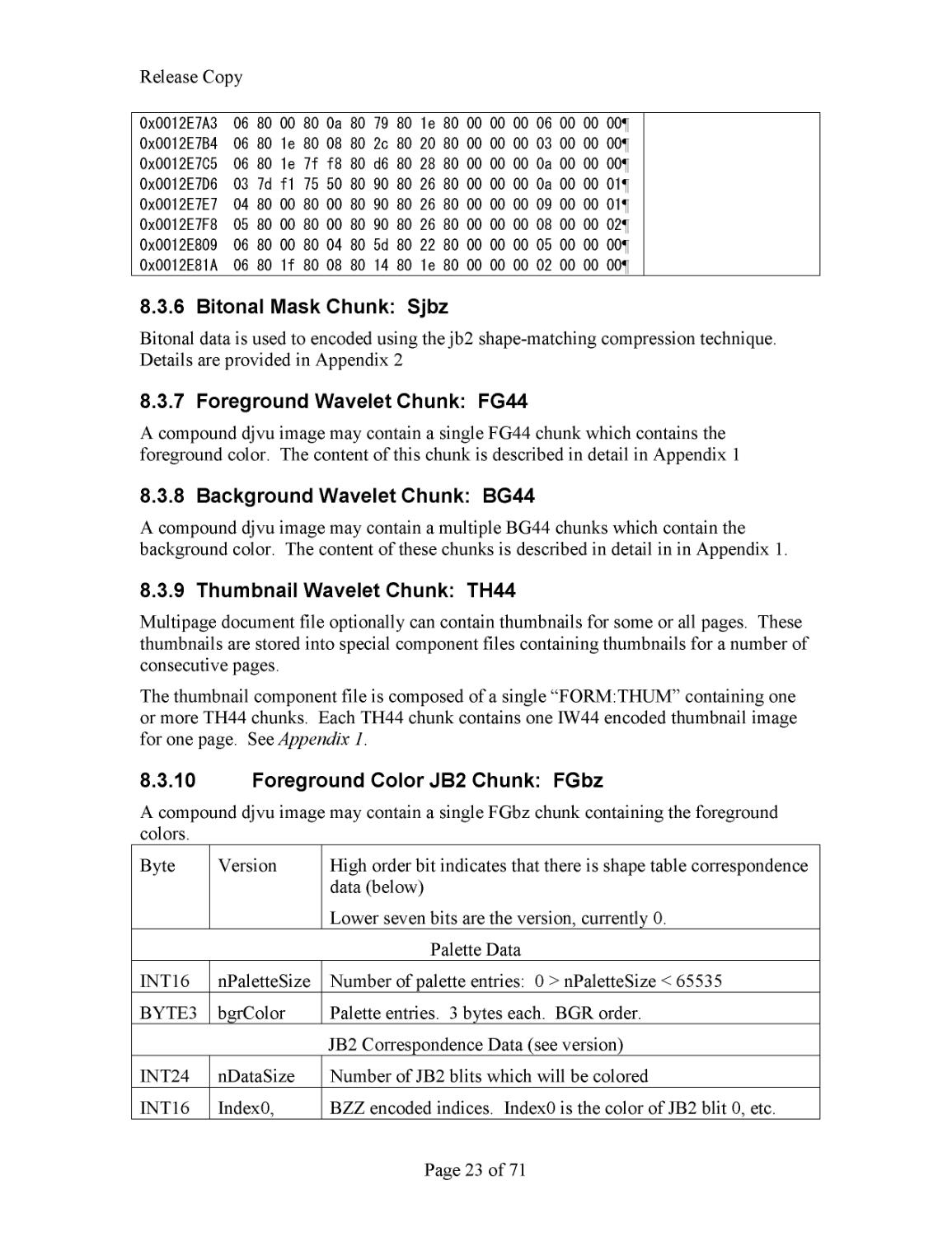
0x0012E7A3 06 80 00 80 0a 80 79 80 1e 80 00 00 00 06 00 00 00

0x0012E7B4 06 80 1e 80 08 80 2c 80 20 80 00 00 00 03 00 00 00

0x0012E7C5 06 80 1e 7f f8 80 d6 80 28 80 00 00 00 0a 00 00 0
0

0x0012E7D6 03 7d f1 75 50 80 90 80 26 80 00 00 00 0a 00 00 01

0x0012E7E7 04 80 00 80 00 80 90 80 26 80 00 00 00 09 00 00 01

0x0012E7F8 05 80 00 80 00 80 90 80 26 80 00 00 00 08 00 00 02

0x0012E809 06 80 00 80 04 80 5d 80 22 80 00 00 00 05 00 00 0
0

0x0012E81A 06 80 1f 80 08 80 14 80 1e 80 00 00 00 02 00 00 00

8.3.6
Bitonal Mask Chunk: Sjbz
Bitonal data is used to encoded using the jb2 shape
-
matching compression technique.
Details are provided in
Appendix 2
8.3.7
Foreground Wavelet Chunk: FG44
A compound djvu image may contain a single FG44 chunk which contains the
foreground color. The content of this chunk is described in detail in Appendix 1
8.3.8
Background Wavelet Chunk: BG44
A compound djvu image may
contain a multiple BG44 chunks which contain the
background color. The content of these chunks is described in detail in in Appendix 1.
8.3.9
Thumbnail Wavelet Chunk: TH44
Multipage document file optionally can contain thumbnails for some or all pages. These
thumbnails are stored into special component files containing thumbnails for a number of
consecutive pages.
The thumbnail component file is composed of a single “FORM:THUM” containing one
or more TH44 chunks. Each TH44 chunk contains one IW44 encoded thum
bnail image
for one page. See
Appendix 1
.
8.3.10
Foreground Color JB2 Chunk: FGbz
A compound djvu image may contain a single FGbz chunk containing the foreground
colors.
Byte
Version
High order bit indicates that there is shape table correspondence
data
(below)
Lower seven bits are the version, currently 0.
Palette Data
INT16
nPaletteSize
Number of palette entries: 0 > nPaletteSize < 65535
BYTE3
bgrColor
Palette entries. 3 bytes each. BGR order.
JB2 Correspondence Data (see version)
INT24
nDataSize
Numbe
r of JB2 blits which will be colored
INT16
Index0,
BZZ encoded indices. Index0 is the color of JB2 blit 0, etc.
R
elease Copy
Page
24
of
71
index1, …
See also file DjVuPalette.cpp in DjVuLibre.
8.3.11
Document Info Chunk: INFO
As discussed in
Single Page Documents
, every DjVu image req
uires an INFO chunk and
this must be the first (non
-
container) chunk
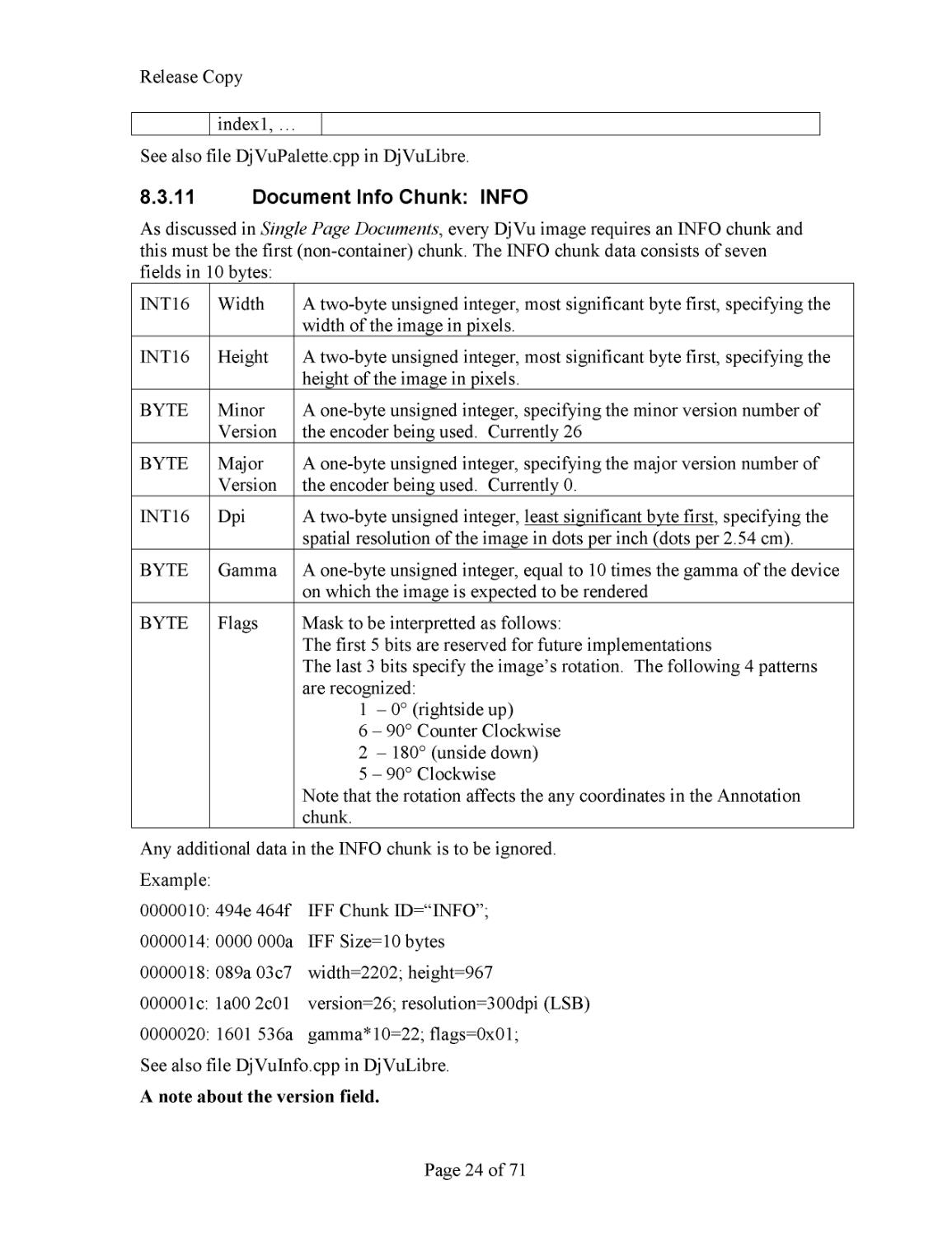
. The INFO chunk data consists of seven
fields in 10 bytes:
INT16
Width
A two
-
byte unsigned integer, most significant byte first, specifying the
width of the image in pixels.
INT16
Heigh
t
A two
-
byte unsigned integer, most significant byte first, specifying the
height of the image in pixels.
BYTE
Minor
Version
A one
-
byte unsigned integer, specifying the minor version number of
the encoder being used. Currently 26
BYTE
Major
Version
A on
e
-
byte unsigned integer, specifying the major version number of
the encoder being used. Currently 0.
INT16
Dpi
A two
-
byte unsigned integer,
least significant byte first
, specifying the
spatial resolution of the image in dots per inch (dots per 2.54 cm).
BYTE
Gamma
A one
-
byte unsigned integer, equal to 10 times the gamma of the device
on which the image is expected to be rendered
BYTE
Flags
Mask to be interpretted as follows:
The first 5 bits are reserved
for future implementations
The last 3 bits specif
y the image’s rotation. The following 4 patter
n
s
are recognized:
1
–
0° (rightside up)
6
–
90° Counter Clockwise
2
–
180° (unside down)
5
–
90° Clockwise
Note that the rotation affects the any coordinates in the Annotation
c
hunk.
Any additional dat
a in the INFO chunk is to be ignored.
Example:
0000010: 494e 464f
IFF Chunk ID=“INFO”;
0000014: 0000 000a
IFF Size=10 bytes
0000018: 089a 03c7
width=2202; height=967
000001c: 1a00 2c01
version=26; resolution=300dpi (LSB)
0000020: 1601 536a
gamma*10=22;
flags=0x01;
See also file DjVuInfo.c
pp in DjVuLibre.
A note about the version field.
R
elease Copy
Page
25
of
71
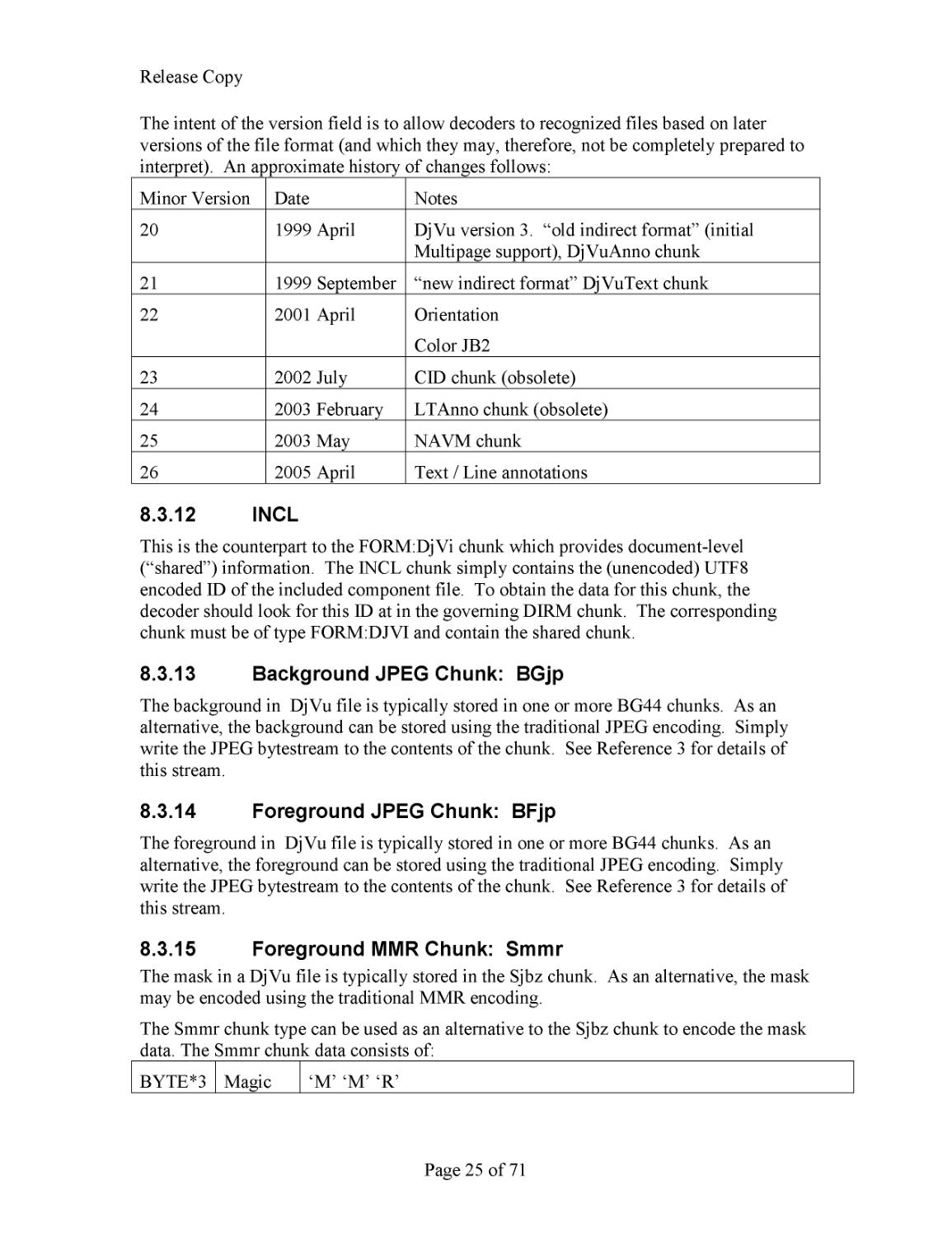
The intent of the version field is to allow decoders to recognized files based on later
versions of the file format (and which they may, therefore, not be completely
prepared to
interpret). An approximate history of changes follows:
Minor Version
Date
Notes
20
1999 April
DjVu version 3.
“old indirect format” (initial
Multipage
support)
,
DjVuAnno chunk
21
1999 September
“new indirect format” DjVuText chunk
22
2001
April
Orientation
Color JB2
23
2002 July
CID chunk (obsolete)
24
2003 February
LTAnno chunk (obsolete)
25
2003 May
NAVM chunk
26
2005 April
Text / Line annotations
8.3.12
INCL
This is the counterpart to the FORM:DjVi chunk which provides document
-
level
(“sha
red”) information. The INCL chunk simply contains the (unencoded) UTF8
encoded ID of the included component file. To obtain the data for this chunk, the
decoder should look for this ID at in the governing DIRM chunk. The corresponding
chunk must be of t
ype FORM:DJVI and contain the shared chunk.
8.3.13
Background JPEG Chunk: BGjp
The background in DjVu file is typically stored in one or more BG44 chunks. As an
alternative, the background can be stored using the traditional JPEG encoding.
Simply
write the JP
EG bytestream to the contents of the chunk. See Reference 3 for details of
this stream.
8.3.14
Foreground JPEG Chunk: BFjp
The foreground in DjVu file is typically stored in one or more BG44 chunks. As an
alternative, the foreground can be stored using the tr
aditional JPEG encoding. Simply
write the JPEG bytestream to the contents of the chunk. See Reference 3 for details of
this stream.
8.3.15
Foreground
MMR Chunk: Smmr
The mask in a DjVu file is typically stored in the Sjbz chunk. As an alternative, the mask
ma
y be encoded using the traditional MMR encoding.
The Smmr chunk type can be used as an alternative to the Sjbz chunk to encode the mask
data. The Smmr chunk data consists of:
BYTE*3
Magic
‘M’ ‘M’ ‘R’
R
elease Copy
Page
26
of
71
BYTE
Flags
0xb000000<s><i>.
<i> is similar to TIFF’s ‘
min
-
is
-
black’ tag. It is set for a reverse video
image.
<s> is set to indictate that the MMR data is in stripes
INT16
Width
Width of image. (MSB first)
INT16
Height
Height of image. (MSB first)
Following this header is either the “regular” MMR encoded
data or (if flags.s is set) the
striped data format consisting
INT16
Rps
Rows per stripe
INT32
Nbytes0
Number of bytes in the first stripe
BYTE*
Mmrdata0
The MMR encoded data for the first stripe
INT32
Nbytes1
Number of bytes in the second stripe
BYTE*
Mmrdata1
The MMR encoded data for the second stripe
…
See also
(a) Reference 5 “G4” and (b)
file MMRDecoder.cpp in DjVuLibre.
R
elease Copy
Page
27
of
71
9
DjVu in the Raw (binary and IFF level dumps)
9.1
Single Page Example (FORM:DjVu)
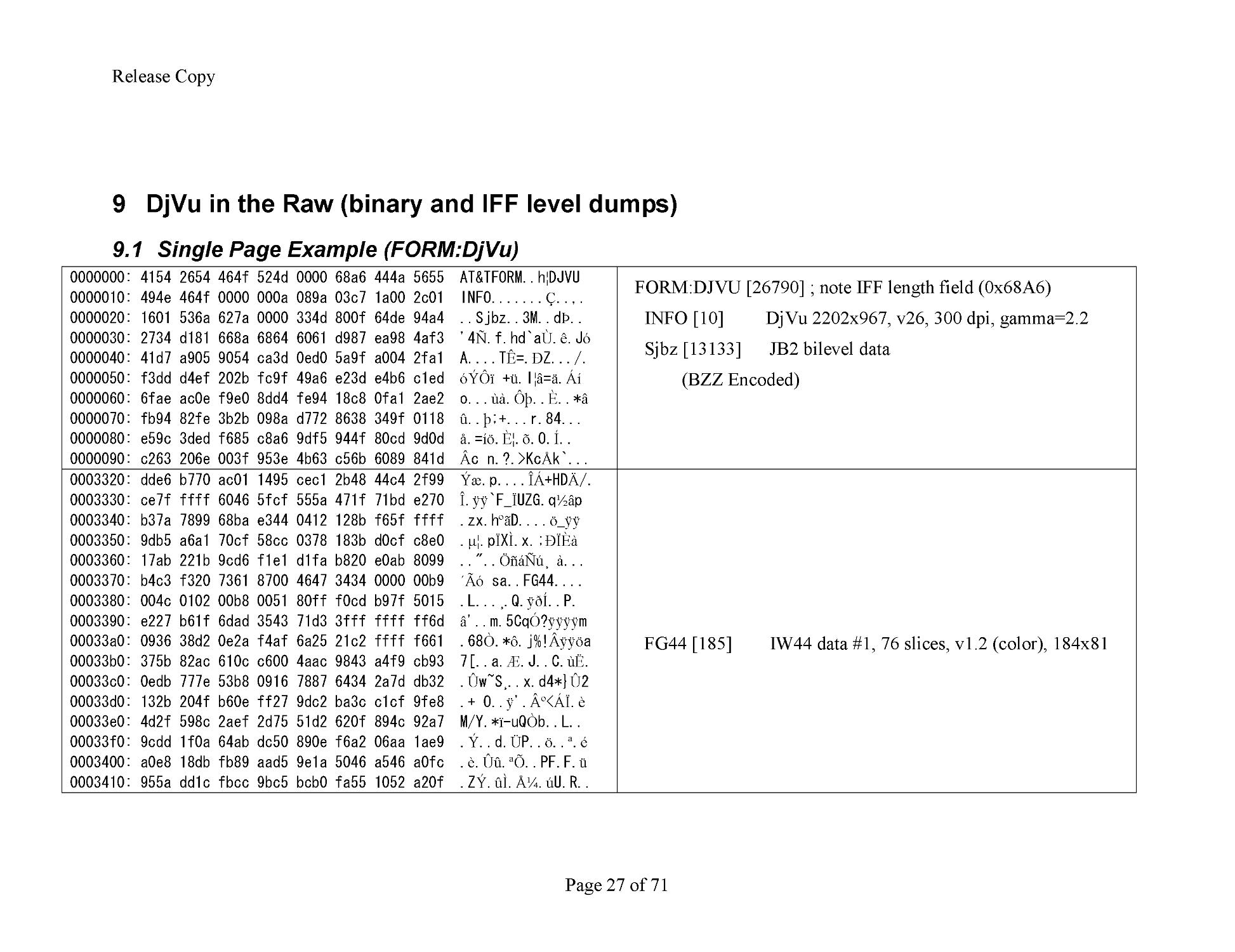
0000000: 4154 2654 464f 524d 0000 68a6 444a 56
55 AT&TFORM..h
¦
DJVU
0000010: 494e 464f 0000 000a 089a 03c7 1a00 2c01 INFO.......
Ç
..,.
0000020: 1601 536a 627a 0000 334d 800f 64de 94a4 ..Sjbz..3M..d
Þ
..
0000030: 2734 d181 668a 6864 6061 d987 ea98 4af3 '4
Ñ
.f.hd`a
Ù
.
ê
.J
ó
0000040: 41d7 a905 9054 ca3d 0ed0
5a9f a004 2fa1 A....T
Ê
=.
Ð
Z.../.
0000050: f3dd d4ef 202b fc9f 49a6 e23d e4b6 c1ed
óÝÔï
+
ü
.I
¦â
=
ä
.
Áí
0000060: 6fae ac0e f9e0 8dd4 fe94 18c8 0fa1 2ae2 o...
ùà
.
Ôþ
..
È
..*
â
0000070: fb94 82fe 3b2b 098a d772 8638 349f 0118
û
..
þ
;+...r.84...
0000080: e59c 3ded f68
5 c8a6 9df5 944f 80cd 9d0d
å
.=
íö
.
Ȧ
.
õ
.O.
Í
..
0000090: c263 206e 003f 953e 4b63 c56b 6089 841d
Â
c n.?.>Kc
Å
k`...
FORM:DJVU [26790]
; note IFF length field (0x68A6)
INFO [10] DjVu 2202x967, v26, 300 dpi, gamma=2.2
Sjbz [13133] JB2 bile
vel data
(BZZ Encoded)
0003320: dde6 b770 ac01 1495 cec1 2b48 44c4 2f99
Ýæ
.p....
ÎÁ
+HD
Ä
/.
0003330: ce7f ffff 6046 5fcf 555a 471f 71bd e270
Î
.
ÿÿ
`F_
Ï
UZG.q
½â
p
0003340: b37a 7899 68ba e344 0412 128b f65f ffff .zx.h
ºã
D....
ö
_
ÿÿ
0003350: 9db5 a6a1 70cf 58cc 0
378 183b d0cf c8e0 .
µ¦
.p
Ï
X
Ì
.x.;
ÐÏÈà
0003360: 17ab 221b 9cd6 f1e1 d1fa b820 e0ab 8099 .."..
ÖñáÑú¸
à
...
0003370: b4c3 f320 7361 8700 4647 3434 0000 00b9
´Ãó
sa..FG44....
0003380: 004c 0102 00b8 0051 80ff f0cd b97f 5015 .L...
¸
.Q.
ÿðÍ
..P.
0003390: e227 b61f
6dad 3543 71d3 3fff ffff ff6d
â
'..m.5Cq
Ó
?
ÿÿÿÿ
m
00033a0: 0936 38d2 0e2a f4af 6a25 21c2 ffff f661 .68
Ò
.*
ô
.j%!
Âÿÿö
a
00033b0: 375b 82ac 610c c600 4aac 9843 a4f9 cb93 7[..a.
Æ
.J..C.
ùË
.
00033c0: 0edb 777e 53b8 0916 7887 6434 2a7d db32 .
Û
w~S
¸
..x.d4*}
Û
2
00033d
0: 132b 204f b60e ff27 9dc2 ba3c c1cf 9fe8 .+ O..
ÿ
'.
º
<
ÁÏ
.
è
00033e0: 4d2f 598c 2aef 2d75 51d2 620f 894c 92a7 M/Y.*
ï
-
uQ
Ò
b..L..
00033f0: 9cdd 1f0a 64ab dc50 890e f6a2 06aa 1ae9 .
Ý
..d.
Ü
P..
ö
..
ª
.
é
0003400: a0e8 18db fb89 aad5 9e1a 5046 a546 a0fc .
è
.
Ûû
.
ªÕ
..P
F.F.
ü
0003410: 955a dd1c fbcc 9bc5 bcb0 fa55 1052 a20f .Z
Ý
.
ûÌ
.
ż
.
ú
U.R..
FG44 [185] IW4
4
data #1, 76 slices, v1.2 (color), 184x81
R
elease Copy
Page
28
of
71
0003400: a0e8 18db fb89 aad5 9e1a 5046 a546 a0fc .
è
.
Ûû
.
ªÕ
..PF.F.
ü
0003410: 955a dd1c fbcc 9bc5 bcb0 fa55 10
52 a20f .Z
Ý
.
ûÌ
.
ż
.
ú
U.R..
0003420: ec35 707c 750e fed7 be89 fb70 101c 293a
ì
5p|u.
þ
.
¾
.
û
p..):
0003430: d6e8 6185 c2ed cabc 1700 4247 3434 0000
Öè
a.
Âíʼ
..BG44..
0003440: 03a7 004a 0102 02de 0143 8afa 048f 09d4 ...J...
Þ
.C.
ú
...
Ô
0003450: 3488 2e32 9043 cf43
d341 caeb 85c6 1553 4..2.C
Ï
C
Ó
A
Êë
.
Æ
.S
0003460: 412d 8382 81a4 454e 7fff ffff ffff aeb8 A
-
....EN.
ÿÿÿÿÿ
.
¸
0003470: afff ffff ffff ffff ffff ffff ffff ffff .
ÿÿÿÿÿÿÿÿÿÿÿÿÿÿÿ
0003480: ffff ffff b03b 7ffc 63ca 673e 4bfb 52dc
ÿÿÿÿ
.;.
ü
c
Ê
g>K
û
R
Ü
0003490: d2a6 5ae
6 7e9f f6ee 3da4 cb7e 826e 9c00
Ò¦
Z
æ
~.
öî
=.
Ë
~.n..
00034a0: 0023 92e4 8a7c 1480 777c 7d11 2f48 8bb1 .#.
ä
.|..w|}./H..
00034b0: f43d 652f 3b4f 08a0 f36e dfe9 3f0f 6f0c
ô
=e/;O..
ó
n
ßé
?.o.
00034c0: c928 36ae 4a38 a87c 4920 2ec0 6d9e 4dff
É
(6.J8
¨
|I .
À
m.M
ÿ
00034
d0: 705a 7a48 b72e 6000 0003 7685 277f ffff pZzH..`...v.'.
ÿÿ
00034e0: fffc 4f28 1d0b 4b61 4e25 54f3 ecaf fa7c
ÿü
O(..KaN%T
óì
.
ú
|
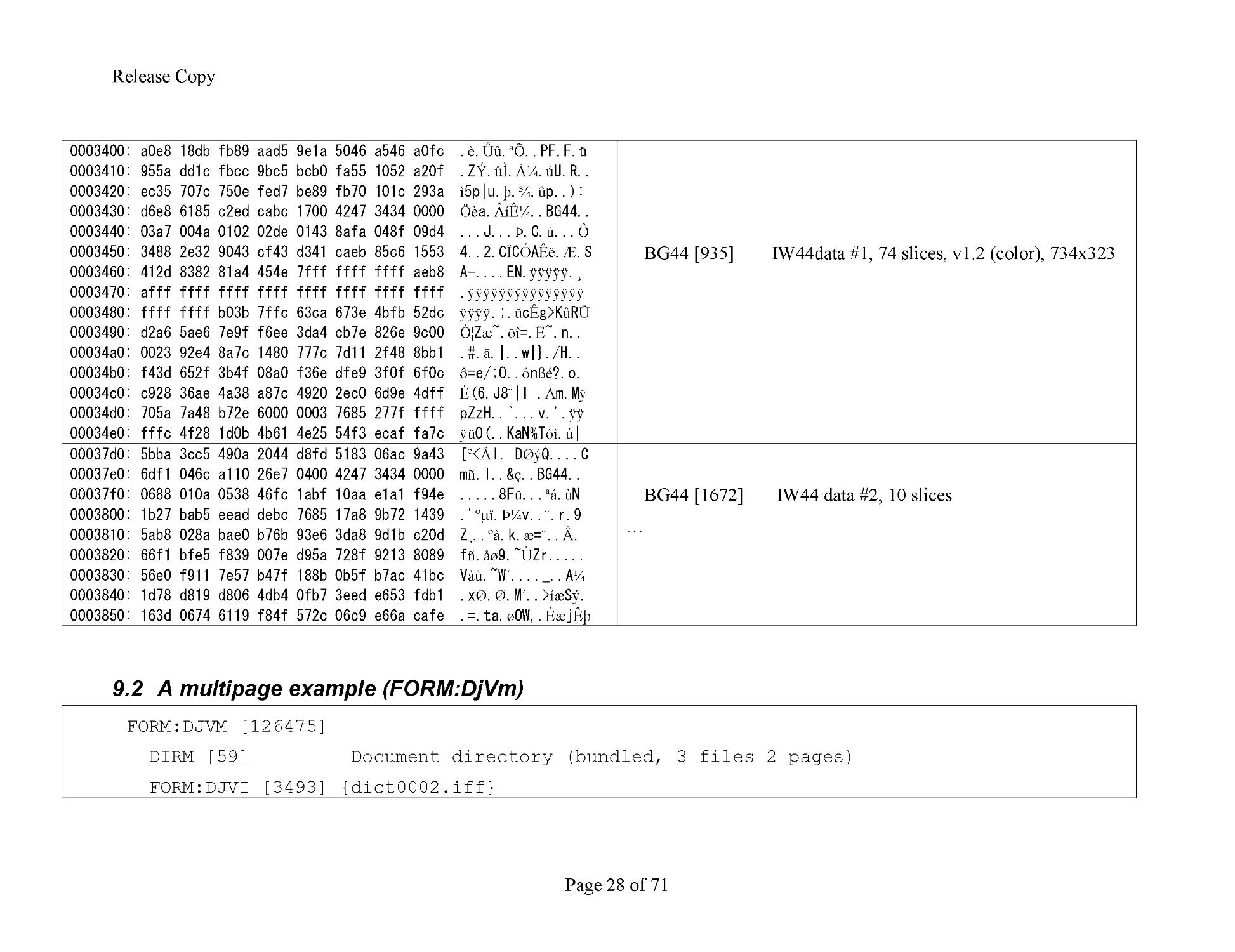
BG44 [935] IW4
4
data #1, 74 slices, v1.2 (color), 734x323
00037d0: 5bba 3cc5 490a 2044 d8fd 5183 06ac 9a43 [
º
<
Å
I. D
Øý
Q....C
00037e0: 6df1 046c a110 26e7 0400 4247 3434 0000 m
ñ
.l..&
ç
..BG44..
00037f0: 0688 010a 0538 46fc 1abf 10aa e1a1 f94e .....8F
ü
...
ªá
.
ù
N
0003800: 1b27 bab5 eead debc 7685 17a8 9b72 1439 .'
ºµî
.
Þ¼
v..
¨
.r.9
0003810: 5ab8 028a bae0 b76b 93e6 3da8 9d1
b c20d Z
¸
..
ºà
.k.
æ
=
¨
..
Â
.
0003820: 66f1 bfe5 f839 007e d95a 728f 9213 8089 f
ñ
.
åø
9.~
Ù
Zr.....
0003830: 56e0 f911 7e57 b47f 188b 0b5f b7ac 41bc V
àù
.~W
´
...._..A
¼
0003840: 1d78 d819 d806 4db4 0fb7 3eed e653 fdb1 .x
Ø
.
Ø
.M
´
..>
íæ
S
ý
.
0003850: 163d 0674 6119 f84f 5
72c 06c9 e66a cafe .=.ta.
ø
OW,.
Éæ
j
Êþ
BG44 [1672] IW4
4
data #2, 10 slices
…
9.2
A multipage example (FORM:DjVm)
FORM:DJVM [126475]
DIRM [59] Document directory (bundled, 3 files 2 pages)
FORM:DJVI [3493] {dict0002.iff}
R
elease Copy
Page
29
of
71
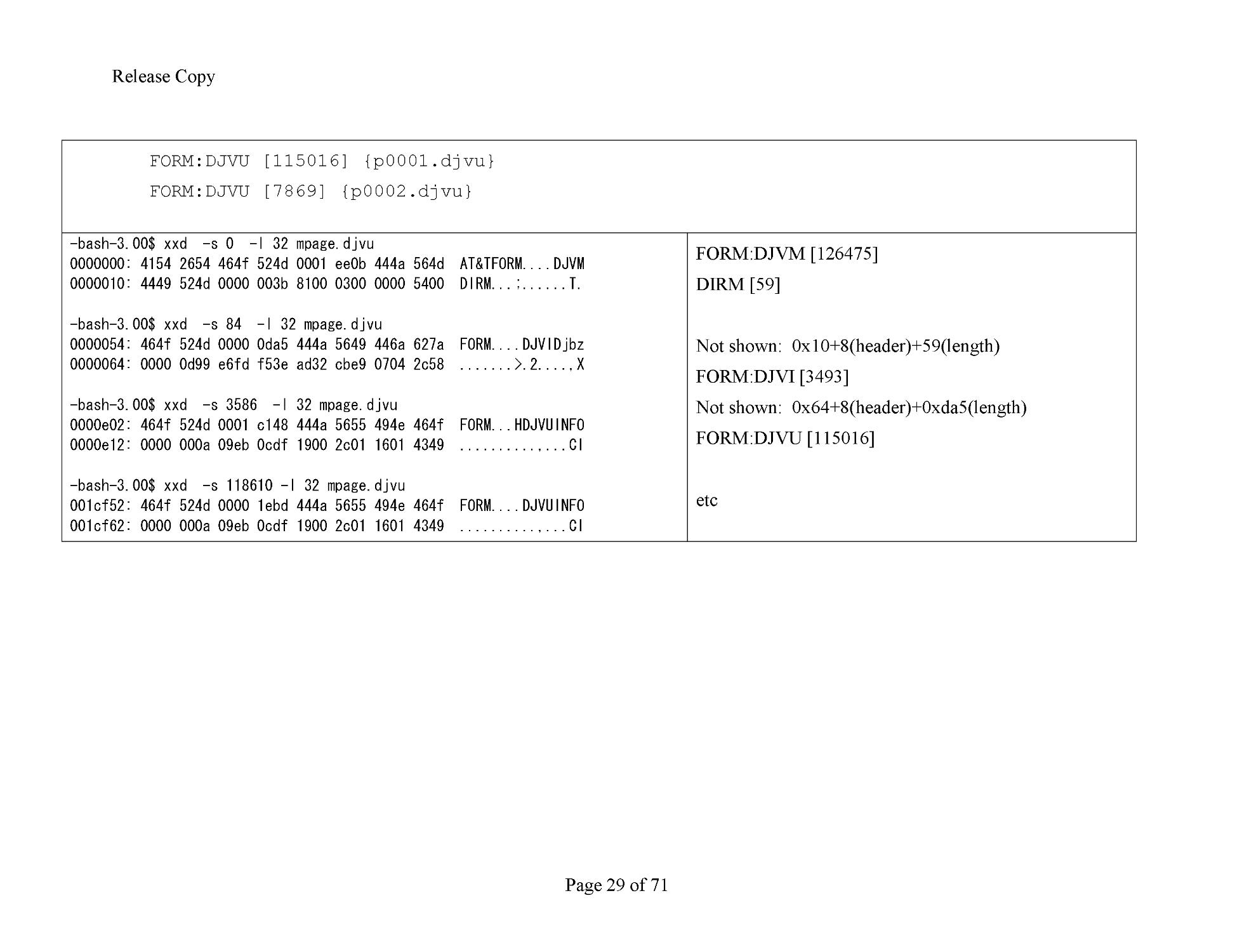
FORM:DJVU [1150
16] {p0001.djvu}
FORM:DJVU [7869] {p0002.djvu}
-
bash
-
3.00$ xxd
-
s 0
-
l 32 mpage.djvu
0000000: 4154 2654 464f 524d 0001 ee0b 444a 564d AT&TFORM....DJVM
0000010: 4449 524d 0000 003b 8100 0300 0000 5400 DIRM...;......T.
-
bash
-
3.00$ xxd
-
s 84
-
l
32 mpage.djvu
0000054: 464f 524d 0000 0da5 444a 5649 446a 627a FORM....DJVIDjbz
0000064: 0000 0d99 e6fd f53e ad32 cbe9 0704 2c58 .......>.2....,X
-
bash
-
3.00$ xxd
-
s 3586
-
l 32 mpage.djvu
0000e02: 464f 524d 0001 c148 444a 5655 494e 464f FORM...HDJVUIN
FO
0000e12: 0000 000a 09eb 0cdf 1900 2c01 1601 4349 ..........,...CI
-
bash
-
3.00$ xxd
-
s 118610
-
l 32 mpage.djvu
001cf52: 464f 524d 0000 1ebd 444a 5655 494e 464f FORM....DJVUINFO
001cf62: 0000 000a 09eb 0cdf 1900 2c01 1601 4349 ..........,...CI
FORM:DJ
VM [126475]
DIRM [59]
Not shown: 0x10+8(header)+59(length)
FORM:DJVI [3493]
Not shown: 0x64+8(header)+0xda5(length)
FORM:DJVU [115016]
etc
R
elease Copy
Page
30
of
71
10
Appendix 1: IW44 coding.
This section describes the coding of chunks of type BG44, FG44, PM44, BM44, and
TH44
. Chunks of type BG44, FG44, and TH44 may be color or grayscale chunks.
Chunks of type PM44 are color chunks. Chunks of type BM44 are grayscale chunks.
All of these color and grayscale chunk types have the same structure. The chunk consists
of a chunk
header followed by arithmetically coded wavelet coefficient updates. The
coefficients are organized in a hierarchical fashion.
10.1
Definitions
Color component
. Compound DJVU Images and Photo DJVU Images contain color or
grayscale image data. Color IW44 Imag
es contain color image data. Grayscale IW44
Images contain grayscale image data. Color image data is coded using three color
components, called Y, Cb, and Cr. These correspond to the usual YCbCr color space,
adjusted to facilitate transformation to the RGB
color space. Grayscale image data is
coded using one color component, called Y. This corresponds to the grayscale intensity
of the image.
Color layer
. A color layer is any of:
The foreground layer of a Compound DJVU Image, coded in one FG44 chunk
The b
ackground layer of a Compound DJVU Image, coded in one or more BG44
chunks
The only layer of a Photo DJVU Image, coded in one or more BG44 chunks
The only layer of a Color IW44 Image, coded in one or more PM44 chunks
The only layer of a Grayscale IW44 Imag
e, coded in one or more BM44 chunks
Color chunk
. A color chunk is a chunk of type BG44, FG44, PM44, or BM44. A color
chunk contains wavelet coefficient update information for one or three color components.
Block
. A rectangular array of pixels of size 32
x 32 or less. The blocks are numbered
starting in the lower left corner of the image. All blocks are 32 x 32 except possibly those
along the right edge or top edge; those blocks may be smaller if the image dimensions are
not divisible by 32.
Block count
.
The number of blocks in the image, denoted by NB.
Wavelet block
. The set of coefficients associated with one block of the image, in one
color component. There are 1024 wavelet coefficients in a wavelet block, numbered 0
through 1023. The coefficients in a
wavelet block have effects on the reconstruction of
other blocks in the image, but for coding purposes they are considered to be localized
within the block in which they are coded.
Bucket
. A particular set of 16 wavelet coefficients within a wavelet block.
A wavelet
block consists of 64 buckets, numbered 0 through 63. Table 2 gives the correspondence
between coefficients and buckets.
Band number
Coefficient indices
Bucket indices
R
elease Copy
Page
31
of
71
0
0
-
15
0
1
16
-
31
1
2
32
-
47
2
3
48
-
63
3
4
64
-
127
4
-
7
5
128
-
191
8
-
1
1
6
192
-
255
12
-
15
7
256
-
511
16
-
31
8
512
-
767
32
-
47
9
768
-
1023
48
-
63
Table
2
: Wavelete coefficient bands
Band
. A subset of wavelet coefficients for a given color component. There are 10 bands.
The correspondence among band nu
mbers, coefficient coefficients, and bucket
coefficients is given by Table 2.
Cycle
. Data for one color component consisting of coefficient updates for all coefficients,
that is, for all 10 bands, starting with band 0. Within one band, only some coefficien
ts are
updated, but within a cycle, all coefficients are updated. The last cycle of a color
component may have fewer than 10 bands.
Color band number
. The current band number for a color component. Each color
component's color band number starts at 0, and
increases by 1 at the end of selected slices
until it reaches 9; then it is reset to 0.
Color band
. A collection of update information for a subset of the coefficients of one
color component of the image, consisting of updates of all the coefficients in
the image
whose indices within their respective blocks are those corresponding to the current color
band's color band number.
Slice
. A slice is the highest level subdivision of a color chunk. A slice contains data for
one color band for each of the color
components in a color layer, that is, for three color
components for a color image, or for one color component for a grayscale image.
Block band
. A collection of update information for a subset of the coefficients of one
color component of a wavelet block
, consisting of updates of the coefficients in the block
whose indices are those corresponding to a given band.
Chrominance delay counter
. An integer counter that indicates how many slices in a
color layer contain a color band only for the Y color compone
nt, and not for the Cb and
Cr color components. The chrominance delay counter is initially set to the value specified
in the INFO chunk for the color layer, and decremented by i after each slice in the color
layer until it reaches 0. See the section on Ban
d counting below.
Step size table
. A table that indicates the precision to which each coefficient in a color
component is currently stored. There are three such tables for a given color layer, one for
R
elease Copy
Page
32
of
71
each color component. Each such table has 16 entries.
Each entry specifies the current
step size for 1, 4, 16, 64, or 256 different coefficient indices, according to Table 3.
10.2
Color chunks within an DjVu file
There may be more than one BG44 or PM44 or BM44 chunks in a DjVu file. If there is
more than one suc
h color chunk, the coefficient updating is continuous across the chunks,
and the data is taken from the chunks in the order in which they appear in the file.
Nothing is reinitialized at the beginning of chunks after the first color chunk of these
types, ex
cept for the low level arithmetic coder. The probability estimates for the
arithmetic coder are not reinitialized.
In a Compound DJVU Image file, in which both an FG44 chunk and one or more BG44
chunks appear in the same file, the coding of the foreground
layer, using the FG44 chunk,
is independent of the coding of the background layer, using the BG44 chunks.
Each color layer is coded using a Dubuc
-
Deslauriers
-
Lemire (4, 4) Interpolative
Wavelet Transform. Each layer of the image is transformed into a s
et of wavelet
coefficients, one wavelet coefficient for each pixel in the original image. This transform
is especially effective for coding images at high compression ratios.
The value of each coefficient is coded in a distributed fashion, through a numbe
r of
cycles. Within one cycle, each coefficient is updated once (that is, in only one of the l0
bands), and receives approximately one additional bit of information. Specifically, from
cycle to cycle the absolute value of a coefficient is first narrowed do
wn by eliminating
possible values for the most significant non
-
zero bit until the correct most significant
non
-
zero bit is found. The sign is coded in the same cycle in which the most significant
non
-
zero bit is found. Then in each subsequent cycle, one ad
ditional bit of the value is
coded.
10.3
Color chunk data headers
A color chunk begin with a data header consisting of 2 or 9 octets, as follows:
Serial number. A one
-
octet unsigned integer. The serial number of the first chunk of a
given chunk type is 0. S
uccessive chunks are assigned consecutive serial numbers.
Number of slices. A one
-
octet unsigned integer. The number of slices coded in the chunk.
Major version number and color type. One octet containing two values, present only if
the serial number is
0. The least significant seven bits designate the major version
number of the standard being implemented by the decoder. For this version of the
standard, the major version number is 1. The most significant bit is the color type bit. The
color type bit is
0 if the chunk describes three color components. The color type bit is I if
the chunk describes one color component.
Minor version number. A one
-
octet unsigned integer, present only if the serial umber is 0.
This octet designates the minor version number
of the standard being implemented by the
decoder. For this version of the standard, the minor version number is 2.
Image width. A two
-
octet unsigned integer, most significant octet first, present only if the
serial number is 0. This field indicates the num
ber of pixels in each row of the image
R
elease Copy
Page
33
of
71
described by the current chunk. The image width will be less than the width of the
original image if the chunk describes a layer coded at lower resolution than the original
image. For a BG44 or FG44 chunk, if W is the
width of the original image specified in
the INFO chunk, and w is the width of the image described by the current chunk, then the
allowable values of w are:
For a BM44 or PM44 chunk, there are no restrictions on the image width.
Image height. A two
-
oc
tet unsigned integer, most significant octet first, present only if
the serial number is 0. This field indicates the number of pixels in each column of the
image described by the current chunk. The image height will be less than the height of
the original
image if the chunk describes a layer coded at lower resolution than the
original image. For a BG44 or FG44 chunk, if H is the height of the original image
specified in the INFO chunk, and h is the height of the image described by the current
chunk, then th
e allowable values of h are:
For a BG44 or FG44 chunk, It must be the case that
For a BM44 or PM44 chunk, there are no restrictions on the image width.
Initial value of chrominance delay counter. A one
-
octet unsigned integer, present only if
the seri
al number is 0. Only the least significant seven bits are used. The most significant
bit is ignored, but should be set to I by an encoder. This field specifies the initial value of
the chrominance delay counter, used as described below.
10.4
Color chunk data
10.4.1
Hierarchical structure of a coded color layer
The data coded in a color chunk consists of information needed to reconstruct wavelet
coefficients. There are one or three color components; each color component has its own
set of wavelet coefficients. Within
a color component, there are 1024 wavelet coefficients
for each 32 x 32 block of the image.
Within one layer (background or foreground for a DJVU Image, or the only layer for an
IW44 Image), coding is divided into a series of slices. All the slices may be
coded in one
chunk, or they may be separated into a number of chunks. The only difference it makes
whether the slices are coded in one chunk or in several chunks is in the order of
progressive rendering; the final reconstructed image will be the same. The
number of
slices in each chunk is specified in the color chunk data header. One slice contains
refinement data for one color band for each color component. Within a color component,
all coefficients in a slice are in the same band.
R
elease Copy
Page
34
of
71
A color chunk describes
the full image at the spatial resolution implied by the image
width and image height fields in the data header of the first chunk of the same type as the
current color chunk.
The sequence of color components within a slice is: first Y, then Cb, then Cr, a
lthough
the Cb and Cr components are not present in a slice if the chunk describes grayscale data
or if the chrominance delay counter is not equal to 0 at the time the slice is coded.
A color band is made up of coefficient updates for all blocks in the ima
ge, but only for
coefficients that are in the currently active band for the color component. Each block's set
of updates within a color band is called a block band. The block bands are coded block by
block, first from left to right within the bottom row, t
hen by rows moving up the image,
left to right within each row.
Within a block band, there are 16, 64, or 256 coefficient updates. The coefficients being
updated are divided into buckets, each bucket containing 16 coefficients. Thus, a block
band contains
1, 4, or 16 buckets. The buckets and coefficients being updated are
determined by the color band number according to Table 2.
10.4.1.1
Band counting.
The header of the first color chunk contains an initial value for the chrominance delay
counter. It may be 0 or a p
ositive integer.
At the beginning of the first color chunk, the color band number for each of the three
color components is set to 0.
At the beginning of each slice, the chrominance delay counter is tested. If the
chrominance delay counter is 0 and if the
slice describes color image data, then all three
color components are present. If the chrominance delay counter is greater than 0 or if the
chunk describes grayscale image data, only the Y color component is present for the slice.
At the end of a slice,
the following actions take place:
The color band number is increased by 1 for the Y component. If the new color
band number exceeds 9, it is set to 0.
If the chrominance delay counter is 0, the color band numbers for the Cb and C r
components are increas
ed by 1. If the new color band numbers exceed 9, they are
set to 0. (Note: The color band numbers for the Cb and Cr components are always
equal to each other.)
If the chrominance delay counter is greater than 0, it is decreased by 1.
A color chunk ends w
hen the number of slices specified in the color chunk header have
been coded. At the beginning of each color chunk after the first for a given color layer,
the chrominance delay counter and color band numbers retain the values they had at the
end of the pr
evious color chunk.
10.4.2
Quantization of coefficients
At each point during the decoding process, each wavelet coefficient has been determined
to a certain precision. The current value a of the coefficient is stored, and a current step
R
elease Copy
Page
35
of
71
size S is associated wit
h the coefficient. The current step size for each coefficient is
governed by a step size table. The index of the entry in the step size table that contains
the step size for a given coefficient is given in Table 3.
If a
≠0, the coefficient is said to be "active". If a > 0, the range of possible actual values of
the coefficient is [a
-
S, a + S). If a < 0, the range of possible actual values of the
coefficient is (a
-
S, a + S]. If a = 0, the coefficient is not active,
and the range of possible
actual values of the coefficient is (
-
2S, 2S).
When the value of a given coefficient is updated, there are three cases.
1.
If the coefficient is not active (a = 0), then there are three possibilities for the next
current interval:
(
-
2S,
-
S], (
-
S,S), or [S, 2S). If the coefficient remains not active,
then the next interval is (
-
S, S). Otherwise, the sign of the coefficient is decoded
to choose between the other two intervals.
2.
If the coefficient is active and a > 0, then there are tw
o possibilities for the next
current interval: [a
-
S, a) or [a, a + S). The next decision for the coefficient is the
increase coefficient absolute value decision. If this decision is
YES
, then [a, a +
S) is the next interval. If the decision is
NO
, then [
a
-
S, a) is the next interval.
3.
If the coefficient is active and a < 0, then there are two possibilities for the next
current interval: (a
-
S, a] or (a, a + S]. The next decision for the coefficient is the
increase coefficient absolute value decision. If
this decision is
YES
, then (a
-
S, a]
is the next interval. If the decision is
NO
, then (a, a + S] is the next interval.
Coefficient index
Index into step size
table
0
0
1
1
2
2
3
3
4
-
7
4
8
-
11
5
12
-
15
6
16
-
31
7
32
-
47
8
48
-
63
9
64
-
127
10
128
-
191
11
192
-
255
12
256
-
511
13
512
-
767
14
R
elease Copy
Page
36
of
71
768
-
1023
15
Table
3
: Step size table indices related to wavelet coefficient indices
10.4.2.1
Initialization of step sizes
The initial values of the step sizes are given in Table 4. There is a sepa
rate table of step
sizes for each color component. Each color component's table is given the same initial
values.
10.4.2.2
Reduction of step sizes.
Each slice contains one band of coefficient update information for each color component.
At the end of a slice, the
step sizes are divided by 2 for the current band for each color
component. The indices of the step sizes to be reduced for each band are given in Table 5.
For a given color band, either i or 7 step sizes are reduced.
Non
-
zero step sizes are always integer
powers of 2. When a step size of i is divided by 2,
the result is set to 0.
10.5
Coefficient updating
Within a block band, each coefficient in the block band may be updated. A block band is
decoded by a preliminary flag computation followed by four passes. O
ne or more of the
passes may be skipped or may not require any decoding, depending on conditions present
at the beginning of the block band's coding and on tests made during the decoding of
previous passes with the block band. The 4 passes are:
1.
Decoding t
he decode buckets decision for the block band.
2.
Decoding the decode coefficients decision for buckets in the block band.
3.
Decoding the activate coefficient decision for coefficients in the block band, and
determining the sign of newly activated coefficients.
4.
Decoding the update decisions for previously active coefficients.
Step size Initial
Table index
value
0
0x04000
1
0x08000
2
0x08000
3
0x10000
4
0x10000
5
0x10000
6
0x20000
7
0x20000
R
elease Copy
Page
37
of
71
8
0x20000
9
0x40000
10
0x40000
11
0x40000
12
0x80000
13
0x40000
14
0x40000
15
0x80000
Table
4
: Initialization of step sizes
During the coefficient updating process, a number of binary decisions are decoded. Each
decision is decoded using the Z´
-
Coder. Decoding a decision using the Z
´
-
Coder may be
done with a conditioning context, or it may be done using the pass
-
through mode of the
Z´
-
Coder. For color chunk decoding, there are up to 584 conditioning contexts, that is, up
to 294 conditioning contexts for the background layer and up to
294 conditioning
contexts for the foreground layer. Within a layer, there are 98 conditioning contexts for
each color component; one or three color components may be present for each layer. The
contexts are as follows:
1 context in each color component i
s for the decode buckets decision.
80 contexts in each color component are for the decode coefficients decision, 8
for each of the 10 bands.
16 contexts in each color component are for the activate coefficient decision.
1 context in each color component is
for the increase coefficient absolute value
decision.
Band number
Step size table
indices
0
0
-
6
1
7
2
8
3
9
4
10
5
ll
6
12
7
13
8
14
9
15
R
elease Copy
Page
38
of
71
Table
5
: Step size reduction schedule
The coefficient sign is decoded using the
pass
-
through mode of the Z´
-
Coder without a
context. For all occurrences of the increase coefficient absolute value decision for any
coefficient after the first such decision, the increase coefficient absolute value decision is
coded using the pass
-
through
mode of the Z´
-
Coder.
10.5.1
Preliminary flag computation.
Flags are computed for each coefficient in the block band, for each bucket in the block
band, and for the block band as a whole.
1.
Flag computation for coefficients. For each coefficient in a block band
, there is a
value of the step size. For each coefficient, there are two flag values, based on the
value of the coefficient and the value of the coefficient's step size. The flags are
called ACTIVE and POTENTIAL. At most one of the flag values may be
SET
f
or
a coefficient in a given cycle. If the coefficient's step size is either 0 or greater
than or equal to 0x8000, then both flag values are
CLEAR
. The two flag values
are:
a)
ACTIVE: The coefficient's ACTIVE flag value is
SET
if the coefficient's
step size i
s greater than 0 and less than 0x8000, and the coefficient's value
is not 0. Otherwise the coefficient's ACTIVE flag value is
CLEAR
. The
sign of the coefficient is known, and the position of the most significant
non
-
zero bit of its absolute value is known.
b)
POTENTIAL: The coefficient's POTENTIAL flag value is
SET
if the
coefficient's step size is greater than 0 and less than 0x8000, and the
coefficient's value is 0. Otherwise the coefficient's POTENTIAL flag
value is
CLEAR
. It is possible that the value of
this coefficient will
become non
-
zero during this cycle.
2.
Flag computation for buckets. Each bucket has two flag values associated with it
depending on the flags of the 16 coefficients in the bucket. The bucket flags have
the same names as the coefficient f
lags. Both, one, or neither of the bucket flags
may be
SET
for a bucket in a given cycle.
a)
ACTIVE: The bucket's ACTIVE flag is
SET
if any of the coefficients in
the bucket have ACTIVE flags
SET
. Otherwise the bucket's ACTIVE
flag value is
CLEAR
.
b)
POTENTIAL
: The bucket's POTENTIAL flag is
SET
if any of the
coefficients in the bucket have POTENTIAL flags
SET
. Otherwise the
bucket's POTENTIAL flag value is
CLEAR
.
3.
Flag computation for the block band. The block band has two flag values
associated with it dependi
ng on the flags of the buckets in the block band. The
block band flags have the same names as the bucket flags. Both, one, or neither of
the block band flags may be
SET
for a block band in a given cycle. The block
band flag values are not needed if the num
ber of buckets in the block band is less
than 16.
R
elease Copy
Page
39
of
71
a)
ACTIVE: The block band's ACTIVE flag is
SET
if any of the buckets in
the block band have ACTIVE flags
SET
. Otherwise the block band's
ACTIVE flag value is
CLEAR
.
b)
POTENTIAL: The block band's POTENTIAL flag
is
SET
if any of the
buckets in the block band have POTENTIAL flags
SET
. Otherwise the
block band's POTENTIAL flag value is
CLEAR
.
10.5.2
Block
-
band
-
decoding pass.
If the block band contains fewer than 16 buckets, the block
-
band
-
decoding pass is
skipped and t
he bucket decoding pass is performed. If the block band's ACTIVE flag is
SET
, the block
-
band
-
decoding pass is skipped and the bucket decoding pass is performed.
If the block band contains 16 buckets, and if the block band's ACTIVE flag is
CLEAR
,
and if the
block band's POTENTIAL flag is
SET
, then the decode buckets decision is
decoded. If the decode buckets decision is
YES
, the bucket
-
decoding pass is performed
for the block band. If the decode buckets decision is
NO
, the bucket
-
decoding pass and
the newly
-
active
-
coefficient
-
decoding pass are skipped for the block band.
10.5.2.1
Arithmetic decoding.
For each color component, there is a single context for use in decoding the
decode
buckets
decision. If the value returned by the Z´
-
Coder for the
decode buckets
decisi
on is
1, then the value of the decode buckets decision is
YES
. If the value returned by the Z´
-
Coder is 0, then the value of the decode buckets decision is
NO
.
The Z´
-
Coder context for the decode buckets decision for each color component is
initially set
to 0.
10.5.3
Bucket
-
decoding pass.
Each bucket has a flag called the coefficient
-
decoding flag. If the bucket
-
decoding pass is
not skipped, then for each bucket in the block band, if the bucket's POTENTIAL flag is
SET
, then the decode coefficients decision for
the bucket is decoded. If the the decode
coefficients decision is
YES
, then the bucket's coefficient
-
decoding flag is
SET
;
otherwise it is
CLEAR
.
10.5.3.1
Arithmetic decoding.
For each color component, there are 80 contexts for use in decoding the
decode
coeffici
ents
decision. For each of the l0 bands in a color component, there are 8 contexts.
There are four contexts that may be used if the block band's ACTIVE
flag is
SET
, and four contexts that may be used if the block band's ACTIVE flag is
CLEAR
. The index of
the context to be used among the 4 possible contexts is computed
as follows.
If the band number is 0, then no
--
0. Otherwise, the value of no is computed as follows:
1.
The bucket number is multiplied by 4, giving a result t.
R
elease Copy
Page
40
of
71
2.
The coefficients numbered t,
t+1, t+2, t+3 are examined, and the number n
0
of
coefficients with value 0 among the four coefficients is counted.
3.
If n
0
= 4, n
0
is reduced to 3.
Then the value of n
0
is used as the index to one of the four contexts, for the given color
component, ba
nd, and block band ACTIVE flag value. If the value returned by the Z´
-
Coder for the decode coefficients decision is 1, then the value of the
decode coefficients
decision is
YES
. If the value returned by the Z´
-
Coder is 0, then the value of the
decode
coe
fficients
decision is
NO
Each of the 80 Z´
-
Coder contexts for the decode coefficients decision for each color
component is initially set to 0.
10.5.4
Newly
-
active
-
coefficient
-
decoding pass.
If the newly
-
active
-
coefficient
-
decoding pass is not skipped, then for
each bucket in the
block band, the coefficient
-
decoding flag is tested. For a given bucket, if the bucket's
coefficient
-
decoding flag is
SET
, then the following procedure is followed for each
coefficient in the bucket: If the coefficient's POTENTIAL flag
is
SET
, then the
activate
coefficient
decision is decoded. If the the
activate coefficient
decision is
YES
, then the
sign of the coefficient s
±
with value +1 or
-
1, is decoded. Then the coefficient is set equal
to
10.5.4.1
Arithmetic decoding.
For each color comp
onent, there are 16 contexts for use in decoding the
activate
coefficient
decision. There are eight contexts that may be used if the block's ACTIVE flag
is
SET
and eight contexts that may be used if the block's ACTIVE flag is
CLEAR
.The index of the contex
t to be used from among the 8 possible contexts is
computed as follows:
1.
The coefficients in the bucket are examined, and the number n
p
of them whose
POTENTIAL flag is
SET
is computed.
2.
Loop through the coefficients whose POTENTIAL flag is
SET
.
a.
Compute i
p
= min(7, n
p
).
b.
Use i
p
as the index into the set of 8 possible contexts, given the color
component and value of the block's ACTIVE flag.
c.
Decode the
activate coefficient
decision using the context; if the
activate
coefficient
decision is
YES
, decode the sig
n using the pass
-
through mode
of the Z´
-
Coder, and set n
p
= 0.
d.
If np> 0, decrement n
p
by 1.
If the value returned by the Z´
-
Coder for the
activate coefficient
decision is 1, then the
value of the activate coefficient decision is
YES
. If the value returned
by the Z´
-
Coder is
R
elease Copy
Page
41
of
71
0, then the value of the
activate coefficient
decision is
NO
. The decoding of the sign s
±
of
a newly activated coefficient uses the pass
-
through mode of the Z´
-
Coder. If the value
returned by the Z´
-
Coder is 1, then s
±
=
-
1. If the val
ue returned by the Z´
-
Coder is 0, then
s
±
= +1.
Each of the 16 Z´
-
Coder contexts for the
activate coefficients
decision for each color
component is initially set to 0.
10.5.5
Previously
-
active
-
coefficient
-
decoding pass.
For all coefficients in the block band,
the following procedure is followed: If the
coefficient's ACTIVE flag is
SET
, the
increase coefficient absolute value
decision is
decoded. If the decision is
NO
, the absolute value of the coefficient is reduced by half of
the coefficient's step size. If
the decision is
YES
, the absolute value of the coefficient is
increased by half of the coefficient's step size. A step size of i is a special case. If the step
size is i and the decision is
NO
, the absolute value of the coefficient is reduced by 1. If
the
step size is 1 and the decision is
YES
, the value of the coefficient is unchanged.
10.5.5.1
Arithmetic decoding.
For each color component, there is a single context for use in decoding the
increase
coefficient absolute
value decision. This context is used to decod
e the
increase coefficient
absolute
value decision if the absolute value of the coefficient is less than or equal to 3
times the value of the step size for the coefficient. Otherwise, the pass
-
through mode of
the Z´
-
Coder is used. (Note: the effect of this
test is that only the second most significant
bit of a coefficient's value is decoded using this context; other less significant bits are
decoded using the pass
-
through mode of the Z´
-
Coder, with no context.)
Whether the context or the pass
-
through mode
is used, if the value returned by the Z´
-
Coder for the
increase coefficient absolute
value decision is 1, then the value of the
increase coefficient absolute value
decision is
YES
. If the value returned by the Z´
-
Coder
is 0, then the value of the increase
coefficient absolute value decision is
NO
.
The Z´
-
Coder context for the increase coefficient absolute value decision for each color
component is initially set to 0.
10.6
Image reconstruction
At any time during the decoding process, an image may be reconstruc
ted from the current
values of the wavelet coefficients already decoded. The wavelet coefficients are stored in
three two
-
dimensional arrays one for each of the Y, Cb, and Cr color components. Each
array has one entry for each image block. Each entry itsel
f is a 1024
-
element one
-
dimensional array. The elements of each one
-
dimensional array are the wavelet
coefficients. The wavelet coefficients are signed fixed
-
point numbers with six fractional
bits.
10.6.1
Sequence of operations
To reconstruct the image from the
coefficients, the following steps must be performed:
R
elease Copy
Page
42
of
71
1.
Reordering coefficients. For each color component, each of the 1024
-
element
coefficient arrays is converted into a 32 x 32 coefficient array. These square
coefficient arrays are embedded into a larger
reconstruction array whose size is
the size of the image.
2.
Inverse wavelet transform. For each color component, the inverse wavelet
transform is applied to the larger reconstruction array. The inverse transform is
applied at progressively finer scales, and
within each scale in each of the two
directions, first vertically, then horizontally.
3.
Precision reduction. For each color component, the data values in the
reconstruction array are reduced to eight bits. Conversion to RGB color space. For
color images, the
eight
-
bit values of each pixel in the YCbCr color space are
converted to the corresponding eight
-
bit values in the RGB color space.
10.6.2
Coordinate system
For indexing the blocks within a color component, the origin (0, 0) is at the lower left
corner of the
image. Horizontal indices increase rightward, and vertical indices increase
upward.
For indexing the coefficients within a 32 x 32 block coefficient array, the origin (0, 0) is
at the lower left corner of the block. Horizontal indices increase rightward,
and vertical
indices increase upward.
For indexing the coefficients and color values within the image in the reconstruction
array, the origin (0, 0) is at the lower left corner of the image. Horizontal indices increase
rightward, and vertical indices incr
ease upward.
When the array of coefficients for a block is embedded into the reconstruction array, the
origin of the block coefficient array is placed into the lower left corner of the section of
the reconstruction array that corresponds to the block.
10.6.3
Re
ordering coefficients
Within each color component, the coefficients in each block are moved from a 1024
-
element linear array into a 32 x 32 square array. The square array from each block is
embedded in a reconstruction array the size of the full image.
T
he mapping from indices in the linear array to indices in the square array is as follows:
if the ten bits of the index in the linear array are
b
9
b
8
b
7
b
6
b
5
b
4
b
3
b
2
b
1
b
0
, b
9
being the most
significant bit of the index, then the bits of the row index of the squa
re array are
b
1
b
3
b
5
b
7
b
9
, b
1
being the most significant bit of the row index, and the bits of the column
index of the square array
b
0
b
2
b
4
b
6
b
8
, b
0
being the most significant bit of the column
index.
If the number of rows in the image is not a multiple of 3
2, then blocks along the top edge
of the image have fewer than 32 rows. If the number of columns in the image is not a
multiple of 32, then blocks along the right edge of the image have fewer than 32 columns.
For all such blocks, all coefficients are coded
; however, coefficients that fall outside the
R
elease Copy
Page
43
of
71
boundary of the image after the coefficient mapping described above are never used,
regardless of their value.
10.6.4
Inverse wavelet transform
The inverse transformation from wavelet coefficients to color values is
done
independently for the three color components. Within a color component the
transformation is done for a decreasing sequence of scale parameters s. For a given scale
parameter
s
, the transformation is done first for columns, then for rows. Within a co
lumn
or row, the transformation is done in two passes, a lifting pass and then a prediction pass.
The scale parameter's initial value is
s
= 16. After the vertical and horizontal
transformations have been done with a given value of s, the value of s is di
vided by 2 and
the next pair of transformations is performed. After the vertical and horizontal
transformations have been performed with
s
= 1, the inverse wavelet transform for the
color component is complete.
The pair of transformations for a given valu
e of
s
involve only rows and columns whose
indices are multiples of
s
. The vertical transformation involves transforming the
coefficients in column 0 whose row indices are multiples of s, then repeating the
transformation for all other columns whose column
indices are multiples of s. Some of
the coefficients transformed by the vertical transformation will already have been
transformed during earlier iterations with larger values of the scale parameter s.
The horizontal transformation involves transforming
the coefficients in row 0 whose
column indices are multiples of s, then repeating the transformation for all other rows
whose row indices are multiples of s. The coefficients transformed by the horizontal
transformation will have been transformed by the ve
rtical transformation during the first
pass for the current scale parameter s. Some of the coefficients transformed by the
horizontal transformation will already have been transformed during earlier iterations
with larger values of the scale parameter s.
To transform one column or row of coefficients:
1.
If transforming a column, select the coefficients in the current column that come
from rows whose indices are multiples of
s
. The coefficient from the row whose
index is
ks
is referred to as
c
k
. The largest v
alue of
k
is referred to as
k
max
.
2.
If transforming a row, select the coefficients in the current row that come from
columns whose indices are multiples of s. The coefficient from the row whose
index is
ks
is referred to as
c
k
. The largest value of
k
is ref
erred to as
k
max
.
3.
Lifting. For each even
-
numbered subscript
k
, 0
≤k≤
k
max
, replace coefficient
c
k
with
Special cases: If
k
-
3 < 0, use
c
k
-
3
= 0. If
k
-
1 < 0, use
c
k
-
1
= 0. If k + 1 >
k
max
,
use
c
k+`
= 0. If
k
+ 3 >
k
max
, use
c
k+3
= 0
3. Prediction. For
each odd
-
numbered subscript
k
, 0
≤k≤
k
max
, replace coefficient
c
k
R
elease Copy
Page
44
of
71
as follows:
a)
If k
-
3
≥ 0 and k+3 ≤
k
max
, replace
c
k
with
b)
Otherwise if k+1
≤
k
max
, replace
c
k
with
c)
Otherwise, replace
c
k
with
c
k
+
c
k
-
1
10.6.5
Precision reduction for color image data
After t
he inverse transformation, a color value in the reconstruction array for each color
component is a signed fixed
-
point value with 6 fractional bits. This value is to be rounded
to the nearest integer V. Then if V <
-
128, V is set to
-
128. If V
≥ 128, V is se
t to 127.
Finally, in the luminance (Y) color component only, V is increased by 128.
10.6.6
Precision reduction for grayscale image data
After the inverse transformation, a grayscale value in the reconstruction array is a signed
fixed
-
point value with 6 fractio
nal bits. This value is to be rounded to the nearest integer
V. Then if V<
-
128, V is set to
-
128. If V
≥128, V is set to 127. Finally, V is replaced by
127
-
V.
10.6.7
Conversion from YC
b
C
r
color space to RGB color space
For a color image, each pixel has a val
ue in each of the color component reconstruction
buffers. To convert a pixel's YCbCr values to the corresponding RGB values, perform the
following transformation:
R = Y
+(3/2)C
r
G = Y
-
(1/4)C
b
-
(3/4)C
r
B = Y
+(7/4)C
b
11
Appendix 2: JB2 coding.
11.1
Genera
l considerations.
Selection layer coding is used in Compound DJVU Images. In such images, there are
three layers
. The foreground layer is coded in one FG44 chunk, and is rendered as
described in Appendix 1. The background layer is coded in one or more BG
44 chunks,
and is rendered as described in Appendix 1. The selection layer is coded using one Sjbz
chunk. Black pixels in the selection layer specify those pixels that are to be rendered
using the foreground color. All other pixels are to be rendered usin
g the background
color.
Black and white coding is used in Bi
-
level DJVU Images. In such images, there are three
layers. The foreground layer is black. The background layer is white. The selection layer
R
elease Copy
Page
45
of
71
is coded using one Sjbz chunk. The selection layer spe
cifies those pixels that are to be
rendered in black. All other pixels are to be rendered in white.
An Sjbz chunk contains a single arithmetically encoded data stream, coded using the Z´
-
Coder (Appendix 3). All data, including headers and record types, is
coded in this
arithmetically coded stream.
11.2
Arithmetic coding
The arithmetically coded data in an Sjbz chunk consists logically of records. The record
types are listed in Table 6, and described in Section 8.4. The records consist of fields. The
fields p
resent for records of each record type are listed in Table 6. The fields within a
record are coded in the order listed in Table 6 for records of that type. Details of the
coding for each field appear in Section 8.5.
A field may contain one or more data el
ements. The data elements consist of flags, pixel
colors, and integers. Because of the nature of arithmetic coding, the records, fields, and
data elements are not of fixed sizes, and do not necessarily begin on bit boundaries within
the data stream.
Flags
are binary decisions, each coded using the Z´
-
Coder with a particular context.
There are two different contexts for flags, the eventual image refinement context and the
offset type context.
Pixel colors are binary decisions, coded using the Z´
-
Coder wit
h a particular context. For
pixel colors, there are 3072 different contexts. There are 1024 contexts used for direct
coding of bitmaps; these correspond to the 2
10
= 1024 different combinations of values
that the pixels in the direct coding template can a
ssume. There are 2048 contexts used for
refinement coding of bitmaps; these correspond to the 2
11
= 2048 different combinations
of values that the pixels in the refinement coding template can assume.
Integers are coded using the multivalue extension to th
e Z´
-
Co
der, described below
.
There are 15 contexts for coding multivalued integers, as described in Table 7.
11.2.1
Initialization of the Z´
-
Coder
All Z´
-
Coder contexts are initialized to the value 0. This applies both to contexts used to
encode single bit valu
es, including pixel colors, and to contexts that are part of an integer
context used by the multivalue extension to the Z´
-
Coder.
11.2.2
The multivalue extension to the Z´
-
Coder for coding of
numeric data
Quantities that can take on multiple values are coded as
integers using the multivalue
extension to the Z´
-
Coder. This extension of the Z´
-
Coder allows all data in the bitstream
to be coded using the same coder, the Z´
-
Coder. There are 15 integer contexts, specified
in Table 7. A single integer context includes
a number of binary contexts.
One integer context consists of a binary decision tree. See Figure 1 for an example of part
of such a tree. The root node of the tree corresponds to the decision about the sign of the
number n being decoded. Each of the two s
ub trees under the root corresponds to a set of
decisions that eventually identify a range in which n lies. The sub trees under the nodes
R
elease Copy
Page
46
of
71
corresponding to identified ranges are complete binary trees that identify the exact value
of n.
Each node of the bina
ry decision tree for an integer context maintains its own binary
probability estimation context for the Z´
-
Coder. The trees for different integer contexts
are completely independent. Thus each node of a tree contains probability information
conditioned on
a conditioning context. The conditioning context consists of both the type
of value being coded (i.e., the selection of the integer context), and of the values of the
decisions coded so far when encoding the current integer.
11.2.3
Record Types
Record type
code
d value
Record type
Fields coded
0
Start of image
Record type Image size
Eventual image refinement flag
1
New symbol, add to image and
library
Record type Absolute symbol
size Bitmap by direct coding
Location relative to a previous
symbol
2
New symbol,
add to library only
Record type Absolute symbol
size Bitmap by direct coding
3
New symbol, add to image only
Record type Absolute symbol
size Bitmap by direct coding
Location relative to a previous
symbol
4
Matched symbol with refinement,
add to image a
nd library
Record type Index of matching
symbol in bitmap library
Relative symbol size Bitmap by
refinement coding Location
relative to a previous symbol
5
Matched symbol with refinement,
add to library only
Record type Index of matching
symbol in bitmap
library
Relative symbol size Bitmap by
refinement coding
6
Matched symbol with refinement,
add to image only
Record type Index of matching
symbol in bitmap library
Relative symbol size Bitmap by
refinement coding Location
relative to a previous symbol
7
Matched symbol, copy to image
without refinement
Record type Index of matching
symbol in bitmap library
Location relative to a previous
symbol
8
Non
-
symbol data
Record type Absolute symbol
size Bitmap by direct coding
R
elease Copy
Page
47
of
71
Absolute location
9
Shared diction
ary or
numcoder
reset
Record type Shared dictionary
size
10
Comment
Record type Comment length
Comment data
11
End of data
Record type
Table 6: Record types and fields coded for each record type
11.2.4
Fields / Contexts
Context name
Integer data coded using
this context
Record type
record type
Image size
image height and image width
matching symbol
index
index within the symbol library of the symbol
matching the
symbol width
current symbol
symbol height
number of pixels in the width of the current
symbol
symbol width
difference
number of pixels in the height of the current symbol
symbol height
difference
number of pixels that must be added to the width of
the matching symbol to obtain the width of the
current symbol
symbol column
number
nu
mber of pixels that must be added to the height of
the matching symbol to obtain the height of the
current symbol column number of the absolute
location of the left edge of the current symbol
(leftmost column of the image is column number 1)
symbol row nu
mber
row number of the absolute location of the top edge
of the current symbol (bottom row of the image is
row number 1)
same line column
offset
number of pixels that must be added to the column
number of the right edge of the previous symbol on
the cur
rent text line to obtain the column number of
the left edge of the current symbol
same line row offset
number of pixels that must be added to the row
number of the current baseline on the current text line
to obtain the row number of the bottom edge of t
he
current symbol
new line column
offset
number of pixels that must be added to the column
number of the left edge of the first symbol on the
current text line to obtain the column number of the
left edge of the current symbol
new line row offset
numbe
r of pixels that must be added to the row
number of the bottom edge of the first symbol on the
current text line to obtain the row number of the top
edge of the current symbol
R
elease Copy
Page
48
of
71
comment length
the number of octets in the current comment
comment octet
on
e octet in the current comment
d
ictionary size
Number of shapes in the shared dictionary.
Table 7: Multivalued integer contexts for arithmetic coding
11.2.5
Coding Phases
Figure 1: Part of the coding tree for multisymbol arithmetic coding. Each internal nod
e
represents one context with its own probability information, to be used by the Z´
-
Coder.
The square node at the root of the tree represents the Phase 1 decision, whether the
integer n being coded is negative. The filled circles are the Phase 2 nodes, mo
ving down
the tree in ever
-
increasing ranges. The open circles represent Phase 3 decisions,
traversing a complete binary subtree to reach the specific value of n. A decoded value of
0 indicates a left branch in this tree. A decoded value of 1 indicates a r
ight branch.
This method allows high compression efficiency by allowing the coder to adapt to the
statistics of the data. In effect, the binary probability information stored collectively in
the nodes of the decision tree closely approximates the probabi
lity distribution of the
underlying multi
-
valued integer.
The allowable range of values for n is always specified. The smallest value that n could
possibly take is denoted by 1. The largest number that n could possibly take is denoted by
h. When 1 and h ar
e equal, n is equal to both of them, and no Z´
-
Coder decoding is
performed.
The decoder maintains a non
-
negative intermediate value v, defined as follows:
At the end of the process of decoding an integer, v is converted to n, the value of the
decoded
integer.
The value of an integer is coded by making a sequence of binary decisions, each one
narrowing the set of possible values that the integer can possibly take. The decisions are
based on traversing a binary decision tree to one of its leaves. Note:
although the tree
conceptually has a large number of nodes, it is possible in an implementation to allocate
memory only for those nodes actually traversed. Decoding proceeds in four phases.
R
elease Copy
Page
49
of
71
11.2.5.1
Phase 1.
Phase 1 determines the sign of n. A value of 0 returne
d by the Z´
-
Coder means that n < 0.
A value of 1 returned by the Z´
-
Coder means that n _> 0.
11.2.5.2
Phase 2.
Phase 2 determines a range of possible values for v. The Z´
-
Coder is invoked repeatedly
to answer the question "Is the value of v in the range being tes
ted?" The sequence of
ranges tested is given in Table 8. A value of 0 returned by the Z´
-
Coder means that v is
not in the specified range, and the next range in the sequence must be tested. A value of 1
returned by the Z´
-
Coder means that v is in the spe
cified range, and decoding is to
proceed to Phase 3.
0
1
-
2
3
-
6
7
-
14
15
-
30
31
-
62
63
-
126
127
-
254
255
-
510
511
-
1022
1023
-
2046
2047
-
4094
4095
-
8190
8191
-
16382
16383
-
32766
32767
-
65534
65535
-
131070
131071
-
262142
Table 8: Sequence of ranges in wh
ich v may fall.
11.2.5.3
Phase 3.
Phase 3 consists of determining the exact value of v within the range determined in Phase
2. If Phase 2 determined that v
--
0, then Phase 3 is skipped. Otherwise, since the size of
the range is a power of 2, the corresponding s
ubtree is a complete binary tree. The
sequence of coding decisions is based directly on traversing the binary tree. At each node,
R
elease Copy
Page
50
of
71
0 returned by the Z´
-
Coder means left branch (smaller values of v) and I means right
branch (larger values of v). The bits ret
urned by the Z´
-
Coder during Phase 3 are the bits
of v, most significant bit first.
11.2.5.4
Phase 4.
In Phase 4, the unsigned value v is converted to n, the signed value to
be returned, as follows:
In any of the phases, if the input values of 1 and h (the ra
nge of allowable values)
predetermine any decision, then the coding for that decision is not performed; the
predetermined decision is assumed.
Each type of integer has its own set of binary contexts. Thus the probability information
will reflect the under
lying probability distribution of the particular type of integer. The
Z´
-
Coder probability state indices of all the binary nodes are initialized to 0.
11.3
Image reconstruction
Records in an Sjbz chunk are interpreted in the order in which they appear. A star
t of data
record specifies the dimensions of the image. An image refinement data record indicates
the end of the Sjbz chunk. An end of data record indicates the end of the Sjbz chunk. A
comment record contains uninterpreted data.
A record identified by an
y other record type describes one bitmap. The model used in
DjVu for the selection layer is based on symbol
-
based coding. Bitmaps are placed into
the reconstructed image as follows: The image is initially entirely white. When a bitmap
is placed into the im
age, the pixels that are black in the current symbol become black at
the appropriate position in the reconstructed image. Once a pixel in the reconstructed
image becomes black, it remains black.
Because symbols in document images are often similar to each
other, it is often possible
to obtain more efficient coding by making use of previously coded symbols. As symbols
are decoded, their bitmaps may be placed into a symbol bitmap library. There is exactly
one symbol bitmap library. Once a symbol has been pla
ced into the symbol bitmap
library, later records may cause copies of the symbol to be placed into the image, or may
define a new bitmap by refining the bitmap in the library.
Depending on the record type, the symbol bitmap may be described by direct codi
ng, by
refinement coding, or by a copy operation. In direct coding, all pixels of the bitmap are
coded directly, without reference to any other bitmap. In refinement coding, all pixels of
the bitmap are also coded directly, but a bitmap in the library is u
sed to make the coding
more efficient. In a copy operation, the pixels of the bitmap are the same as the pixels of
a bitmap in the library.
Depending on the record type, the bitmap may or may not be placed into the image. If the
bitmap is placed into the
image, then depending on the record type, it may be placed
either at an absolute location or at a location relative to a previously placed bitmap.
R
elease Copy
Page
51
of
71
Depending on the record type, the bitmap may or may not be placed into the symbol
bitmap library. The first
symbol placed into the library has index 0. Subsequent symbols
are assigned consecutive integer indices.
The pixels of the reconstructed image are arranged in a rectangular coordinate system.
For the pixel in the lower left corner of the image, the colum
n number is i and the row
number is 1. All coordinates refer to the pixels themselves, not to the edges between
pixels.
11.4
Records
Records in Sjbz chunks have the following interpretations.
11.4.1
Start of image
A start of image record is the first record in an
Sjbz chunk. the image. It specifies the
dimensions of the image
11.4.2
New symbol, add to image and library
A new symbol, add to image and library record specifies the bitmap of a symbol that is
coded directly and placed into the reconstructed image and into th
e symbol bitmap library.
11.4.3
New symbol, add to library only
A new symbol, add to library only record specifies the bitmap of a symbol that is coded
directly and placed into the symbol bitmap library but not into the image.
11.4.4
New symbol, add to image only
A
new symbol, add to image only record specifies the bitmap of a symbol that is coded
directly and placed into the reconstructed image but not into the symbol bitmap library.
11.4.5
Matched symbol with refinement, add to image and library
A matched symbol with re
finement, add to image and library record specifies the bitmap
of a symbol that is coded by refinement of a symbol in the symbol bitmap library and
placed into the reconstructed image and into the symbol bitmap library.
11.4.6
Matched symbol with refinement, add
to library only
A matched symbol with refinement, add to library only record specifies the bitmap of a
symbol that is coded by refinement of a symbol in the symbol bitmap library and placed
into the symbol bitmap library, but not into the reconstructed i
mage.
11.4.7
Matched symbol with refinement, add to image only
A matched symbol with refinement, add to image only record specifies the bitmap of a
symbol that is coded by refinement of a symbol in the symbol bitmap library and placed
into the reconstructed ima
ge, but not into the symbol bitmap library.
R
elease Copy
Page
52
of
71
11.4.8
Matched symbol, copy to image without refinement
A matched symbol, copy to image without refinement record specifies the location at
which the bitmap of a symbol in the symbol bitmap library is to be placed int
o the
reconstructed image.
11.4.9
Non
-
symbol data
A non
-
symbol data record specifies a direct coded bitmap to be placed at an absolute
location in the reconstructed image. A bitmap of non
-
symbol data is not placed into the
symbol bitmap library.
11.4.10
Shared diction
ary or reset
This record is overloaded and its meaning depends on its context. If the record occurs
before a START_OF_DATA, then this ia a REQUIRED_DICT records. If the record
occurs after a START_OF_DATA record then th
is is a NUMCODER_RESET record.
11.4.10.1
Sha
red Shape Dictionaries
Starting with version 21, the JB2 format provides support for sharing symbol definitions
between the pages of a document. To achieve this objective, the JB2 image data chunk
must be able to address symbols defined elsewhere by a JB2
dictionary data chunk shared
by all the pages of a document.
A #REQUIRED_DICT_OR_RESET# (9) record type can appear
before
the
#START_OF_DATA# (0) record. The record type field is followed by a single
number
arithmetically encoded
using
the
sixteenth
“dic
tionary size”
context. This record appears
when the JB2 data chunk requires symbols encoded in a separate JB2 dictionary data
chunk. The number (the
dictionary size
) indicates how many symbols should have been
defined by the JB2 dictionary data chunk. T
he decoder should simply load these symbols
in the symbol library and proceed as usual. New symbols potentially defined by the
subsequent JB2 image data records will therefore be numbered with integers greater or
equal than the dictionary size.
11.4.10.2
Numcoder R
eset
The encoding of numbers potentially uses an unbounded number of binary coding
contexts. These contexts are normally allocated when they are used for the first time (see
ICFDD informative note, page 27).
Starting with version 21, a #REQUIRED_DICT_OR_RE
SET# (9) record type can appear
after
the #START_OF_DATA# (0) record. The decoder should proceed with the next
record after
clearing all binary contexts used for coding numbers
. This operation implies
that all binary contexts previously allocated for cod
ing numbers can be deallocated.
Starting with version 21, the JB2 encoder should insert a
#REQUIRED_DICT_OR_RESET# record type whenever the number of these allocated
binary contexts exceeds #20000#. Only very large documents ever reach such a large
number
of allocated binary contexts (e.g large maps). Hardware implementation
however can benefit greatly from a hard bound on the total number of binary coding
R
elease Copy
Page
53
of
71
contets. Old JB2 decoders will treat this record type as an #END_OF_DATA# record
and cleanly stop d
ecoding (see ICFDD page 30, Image refinement data).
11.4.10.3
Record Types in a Shared Dictionary
The shared JB2 dictionary data format is a pure subset of the JB2 image data format:
REQUIRED_DICT (9)
START_OF_DATA (0)
NEW_MARK_LIBRARY_ONLY (2)
MATCHED_REFINE_LIBR
ARY_ONLY (5)
NUMCODER_RESET (9)
PRESERVED_COMMENT (10)
END_OF_DATA (11)
Note that each shared dictionary can itself include another shared dictionary.
The JB2 dictionary data is usually located in an
Djbz
chunk. Each page
FORM:DJVU
may directly contain a
D
jbz
chunk, or may indirectly point to such a chunk using an
INCL
chunk (see
Multipage DjVu documents.
)
11.4.11
Comment
A comment record contains data whose interpretation is not specified by the standard.
11.4.12
End of data
An end of data record is the last record of
an Sjbz chunk.
11.5
Fields
The following fields are coded in records of types specified in Table 6 and in Section 8.4.
11.5.1
Record type
The record type is coded by the multivalue extension to the Z´
-
Coder using the record
type context. The range of allowable rec
ord types is from 0 to 11. The coded values are
specified in the first column of Table 6.
11.5.2
Image size
The width and height of the image are coded by the multivalue extension to the Z´
-
Coder
using the image size context. The width is coded first, then the
height. The range of
allowable values is from 0 to 262142. The width and height of a Compound DJVU Image
or Bilevel DJVU Image must be the same as the width and height of the image specified
in the INFO chunk.
11.5.3
Eventual image refinement flag
The EVENTUAL
IMAGE REFINEMENT flag is coded once, in the start of image
record, to notify the decoder whether image refinement data will eventually be provided.
It is a binary value, coded by the Z´
-
Coder using the eventual image refinement context.
R
elease Copy
Page
54
of
71
The coded value 1 m
eans
TRUE
and the coded value 0 means
FALSE
. Note: This flag is
always
FALSE
in the current version of the standard, but it may be
TRUE
in later
versions.
11.5.4
Index of matching symbol in bitmap library
The index of the matching symbol in the bitmap library is
coded with the multivalue
extension to the Z´
-
Coder, using the matching symbol index context. The range of
allowable values is from 0 to one less than the number of symbols currently in the bitmap
library.
11.5.5
Absolute symbol size
The width of a symbol is c
oded by the multivalue extension to the Z´
-
Coder, using the
symbol width context. Then the height of a symbol is coded by the multivalue extension
to the Z´
-
Coder, using the symbol height context. The range of allowable values for both
of these data elemen
ts is from 0 to 262142.
11.5.6
Relative symbol size
The signed differences between the width and height of the current symbol and the width
and height respectively of the matching symbol are coded by the multivalue extension to
the Z´
-
Coder using the symbol wid
th difference context for the width and using the
symbol height difference context for the height. The width difference is coded first, then
the height difference. The coded signed difference is added to the width or height of the
matching symbol to obtain
the width or height respectively of the current symbol. The
range of allowable values for both of these data elements is
-
262143 to 262142.
11.5.7
Absolute location
The horizontal and vertical positions of the upper left corner of the bitmap are coded by
the m
ultivalue extension to the Z´
-
Coder using the symbol column number context for
the horizontal position and the symbol row number context for the vertical position. The
horizontal position is coded first, then the vertical position. The range of allowable v
alues
for the horizontal position is from i to the number of pixels in the width of the image. The
range of allowable values for the vertical position is from i to number of pixels in the
height of the image.
11.5.8
Location relative to a previous symbol
The OF
FSET TYPE flag is coded by the Z´
-
Coder using the offset type context. It
indicates the reference symbol for coding the offset of the location of the current symbol.
The coded value 1 means
FIRST
, which means that the location of the current symbol is
bein
g specified relative to the first symbol on the current text line. The value 0 means
PREVIOUS
, which means that the location of the current symbol is being specified
relative to the most recently coded symbol on the current text line.
If the OFFSET TYPE f
lag is
FIRST
,then the reference symbol is the first symbol on the
current text line. The horizontal offset is the signed difference between the left edge of
the current symbol and the left edge of the reference symbol. It is coded with the
R
elease Copy
Page
55
of
71
multivalue exten
sion to the Z´
-
Coder using the new line column offset context. The
coded signed difference is added to the column number of the left edge of the reference
symbol to obtain the column number of the left edge of the current symbol. The vertical
offset is the
signed difference between the top edge of the current symbol and the bottom
edge of the reference symbol. It is coded by the multivalue extension to the Z´
-
Coder
using the new line row offset context. The coded signed difference is added to the row
number
of the bottom of the reference symbol to obtain the row number of the top edge
of the current symbol. The current symbol is then treated as the first symbol of a new text
line. In this case, the horizontal offset is coded first, then the vertical offset.
If the OFFSET TYPE flag is
PREVIOUS
, then the reference symbol is the most recently
coded symbol on the current text line. The horizontal offset is the signed difference
between the left edge of the current symbol and the right edge of the reference symbo
l. It
is coded by the multivalue extension to the Z´
-
Coder using the same line column offset
context. The coded signed difference is added to the column number of the right edge of
the reference symbol to obtain the column number of the left edge of the cu
rrent symbol.
The vertical offset is the signed difference between the bottom edge of the current symbol
and the current baseline. The current baseline is the median of the bottom edges of the
three most recently coded symbols on the current line, if there
are at least three symbols
on the current line. If there are fewer than three previously coded symbols on the current
line, the baseline is the bottom edge of the first symbol on the current line. The vertical
offset is coded by the multivalue extension t
o the Z´
-
Coder using the same line row offset
context. The coded signed difference is added to the row number of the current baseline
to obtain the row number of the bottom edge of the current symbol. In this case, the
horizontal offset is coded first, the
n the vertical offset.
The first symbol in the image is coded as if it were relative to the first symbol on the
current text line. The pixel in the upper left corner of the image is taken to be the bottom
left corner of this "first symbol." Then the first
symbol in the image is treated as the first
symbol of a new text line.
11.5.9
Bitmap by direct coding
Non
-
symbol bitmaps and symbol bitmaps with no sufficiently closely matching symbol
in the symbol library are coded directly. A directly coded bitmap is coded
by repeated
applications of the Z´
-
Coder to the pixels of the bitmap left to right across the rows,
starting with the top row. When one row has been coded, the next lower row is coded.
Each pixel is coded by the Z´
-
Coder using an appropriate context based
on the values of
10 previously coded pixels. A coded value of 1 means the pixel is BLACK. A coded
value of 0 means the pixel is WHITE. The colors of the pixels numbered 1 through 10 in
Figure 2, taken collectively,
form a 10
-
bit value. Each of these valu
es is an index into a table of 1024 different direct
coded bitmap contexts. The pixel labeled P in Figure 2 is coded using the context indexed
by the collective values of the other 10 numbered pixels in the template.
R
elease Copy
Page
56
of
71
Figure 2: Template for direct coding
Pixels outside the bounding box of the bitmap being coded are considered to be white.
11.5.10
Bitmap by refinement coding
Some bitmaps are coded by making use of data from another bitmap; this process is
called refinement coding. Matched symbols other than tho
se to be copied are coded using
refinement coding.
A bitmap coded by refinement coding is coded by repeated applications of the Z´
-
Coder
to the pixels of the bitmap left to right across the rows. When one row has been coded,
the next lower row is coded. E
ach pixel is coded by the Z´
-
Coder using an appropriate
context based on the values of 4 previously coded pixels from the bitmap being coded
and 7 pixels from the matching bitmap. (The pixels numbered 1 through 4 in Figure 3 are
from the current symbol; th
e pixels numbered 5 through 11 are from the matching
symbol.) A coded value of 1 means the pixel is
BLACK
. A coded value of 0 means the
pixel is
WHITE
. The colors of the pixels numbered 1 through 11 in Figure 3, taken
collectively, form an 11
-
bit value. Ea
ch of these values is an index into a table of 2048
different refinement coded bitmap contexts. The pixel labeled
P
in Figure 3 is coded
using the context indexed by the collective values of the 11 numbered pixels in the
template. Pixel
7
is in the positio
n in the matching symbol that corresponds to the
position of pixel
P
in the current symbol when the two symbols are aligned.
Alignment of the current bitmap and the matching bitmap proceeds as follows. For
matched symbols, the current symbol and the match
ing symbol are aligned according to
the geometric centers of their bounding rectangles. If the number of columns or rows is
even, the geometric center falls between two columns or rows, respectively. In this case,
the leftmost of the two central columns or
the lowermost of the two central rows is
considered to be the center column or row, respectively.
Figure 3: Template for refinement coding. (a) Pixels from symbol being coded from
matching symbol. (b) Pixels from matching symbol.
It is possible for the
current symbol to have empty edge rows or columns. These empty
rows and columns are coded, and are included in the bounding rectangle. For symbols
added to the library, the symbol is added to the library after if has been placed into the
R
elease Copy
Page
57
of
71
image. Any empty
edge rows and columns are removed before the symbol is added to the
library.
11.5.11
Comment length
The comment length is the number of octets in the comment. It is coded by the
multivalue extension to the Z´
-
Coder using the comment length context. The range of
allowable values for the comment length is from 0 to 262142.
11.5.12
Comment data
Comment data consists of the individual octets of the comment. The number of octets in
the comment is given by the comment length field. Each of the octets is coded using the
multi
value extension to the Z´
-
Coder using the comment octet context. The range of
allowable values for each octet is from 0 to 255.
12
Appendix 3: Z´coding.
The Z´
-
Coder is an approximate binary arithmetic coder. Decoding proceeds as follows.
See also file ZPCo
dec.h and ZPCodec.cpp in DjVuLibre.
12.1
Registers and data storage
In Figure 1 and Figure 2, the values of variables A, C, D, and Z are stored in registers of
at least 16 bits each. A and C retain their values between invocations of the Z´
-
Coder.
The values o
f D and Z are recomputed during each invocation of the Z´
-
Coder. Note:
If
register overflow can be ignored, storing variables A and C in registers of exactly 16 bits
allows a simplification of lines 11, 12, 16, and 17 of Figure 1 and lines 8, 9, 12, and 13
of
Figure 2
.
At the beginning of a chunk, the values of A and C are reinitialized. When the decoder is
decoding a chunk, it may require more bits than are present within the chunk's data. In
this case, all additional required bits are to be assumed by th
e decoder to be 1. If there are
excess bits at the end of a chunk, they are ignored.
K is conceptually an array with a single 8
-
bit entry for each binary decision context.
(Inpractice, K consists of a number of individual values, arrays, and tree nodes, b
ut each
one has a specific address and a single 8
-
bit value at any time.) This array is indexed by
the value of i, which is the input to the decoder. K(i) is the current value of the
probability state index for context i. K(i) may be updated as part of the
decoding process.
In pass
-
through mode, the decoder is invoked with no input argument. No context is
involved.
B is the 1
-
bit value returned by the decoder.
The Z´
-
Coder is state
-
based. Decoding is governed by 4 fixed tables, given in Table 9.
The tab
les are indexed by K(i), the probability state index for the current context. All
probability state indices are initialized to 0. That is, at the beginning of coding, for all i,
K(i) = 0. These values are not reinitialized at the beginning of chunks after
the first.
R
elease Copy
Page
58
of
71
The more probable symbol is denoted by MPS. The MPS is 1 if the probability state
index is an odd integer, and 0 if the probability state index is an even integer. The less
probable symbol is denoted by LPS. The LPS is 0 if the probability stat
e index is an odd
integer, and 1 if the probability state index is an even integer.
∆
k
is the amount by which the current arithmetic coding interval is reduced if the decoded
symbol is the MPS. θ
k
is the threshold above which an MPS triggers a probability state
update. μ
k
is the next probability state index for context k after an MPS tri
ggers a
probability state index update. An LPS always triggers a probability state index update.
λ
k
is the next probability state index for context k after an LPS.
12.2
Initialization
Initially, A is set to 0x0000. Two octets are read from the input data stre
am into the
lowest 16 bits of C. If the bits of C are numbered such that bit 15 is the most significant
bit and bit 0 is the least significant bit, then the first input octet is stored in bits 15
through 8, and the second input octet is stored in bits 7 th
rough 0.
12.3
Decoding
Figure 1 shows the steps involved in decoding a single binary decision. The input to the
decoder is the index i of the appropriate context for the binary decision being decoded.
The output from the decoder is a single bit B.
12.3.1
Notes on s
pecific lines of Figure 1
Line 2. The division is a right shift, discarding the two least significant bits.
Lines 4
-
8. These lines are executed when the decoded bit is the MPS.
Line 5. This line determines the value of MPS from the odd/even parity of th
e probability
state index.
Line 6. Sometimes an MPS event triggers an update of the probability state index, base
d
on the value of θ
k
. Note that when the probability state index k = 0 or k
≥ 83,
θ
k
= 0, so an
MPS will trigger an update of the probability state index. All probability state indices are
initialized to 0, but the first coded decision for a context causes
the index to become
larger than 83. When k = 0 or k
≥ 83, the probability estimate for the context is in its
early estimation phase. When 0
≤ k≤ 83, the probability estimate for the context is in its
steady state phase, which it never leaves.
Lines 9
-
14.
These lines are executed when the decoded bit is the LPS.
Line 10. This line determines the value of LPS from the odd/even parity of the
probability state index.
Line 13. An LPS always triggers an update of the probability state index.
Lines 15
-
18. When
the values in the registers are too large, they must be renormalized.
Lines 1ti
-
17. A+A and C+C may be accomplished by left shifts, leaving the least
significant bit equal to 0.
Line 17. The least significant bit of C is filled with the next bit from th
e input stream.
R
elease Copy
Page
59
of
71
Bits are taken from each octet in the input stream most significant bit first.
Figure
1
: Decoder for Z´
-
Coder
12.4
Pass
-
through decoding
Figure 2 shows the steps involved in decoding a single binary decision using
the Z´
-
Coder in pass
-
through mode. No input is required. No context is involved. No probability
state index values are updated. The output from the decoder is the single bit B.
12.4.1
Notes on specific lines of Figure 2
Line 1. The division is a right shift, di
scarding the three least significant bits.
Lines 2
-
5. These lines are executed when the decoded bit is 0.
Lines 11
-
10. These lines are executed when the decoded bit is 1.
Lines 11
-
14. When the values in the registers are too large, they must be renormal
ized.
Lines 12
-
13. A+A and C+C may be accomplished by left shifts, leaving the least
significant bit equal to 0.
Line 13. The least significant bit of C is filled with the next bit from the input stream.
Bits are taken from each octet in the input strea
m most significant bit first.
R
elease Copy
Page
60
of
71
Figure
2
: Decoder for Z´
-
Coder operating in pass
-
through mode.
R
elease Copy
Page
61
of
71
k
∆
k
θ
k
μ
k
λ
k
0
0x8000
0x0000
84
145
1
0x8000
0x0000
3
4
2
0x8000
0x0000
4
3
3
0x6BBD
0x10A5
5
1
4
0x6BBD
0x10A5
6
2
5
0x5D45
0x1F28
7
3
6
0x5D45
0x1F28
8
4
7
0x51B9
0x2BD3
9
5
8
0x51B9
0x2BD3
10
6
9
0x4813
0x36E3
11
7
10
0x4813
0x36E3
12
8
11
0x3FD5
0x408C
13
9
12
0x3FD5
0x408C
14
10
13
0x38B1
0x48FD
15
11
14
0x38B1
0x48FD
16
12
15
0x3275
0x505D
17
13
16
0x3275
0x505
D
18
14
17
0x2CFD
0x56D0
19
15
18
0x2CFD
0x56D0
20
16
19
0x2825
0x5C71
21
17
20
0x2825
0x5C71
22
18
21
0x23AB
0x615B
23
19
22
0x23AB
0x615B
24
20
23
0x1F87
0x65A5
25
21
24
0x1F87
0x65A5
26
22
25
0x1BBB
0x6962
27
23
26
0x1BBB
0x6962
28
24
27
0x18
45
0x6CA2
29
25
28
0x1845
0x6CA2
30
26
29
0x1523
0x6F74
31
27
30
0x1523
0x6F74
32
28
31
0x1253
0x71E6
33
29
32
0x1253
0x71E6
34
30
33
0x0FCF
0x7404
35
31
k
∆
k
θ
k
μ
k
λ
k
34
0x0FCF
0x7404
36
32
35
0x0D95
0x75D6
37
33
36
0x0D95
0x75D6
38
34
37
0x0B9D
0x7768
39
35
38
0x0B9D
0x7768
40
36
39
0x09E3
0x78C2
41
37
40
0x09E3
0x78C2
42
38
41
0x0861
0x79EA
43
39
42
0x0861
0x79EA
44
40
43
0x0711
0x7AE7
45
41
44
0x0711
0x7AE7
46
42
45
0x05F1
0x7BBE
47
43
46
0x05F1
0x7BBE
48
44
47
0x04F9
0x7C75
49
45
48
0x04F9
0x7C7
5
50
46
49
0x0425
0x7DOF
51
47
50
0x0425
0x7DOF
52
48
51
0x0371
0x7D91
53
49
52
0x0371
0x7D91
54
50
53
0x02D9
0x7DFE
55
51
54
0x02D9
0x7DFE
56
52
55
0x0259
0x7E5A
57
53
56
0x0259
0x7E5A
58
54
57
0x01ED
0x7EA6
59
55
58
0x01ED
0x7EA6
60
56
59
0x01
93
0x7EE6
61
57
60
0x0193
0x7EE6
62
58
61
0x0149
0x7F1A
63
59
62
0x0149
0x7F1A
64
60
63
0x010B
0x7F45
65
61
64
0x010B
0x7F45
66
62
65
0x00D5
0x7F6B
67
63
66
0x00D5
0x7F6B
68
64
67
0x00A5
0x7F8D
69
65
R
elease Copy
Page
62
of
71
k
∆
k
θ
k
μ
k
λ
k
68
0x00A5
0x7F8D
70
66
69
0x007B
0x7FAA
71
67
70
0x007B
0x7FAA
72
68
71
0x0057
0x7FC3
73
69
72
0x0057
0x7FC3
74
70
73
0x003B
0x7FD7
75
71
74
0x003B
0x7FD7
76
72
75
0x0023
0x7FE7
77
73
76
0x0023
0x7FE7
78
74
77
0x0013
0x7FF2
79
75
78
0x0013
0x7FF2
80
76
79
0x0007
0x7FFA
81
77
80
0x0007
0x7FF
A
82
78
81
0x0001
0x7FFF
81
79
82
0x0001
0x7FFF
82
80
83
0x5695
0x0000
9
85
84
0x24EE
0x0000
86
226
85
0x8000
0x0000
5
6
86
0x0D30
0x0000
88
176
87
0x481A
0x0000
89
143
88
0x0481
0x0000
90
138
89
0x3579
0x0000
91
141
90
0x017A
0x0000
92
11
2
91
0x24EF
0x0000
93
135
92
0x007B
0x0000
94
104
93
0x1978
0x0000
95
133
94
0x0028
0x0000
96
100
95
0xl0CA
0x0000
97
129
96
0x000D
0x0000
82
98
97
0x0BSD
0x0000
99
127
98
0x0034
0x0000
76
72
99
0x0Y8A
0x0000
101
125
100
0x00A0
0x0000
7
0
102
101
0x050F
0x0000
103
123
k
∆
k
θ
k
μ
k
λ
k
102
0x0117
0x0000
66
60
103
0x0358
0x0000
105
121
104
0x01EA
0x0000
106
110
105
0x0234
0x0000
107
119
106
0x0144
0x0000
66
108
107
0x0173
0x0000
109
117
108
0x0234
0x0000
60
54
109
0x00F5
0x0000
111
115
110
0x
0353
0x0000
56
48
111
0x00A1
0x0000
69
113
112
0x05C5
0x0000
114
134
113
0x011A
0x0000
65
59
114
0x03CF
0x0000
116
132
115
0x01AA
0x0000
61
55
116
0x0285
0x0000
118
130
117
0x0286
0x0000
57
51
118
0x01AB
0x0000
120
128
119
0x03D3
0x0000
53
47
120
0x011A
0x0000
122
126
121
0x05C5
0x0000
49
41
122
0x00BA
0x0000
124
62
123
0x0SAD
0x0000
43
37
124
0x007A
0x0000
72
66
125
0x0CCC
0x0000
39
31
126
0x01EB
0x0000
60
54
127
0x1302
0x0000
33
25
128
0x02E6
0x0000
56
50
129
0x1B81
0x0000
29
131
130
0x045E
0x0000
52
46
131
0x24EF
0x0000
23
17
132
0x0690
0x0000
48
40
133
0x2865
0x0000
23
15
134
0x09DE
0x0000
42
136
135
0x3987
0x0000
137
7
R
elease Copy
Page
63
of
71
k
∆
k
θ
k
μ
k
λ
k
136
0x0DC8
0x0000
38
32
137
0x2C99
0x0000
21
139
138
0x10CA
0x0000
140
172
139
0x3B5F
0x0000
15
9
140
0x0B5D
0x0000
142
1?0
141
0x5695
0x0000
9
85
142
0x078A
0x0000
144
168
143
0x8000
0x0000
141
248
144
0x050F
0x0000
146
166
145
0x24EE
0x0000
147
247
146
0x0358
0x0000
148
164
147
0x0D30
0x0000
149
197
148
0x0234
0x0000
150
162
149
0x0481
0x0000
151
95
150
0x0173
0x0000
152
160
151
0x01?A
0x0000
153
173
152
0x00F5
0x0000
154
158
153
0x007B
0x0000
155
165
154
0x00A1
0x0000
70
156
155
0x0028
0x0000
157
161
156
0x011A
0x0000
66
60
157
0x000D
0x0000
81
159
158
0x01AA
0x0000
62
56
159
0x0034
0x0000
75
71
160
0x0286
0x0000
58
52
161
0x00A0
0x0000
69
163
162
0x03D3
0x0000
54
48
163
0x011?
0x0000
65
59
164
0x05C5
0x0000
50
42
165
0x01EA
0x0000
167
171
166
0x08AD
0x0000
44
38
167
0x0144
0x0000
65
169
168
0x0CCC
0x0000
40
32
169
0
x0234
0x0000
59
53
k
∆
k
θ
k
μ
k
λ
k
170
0x1302
0x0000
34
26
171
0x0353
0x0000
55
47
172
0x1B81
0x0000
30
174
173
0x05C5
0x0000
175
193
174
0x24EF
0x0000
24
18
175
0x03CF
0x0000
177
191
176
0x2B74
0x0000
178
222
177
0x0285
0x0000
179
189
178
0x201D
0x0000
180
218
179
0x01AB
0x0000
181
187
180
0x1715
0x0000
182
216
181
0x011A
0x0000
183
185
182
0x0FB7
0x0000
184
214
183
0x00BA
0x0000
69
61
184
0x0A67
0x0000
186
212
185
0x01EB
0x0000
59
53
186
0x06E7
0x0000
188
210
187
0x02E6
0x0000
55
49
188
0x0496
0x0000
1
90
208
189
0x045E
0x0000
51
45
190
0x030D
0x0000
192
206
191
0x0690
0x0000
47
39
192
0x0206
0x0000
194
204
193
0x09DE
0x0000
41
195
194
0x0155
0x0000
196
202
195
0x0D½8
0x0000
37
31
196
0x00E1
0x0000
198
200
197
0x2B74
0x0000
199
243
198
0x0094
0
x0000
72
64
199
0x201D
0x0000
201
239
200
0x0188
0x0000
62
56
201
0x1715
0x0000
203
237
202
0x0252
0x0000
58
52
203
0x0FB7
0x0000
205
235
R
elease Copy
Page
64
of
71
k
∆
k
θ
k
μ
k
λ
k
204
0x0383
0x0000
54
48
205
0x0A67
0x0000
207
233
206
0x0547
0x0000
50
44
207
0x06E7
0x0000
209
231
208
0x07
E2
0x0000
46
38
209
0x0496
0x0000
211
229
210
0x0BC0
0x0000
40
34
211
0x030D
0x0000
213
227
212
0x1178
0x0000
36
28
213
0x0206
0x0000
215
225
214
0x19DA
0x0000
30
22
215
0x0155
0x0000
217
223
216
0x24EF
0x0000
26
16
217
0x00E1
0x0000
219
221
218
0x320E
0x0000
20
220
219
0x0094
0x0000
71
63
220
0x432A
0x0000
14
8
221
0x0188
0x0000
61
55
222
0x447D
0x0000
14
224
223
0x0252
0x0000
57
51
224
0x5ECE
0x0000
8
2
225
0x0383
0x0000
53
47
226
0x8000
0x0000
228
87
227
0x0547
0x0000
49
43
228
0x481A
0x0000
230
246
k
∆
k
θ
k
μ
k
λ
k
229
0x07E2
0x0000
45
37
230
0x3579
0x0000
232
244
231
0x0BC0
0x0000
39
33
232
0x24EF
0x0000
234
238
233
0x1178
0x0000
35
27
234
0x1978
0x0000
138
236
235
0x19DA
0x0000
29
21
236
0x2865
0x0000
24
16
237
0x24EF
0x0000
25
15
238
0x39
87
0x0000
240
8
239
0x320E
0x0000
19
241
240
0x2C99
0x0000
22
242
241
0x432A
0x0000
13
7
242
0x3B5F
0x0000
16
10
243
0x447D
0x0000
13
245
244
0x5695
0x0000
10
2
245
0x5ECE
0x0000
7
1
246
0x8000
0x0000
244
83
247
0x8000
0x0000
249
250
248
0x5695
0
x0000
10
2
249
0x481A
0x0000
89
143
250
0x481A
0x0000
230
246
13
Appendix 4: BZZ coding
Numerous streams in the DjVu file format are compressed using the general purpose
compressor described here called BZZ.
BZZ transforms the input data using the w
ell
documented Burrows
-
Wheeler Transform. However,
the traditional “Move To Front”
permutation table
is augmen
ted with a frequency estimation provided by the
ZPCoder.
See also file BSByteStream.cpp.
13.1
Encoding
BZZ first takes as input a 24
b
it integer as bl
ock size
between 10K and 4M
and an input
stream (to be compressed). The stream is partitioned into blocks
terminated with a
R
elease Copy
Page
65
of
71
special <EOB> symbol.
It is then
tr
ansformed using the well
-
documented Burrows
-
Wheeler (
BW or “
block sorting
”
) transform.
Then, o
ne block at a time, t
he block size
and resulting output stream are then passed as input to the compressed using the
Z´
-
Coder
(Appendix 3)
.
13.2
Decoding
We describe the decoding algorithm by means of pseudo
-
code.
13.2.1
Decoding p
seudo code
13.2.1.1
Z´
-
Coder
utilities
//
-----
---------------------------------
// decode one bit with the pass
-
thru mode
FUNCTION decode_passthru()
// see
section
12.4
,
Pass
-
through decoding
....
//
--------------------------------------
/
/ decode one bit using context i
// out of an array of 260 arithmetic contexts // initialized to zero
before decoding the first block.
FUNCTION decode( i:integer )
//
see
section
12.4
,
Decoding
...
.
//
--------------------------------------
// decode a b
-
bit integer using the pass
-
thru encoder
FUNCTION decode_raw( b:integer )
var n: integer
n := 1
while n < (2^b)
n := (n*2) + decode_passthru()
return n
-
(2^b)
//
-------------------
-------------------
// decode a b
-
bit integer using 2^b
-
1 arithmetic // contexts
k[cxoffset] to k[cxoffset+2^b
-
2]
FUNCTION decode_bin(cxoffset, b)
var n: integer
n := 1
while n < (2^b)
n := (n*2) + decode(cxoffset+n
-
1)
return n
-
(2^b)
13.2.1.2
Decod
e a block
//
--------------------------------------
// decode a data block from a bzz encoded file
R
elease Copy
Page
66
of
71
FUNCTION decode_block
var blocksize : integer
markerpos : integer
mtf : array [0..255] of bytes
data : array [0..blocksi
ze
-
1] of byte
fshift : integer
fadd : integer
mtfno : integer
freq : array [0..3] of integer
posn : array [0..blocksize
-
1] of integer
posc : array [0..blocksize
-
1] of byte
count
: array [0..255] of integer
last : integer
k : integer
/////// PHASE1
-
arithmetic decoding
// decode block size
blocksize := decode_raw(24);
// decode estimation speed
fshift := 0
if (decode_passthru())
if (decode_passthru())
fshift := 2;
else
fshift := 1;
// fill mtf array
for i:= 0 to 255
mtf[i] = i
// decode
mtfno := 3
markerpos :=
-
1
fadd := 4;
for i:=0 to 3
freq[i] = 0;
for i := 0 t
o blocksize
-
1
var ctxid : integer
fc : integer
if (mtfno <= ctxid)
ctxid = mtfno
else
ctxid := 2
assert( ctxid=0 or ctxid=1 or ctxid=2 )
if (decode(ctxid))
mtfno := 0;
da
ta[i] := mtf[mtfno];
else if (decode(ctxid+3))
mtfno := 1;
data[i] := mtf[mtfno];
R
elease Copy
Page
67
of
71
else if (decode(6))
mtfno := 2 + decode_bin(7, 1);
data[i] := mtf[mtfno];
else if (decode(8))
mtfno := 4 + deco
de_bin(9, 2);
data[i] := mtf[mtfno];
else if (decode(12))
mtfno := 8 + decode_bin(13, 3);
data[i] := mtf[mtfno];
else if (decode(20))
mtfno := 16 + decode_bin(21, 4);
data[i] := mtf[mtfno];
els
e if (decode(36))
mtfno := 32 + decode_bin(37, 5);
data[i] := mtf[mtfno];
else if (decode(68))
mtfno := 64 + decode_bin(69, 6);
data[i] := mtf[mtfno];
else if (decode(132))
mtfno := 128 + decode_bin(
133, 7);
data[i] := mtf[mtfno];
else
mtfno := 256; // EOB symbol
data[i] := 0;
markerpos := i;
if mtfno < 256
// update frequencies
fadd := fadd + shiftright(fadd, fshift)
if (fadd > 0x10000000)
fadd = shiftright(fadd, 24)
for j:=0 to 3
freq[j] = shiftright(freq[j], 24)
if (mtfno < 4)
fc := fadd + freq[mtfno]
else
fc := fadd
// rotate mtf
k := mtfno
while k > 3
mtf[k] := mtf[k
-
1]
k := k
-
1
while k > 0 and fc>=freq[k
-
1]
mtf[k] := mtf[k
-
1]
freq[j] := freq[k
-
1]
k := k
-
1
mtf[k] := data[i]
freq[k] := fc
13.2.1.3
Reverse
Burrows Wheeler Transform
/////// PHASE2
-
inverse burrows wheeler transform
assert( markerpos>0 and markerpos<blocksize )
for i := 0 to 255
R
elease Copy
Page
68
of
71
count[i] := 0
for i := 0 to blocksize
-
1
k := data[i]
posc[i] := k
if i = marke
rpos
posn[i] := 0
else
posn[i] := count[k]
count[k] := count[k] + 1
last := 1
for i := 0 to 255
k := count[i]
count[i] := last
last := last + k
assert( last = blocksize )
k := 0
last := blocksi
ze
-
1
while last > 0
last := last
-
1
data[last] := posc[k]
k := count[posc[k]] + posn[k]
assert(k = markerpos)
/////// FIN
-
return blocksize
-
1 decoded bytes
return data[0 ... blocksize
-
2]
13.2.2
Notes
13.2.2.1
Overview of decoding a bloc
k
For each block
, o
ne must decode
the blocksize (with decode_raw)
the estimation speed FSHIFT=0,1,2 (two bits with the passthru decoder)
the sequence of symbols representing the Burrows
-
Wheeler transform of the
block.
At this point, t
he sequence of symbols
is logically encoded as a sequence
of numbers representing the position of each symbol in the MTF array.
Then one must perform the inverse Burrows
-
Wheeler transform to recover the decoded
block.
The following points are significant
when
recovering the BWT
and discussed below
:
The
MTF array is reordered after decoding each number
.
The numbers themselves are
arithmetically
encoded.
13.2.2.2
MTF array reordering:
The MTF array contains 256 bytes initialized with the identity mapping, that is
MTF[0]=0, MTF[1]=1, ... MT
F[255]=255.
R
elease Copy
Page
69
of
71
Whenever one decodes a number MTFNO,
the corresponding symbol to store in the
Burrows
-
Wheeler buffer is MTF[MTFNO]
(except, for
the EOB symbol
–
see
13.2.2.3
Decoding
the number MTFNO
) and
the contents of the MTF array are rotated. The
rotation moves the symbol that was at position MTF[MTFNO] to a position M that can
be 0, 1, 2, or 3. Meanwhile the symbols MTF[M] to MTF[MTFNO
-
1] are moved to
positions M+1 to MTFNO.
The position M is chosen
using an estimate of the frequency of the symbol
MTF[MTFNO]. One strives to position the most frequent symbols at the beginning of
the MTF array. To that
end
, one maintains an array FREQ[0..3] that contains numbers
representative of the instantaneous fre
quencies of the symbols MTF[0...3].
Of course this array must also be "rotated" when the rotation of the MTF array affects its
first four elements.
Consider the frequency F(T) of a particular symbol S measured after decoding the T
-
th
symbol.
Ideally,
F(T)
=
λ
* F(T
-
1) + D
W
here
0 <
λ
<= 1
. This
models
how quickly one forgets
past information and
D=1 if the T
-
th symbol is S, and D=0 othe
rwise
. This
allows F(T) to grow
each time the symbol S occurs
To avoid multiplying all the frequencies by
λ
, the FREQ array
contains instead
G(T) = F(T) /
λ
T
It is then easy to see that
G(T) = G(T
-
1) + D /
λ
T
.
Therefore we only need to update the G corresponding to the symbol being decoded (i.e.
D=1), since the G for the other symbols does not change.
A dedicated variable FA
DD contains
λ
T
.
Before each rotation we divide FADD by
λ
T
.
This is accomplished by the line
FADD =
FADD + SHIFTRIGHT(FADD,
FSHIFT)
The values 0, 1 or 2 of variable FSHIFT correspond the
λ
= 1/2, 2/3 or 4/5.
To avoid
overflows we divide everything (FA
DD and FREQ[0..3]) by 0x10000000 whenever
FADD becomes bigger than 0x10000000.
This happens rarely enough to take very little
time.
The G(T) of the freshly decoded symbol is therefore G(T
-
1) + FADD.
We can only
compute this exactly when S is one of the f
irst four symbols of the MTF because we only
store FREQ[0..3].
If the decoded number MTFNO is greater than 3, we assume that G(T
-
1)=0 simply consider G(T)=FADD.
The number M is then chosen to make sure the array FREQ remains sorted in decreasing
order aft
er the rotation.
R
elease Copy
Page
70
of
71
13.2.2.3
Decoding
the number MTFNO
Now we can discuss how the numbers MTFNO are stored.
There are 262 arithmetic
coding contexts.
These are initialized to zero at the beginning of the stream decoding
process.
They should
not
be reset to zero at
the beginning of the block decoding process.
Because the most frequently used symbols should appear near the front of the array,
we
expect small values for
MTFNO (the index into MTF array)
. By design, the
number of
bits and the number of contexts
required
to decode increases for larger values of
MTFNO:
A first bit is decoded using context 0, 1 or 2.
Context 0 or 1 are used if the previous MTFNO was 0 or 1. Otherwise context 2 is
used, If this bit is set, the new MTFNO is 0.
Otherwise a second bit is decode
d using context 3, 4, or 5.
Context 3 or 4 are
used if the previous MTFNO was 0 or 1. Otherwise context 5 is used.
If this bit is
set, the new MTFNO is 1
Otherwise a third bit is decoded using context 6.
If this bit is set, the new
MTFNO is obtained by
adding
2 to a 1 bit number decoded with DECODE_BIN
using context 7.
Otherwise a fourth bit is decoded using context 8.
If this bit is set, the new
MTFNO is obtained by adding
4 to a 2 bit number decoded with DECODE_BIN
using context 9..11.
And so forth un
til …
Otherwise a ninth bit is decoded using context 132.
If this bit is set, the new
MTFNO is obtained by adding
128 to a 7 bit number decoded with
DECODE_BIN using context 133..261.
Otherwise the next symbol is the EOB symbol.
Since there is only one E
OB
symbol, we store a zero in the Burrows
-
Wheeler buffer and record its position in
variable MARKERPOS.
13.2.2.4
Inverse Burrows
-
Wheeler transform
After decoding the BLOCKSIZE symbols composing the Burrows
-
Wheeler buffer, we
need to perform the inverse Burrows
-
Whee
ler transform to recover the
BLOCKSIZE
-
1
decoded bytes followed by the EOB symbol.
To start, we
copy the buffer into an array POSC[0...BLOCKSIZE
-
1],
prepare an array COUNT[0..255] that counts how many occurences of each
symbol are found,
prepare
an array
POSN[0..BLOCKSIZE
-
1] that indicates the rank of each
occurence of a symbol in the buffer.
R
elease Copy
Page
71
of
71
Imagine that we are sorting the buffer in symbol order (EOB being the smallest symbol).
The buffer would be composed of a single EOB, followed by a run of COUNT[0]
s
ymbols 0, followed by a run of COUNT[1] symbols 1, etc.
Using the COUNT array, we compute the position SORTEDPOS[0..255] of each run of
symbol in this array.
To perform the inverse Burrows
-
Wheeler transform, it is now sufficient to follow the
thread bac
kwards:
k := 0
last := blocksize
-
1
while last > 0
last := last
-
1
data[last] := posc[k]
k := sortedpos[posc[k]] + posn[k]
The array DATA[0...BLOCKSIZE
-
2] then contains the decoded bytes of the block.