/























Текст
                    AMD Threadripper

|

Memory Buyer’s Guide

|

Keyboard Roundup

MODDER Q&A
BEN LZICAR

Rey’s Speeder
Brian Carter Rides To Another PDXLAN Mod Contest Win

September | Vol. 17 Iss. 09
COMPUTERPOWERUSER.COM
Complimentary Copy

SEPTEMBER 2017 | VOL 17 ISSUE 09

34

11

Mad Reader Mod: Rey’s Speeder

Mech Warriors: Keyboard Roundup

FRONTSIDE — P. 4

BUYER’S GUIDE — P. 54

News, product release information, and
stats from the tech industry.

A slew of new PC platforms means it’s
time to check out the memory market.

HEAVY GEAR — P. 11

LOADING ZONE — P. 64

The latest PC hardware is here: reviews,
product profiles, and category roundups.

Software projects, betas, updates, and more.

DID YOU FIND THE HIDDEN
CPU LOGOS ON OUR COVER?

DIGITAL LIVING — P. 73
HARD HAT AREA — P. 34
CPU’s Mad Reader Mod winner, LAN
party coverage, and in-depth looks at the
latest technology.

Trends and leisure, news from around the
web, tech company interviews, and more.

BACK DOOR — P. 87
Monthly last-page interview with people
who help to shape the PC industry.

Gotcha. Here they are.

Contact Us
P.O.Box 82545
Lincoln, NE 68501

Advertising: (800) 247-4880
Fax: (402) 479-2104

or

Circulation: (800) 334-7458
Fax: (402) 479-2123
www.cpumag.com
email: feedback@cpumag.com

120 W. Harvest Drive
Lincoln, NE 68521

Print ISSN: 1536-7568
Online ISSN: 2473-8468

Copyright 2017 by Sandhills Publishing Company. Computer Power User is a registered trademark of Sandhills Publishing Company. All rights reserved.
Reproduction of material appearing in Computer Power User is strictly prohibited without written permission.

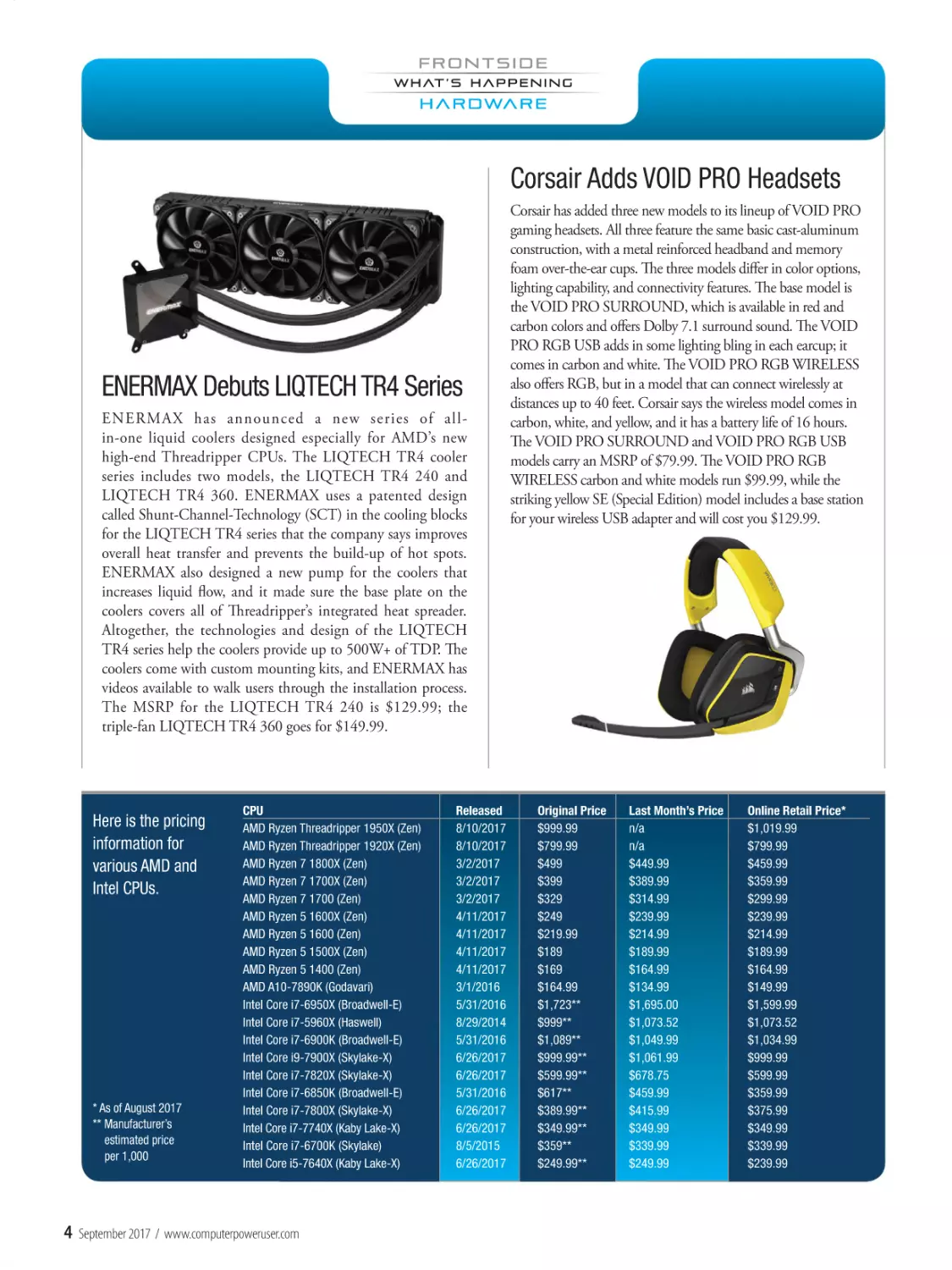
Corsair Adds VOID PRO Headsets

ENERMAX Debuts LIQTECH TR4 Series
ENERMAX has announced a new series of allin-one liquid coolers designed especially for AMD’s new
high-end Threadripper CPUs. The LIQTECH TR4 cooler
series includes two models, the LIQTECH TR4 240 and
LIQTECH TR4 360. ENERMAX uses a patented design
called Shunt-Channel-Technology (SCT) in the cooling blocks
for the LIQTECH TR4 series that the company says improves
overall heat transfer and prevents the build-up of hot spots.
ENERMAX also designed a new pump for the coolers that
increases liquid flow, and it made sure the base plate on the
coolers covers all of Threadripper’s integrated heat spreader.
Altogether, the technologies and design of the LIQTECH
TR4 series help the coolers provide up to 500W+ of TDP. The
coolers come with custom mounting kits, and ENERMAX has
videos available to walk users through the installation process.
The MSRP for the LIQTECH TR4 240 is $129.99; the
triple-fan LIQTECH TR4 360 goes for $149.99.

Corsair has added three new models to its lineup of VOID PRO
gaming headsets. All three feature the same basic cast-aluminum
construction, with a metal reinforced headband and memory
foam over-the-ear cups. The three models differ in color options,
lighting capability, and connectivity features. The base model is
the VOID PRO SURROUND, which is available in red and
carbon colors and offers Dolby 7.1 surround sound. The VOID
PRO RGB USB adds in some lighting bling in each earcup; it
comes in carbon and white. The VOID PRO RGB WIRELESS
also offers RGB, but in a model that can connect wirelessly at
distances up to 40 feet. Corsair says the wireless model comes in
carbon, white, and yellow, and it has a battery life of 16 hours.
The VOID PRO SURROUND and VOID PRO RGB USB
models carry an MSRP of $79.99. The VOID PRO RGB
WIRELESS carbon and white models run $99.99, while the
striking yellow SE (Special Edition) model includes a base station
for your wireless USB adapter and will cost you $129.99.

WATCHING THE CHIPS FALL

Here is the pricing
information for
various AMD and
Intel CPUs.

* As of August 2017
** Manufacturer’s
estimated price
per 1,000

4

CPU
AMD Ryzen Threadripper 1950X (Zen)
AMD Ryzen Threadripper 1920X (Zen)
AMD Ryzen 7 1800X (Zen)
AMD Ryzen 7 1700X (Zen)
AMD Ryzen 7 1700 (Zen)
AMD Ryzen 5 1600X (Zen)
AMD Ryzen 5 1600 (Zen)
AMD Ryzen 5 1500X (Zen)
AMD Ryzen 5 1400 (Zen)
AMD A10-7890K (Godavari)
Intel Core i7-6950X (Broadwell-E)
Intel Core i7-5960X (Haswell)
Intel Core i7-6900K (Broadwell-E)
Intel Core i9-7900X (Skylake-X)
Intel Core i7-7820X (Skylake-X)
Intel Core i7-6850K (Broadwell-E)
Intel Core i7-7800X (Skylake-X)
Intel Core i7-7740X (Kaby Lake-X)
Intel Core i7-6700K (Skylake)
Intel Core i5-7640X (Kaby Lake-X)

September 2017 / www.computerpoweruser.com

Released
8/10/2017
8/10/2017
3/2/2017
3/2/2017
3/2/2017
4/11/2017
4/11/2017
4/11/2017
4/11/2017
3/1/2016
5/31/2016
8/29/2014
5/31/2016
6/26/2017
6/26/2017
5/31/2016
6/26/2017
6/26/2017
8/5/2015
6/26/2017

Original Price
$999.99
$799.99
$499
$399
$329
$249
$219.99
$189
$169
$164.99
$1,723**
$999**
$1,089**
$999.99**
$599.99**
$617**
$389.99**
$349.99**
$359**
$249.99**

Last Month’s Price
n/a
n/a
$449.99
$389.99
$314.99
$239.99
$214.99
$189.99
$164.99
$134.99
$1,695.00
$1,073.52
$1,049.99
$1,061.99
$678.75
$459.99
$415.99
$349.99
$339.99
$249.99

Online Retail Price*
$1,019.99
$799.99
$459.99
$359.99
$299.99
$239.99
$214.99
$189.99
$164.99
$149.99
$1,599.99
$1,073.52
$1,034.99
$999.99
$599.99
$359.99
$375.99
$349.99
$339.99
$239.99

CableMod Announces ModWrap

New X399 Memory From G.SKILL
G.SKILL has released specs for new kits of DDR4 in the Flare
X line that it created for AMD’s Threadripper platform. The
memory specs are optimized for motherboards sporting X399
chipsets and high-end Threadripper CPUs. The specifications
are for 1.35V kits that run at frequencies from 2933MHz to
3600Mhz. There are two kit capacities: 32GB (8GB x 4) and
128GB (16GB x 8). The latter kit takes advantage of the eight
memory slots that can run in quad-channel mode on AMD’s
X399 platform. G.SKILL says the 32GB 3600MHz kit of
Flare X is the fastest memory kit that has been released for
AMD’s platform. The specifications for that kit as well as the
other new kits are as follows:
FREQUENCY TIMING
3600MHz
16-18-18-38
3466MHz
16-18-18-38
3200MHz
14-14-14-34
2933MHz
14-14-14-34

KIT CAPACITY
32GB
(8GB x 4)
32GB
(8GB x 4)
32GB
(8GB x 4)
128GB (16GB x 8)

The ModWrap is a sleeving kit from CableMod that lets users
dress up the cooling tubes used in AIO coolers. Custom loops
often have transparent tubing, so enthusiasts can dye the
color of the liquid to fit the color scheme of their systems.
AIO liquid-cooling kits come pre-filled with liquid and
generally have black tubing, which stylistically will work in
most builds. With the ModWrap, users can give the tubing
in AIO kits extra visual punch. The ModWrap sleeving is
made of nylon and is custom fit for specific lines of coolers.
The sleeving comes in your choice of five colors: White, Red,
Light Blue, Light Green, and Carbon (the colors match the
ones CableMod uses for its ModMesh cables). The kits come
in two series: Series 1 kits work with Corsair’s second-gen
Hydro coolers, while Series 2 kits work with EVGA CLC
coolers and NZXT Kraken models. CableMod says it may
add sleeving kits for other cooler models if there is enough
demand. The ModWrap kits are priced at $19.90.

VOLTAGE
1.35V
1.35V
1.35V
1.35V

Lian Li Goes Small With PC-Q39 WX
Lian Li’s PC-Q39 WX is a small-form-factor tower that features
a tempered-glass side panel on the left. The Mini-ITX case
supports full ATX-sized power supplies and has slots for three
graphics cards. The interior layout divides the chassis into two
compartments, one that runs along the bottom for the power
supply and storage drives, the other for the motherboard and
graphics cards. The lower compartment holds a drive rack that
can handle up to two 3.5-inch drives and one 2.5-inch drive.
Another 2.5-inch drive can be placed in the back of the case,
plus there is room for one more on the motherboard tray. The
main compartment has room for graphics cards up to 320mm
long and a CPU cooler up to 120mm. The chassis itself is made
of aluminum and measures 348 x 252 x 346 (HxWxD in mm).
The case has spots for up to four fans (2 x 120mm on top, plus
2 x 120mm or 1 x 140mm on the bottom). It also supports
liquid-cooling radiators up to 240mm on top. The MSRP for
the new PC-Q39 WX is $209.99.

CPU / September 2017

5

Thermaltake Reveals Two New Views
Thermaltake’s new View 71 TG and View 71 TG RGB are
nearly identical towers, but they vary in the type and number
of fans included with the cases. The View 71 TG has two
preinstalled 140mm Riing Blue fans, while the View 71 TG
RGB comes with three preinstalled 140mm Riing RGB fans.
Other than that, the specs for the two cases look the same, with
the same interior structure and 5mm tempered-glass panels on
the front, top, and both sides. Both cases measure 592 x 274
x 577 (HxWxD in mm) and they each weigh a hefty 41.66
pounds. Inside, they have an HDD rack that holds four 2.5inch or 3.5-inch drives, plus there are mounts for an additional
six 2.5-inch or three 3.25-inch storage units. The cases support
motherboards up to EATX, and they have 8+2 expansion slots.
Graphics cards can range up to 410mm without the HDD
rack, or 310mm with the rack. The CPU cooler has 190mm of
headroom. Pricing wasn’t available at press time, but by the time
you read this, both cases should be available at retailers.

HARDWARE MOLE

ADATA Unveils XPG SX9000 SSD

HyperX Releases Kit For Gamers
Who Want Keyboard Feedback
HyperX, the extreme gaming division of Kingston
Technology, has released a keycaps upgrade kit. The kit
is aimed at gamers who play MOBA or FPS games. The
kit contains keycaps in your choice of two colors: red
(HXS-KBKC1) or titanium (HXS-KBKC2). The caps
are textured to give users more tactile feedback from
their keyboard while gaming, plus they have a coating
that gives them extra durability. Along with caps for
the keys commonly used in MOBA/FPS games, the kit
contains a HyperX keycap removal tool. HyperX says the
replacement gaming keycaps are compatible with Cherry
mechanical switches. MSRP for the new keycaps upgrade
kit from HyperX is $14.99.

6

September 2017 / www.computerpoweruser.com

ADATA’s fastest consumer SSD is on the way. The XPG
SX9000 is an PCIe Gen 3x4 NVMe 1.2 SSD that uses
the M.2 2280 form factor. ADATA is targeting the new
drives at gamers and overclockers. The XPG SX9000 can
read sequential data at up to 2800MBps and write at up
to 1,450MBps. The drive uses MLC NAND and has a
Marvell controller. ADATA says random 4K read/write
speeds are 310K/240K IOPS. The new series ships with
a black heat spreader that has the ADATA logo, but the
company is leaving it up to buyers to decide whether they
want to attach it to the drive. Thermal paste is pre-applied
to the heat spreader to make the DIY installation as
painless as possible. The exact availability date hasn’t been
released, but ADATA says the new drives will be available
in 256GB, 512GB, and 1TB capacities.

Skydance Interactive Announces
$12.99 Release For PWNED FPS

Paragon Releases Free Preview
Version Of Hard Disk Manager 16
Paragon Software Group is getting ready to release the next
commercial version of Hard Disk Manager, the company’s
suite of tools that helps you maintain your storage devices
and protect your data. Version 16 of the software includes
new features and utilities for partitioning drives, making and
scheduling backups, and restoring data. Paragon says the latest
version of the suite has an improved user interface that makes
using the software more intuitive, and it includes a new Create
Backup Job Wizard that speeds up the process of creating
individual backups or scenario-based backups for your PC.
Recently the company released a “free preview” version of
HDM 16 at www.paragon-software.com to let users download
and try out the new features with their storage devices. The
preview version is completely free to use and there is no timebased cutoff, so it won’t shut down in 15 or 30 days (note that
it won’t let you upgrade for free to later versions).

Entertainment software publisher Skydance Interactive
announced it is releasing the new game PWNED for
Windows PCs via Steam Early Access. The company first
debuted the game at Comic-Con in San Diego in July.
The fast-action FPS game will only cost $12.99. SkyDance
describes PWNED as an arena-based shooter that takes
place in a “dystopian future” and says it features “threedimensional rocket-jumping combat.” Along with the low
price point for PWNED, Skydance says users who buy
the software in the first few days of September will receive
special skins they can use in the game. Early purchasers also
can participate in a contest to win prizes on the PWNED
leaderboard. Skydance says it will award the best player on
the board each day a new gaming computer (the special
computer givewaway contest will run until September 3).

SOFTWARE SHORTS

Google Releases Android 8.0, “Oreo”
Google’s Android operating system is now found on about
two billion mobile devices worldwide. The latest version of
the OS is called Oreo (or Android 8.0), and it is now available
to the public. The update includes a number of new features.
Google says Oreo boots twice as fast as previous iterations of
Android (which also are named after various confections),
and the redesigned interface gives users access to more apps
with fewer taps. There’s also a picture-in-picture feature that
lets you see two apps at once. A menagerie of more than 60
new emojis is available to help people express themselves, and
the autofill feature now works with passwords, so you can log
into your favorite apps and websites faster. Google also has
made a number of tweaks that it says improve the battery life
of mobile devices and also increase user security. You can learn
more about all the new features by visiting www.android.com.

CPU / September 2017

7

Mozilla’s New Firefox 55 Browser
Supports WebVR Standard

Google Adds Q&A To Maps & Search
Google is adding a new question-and-answer feature to Maps
and mobile Search. The Q&A feature lets users post questions at
the bottom of business listings that appear on Maps or in Search
when someone looks for a type of company by location (say,
restaurants in Seattle or museums in Cleveland) or a particular
business by name. The listings show information about the
company and give a street address and other contact information.
At the bottom of the listing, the new Q&A feature will let users
post a question about the business or institution (Do you serve
gluten-free meals? What’s the best time to visit this exhibit?) and
then someone from the business or other users can post answers.
Users who post a question will receive a notification when somone
posts an answer. Users will be able to scroll through questions
other people have asked and “upvote” or “downvote” them, so
the most useful information will appear toward the top of the
questions list. Businesses also will be allowed to create a sort of
FAQ list by asking and answering their own questions.

Mozilla, the non-profit organization that supports and
promotes open-source technologies and products, has
released an updated version of the Firefox web browser.
Firefox 55 is the first Windows desktop browser that
supports WebVR, the standard that was created to allow
people to experience virtual reality programs with just a
browser and a headset. In addition to being able to view
virtual reality content, Firefox 55 has been tweaked in
various ways to improve performance and usability. The
address bar includes predictive search suggestions and
a one-click search function. Version 55 also prioritizes
authenticated addresses (sites using the HTTPS protocol
instead of just HTTP) for more secure Internet browsing.
Other new features include changes to make pages load
faster and to improve battery life in portable devices.

SITE SEEING

So You Think You Know The Internet
The PIR, or Public Interest Registry, is the non-profit entity
that handles registration for the .org domain and a few others.
PIR recently conducted a nationwide survey of internet users
to find out how much they really know about the network. It
turns out, not so much. For starters, only 20% of respondents
knew that the World Wide Web and the internet are two
different things. A slightly higher percentage (29%) knew what
the abbreviation HTTP stands for. Only 31% could define
what the DNS does, and barely 32% even know what decade
the web began. The results are a little confounding, especially
when you consider the average respondent had been using the
internet for 17 years (!). For information on the survey and a
link to a graphic that illustrates some of the survery results, see
http://pir.org/internet-101-survey-how-much-do-people-reallyknow-about-the-internet/.

8

September 2017 / www.computerpoweruser.com

Job Of The Month
Got the right stuff? OK, so we’re really not talking about applying for an astronaut position here, but it
is a position with the same parent organization. NASA employs thousands of people in STEM positions
(hey, they practically invented the pocket protector), and they are currently looking for an Information
Technology Specialist (Data Management) for their offices at the Langely Research Center in Hampton,
Va. This person will help capture data, classify data, integrate data, manage data, model with data,
analyze data . . . well, you get the idea. You’ll be a doing lots of stuff with data. The ideal candidate will be
experienced with data analytics techniques and know all about data modeling and data standardization
procedures. The IT Specialist, Data Management works closely with other IT and engineering teams at
NASA. You won’t be walking on the moon (they say it’s not a remote working position, anyway), but who
knows, you may end up meeting some folks who do. Hey, it’s NASA! See the site below for more info.
Source: www.usajobs.gov

Three Letters: M.I.T.
The Center For Data Innovation, a global think tank that
examines public policy as it pertains to technology and
data, recently released a report that ranked all 50 U.S.
states on how well-prepared they are to participate in
tomorrow’s data-driven economy. The report examined
25 indicators in three key technology asset categories:
1) availability of datasets (in areas such as energy,
education, health care, and so on); 2) technology
(how well the state is doing in developing broadband
access and other digital infrastructure); and 3) people
and companies (whether a sufficient pool of data
professionals is available and how many technologybased companies are already in the state). The results
of the report show Massachussetts is well positioned for
the future, while Mississippi has some catching up to do.

1,388+
The collective equivalent time in years that
all of humanity spends entering passwords
into digital devices each day. This estimate
by Microsoft Principal Researcher Dr.
Cormac Herley assumes two billion people
enter an average of one password per
day. And that number has no doubt grown
significantly, as Herley’s original calculation
was based on data from 2014.
Cormac Herley, “Passwords: A Guide To The
Ruins And Lessons For Improvement”

24 million
The number of households worldwide that
will own at least one virtual reality device by
the end of 2017.
Parks Associates

256 million
The number of people worldwide who will
be using virtual reality devices by the year
2022. This forecast also projects annual
VR revenues in the U.S. alone will top $60
billion in five years.
ABI Research

Source: Center For Data Innovation

Facebook & Google: Yes, They Do Own The World
Modern consumers spend a great deal of time on digital media, and 57% of that time is spent on
mobile apps. Even when you take tablets out of the equation, smartphone apps still account for more
than half our digital media time. According to research by comScore, seven apps have now achieved
50% or more market
penetration (installed
on more than half of the
devices that use mobile
apps). Facebook leads
the pack with 81%, with
Google’s YouTube in
second place with 71%.
In fact, Facebook and
Google own eight of the
10 most popular apps.

$237 billion
The total revenues of the robotics industry
worldwide by the year 2022. This total
includes such items as autonomous
vehicles, consumer robots, enterprise
robots, and unmanned aerial vehicles.
Total revenues from these categories in
2016 reached $31 billion.
Tractica

Source: comScore

CPU / September 2017

9

Mech Warriors
We Put Thirteen Mechanical Keyboards To The Test
s a group, enthusiasts tend to upgrade
their hardware at a faster pace than Joe
and Jane PC User. If you want to play the
latest and greatest games or power through
a heavy workload in no time, you have to
have a beefy graphics card, powerful CPU,
smoking-fast SSD, and so forth. Plus, who
doesn’t love the excitement of jamming
brand-new components into their rig? It’s
our way of life.
However, whether you’re upgrading
an existing system or building a new one
from the ground up, we tend to pass over
certain parts despite the promises we make
to the contrary. If the mouse keeps clicking
and tracks true, we tell ourselves that we’ll
replace it next time. Why worry about a
handful of dead or stuck pixels when your
monitor has millions more that work
perfectly? And of course, unless you’ve
created a Mountain Dew swamp within
your keyboard, most of the time it will keep
right on typing.
If you’re still forcing your fingers to toil
away at a decade-old keyboard, maybe
the time has come for you to think about
swapping it for a newer model. This isn’t
always true, as high-quality mechanical
keyboard can stand up to years of punishment. But it’s precisely for that reason we’ve
assembled a small army of mechanical
keyboards for this roundup. The mushy $15
keyboard in front of you is doing you no
favors. Make the move to mechanical and
don’t look back. Instead, look at all these
awesome options; one of them will be your
next keyboard.

A

Hooked On A Feeling
We’ve been preaching the benefits of
mechanical keyboards for years, but if you’re
new to the game, here are the CliffsNotes.
For starters, the keyswitches that mechanical
keyboards use are far more durable and longlasting than keyboards with rubber dome
CPU RANKING

0 = ABSOLUTELY WORTHLESS

or membrane switches. Further, with a little
practice, you can use mechanical switches’
characteristics to make typing easy, fast,
and effortless. To wit, clicky and tactile
keyswitches give you both aural and haptic
cues, respectively, to type without bottoming
out the keys as you go. Eventually, you’ll
be typing up a storm and wondering why
you spent the best years of your life using a
substandard keyboard.
Despite the general advantages of mechanical keyboards, we don’t recommend
haphazardly buying one. Clicky keyboards,
for example, are music to some users’ ears
but a cacophonous nightmare to others.
If you can’t stand the sound, you’ll want a
mechanical keyboard with silent, or nonclicky, switches. We recommend taking a
mechanical keyboard or two for a test drive;
take advantage of your next LAN party, or
if your friend(s) have one, take advantage of
them. After chronicling the adventures of
the quick brown fox and its jumps over lazy
dogs a few times, you’ll know the type of
mechanical switch for you.

In a similar vein, when we review a
mechanical keyboard, we keep our personal
preferences (see above: cacophonous clicky
switches) in check and evaluate each
board on its individual merits. If we feel
like a manufacturer has product a brilliant
keyboard with Blue or Green switches, we’ll
assess it as such.

Cherry MX BOARD 6.0
Leading off our roundup is the keyboard
from the company that’s arguably responsible
for the modern resurgence of mechanical
keyboards among enthusiasts. After watching
other companies succeed on the back of
its incredibly popular MX keyswitches,
German designer Cherry delivers its own
keyboard, the MX BOARD 6.0. If you’ve
always wondered what Cherry’s vision of the
quintessential MX-based keyboard might be,
wonder no longer.
As far as construction goes, the MX
BOARD 6.0 is practically peerless. Sleek
and stately, the chassis is a combination of
aluminum and plastic, like the majority of

MX Board 6.0
$175.99 | Cherry | www.cherry.de

Specs: Switch type: Mechanical (Cherry MX Red); 50 million keystroke life span; Interface: USB;
Red LED lighting; Full anti-ghosting; Full n-key rollover; Macros: N/A; Warranty: 2 years

2.5 = ABSOLUTELY AVERAGE

5 = ABSOLUTELY PERFECT

CPU / September 2017

11

its keyboard’s switches, Cherry’s decision not
to offer the MX BOARD 6.0 with alternate
switches is somewhat puzzling
Also puzzling is the extent of the MX
BOARD 6.0’s options, which are rather
limited. As we said, the red LEDs’ brightness
is outstanding, but brightness is all you get—
no custom colors or effects, no macros, no
software. Another conundrum is that the
MX BOARD 6.0’s Red switches are probably
the best fit for gamers and yet the keyboard
has none of the goodies they want.
As “just a keyboard,” the MX BOARD
would be damn near perfect, but we know
there’s no such thing as “just a keyboard”
anymore. An ultra-premium price is fine, but
the feature set has to match. If “the perfect
MX Red experience” and nothing else is on
your wish list, take a look.

MasterKeys Pro S
$79.99 | Cooler Master | www.coolermaster.com

Specs: Switch type: Mechanical (Cherry MX Green); 50 million keystroke life span; Interface: USB;
Macros: Yes; Full anti-ghosting; Full n-key rollover; Warranty: 2 years

our boards, but Cherry’s execution is a sight
to behold. In addition to its clean lines, the
MX BOARD 6.0 had absolutely no flex
to it. Even the wrist rest, which attaches
magnetically, is luxurious. Measuring a
little over 3.5 inches deep and coated with
soft-touch rubber, the wrist rest is a terrific
complement rather than an afterthought.
The MX BOARD 6.0’s LEDs shine through
its keycaps more brightly than any of the
other keyboards we tested. If you want proof
that elegance doesn’t have to be elaborate,
Cherry’s keyboard is exhibit A.
Similarly, it’s no great surprise that the
MX Reds work flawlessly. These switches
aren’t generally regarded as the best switches
for general-purpose typing, and in truth
we prefer our keys to at least offer a tactile
response. That said, the MX BOARD 6.0
arguably has the best feel of any mechanical
keyboard that uses Red switches. As such,
it has the speed that hardcore gamers are
looking for in a mechanical keyboard
without delivering substandard results while
writing a term paper or the next Great
American Novel.
But as good as the MX Reds are in the
MX BOARD 6.0, it doesn’t change the fact
that many people would rather use MX
Browns, Blues, Blacks, or one of the other
CPU RANKING

12

0 = ABSOLUTELY WORTHLESS

September 2017 / www.computerpoweruser.com

colors in Cherry’s palette. Curiously, Cherry
makes no other variants of the MX BOARD
6.0, so even if you’ve fallen in love with the
look, you might have to persuade yourself
into having a similar affection for the Red
switches. As the company that actually makes

Cooler Master MasterKeys Pro S
Lately, we’ve noticed a trend among
keyboard manufacturers toward fullflavored flash. We’re talking about RGB
LED lighting—the more the better. Now
that virtually every other system component
has embraced LEDs, these keyboards fit
right in. Cooler Master’s MasterKeys S
course-corrects.

K95 RGB PLATINUM
$199.99 | Corsair | www.corsair.com

Specs: Switch type: Mechanical (Cherry MX Brown); 50 million keystroke life span; Interface: USB;
Macros: Yes (6 dedicated keys); Per-key RGB backlighting (16.8 million colors); Full anti-ghosting;
Full n-key rollover; Warranty: 2 years

2.5 = ABSOLUTELY AVERAGE

5 = ABSOLUTELY PERFECT

Perfect for minimalists, the MasterKeys S
is one of two keyboards in our roundup to
feature a tenkeyless design. In other words,
Cooler Master lopped off the numeric
keypad, making this keyboard considerably
smaller than its compatriots. (If you want
the numpad back, the MasterKeys L is your
ticket.) As such, the MasterKeys S follows
in the tradition of Cooler Master’s other
tenkeyless boards, such as the QuickFire
Rapid. At 2.13 pounds, the MasterKeys S has
a little heft, but it didn’t feel cumbersome.
Cooler Master touts the MasterKeys S’
durability, and we buy it. The plastic frame is
exceptionally rigid; we’d have no reservations
about flinging this keyboard into a backpack
for transport to a LAN party. Cooler
Master uses PBT keycaps that are 1.5mm
thick, or nearly twice as thick as most ABS
keycaps. After pulling off one of the keycaps
and comparing it to a couple of others, the
MasterKeys S’ keycaps do feel slightly more
rigid. Keycap breakage does happen from
time to time, so the 1.5mm-thick keycaps (the
included red replacement WASD—plus Q, E,
and R—keycaps don’t appear to have the same
thickness) are a non-negligible benefit.
The MasterKeys S that Cooler Master sent
us used Cherry MX Greens, clicky and tactile
switches that are even stiffer than MX Blues.
The Greens will give your fingers a workout,
but their implementation on the MasterKeys
S will be immensely satisfying for anyone
who prefers a firmer feel. Don’t fret if you
favor a lighter touch, as Cooler Master also
makes the MasterKeys S with MX Blue, Red,
Brown, or Silver switches.
There’s no software for the MasterKeys S,
which is a benefit or a drawback depending
on how you use your keyboard. Macro
maniacs may need a little more than the
MasterKeys S’ onboard capabilities. That
said, this is a no-nonsense tenkeyless board
that can take a punch.

Corsair K95 RGB PLATINUM
Corsair has never been a company that
cuts corners. Even its wares made for thrifty
enthusiasts have terrific fit and finish and
attention to detail. So naturally, Corsair’s
flagship mechanical keyboard, the K95 RGB
PLATINUM, arrived on our doorstep dressed
to impress. Spoiler: We were impressed.
CPU RANKING

0 = ABSOLUTELY WORTHLESS

Our K95 included
Cherry MX Brown
switches, which are
among Cherr y’s
lightest and fastest
switches, requiring
a mere 45cN to
actuate. This puts
them on par with
Cherry MX Reds
(you might refer to
them as the “gamer
switches”), but the
Browns also have
a tactile bump
Attack X3
that makes them
$109.99 | COUGAR | www.cougargaming.com
more suitable as
an everyday board.
Alternatively, Corsair
Specs: Switch type: Mechanical (Cherry MX Speed); 50 million keystroke
offers the K95 with
life span; Interface: USB; Macros: Yes; Per-key RGB backlighting (16.8
Cherry MX Speed
million colors); Full anti-ghosting; Full n-key rollover; Warranty: 1 year
switches, a relative
newcomer that’s even
more similar to the
Reds. (The biggest
difference is travel
distance—2mm for
MX Red switches
vs. 1.2mm for the
Speeds.) Of course,
the Browns as Corsair
has implemented Francium Pro
them on the K95 are $164.99 | Deck | www.deckkeyboards.com
excellent, solid allaround performers
Specs: Switch type: Mechanical (Cherry MX Brown); 50 million keystroke
but also fast enough
life span; Interface: USB; Macros: Yes; White LED backlighting; Full antito lead you to victory
ghosting; Full n-key rollover; Warranty: 1 year
in your favorite
game(s).
Corsair is obviare undoubtedly attractive. Although the
ously aware that the K95 will be the weapon
aluminum itself was sturdy, the plastic
of choice for many gamers and designed the
portion of the body did flex slightly.
keyboard as such. The column of six macro
Put “RGB” in your keyboard’s name,
keys on the left edge of the keyboard are
and you’d better be prepared to deliver,
texturized (as is the Spacebar), and Corsair
especially if that keyboard will separate
also includes extra sets of texturized
potential buyers from a pair C-notes.
keycaps that match popular game layouts
Thankfully, this isn’t a concern with the
(FPS and MOBA). A magnetized wrist
K95, thanks to a combination of bright
wrest would have been nice, but the wide
LEDs and truly great software, the Corsair
strip of soft-touch rubber that Corsair
Utility Engine. In addition to giving you
uses is quite comfortable. An aircrafta great deal of control over the LEDs’
grade aluminum backplate runs from top
color (per-key lighting, natch), speed, and
to bottom of the K95, and the contours

2.5 = ABSOLUTELY AVERAGE

5 = ABSOLUTELY PERFECT

CPU / September 2017

13

so forth, CUE connects to certain other
Corsair components and unites them, as
the company has slowly made good on
the promises it made with Corsair Link so
long ago. You can also download additional
community-generated effects. As good as
the lighting aspect of CUE is, its macro
controls are arguably better, and the clean
UI makes Corsair’s software accessible and
powerful in equal measure.
The K95 RGB PLATINUM is an outstanding example—maybe the best
example—of what a Cherry MX mechanical keyboard with customizable RGB
LED lighting can be. That much is
undeniable. On the other hand, Corsair
doesn’t hold a monopoly over LEDs or
Cherry switches. Corsair’s K95 RGB
PLATINUM gives you a lot, but for 200
bucks, it’s asking a lot in return.

COUGAR Attack X3 RGB
In this business, a proper show of force
can be the difference between a product
going gangbusters and gathering dust in an
online retailer’s warehouse. You don’t think
brags like “aggressive design” and “Starfleetgrade components” happen by accident,
do you? Well, if you need your stuff to be
threatening, you can shut things down right
now. We have a keyboard from a company
whose namesake is one of North America’s

premier apex predators, and its product name
is “Attack” . . . times three!
Let’s get serious, though, because
COUGAR’s redesigned Attack X3 RGB
is one cool cat. It’s one of two keyboards
in this roundup to use Cherry’s MX Speed
(aka Silver) keyswitches. Notice again that
show of force, this time from Cherry: MX
Speed switches are fast, and gamers love
fast. Specifically, these linear switches have
an actuation force of 45cN, putting them
on equal footing with Cherry’s other “fast”
switch, the MX Red. The key difference
between the two is the Speeds’ slightly lower
travel distance of 1.2mm. (A Red switch has
2mm actuation point.)
Despite their profile, the MX Speed
switches on the Attack X3 RGB feel closer to
Cherry’s other linear switch, the MX Black.
This keyboard has a light touch, to be sure;
it’s most definitely a gamer, and we liked
its overall performance. We even prefer the
Attack X3 RGB’s switches over MX Reds
for general-purpose typing. COUGAR also
offers the Attack X3 RGB with MX Red,
Black, Brown, or Blue keyswitches, but you
won’t get the detachable wrist rest that this
new model includes.
COUGAR sticks with a tried-and-true
combination of brushed aluminum and plastic
for the Attack X3 RGB’s chassis. The finish is
subdued, without much luster, but the Attack

AORUS K7
$129.99 | GIGABYTE | www.aorus.com

Specs: Switch type: Mechanical (Cherry MX Red); 50 million keystroke life span; Interface:
USB; Macros: Yes; Per-key RGB backlighting (16.8 million colors); Full anti-ghosting; Full
n-key rollover; Warranty: 2 years
CPU RANKING

14

0 = ABSOLUTELY WORTHLESS

September 2017 / www.computerpoweruser.com

2.5 = ABSOLUTELY AVERAGE

5 = ABSOLUTELY PERFECT

X3 RGB is still a sleek board. COUGAR
reports a weight of 2.2 pounds; despite this,
we thought the keyboard was reasonably
sturdy. With a gentle twist, the plastic part of
the Attack X3 RGB’s chassis wanted to pull
away where it met the aluminum, but the
aluminum itself was rock-solid.
The UIX System that COUGAR has
developed to fully harness the Attack X3
RGB’s capabilities is arguably as good as the
keyboard itself. COUGAR gives you plenty
of dials and knobs to turn. In addition to
flipping the On switch to activate the typical
set of lighting effects (ripple, wave, reactive—
you know the drill), you can drill down and
customize the effects. The UIX System also
handles macro recording and profile creation.
To make matters better, we liked the UI’s
aesthetic, as well.
Available for $109.99, COUGAR’s new
Attack X3 RGB is an awesome, approachable
keyboard for gamers seeking their first
mechanical keyboard, but it’s also an
intriguing option for MX Red veterans who
want to give the Speeds a shot. If you bag this
big cat, you won’t be disappointed.

Deck Francium Pro
Most of the companies featured in this
roundup dabble in all sorts of product
categories. Deck makes keyboards and only
keyboards. (And Deck comes by it honestly,
as parent company TG3 Electronics produces
specialized keyboards for a wide range of
industries—think hospitals, emergency
vehicles, POS devices, and more.) For this
tenkeyless mechanical keyboard, Deck
turned to the periodic table to give us the
Francium Pro. See, everyone’s fourth-favorite
alkali metal (apologies to rubidium and
cesium) has an atomic number of 87. Want
guess how many keys the Francium Pro has?
Beneath the Deck’s keycaps are Cherry MX
switches. Our Francium Pro had MX Browns,
which have the same fast and light action as
the MX Red switches, requiring 45cN to
actuate, but they also have an accompanying
tactile bump. As a result, the Francium Pro is
an outstanding all-around keyboard, provided
you don’t have any qualms about ditching the
numpad. We thought the keyboard was fast
and responsive, a great example of the MX
Brown switches in action.

Design-wise, the
volume controls)
Francium Pro is a string
are a nice touch.
of hits and one glaring
As far as
swing-and-a-miss.
other touching
Beneath the plastic
is concerned,
exterior is a metal frame
C h e r r y ’s M X
that must be made out
Red is the switch
of vibranium, because
of choice on the
this keyboard didn’t
AORUS K7; at
give an inch when we
the time of this
tried to twist the body.
writing, Blues or
Deck then doubles
Browns weren’t an
down on durability,
option. We can’t
topping the switches
fault GIGABYTE
with thick PBT
for tapping the
keycaps. In addition
s w i t c h t h a t ’s
RIPJAWS KM780 RGB
to their resilience,
exceedingly
$169.99 | G.Skill | www.gskill.com
the PBT keycaps are
popular among
highly resistant to
gamers to use
fingerprints. Because of
in a keyboard it
Specs: Switch type: Mechanical (Cherry MX Brown); 50 million keystroke life span; Interface:
the keycaps’ thickness,
intends to market
USB; Macros: Yes (6 dedicated keys); Per-key RGB backlighting (16.8 million colors); Full
though, we didn’t
to
gamers, but
anti-ghosting; Full n-key rollover; Warranty: 2 years
think the Francium
anyone who favors
Pro’s LEDs had quite
tactile and/or
the shine as many of the other keyboard
clicky switches must look else-where. There
if you want easy access to lots of LED
in the roundup, but that’s not its greatest
were no surprises from the AORUS K7’s
patterns and colors, there are other choices
offense. Rather than stick with a plain, but
Reds. The switches are fast and smooth—this
that might serve you better.
inoffensive font for the keycaps, Deck chose
is can’t-miss performance if you need a rapidsomething that resembles the cover of a
fire response in your game of choice.
GIGABYTE AORUS K7
children’s fantasy novel. Perhaps Deck was
As more companies establish and
Rather than use a standalone program
hoping to distinguish the Francium Pro
develop gaming brands, GIGABYTE
to command the AORUS K7’s LEDs, the
from other tenkeyless mechanical keyboard.
has answered with its AORUS family. In
AORUS GRAPHICS ENGINE gives you
Mission accomplished, but not in the way
addition to the usual suspects, the AORUS
the tools. Naming aside, the move makes
the company likely intended.
line has a wide range of components, such
a lot of sense. As much as we grouse
Instead of the 16.8 million colors some
as mice, a CPU cooler, and even a gaming
about ecosystem lock-in, we’d much
companies’ keyboards boast, Deck gives you
chair. Joining the gang is the AORUS K7,
rather have a single tweaking and tuning
two. You can get a Francium Pro with either
a mechanical keyboard with virtually wallutility running the show if we’re using
blue or white LEDs. And even though you
to-wall LED lighting.
hardware from a single manufacturer.
can customize those monochromatic LEDs in
In terms of physical design, the AORUS
(And to be clear, the software absolutely
any pattern you please, be prepared to do a lot
K7 is sleek and sensible. GIGABYTE uses
works with the AORUS K7 even if it’s the
of the legwork. Rather than give you a utility
a thin sheet of brushed aluminum for the
only GIGABYTE component you own.)
with a GUI, you’ll have to roll up your sleeves
top of the keyboard’s frame. Just a shade or
The UI won’t win any beauty pageants,
and script the lighting effects yourself (or cheat
two lighter than gunmetal, the gray color
but it makes setting up the AORUS K7’s
and download some from sites dedicated
has a slightly lustrous finish that nonetheless
per-key lighting far easier than relying
to mechanical keyboards). If that sounds
remained relatively free of fingerprints. The
on the onboard controls (which are
daunting, Deck doesn’t leave you completely
rest of the housing is plastic, and because
decent in their own right). THE AORUS
high and dry, as a handful of lighting effects
GIGABYTE keeps the dimensions of this
GRAPHICS ENGINE lets you create
are built into the Francium Pro.
board to absolute minimum it doesn’t quite
macros, too.
All of this makes Deck’s tenkeyless
have the same firmness as some of the other
In short, the AORUS K7 is another
dynamo a bit of a mixed bag. It’s tough
keyboards we tested. We’ll also give credit
fine offering from GIGABYTE’s gaming
as nails, make no mistake, and the Cherry
where it’s due: The AORUS K7’s adjustable
lineup, this time in keyboard form. “By the
MX Brown switches are terrific. Despite
feet (we first thought the adjustment wheels
numbers” often gets a bad rap; in this case,
selling online at a deep discount ($94),
at the top of the keyboard were dueling
GIGABYTE has given us a solid Cherry MX
CPU RANKING

0 = ABSOLUTELY WORTHLESS

2.5 = ABSOLUTELY AVERAGE

5 = ABSOLUTELY PERFECT

CPU / September 2017

15

Red keyboard that won’t take too big of a bite
out of your wallet.

G.Skill RIPJAWS KM780 RGB
G.Skill wasn’t the first company to realize
the potential of mechanical keyboards
among gamers and other enthusiasts, but the
company’s understanding of this audience is
the reason why a keyboard like the RIPJAWS
KM780 RGB is a powerful competitor.
Like the company’s memory modules
of the same name, there’s no mistaking the
RIPJAWS KM780 RGB. G.Skill clearly
wanted to make a keyboard that would appeal
to the FPS/MOBA/RTS crowd, and it went
all in aesthetically. The KM780 RGB is not
a keyboard you can sneak into the office,
and that’s a badge of honor as far as we’re
concerned. In addition to the anodized,
brushed-aluminum backplate, G.Skill rings
the periphery of the KM780 RGB with what
amounts to a roll cage. The end result is a
keyboard that doesn’t give an inch in terms
of durability, but it does result in one of the
largest footprints of the keyboards we tested.
For our tastes, it’s a great-looking keyboard.
The Cherry MX Brown switches our
KM780 RGB uses (G.Skill alternatively
lines the RIPJAWS KM780 RGB’s maw
with Red and Blue choppers, as well)
are a delight. Requiring 45cN of force
to actuate and offering a tactile bump,
the Browns have the same light touch

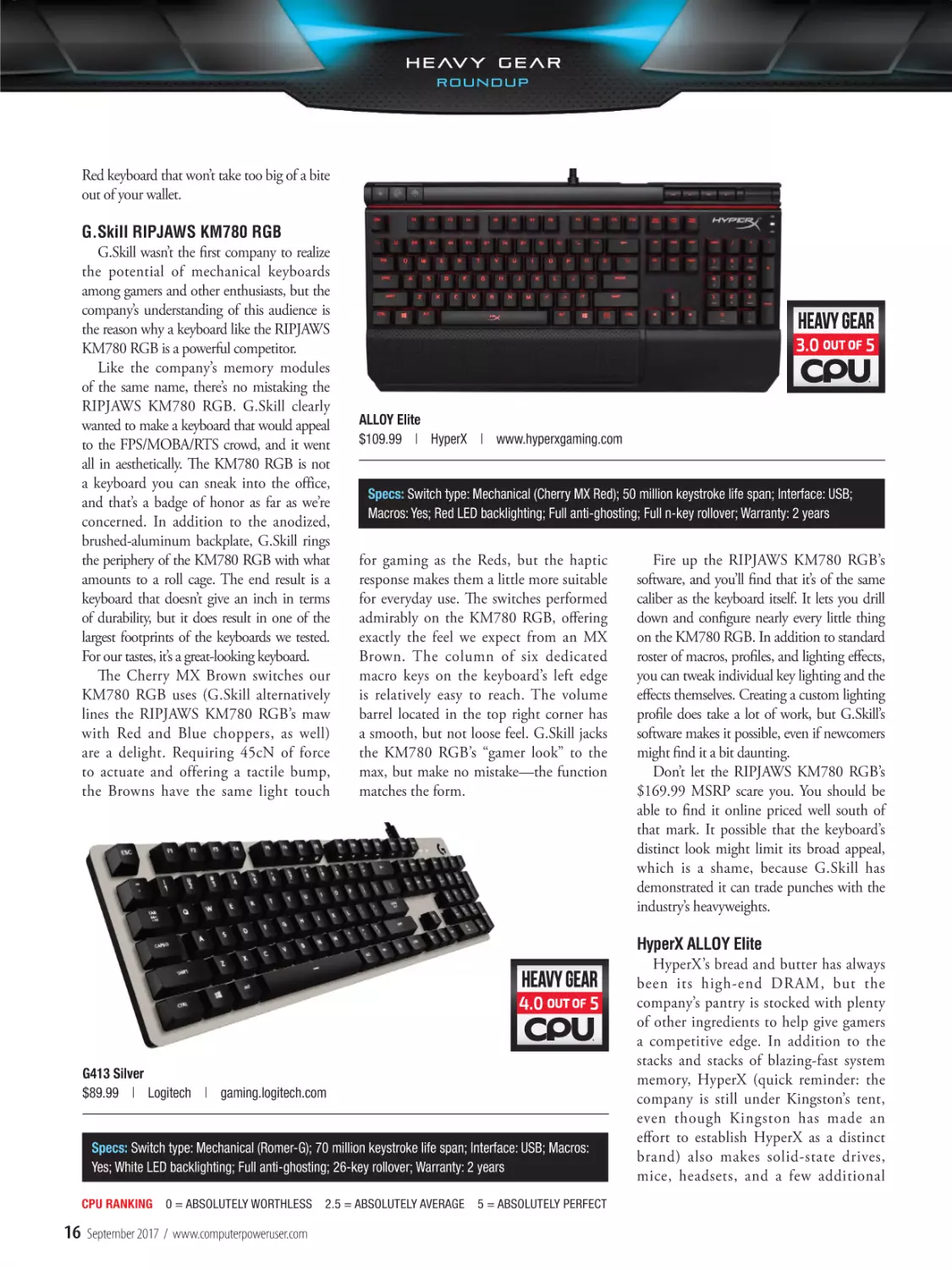
ALLOY Elite
$109.99 | HyperX | www.hyperxgaming.com

Specs: Switch type: Mechanical (Cherry MX Red); 50 million keystroke life span; Interface: USB;
Macros: Yes; Red LED backlighting; Full anti-ghosting; Full n-key rollover; Warranty: 2 years

for gaming as the Reds, but the haptic
response makes them a little more suitable
for everyday use. The switches performed
admirably on the KM780 RGB, offering
exactly the feel we expect from an MX
Brown. The column of six dedicated
macro keys on the keyboard’s left edge
is relatively easy to reach. The volume
barrel located in the top right corner has
a smooth, but not loose feel. G.Skill jacks
the KM780 RGB’s “gamer look” to the
max, but make no mistake—the function
matches the form.

G413 Silver
$89.99 | Logitech | gaming.logitech.com

Specs: Switch type: Mechanical (Romer-G); 70 million keystroke life span; Interface: USB; Macros:
Yes; White LED backlighting; Full anti-ghosting; 26-key rollover; Warranty: 2 years
CPU RANKING

16

0 = ABSOLUTELY WORTHLESS

September 2017 / www.computerpoweruser.com

2.5 = ABSOLUTELY AVERAGE

5 = ABSOLUTELY PERFECT

Fire up the RIPJAWS KM780 RGB’s
software, and you’ll find that it’s of the same
caliber as the keyboard itself. It lets you drill
down and configure nearly every little thing
on the KM780 RGB. In addition to standard
roster of macros, profiles, and lighting effects,
you can tweak individual key lighting and the
effects themselves. Creating a custom lighting
profile does take a lot of work, but G.Skill’s
software makes it possible, even if newcomers
might find it a bit daunting.
Don’t let the RIPJAWS KM780 RGB’s
$169.99 MSRP scare you. You should be
able to find it online priced well south of
that mark. It possible that the keyboard’s
distinct look might limit its broad appeal,
which is a shame, because G.Skill has
demonstrated it can trade punches with the
industry’s heavyweights.

HyperX ALLOY Elite
HyperX’s bread and butter has always
been its high-end DRAM, but the
company’s pantry is stocked with plenty
of other ingredients to help give gamers
a competitive edge. In addition to the
stacks and stacks of blazing-fast system
memory, HyperX (quick reminder: the
company is still under Kingston’s tent,
even though Kingston has made an
effort to establish HyperX as a distinct
brand) also makes solid-state drives,
mice, headsets, and a few additional

etc.—for ages. Despite its long history
in the market, Logitech has watched
as a horde of others recognized the
runaway popularity of mechanical
keyboards and flooded the market
with contenders, and most of them
use battle-tested and enthusiastrespected Cherry MX switches.
To beat back the horde of other
mechanical gaming keyboards,
Logitech equips the G413
Silver with exclusive Romer-G
mechanical switches. Produced
MSI GK-701 RGB
with an assist from Omron,
$129.99 | MSI | us.msi.com
the Romer-Gs are quiet, tactile
switches that closely resemble
Cherry MX Browns. According
Specs: Switch type: Mechanical (Cherry MX Speed); 50 million keystroke life span; Interface: USB; Macros:
to Logitech, its switches have a
Yes; RGB LED backlighting (16.8 million colors); Full anti-ghosting; Full n-key rollover; Warranty: 1 year
shorter actuation point—1.5mm—
than Cherry’s Brown switches.
odds and ends. Its flagship keyboard is
of replacement keycaps; the set consists
We’ve typed our way through several
the ALLOY Elite.
of WASD and 1-4 keycaps. All of the
Cherry-based boards with switches
As far as switch selection goes, where a
alternate keycaps are titanium-colored,
of every color; the Romer-G switches
lot of manufacturers zig, HyperX . . . also
and the WASD keycaps are texturized.
have an undeniably different feel. Is it
zigs. Of course, when zigging involves
The LED lighting on the ALLOY Elite
better than, say, the MX Browns? We
using Cherry MX mechanical switches,
is a bit on the basic side. We’ll admit
felt like the Romer-G switches were
that’s not a knock. Our ALLOY Elite had
that sometimes choosing from 16.8
a touch firmer than comparable
MX Red switches (no bumps, no clicks),
million possible colors and dozens of
Cherries, but again, it’s largely a
but HyperX also produces the keyboard
wacky effects can be, at times, exhausting,
matter of preference. Less a matter of
with the other two “Big Three” Cherry
but there’s a very real danger of going
preference was the fact that the G413
switches—MX Blues and MX Browns.
underboard and not giving enthusiasts
Silver’s Spacebar was noticeably noisier
Red switches are often pigeonholed as the
as much as they’ve come to anticipate.
than its counterparts with Cherry
“gamer switches,” people who like easy,
The ALLOY Elite’s red LED lighting is
switches. On the whole, though, we
breezy typing should find the switches
decent, but it’s also the only available
enjoying using the keyboard.
on the ALLOY Elite to their liking.
color. Similarly, the limited number of
Credit Logitech with points for the
Sure, it’s not groundbreaking, but using
lighting effects all deliver as expected
G413 Silver’s construction, too. The
the ALLOY Elite was exactly what we’d
while simultaneously leaving any and all
base of the keyboard is plastic, but the
expect from an MX Red keyboard.
games unchanged.
backplate is sleek brushed aluminum
A mix of plastic and steel make up
Over the years, Kingston has made
(5052 aluminum-magnesium alloy, to be
the ALLOY Elite’s body, and the end
consistently good hardware under its
precise). The aluminum lends a welcome
result is, for the most part, a relatively
HyperX label, and the ALLOY Elite is no
degree of rigidity to the overall frame,
sturdy keyboard. If that sounds like we’re
exception. There are no huge surprises,
and yet the G413 Silver didn’t seem
hedging, we are. The top “bar” of the
good or bad, and we need keyboards like
overweight when we held it. The keycaps
ALLOY Elite, where the LED and media
that. You can bring the ALLOY Elite home
do collect fingerprints like an episode of
keys are located, appears to be entirely
to mom and dad, and we guarantee you
CSI, if that’s a concern. Logitech also
plastic. To be fair, we suspect this would
they’ll approve.
includes a set of WASD (plus QER and
only become a problem if you used the
1-5) replacement keycaps, and they’re
ALLOY Elite in a cage fight, but it also
Logitech G413 Silver
contoured differently rather a different
gives the keyboard a slightly less than
Of all the manufacturers with a hat
color. We can see the benefit of being
premium air. That said, HyperX included
in this ring, Logitech is the only one
able to distinguish and locate the most
a detachable wrist wrest that’s treated
we’d consider a household name. The
important keys in the heat of battle,
with a sweet, soft-touch coating that we’re
company has been making keyboards—
but the keycaps didn’t revolutionize our
suckers for. You also get a small bundle
high-end, budget-friendly, gaming,
experience, either.
CPU RANKING

0 = ABSOLUTELY WORTHLESS

2.5 = ABSOLUTELY AVERAGE

5 = ABSOLUTELY PERFECT

CPU / September 2017

17

To fully harness the G413 Silver’s
capabilities, you’ll need to download
Logitech Gaming Software. On this
keyboard, LGS’ principal role is
configuring macros (and Logitech
s u p p l e m e n t s t h i s by g i v i n g yo u
access to literally hundreds of gamespecific profiles), mostly because the
monochromatic LEDs have a single
effect: breathing. One neat surprise
was LGS’ ability to record and display
heatmaps of your most frequently
pressed keys, something competitive
gamers will likely appreciate. Otherwise,
LGS as it works with the G413 is simple
and straightforward.
Logitech arguably took a big risk by
developing its own switches instead of
jumping on the Cherry train. We think
the gamble has paid off, especially when
you consider the G413 Silver can be
yours for 90 bucks. That’s a steal. If you’re
not married to Cherry, let the Romer-G
switches win your heart.

MSI GK-701 RGB
Over the last few years, MSI has a
made a concerted effort to establish itself
as the first name in gaming. Graphics
cards, motherboards, laptops, you name
it—if videogames are at the top of your
to-do list, MSI makes it painfully easy
to find hardware that’s up to the task.
The company has extended its reach
to peripherals, too, with gaming mice,
monitors, and keyboards (obviously).
Like most of the keyboards in the
roundup, the GK-701 RGB makes
ample use of LED lighting. No, all that
flash won’t make you a better gamer, but
you’ll look good doing it. You’ll have
20 animations at your disposal, plus the
ability to adjust LED color and intensity.
However, without a utility to manage
the GK-701 RGB’s customizations, the
process can be somewhat of a chore.
Further perplexing is the fact that MSI’s
Mystic Light software works with other
manufacturers’ keyboards but not the
GK-701 RGB. On balance, though, the
GK-701 RGB’s LEDs have a nice glow;
because the keys are nestled within a
fairly deep frame, the shine is a little
CPU RANKING

18

0 = ABSOLUTELY WORTHLESS

September 2017 / www.computerpoweruser.com

subdued. Speaking of that frame, the
GK-701 RGB has a plastic body.
Overall, the frame has some flex, but at
the same time it doesn’t feel flimsy. The
matte finish did pick up a fair number of
fingerprints as we used it.
MSI presents you with a single choice
of Cherry MX switch if you want the
GK-701 RGB, but we suspect gamers
with itchy trigger fingers will appreciate
it. The Cherry MX Speed switches are
the lightest of Cherry’s offerings and
comparable to the MX Reds. Both silent,

Patriot Viper V770
As soon as a particular type of
component picks up steam among
enthusiasts, you can expect Patriot
to arrive on the scene in short order,
offering its own unique take. Most of us
know that Patriot was among the first
to introduce high-performance memory
modules, and over the course of the
company’s three-decade history it’s done
the same thing for lots of other hardware.
Patriot’s Viper line of gaming peripherals
is yet another example.

Viper V770
$139.99 | Patriot | patriotmemory.com

Specs: Specs: Switch type: Mechanical (Kailh Red); 50 million keystroke life span; Interface:
USB; Per-key RGB backlighting (16.8 million colors); 109-key rollover; Macros: Yes (5 profiles);
USB pass-through port; Game mode; Warranty: 2 years

linear switches have an actuation force of
45cN, but as you’ll recall, the Speeds have
a slightly shorter actuation point, just
1.2mm. Typing on the GK-701 RGB is
indeed effortless, and we suspect gamers
will like this APM monster.
Overall, the GK-701 RGB is a great
way for gamers and other enthusiasts
to get a fast mechanical keyboard
with solid LED lighting. Mystic Light
compatibility would’ve been a terrific
treat for MSI loyalists, and which makes
this keyboard just a little less delectable
than it could’ve been.

2.5 = ABSOLUTELY AVERAGE

5 = ABSOLUTELY PERFECT

You’ll regularly hear manufacturers say
that they take their customers’ feedback
and input seriously, but Patriot puts
action to those words. The Viper V760,
debuted last year with Kailh Brown
mechanical keyswitches, but thanks
solely to customer feedback, this year’s
Viper, the V770, has a different switch
beneath its keycaps.
On the V770, Patriot dispenses
with the Kailh Brown’s tactile bump in
favor linear Kailh Red switches. This
is our first encounter with Chinese
manufacturer Kaihula’s switches in

this roundup, so if you’re unfamiliar
with them they have similar profile
to Cherry’s MX switches of the same
color. Kailh and Cherr y MX Red
switches are both silent, provided you
don’t bottom them out. Kailh Reds
are slightly stiffer, requiring 50cN to
actuate. We won’t go so far as to say
the difference is imperceptible for
everyone, but we thought the Viper
V770 gave us performance consistent
with other keyboards in the roundup
that used Cherry’s Reds. Instead of
declaring one Red superior to the
o t h e r, b e c a u s e y o u c o u l d e a s i l y
disagree, we’ll say this: The action on
Patriot’s keyboard was fast, responsive,
and accurate. Gamers, get in line.
Patriot competes with Razer for the
best wrist rest of the bunch (an overlooked
aspect that we wish more companies would
devote more attention to), but for different
reasons. The BlackWidow Chroma V2’s
wrist rest is a Tempur-Pedic California
King bed you buy for your wrists, the
Viper V770’s is a Vegas vacation (not
that the latter is uncomfortable, per se,
thanks to a soft-touch coating). When you
magnetically attach the V770’s wrist rest to

the keyboard, it illuminates a brilliant strip
of LEDs. An aluminum backplate gives the
keyboard a sharp look and a stiff backbone.
Patriot’s software completes the package.
It lets you control and customize the
Viper V770’s RGB LEDs, as well as
program macros. You can set up per-key
lighting, choosing from 16.8 million
colors, or punch in one of 10 effects, with
some customization to boot. The Viper
V770 has five dedicated macro keys, but
you can record to every key on the board
if you like (with the exception of the
Windows key).
We liked Patriot’s Viper V760 last year,
and we like the Viper V770 this year.
Anyone who wants quick keys, great LED
lights, and a solid configuration utility,
all wrapped in a stylish chassis, needs this
keyboard on their short list.

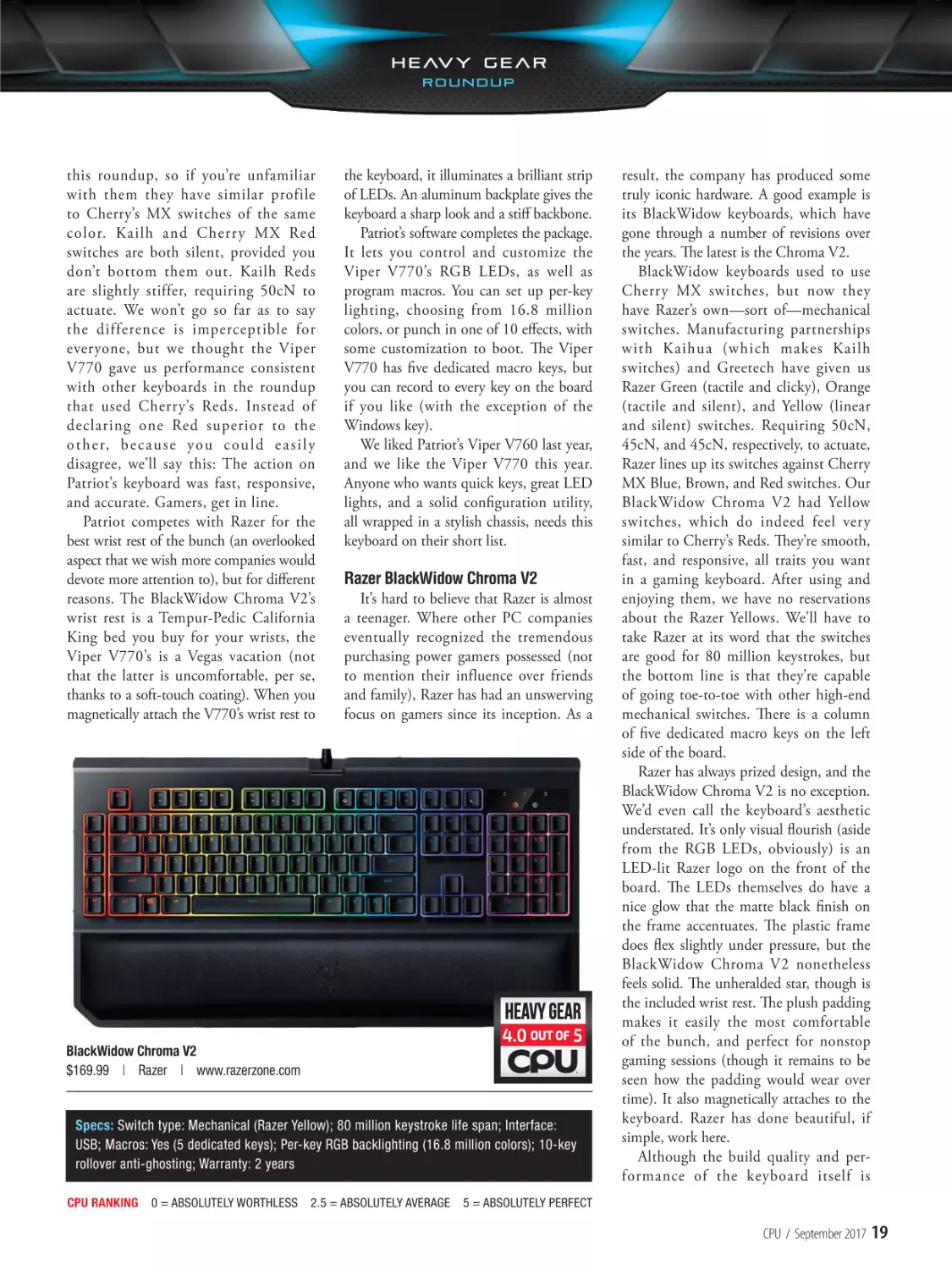
Razer BlackWidow Chroma V2
It’s hard to believe that Razer is almost
a teenager. Where other PC companies
eventually recognized the tremendous
purchasing power gamers possessed (not
to mention their influence over friends
and family), Razer has had an unswerving
focus on gamers since its inception. As a

BlackWidow Chroma V2
$169.99 | Razer | www.razerzone.com

Specs: Switch type: Mechanical (Razer Yellow); 80 million keystroke life span; Interface:
USB; Macros: Yes (5 dedicated keys); Per-key RGB backlighting (16.8 million colors); 10-key
rollover anti-ghosting; Warranty: 2 years
CPU RANKING

0 = ABSOLUTELY WORTHLESS

2.5 = ABSOLUTELY AVERAGE

result, the company has produced some
truly iconic hardware. A good example is
its BlackWidow keyboards, which have
gone through a number of revisions over
the years. The latest is the Chroma V2.
BlackWidow keyboards used to use
Cherry MX switches, but now they
have Razer’s own—sort of—mechanical
switches. Manufacturing partnerships
with Kaihua (which makes Kailh
switches) and Greetech have given us
Razer Green (tactile and clicky), Orange
(tactile and silent), and Yellow (linear
and silent) switches. Requiring 50cN,
45cN, and 45cN, respectively, to actuate,
Razer lines up its switches against Cherry
MX Blue, Brown, and Red switches. Our
BlackWidow Chroma V2 had Yellow
switches, which do indeed feel very
similar to Cherry’s Reds. They’re smooth,
fast, and responsive, all traits you want
in a gaming keyboard. After using and
enjoying them, we have no reservations
about the Razer Yellows. We’ll have to
take Razer at its word that the switches
are good for 80 million keystrokes, but
the bottom line is that they’re capable
of going toe-to-toe with other high-end
mechanical switches. There is a column
of five dedicated macro keys on the left
side of the board.
Razer has always prized design, and the
BlackWidow Chroma V2 is no exception.
We’d even call the keyboard’s aesthetic
understated. It’s only visual flourish (aside
from the RGB LEDs, obviously) is an
LED-lit Razer logo on the front of the
board. The LEDs themselves do have a
nice glow that the matte black finish on
the frame accentuates. The plastic frame
does flex slightly under pressure, but the
BlackWidow Chroma V2 nonetheless
feels solid. The unheralded star, though is
the included wrist rest. The plush padding
makes it easily the most comfortable
of the bunch, and perfect for nonstop
gaming sessions (though it remains to be
seen how the padding would wear over
time). It also magnetically attaches to the
keyboard. Razer has done beautiful, if
simple, work here.
Although the build quality and performance of the keyboard itself is

5 = ABSOLUTELY PERFECT

CPU / September 2017

19

great, the market is brimming with
cheaper options that have equally good
mechanical switches and solid designs.
So, what exactly does $170 buy you?
The BlackWidow Chroma V2 is a
great keyboard, but what puts it in the
upper echelon of gaming keyboards is
Razer’s software package, which has been
polished and refined over the years. Razer
Synapse gave us extensive and intuitive
control over the keyboard’s macros and
lighting effects. With Chroma, you can
design your own effects or download
community creations, including gamespecific packages. These tools aren’t simply
well-developed extras; they’re an integral
part of Razer’s flagship keyboard.
Usually, when hardware doesn’t
surprise us, it’s a disappointment. With
the BlackWidow Chroma V2, it would’ve
been a bigger surprise if Razer hadn’t
reasserted its power. Sometimes, you have
to pay for greatness.

Topre RealForce RGB
Despite their protestations to the contrary, power users are as susceptible to
herd mentality as any other group. Ask a
group of enthusiasts whether they prefer
AMD or NVIDIA graphics cards, for
example, and expect a rancorous partisan
debate, with both sides passionately
stating their case.
When it comes to keyboards, there
is a very big herd that wants you to
believe that Cherry MX switches are
the mechanical keyswitches you want.
The idea that you’d want a different
mechanical keyswitch is nonsensical.
The contention that a terrific keyswitch
can have the properties of a rubber
dome—heresy. Do you think Japanese
company Topre concerns itself with the
opinions of the herd?
If the RealForce RGB is any indication, it does not. Regularly billed as a
hybrid, the switch Topre uses in this
keyboard is what the company calls
“electrocapacitive,” which is short for
“electrostatic capacitive.” We detailed
the RealForce RGB’s unique switch
last month (see page page 20 in the
August 2017 issue), but here’s a quick
CPU RANKING

20

0 = ABSOLUTELY WORTHLESS

September 2017 / www.computerpoweruser.com

RealForce RGB
$232 | Topre | www.topre.co.jp/en

Specs: Switch type: Hybrid (Topre electrocapacitive); 50 million keystroke life span; Interface: USB; Macros:
Yes; Per-key RGB backlighting (16.8 million colors); full anti-ghosting; Full n-key rollover; Warranty: 1 year

recap: Rubber domes under each keycap
compress, and the top of the dome
makes contact with the PCB’s circuit.
A conical spring above each dome is
largely responsible for the switches’
unique feel, and Topre has other tricks,
such as using O-rings to dampen the
switches’ acoustics.
Requiring 45cN to actuate, Topre’s
switches are comparable to Cherry MX
Reds and Browns, and they do have a
light touch. The RealForce RGB’s keys
felt a little crisper than the Cherries, and
they’re whisper-quiet if you can train your
fingers to not bottom out the keys. That’s
easier said than done, though, and the
RealForce RGB’s Spacebar in particular
has a distinct clack if you bottom it
out, which happened frequently. That
said, typing on the RealForce RGB felt
outstanding. The action was smooth, and
the tactile feedback from the switches felt
outstanding to us. Topre’s switches are
more than capable of competing with the
best in the business.
Elsewhere, the RealForce RGB distinguishes itself in a couple of ways.
The keyboard’s stems are compatible
with Cherry MX keycaps, which gives
you access to a substantial buffet of
aftermarket keycaps. (Real mechanical
keyboard aficionados go whole-hog on
this type of customization, so MX keycap
compatibility is a bigger feather in the
RealForce RGB’s cap than you might
think.) From a functional standpoint,
this keyboard’s real knockout feature

2.5 = ABSOLUTELY AVERAGE

5 = ABSOLUTELY PERFECT

is its Actuation Point Changer. Letting
you adjust the switches’ actuation point
(1.5mm, 2.2mm, or 3mm), either
globally or on a per-key basis, APC
means the RealForce RGB can be a fast
gaming keyboard or a typing tank for
anyone with heavy fingers. The difference
is subtle at first, but as you experience
typing at different actuation points you’ll
understand how awesome this feature is.
A l t h o u g h t h e RG B l i g h t s o n
the keyboard have a nice shine, the
customization options are a somewhat
limited. First and foremost, the RealForce
RGB is a board for people who are fanatics
about the overall typing experience. The
$232 price tag is a chunk of change
(however, Topre has discounted it to
$199.99 until the end of September), but
if you fall in love with the switches this will
be the last keyboard you’ll ever need.

Get On Board
If there’s one thing that unifies
these keyboards, it’s that they’re all
unequivocally superior to that bottomof-the-barrel keyboard you’ve been
suffering with for years. Although we’re
trending toward a mandatory LED
tax on gaming keyboards, with a little
diligence you can still find exactly the
mechanical keyboard you want for
exactly the price you want to pay. We’re
confident that one of these boards will
become your fingers’ new best friend. ■
BY VINCE COGLEY

GT75VR Titan-082
$4,299 (as tested)
MSI
us.msi.com

MSI GT75VR Titan
nthusiasts who follow product
Eas CES
announcements at big shows, such
and Computex, know some of

the biggest headliners never make it
to consumers. Some components are
prototypes, while other items turn out
to be infeasible for mass production.
MSI’s GT75VR Titan was one of the
“hot” products of this year’s Computex,
and fortunately for enthusiasts, MSI has
followed through with the hyped DTR
(desktop replacement notebook). Our
$4,299 sample boasts Intel’s Core i77820HK, 64GB of DDR4-2400, and
NVIDIA’s GeForce GTX 1080. There
are also two Samsung PM961 drives to
form a RAID 0 configuration using PCIe,
NVMe SSDs.
As with any DTR, the GT75VR Titan
is only somewhat portable—it weighs in
at 9.92 pounds. And when it comes to
bulk, the 17.3-inch screen and powerful
cooling system doesn’t do the notebook
format any favors. Enthusiasts familiar
with DTR understand that you won’t
be hauling this notebook around all day
long, but it’s possible to use on the go,
should you need it.
CPU RANKING

0 = ABSOLUTELY WORTHLESS

With these disclaimers out of the way,
power users can’t ask for much more from
a notebook. The Intel Core i7-7820HK,
for example, is a quad-core mobile CPU
with Hyper-Threading to process up to
eight concurrent threads. With a base
speed of 2.9GHz and a healthy Turbo
Boost of 3.9GHz, the Core i7-7920HK
is one of the fastest mobile processors
available. Multitasking and video
rendering duties are further enhanced by
this notebook’s 64GB of DDR4-2400
memory.
MSI offers a version of the GT75VR
Titan with two GeForce GTX 1070
GPUs in SLI, but this configuration’s
GeForce GTX 1080 is capable of gaming
at the notebook’s native 3,820 x 2,160
resolution without the need for a second
card. In our game testing, the notebook
delivered 53fps in Metro: Last Light and
45fps in Witcher 3 at the 4K resolution
and highest settings. Games looked
great on the IPS panel. The autumn
scenes in Witcher 3, in our testing, were
particularly vibrant.
The GT75VR Titan’s standard storage
subsystem is another area where MSI goes

2.5 = ABSOLUTELY AVERAGE

above and beyond. With almost a 1TB
(952GB effective) of storage from the
Samsung PM961 drives, you won’t be
lacking for storage space on the OS drive.
CrystalDiskMark tests on the RAID 0
configuration showcased a Sequential
Read Speed of 3295MBps and Sequential
Write of 2961MBps. Another 1TB
(908GB effective) of capacity is available
via the Hitachi Travelstar HDD.
MSI complements the top-of-the-line
hardware with extras that gamers and
enthusiasts will appreciate. Let’s start with
the SteelSeries Rapid Mechanical RGB
keys, which have action that feels and
sounds like Cherry MX Blue switches.
The onboard SteelSeries Engine 3 also
allows for per-key RGB lighting control.
Continuing with game enhancing
features, the GT75VR boasts an ESS
SABRE DAC that supports up to
32-bit/384KHz audio and what MSI
calls “high-res” audio. Essentially, the
enhanced audio allows for more accurate
playback of lossless audio and other
digital music recorded at a high sample
frequency. MSI partners with Nahimic
for sound processing, and the preinstalled

5 = ABSOLUTELY PERFECT

CPU / September 2017

21

Benchmark Results

MSI GT75VR Titan

3DMark Fire Strike

14816

Graphics Score

18929

Physics Score

11173

PCMark 10

5531

Essentials

7770

Productivity

7592

Digital Content Creation

6971

SiSoftware Sandra 2017

Nahimic 2 utility features a 3D sound
feature for virtual 7.1 surround sound.
You can combine the virtual surround
sound with Nahimic’s Sound Tracker tool
for onscreen indicator of where in-game
sounds originate.
Network connectivity, both wired
and wireless, is on the bleeding-edge.
The Ethernet connection is powered by
Killer MULTI GIG and supports wired
speeds up to 10Gbps. Although most ISPs
don’t yet provide enough bandwidth for
this speed, the MULTI GIG port does
mean the notebook will be ready for
when next-gen broadband arrives in your
neighborhood. The Wi-Fi connection is
also a Killer product, the Wireless AC1535 that supports MU-MIMO and
beamforming.
We’ve already covered a bit of the
GT75VR Titan’s performance in our
game and storage tests, but there are
other results worthwhile to explore.

In Cinebench 15, for example, the
notebook generated 760 points in the
CPU test—a good mark for a mobile
processor. The dual-channel DDR42400 memory was also speedy, delivering
29.14GBps in SiSoftware Sandra’s
Memory Bandwidth test. In the new
PCMark 10 benchmark, the GT75VR
Titan produced an overall score of 5331,
highlighted by a Digital Content Creation
mark of 6971.
MSI continues to improve upon its
Titan notebooks, and the changes
are much more than keeping up with
modern CPU and GPU architecture.
Cutting-edge additions, such as
mechanical RGB keys, support for high
fidelity audio, and Killer networking,
improve the all-around experience. The
GT75VR Titan’s all-around luxury is in
line with the $4,299 cost. ■
BY

NATHAN LAKE

Dhrystone AVX2 (GIPS)

161.71

Whetstone AVX
(GFLOPS)

95

Multi-Media Integer
AVX2 x32 (Mpixels/s)

458.21

Multi-Media Long-int
AVX2 x16 (Mpixels/s)

166.3

Multi-Media Quad ALU
x1 (Mpixels/s)

1.83

Floating B/F AVX/128
(GBps, mem bandwidth)

29.14

CrystalDiskMark 5.1.2
(MBps)
Sequential Read
(Q32T1)

3295

Sequential Write
(Q32T1)

2961

Random 4K Read
(Q32T1)

640.6

Random 4K Write
(Q32T1)

567.3

POV-Ray 3.7 (Pixels/s)

1634.13

Cinebench 15 (Points)

760

Games

(3,820 x 2,160)

Metro: Last Light (Very
High, 16xAF; SSAA off)

53fps

Sniper Elite 4 (VSync
off, Ultra, DX12)

62fps

Witcher 3: Wild Hunt
(Vsync Off, Unl. FPS,
Ultra)

45fps

Specs: CPU: Intel Core i7-7820HK; Memory: 64GB DDR4-2400; Chipset: Intel CM238; GPU: NVIDIA GeForce GTX 1080; Storage: 2 x Samsung 512GB
PM961 (RAID 0), 1TB Hitachi Travelstar; Networking: Killer MULTI GIG 10Gb, Killer N1535; OS: Windows 10 Professional; Ports: 5 x USB 3.0, 1 x USB
Thunderbolt 3 (Type-C), 1 x HDMI 1.4, 1 x mini DP 1.2, 1 x S/PDIF, audio I/O; 3-in-1 card reader (SD/SDHC/SDXC); Warranty: 1 year
CPU RANKING

22

0 = ABSOLUTELY WORTHLESS

September 2017 / www.computerpoweruser.com

2.5 = ABSOLUTELY AVERAGE

5 = ABSOLUTELY PERFECT

Core i7-7820X
$589
Intel
www.intel.com

Intel Core i7-7820X
e still don’t know how Intel’s highest
DDR4-2666, which is a bit faster
W
core-count Skylake-X processors will
than the DDR4-2400 speed limit
perform, but here’s an eight-core appetizer to
that the 6-core 12-thread Core i7nibble on in the meantime.
The Intel Core i7-7820X is, at least
architecturally, closer to the Core i9-7900X
than to the Kaby Lake-X Core i7-7740X,
and that’s a good thing. This processor
features eight cores with Hyper-Threading
enabled, letting it handle up to sixteen
concurrent threads at once. The base clock is
set to a modest 3.6GHz, but it has a Turbo
Boost 2.0 frequency of up to 4.3GHz.
Those clocks put it at a rather significant
single-core disadvantage compared to the
fastest Kaby Lake-X processor, however, this
processor is the least expensive of the X
Series processors to have Intel Turbo Boost
Max Technology 3.0 switched on, which
gives the fastest core a little more room to
run, to the tune of 4.5GHz, which is the
Core i7-7740X’s Max Turbo frequency.
But there are other things about the
Core i7-7820X that make it a significantly
better choice for enthusiasts, such as its
beefier 11MB L3 cache and an onboard
quad-channel memory controller, which
does wonders for memory-limited
applications and actually lets you use
all of the memory slots on your X299
motherboard. Another thing that gamers
and storage savants will be happy to hear is
that this processor supports up to 28 PCIe
3.0 lanes, which is 12 more than the Core
i7-7740X and anything currently available
on Intel’s mainstream Z270 platform.
Other features include an 8GTps DMI
3.0 bus and support for up to 128GB of

7800X is saddled with. The 7820X
features a few tweaks compared to
original Skylake procs, including a
rebalanced cache hierarchy that
dedicates more private MLC
(Mid-Level Cache) to each of the
chip’s 8 cores, resulting in modest
improvements in IPC (instructions
per clock), but at the cost of some
increased latency. Other extras
include AVX-512 instructions,
support for Intel SpeedShift
technology that enables the processor
to change P states in as little as 1ms,
an improved the front-end, deeper
out-of-order buffers, an increased
the execution unit count, and higher
load/store bandwidth.
This processor is manufactured
on Intel’s 14nm process-based
die and it comes with a rather
high 140-watt TDP. When we
overclocked the CPU, we got stable
scores at 4.3GHz, with a minimal
bump in voltage. These chips get
hot fast, so we didn’t get pushy.
The Intel Core i7-7820X is a
solid, if slightly expensive, starting
point for enthusiasts looking to
build an X299-based system that
needs tons of memory bandwidth
and could do with a decent amount
of PCIe lanes. ■
BY

Intel Core
i7-7820X

i7-7820X OCed
@ 4.3GHz

3DMark Fire Strike Ext.

13,601

13,615

Graphics Score

14,400

14,314

Physics Score

20,963

22,230

Graphics Test 1

76.8fps

76.40fps

Graphics Test 2

52.84fps

52.51fps

Physics Test

66.55fps

70.57fps

Combined Test

32.57fps

32.53fps

6,400

6,782

Dhrystone Integer Native
AVX2 (GIPS)

363.68

393

Whetstone Single-float Native
AVX (GFLOPS)

216.7

233.16

1.27

1.51

426.69

499.29

x1 Multi-Media Quad ALU
(Gpixels/sec.)

4.07

4.59

x64 Multi-Media Single-float
AVX512F (Gpixels/sec.)

1.49

1.83

Integer Memory Bandwidth
B/F AVX512/512 (GBps)

49.47

47.4

Floating Memory Bandwidth
B/F AVX512/512 (GBps)

50.85

48.89

Cinebench 15 (Points)

1,739

1,850

POV-Ray 3.7 (Pixels/sec.)

3,696.44

3,983.04

Sniper Elite 4 (Vsync Off,
Ultra, DX12)

120.29fps

120.97fps

The Witcher 3 (Vsync off,
Unl.fps, Ultra)

104.75fps

110.03fps

PCMark 10 Score
Sandra 2017 Platinum

x128 Multi-Media Integer
AVX512/BW (Gpixels/sec.)
x64 Multi-Media Long-int
AVX512/DQW (Mpixels/sec.)

ANDREW LEIBMAN

Specs: Clock speed: 3.6GHz base, 4.5GHz Turbo Boost Max Technology 3.0; 8-cores; unlocked multiplier; quad-channel DDR4-2666 memory; 28 PCIe
lanes; 11MB L3 Cache; Hyper-Threading; Turbo Boost; 14nm; 140W TDP
Test System Specs: Motherboard: ASRock X299 Taichi; GPU: EVGA GeForce GTX 1080 Ti FTW3; Memory: 32GB Kingston HyperX DDR4-3200; Storage:
480GB Patriot Hellfire PCIe SSD; OS: Windows 10 Enterprise
CPU RANKING

24

0 = ABSOLUTELY WORTHLESS

September 2017 / www.computerpoweruser.com

2.5 = ABSOLUTELY AVERAGE

5 = ABSOLUTELY PERFECT

SSD S700 500GB
$199.99 | HP | www.hp.com

Benchmark Results

HP SSD S700
500GB

CrystalDiskMark 5.2.1*

HP SSD S700 500GB
sk anyone in the enthusiast old guard
about Hewlett-Packard, and you’ll
probably get a condensed dissertation
about the company’s pivotal role in not
only establishing personal computers
but also Silicon Valley itself. Ask a LAN
party youngling playing Rocket League
on his dad’s gaming rig, and the answer
will probably be, “I think they made my
grandparents’ printer.”
Indeed, although HP is a dominant
force in a lot of tech industries and still
maintains a very healthy share of the
overall PC market, the company has been
searching for an identity that resonates
among gamers and other power users. This
summer, HP seems to be finding its way,
announcing the OMEN line of gaming
systems and becoming an official partner
of the 2017 Overwatch World Cup.
Almost simultaneously, HP is attempting
to make inroads in another enthusiast
arena: solid-state drives. The SSD S700
and SSD S700 Pro series make up the

A

Sequential read

521.7

Sequential write

464.5

4K read

25.50

4K write

115.2

Sequential read (QD32)

557.5

Sequential write (QD32)

512.5

4K read (QD32)

222.3

4K write (QD32)

322

PCMark 8 Storage

4904

AS-SSD 1.9*

initial foray. HP sent us its biggest S700,
a 500GB 6Gbps SATA drive that slips
in just under the $200 mark. The math
practically does itself. Based on this drive’s
MSRP, you’re paying $0.40/GB.
Let’s get this out of the way now: These
SSDs aren’t going to burn up the test track,
which is largely a result of 6Gbps SATA
bus bottlenecking throughput. Instead,
HP is positioning the S700 and S700
Pro as sources of affordable, long-lasting
solid-state storage. Equipped with a Silicon
Motion controller and a stack of 3D TLC
NAND, the SSD has the hallmarks of an
approachable, cost-effective drive.
HP has imbued the S700 with a handful
of other benefits intended to help it stand
up to regular punishment. There’s advanced
wear-leveling, which we’ve come to expect
at this point, so this SSD should be good for
295 TBW. Higher Order LDPC (low-density
parity check) Error Correction keeps data on
the drive safer. An all-metal enclosure acts as
a natural heatsink; combined with the S700’s

Sequential read

524.16

Sequential write

461.46

4K read

19.40

4K write

100.96

4K read (64Thrd)

204.29

4K write (64Thrd)

293.58

*all results in MBps

7mm thickness, it’s a good fit for laptops
in need of a better boot drive. Laptop users
should also like that the S700 uses a scant
5mW in sleep mode.
We pitted the 500GB S700 against
CrystalDiskMark and AS-SSD, and it
delivered precisely the throughput that’s
consistent with modern 6Gbps SATA SSDs.
The S700 might not be your next boot
drive, but it’s a perfectly acceptable source
of fast, dependable supplemental storage or
a can’t-miss upgrade for a sluggish laptop. ■
BY VINCE

COGLEY

Specs: Interface: 6Gbps SATA; Controller: Silicon Motion SM2258; Maximum sequential read/write: 560MBps/515MBps; Random 4KB read/write: 75,000
IOPS/95,000 IOPS; Form factor: 2.5-inch; Warranty: 3 years
Test system specs: Processor: Intel Core i9-7900X; Motherboard: ASROCK X299 Taichi; GPU: EVGA GeForce GTX 1080 Ti FTW3; Memory: 32GB Corsair
Vengeance LED DDR4-3200; Storage: 480GB Patriot Hellfire; OS: Windows 10 Enterprise
CPU RANKING

0 = ABSOLUTELY WORTHLESS

2.5 = ABSOLUTELY AVERAGE

5 = ABSOLUTELY PERFECT

CPU / September 2017

25

Eisbaer 420 CPU
$152.30
Alphacool
www.alphacool.com

Alphacool Eisbaer 420 CPU
t the beginning of the year, we
reviewed Alphacool’s Eisbaer 360,
an all-in-one CPU cooler with quick
release fittings to let you expand the loop
without needing to drain the system or
take the AIO apart. Alphacool recently
added a new flagship CPU cooler, the
Eisbaer 420, that brings a similar feature
set with a 420mm copper radiator and
three 140mm Eiswind 14 fans. If you
have the space for such a voluminous
radiator inside your case, this expandable
AIO might just be for you.
The Eisbaer 420 CPU, similar to the
Eisbaer 360 CPU, comes completely
preassembled and factory-filled with
coolant, so you can install it right away.
Alphacool includes mounting kits for all
modern Intel processors, including LGA
2066 sockets. On the AMD side, there
are mounting kits for AM4 and previous
generation AMD processors. Alphacool
tells us a TM4 bracket for Threadripper
chips is now available for preorder and
should be available by the time you read
this. Maybe more importantly, the Eisbaer
AIO’s cold plate is large enough to cover
the Threadripper die.
We’ve been big fans of Alphacool’s
integrated quick disconnect system,

A

and the same fittings are present on the
Eisbaer 420 CPU. Notably, Alphacool
also sells Eiswolf GPX-Pro AIO kits
(GPU coolers) with the same quick
disconnect system. Should you have a
different GPU block in mind, Alphacool
also sells adapters to make the quick
disconnect system work with standard
G1/4 fittings. We also like that Alphacool
includes a fill port on the pump/water
block unit, so you can quickly add
coolant if you do opt to expand the loop.
Alphacool tells us that the Eisbaer
420 CPU is the largest AIO available,
and after a bit of research, we found no
other closed-loop kits with a 420mm
radiator. The extra-long and wide copper
fin structure, of course, is great for heat
dissipation, but support for this big bear
of a radiator requires a huge case. Even
some full towers might not have room
for it. We installed the AIO into the top
panel of a Thermaltake Urban T81, where
it fit quite nicely.
The three Eiswind 14 fans included
with the Eisbaer 420 CPU are different
than the PWM-controlled Eiswind 12
fans that come with the Eisbaer 360
CPU. Despite sharing the same series
name, the 140mm Eiswind 14 fans

feature a static 1,100rpm fan speed. The
tremendous length of the radiator, in part,
alleviates the need for super-speedy fans,
but we still like having PWM control as
an option for keeping noise to an absolute
minimum when the PC is idle.
Much like the Eisbaer 360 CPU, the
420 model offers quite a bit of headroom
for overclocking. We tested the unit with
Intel’s Core i7-7820X and ASRock’s X299
Taichi. Prime95’s SmallFFT torture test
pushed average CPU temperatures to only
55.63 degrees Celsius with a maximum
of 60 C. We also ran POV-Ray 3.7 for
ten minutes, where CPU temperatures
averaged 52.7 C with a max of 58 C. In
idle, the Core i7-7820X averaged a cool
25 C.
Alphacool’s expandable AIO design
is especially powerful when paired with
large radiators, such as what you’ll find
on the Eisbaer 420 CPU, as the unit
has greater cooling potential for loop
upgrades down the road. Compatibility
will likely be a roadblock for some users,
but otherwise, there’s little to complain
about in terms of design, performance,
and pricing. ■
BY

NATHAN LAKE

Specs: Materials: copper (waterblock and radiator); Socket compatibility: Intel LGA 2066/2011(3)/2011/1366/115X/771/604, AMD FM2(+)/FM1/AM3(+)/
AM2(+)/939/940/G34; Pump: 2,600rpm, 7-13.5V; Fans: 3 140mm Alphacool Eiswind 14 fans (1,100 rpm); Radiator dimensions: 1.18 x 5.66 x 19.26
inches (HxWxL); Warranty: 2 years
Test System Specs: Processor: Intel Core i7-7820X; Motherboard: ASRock X299 Taichi; GPU: EVGA GeForce GTX 1080 Ti FTW3; Memory: HyperX 32GB
Predator DDR4-3000; Storage: 480GB Patriot Hellfire; OS: Windows 10 Enterprise
CPU RANKING

26

0 = ABSOLUTELY WORTHLESS

September 2017 / www.computerpoweruser.com

2.5 = ABSOLUTELY AVERAGE

5 = ABSOLUTELY PERFECT

VOID PRO Surround
$79.99
Corsair
www.corsair.com

Corsair VOID PRO Surround
orsair recently launched its new VOID
PRO family of gaming headsets,
and we opted to take the VOID PRO
Surround for a test drive. Compared to
other headsets in the new product line,
the VOID PRO Surround resides in a
more affordable neighborhood, but you
aren’t missing out on audio quality when
you opt to pick up this model over one of
the others.
The difference between the unit we
tested and the VOID PRO RGB Wireless
is all in its name; the $99 cordless unit
features a built-in battery (over 16 hours
of battery life, 2.4GHz wireless audio
with up to 40ft of range) and an RGB
LED under the Corsair logo on the cans.
There’s a $129 yellow VOID PRO RGB
Wireless SE (Special Edition) that comes
with everything mentioned above and a
bundled receiver dock and wireless USB
adapter holder. There’s also a basic VOID
PRO RGB that carries the same $79
price as the VOID PRO Surround, but it
comes with a corded USB-only interface.
With the VOID PRO Surround,
we like having the option of plugging
in the USB dongle to take advantage
of the headset’s Dolby Headphone 7.1
surround sound capabilities, or putting
it away when we want to switch to a
non-PC source, such as a game console or
smartphone. We do miss out on the RGB

C

LED-backlit logo the other VOID PRO
models feature.
No matter which unit you choose,
however, they all come equipped with
custom tuned 50mm Neodymium
drivers, which deliver a rich and full
sound experience whether you’re
enjoying surround or stereo content.
The unidirectional noise-cancelling
microphone on this unit delivers a similar
high-quality experience, with its 50Hz to
18kHz frequency response and-38dB (+/3dB) sensitivity.
In addition to improving the experience
for your teammates, the VOID PRO
Surround also supports Sidetone
Control, which lets you hear your voice
through the headphones to keep you
from shouting unnecessarily or becoming
the “heavy breather” of the group. Better
yet, the VOID PRO Surround has been
DISCORD Certified, which means it’ll play
nice and sound great when you’re running
one of the most popular gaming chat apps.
The mic and sound performance of
a headset is important, sure, but it’s
really only half of the story. We’re happy
to report that Corsair have nailed the
comfort aspect as well; the VOID PRO
Surround is one of the most comfortable
headsets we’ve used. It weighs a hefty
13.4-ounces, but Corsair’s engineers have
figured out a way to evenly distribute

that weight across the microfiber mesh
headband and memory foam ear cup
cushions. Those cushions are also large
enough that they’re not resting on any
sensitive portions of your ears. As a result,
the headset stays put and feels great, even
after hours of nonstop gaming.
We downloaded Corsair’s CUE
Control utility to enable/disable the
Dolby Headphone 7.1 surround sound,
but there’s no RGB LED and currently
no other Corsair components installed
on our test system, making the software
seem largely unnecessary beyond offering
a handful of EQ settings, which we rarely
adjust anyway.
The VOID PRO Surround comes
with your choice of Cherry Red or
Carbon (black) can highlights. The
unit is composed of a plastic adjustable
headband, with anodized black aluminum
brackets between the headband and the
cans, letting them swivel and rotate for a
perfect fit or easy travel.
After several days spent with the VOID
PRO Surround effectively glued to our
scalp, we’re pleased to report that this
unit is comfortable and great-sounding
enough that we’d be content to use it for
gaming, music, streaming video, movies
and more, all day, every day. ■
BY

ANDREW LEIBMAN

Specs: Drivers: 50mm neodymium driver, 20Hz to 20kHz; Impedance: 32 ohm @ 1kHz; Mic: 50Hz to 18kHz; Sensitivity: -38dB (+/-3dB); Controller: On-can
volume; LEDs: None; Connector: 3.5mm plug, USB dongle for Dolby Headphone 7.1
CPU RANKING

0 = ABSOLUTELY WORTHLESS

2.5 = ABSOLUTELY AVERAGE

5 = ABSOLUTELY PERFECT

CPU / September 2017

27

ARCTIC BioniX F120 & F140
he majority of case fans come with
a two-year warranty, and some
higher-end models are backed by a fiveyear warranty. ARCTIC’s new BioniX
F120 (a 120mm fan) and F140 (a
140mm fan) series boast a nearly unheard
of 10-year warranty. Why is ARCTIC so
confident in the BioniX fans, you might
ask? The company indicates that most
fans are designed with a 1- or 2-phase
motor, while the BioniX fans feature
a 3-phase motor that, by comparison,
drastically reduces motor temperature.
Turning down coil heat, according to
ARCTIC, quadruples the life span of the
fan motor and also reduces noise. Power
users should also like that the BioniX fans
produce high airflow and feature a wide
PWM range (200-1,800rpm).
On the BioniX line, ARCTIC eschews
the bright white blades so commonly
found on its low-noise “F” series for black
blades and a colored inner frame. Our
BioniX F120 sample features a white
inner frame, while the BioniX F140
boasts a red inner frame. ARCTIC also
offers the BioniX line in green and yellow
colors. By moving the accent color to the

T

BioniX F120 & F140
$14.99/F120, $15.99/F140 | ARCTIC | www.arctic.ac

frame, rather than the rotating blades that
blur during operation, the color is more
distinct inside the case.
In addition to changing up the look,
the BioniX fans bring some serious
airflow to ARCTIC’s fan lineup. The
BioniX F120 is rated for 69cfm at the full
1,800rpm, while the F140 hits 104cfm
at full throttle. Impressively, the rated
airflow matches some fans that we’ve
recently tested that operate at 2,000rpm.
ARCTIC’s engineers tweaked the fan
blade design to generate higher airflow
without increasing noise.
At full speed, we’d rate the fan noise as
average for both the 120mm and 140mm
models. The fans aren’t silent when the
PC is under full load, nor are they so
loud as to be distracting. The BioniX’s
200rpm minimum fan speed, on the flip
side, ensures the F120 and F140 fans are
quiet during idle. In our testing, noise
levels aren’t really noticeably until the fan
reaches 1,200rpm, so the BioniX fans are
unobtrusive in everyday application.
A RC T I C m a k e s a s m a l l , b u t
important, addition to the PWM plug
by including both a male and female

connector. The design makes it easy to set
up multiple BioniX fans in a series. The
BioniX series also supports ARCTIC’s
PWM Sharing Technology, where up to
10 fans (assuming the motherboard has
a high power fan header) can run in a
daisy-chain for a single point of PWM
control. The fan’s female 4-pin header, of
course, could also support any other 3- or
4-pin fan—not just ARCTIC’s BioniX
line.
The BioniX F120 and F140 are welldesigned fans, and in particular, we like
the wide PWM range and impressive
airflow at 1,800rpm. The 10-year
warranty and dual PWM plug set add
to the premium features. With fans on
the leading edge of the RGB LED craze,
it’s notable that ARCTIC foregoes LEDs
entirely on these “gaming” fans, but the
fan’s look is still bold enough to attract
attention inside a case. ARCTIC tell
us that the fans should be available by
September 13th. ■
BY

NATHAN LAKE

Specs: Dimensions: 120 x 120 x 27mm (F120), 140 x 140 x 28 (F140); Speed: 200-1,800rpm; Maximum airflow: 69cfm (F120), 104cfm (F140); Maximum
noise: 0.5 Sone (F120, 0.6 Sone (F140); Connectors: 4-pin PWM (male and female); LED: none; Current: 0.2A (F120), 0.25 (F140); Warranty: 10 years
CPU RANKING

28

0 = ABSOLUTELY WORTHLESS

September 2017 / www.computerpoweruser.com

2.5 = ABSOLUTELY AVERAGE

5 = ABSOLUTELY PERFECT

State-Of-The-Art
Standards
AMD XFR
ast month we looked at Intel’s Turbo
Boost Technology as it has evolved over
the past eight years, and now it’s time to
shine the spotlight on AMD’s automated
clock speed-tweaking technologies. Unlike
Intel’s technology, AMD has gone through
a couple revisions, initially Turbo Core,
followed by Turbo Core 2, which was
ultimately scrapped in favor of Precision
Boost and XFR (Extended Frequency
Range) in the firm’s latest Zen-based
processors. But before we get ahead of
ourselves, let’s take a closer look at how
AMD found itself with a series of processors
that could do better than their base clocks
on a consistent basis.

L

The Original Turbo
The idea of dynamic frequency scaling has
its origins in technologies that significantly
predate both Intel’s Turbo Boost and
AMD’s similar efforts. The Turbo Button
was a physical button that existed on the
front panel of a handful of beige-box
IBM compatibles that were shipped with
processors that ran at faster core clocks than
the original 4.77MHz of the Intel 8088.
Today, we take it for granted that
upgrading our processor to a model that
runs at a higher frequency always results
in universal software compatibility and
generally better performance across the
board. But in the mid-to-late ’80s, this
was not the case. The developers of some
early PC games used the CPU clock for
timing animations (we’re using the term
“animations” loosely here) and in-game
events, which meant that they only ran
correctly if the processor was running at
the CPU speed that the game was designed
to use. PCs equipped with a Turbo Button

In the bad old days, some IBM compatibles needed to underclock the CPU via a Turbo Button
just to play a handful of legacy games.

CPU / September 2017

29

It was as true then as it is now;
High-end processors that consume
significantly more than 140 watts
have a hard time dissipating heat
quickly enough using conventional
(read: affordable) cooling devices
to be commercially viable. Even
stricter power and thermal limits,
in the neighborhood of 65 watts,
needed to be instituted on desktop
processors that commonly shipped
with low-profile, air-cooled CPU
heatsinks. Mobile processors, which
are heat- and power-limited to
the tune of around 35 watts, can’t
simply run at higher generationon-generation clocks to outperform
their predecessors.
This has resulted in processors
that, for the better part of the
last decade, have had to make
AMD’s Bulldozer architecture may have a bad reputation among enthusiasts, but Turbo Core Technology
tradeoffs between core count and
gave you more bang for your buck.
clock speed to stay within roughly
the same thermal envelope. To
simplify what we’re talking about,
consider that a single-core processor can
there was another problem that both
could effectively reduce the clock speed to
stay within its power and heat output
Intel and AMD’s chip designers were
support these software titles, and then run
limits with a 4.2GHz core clock, but
beginning to encounter, and that was
with Turbo enabled, or effectively full speed,
a dual-core processor will need to be
their processors’ physical limitations with
for any software that didn’t suffer this fault.
clocked at 3.6GHz to do the same,
regard to heat and power.
Modern versions of turbo have flipped the
script significantly, and we’re
grateful that these sorts of
workarounds are no longer
necessary.

The Heat & Power
Problem
In last month’s look
at Intel’s Turbo Boost
technology, we implied that
there was a link between
multicore processors
struggling with singlethreaded software and
Intel’s desire to convert
the power those idle cores
weren’t using into a real
performance advantage.
But even before anyone
was making multicore
processors, back in the
days of NetBurst Pentium
4s and K7-based Athlons,

30

Turbo Core relied on P-state transitions to signal the system when to raise the base clock.

September 2017 / www.computerpoweruser.com

and a quad-core processor will take
another 400MHz to 600MHz hit to
its clock speed to operate within the
same boundaries.

TDP VS. Power Draw
The terms TDP (Thermal Design
Power, or thermal watts) and power
draw (electrical watts) are often
mistakenly used interchangeably.
TDP refers to the measurement of
the processor’s thermal output and is
designed to be used as a reference point
for choosing a suitable CPU cooler. The
TDP is a number that the processor
should not consistently be approaching
under typical loads, and if the TDP
is met, thermal throttling will occur,
resulting in significant drops in clock
speed and performance. The TDP
for any ASIC can be determined by
subtracting the maximum temperature
for the heat spreader junction (tCaseC)
from the maximum temperature at the
HSF fan inlet (tAmbientC), divided by
the minimum degrees Celsius per watt
rating of a heatsink.
If we take a look at the AMD Ryzen
3 1300X we reviewed recently, we

can calculate its TDP by subtracting
71.3 (max temp at the processor’s
heat spreader) from 42 (max temp at
heatsink), and then dividing the result
by 0.451, which is effectively a minimum
degrees-Celsius-per-watt capacity for the
thermal performance of AMD-compatible
coolers. This gives us a TDP of 64.96, or
65 watts.
Keep in mind that when we use a
phrase like “maximum temperature,”
we’re really referring to the highest
operating temperature before the CPU
begins to throttle its speed to prevent
damage to the hardware. This is the upper
limit of desirable performance, even when
overclocking is factored in. The reference
power draw limit (current times voltage)
for AMD’s Socket AM4 is 128 watts, and
the processor’s tendency to approach this
number isn’t influenced by aftermarket
CPU coolers or other hardware choices.
When talking about Ryzen processors
and A-Series APUs that plug into the
AM4 socket, that 128 watts can be
considered a constant. Note that the
AMD Ryzen Threadripper’s TM4 socket
on X399 motherboards will have a
significantly higher reference power draw

limit, considering the flagship AMD
Ryzen Threadripper 1950X processor
has a TDP of 180 watts. The AMD
Wraith Stealth cooler, which ships with a
number of the most affordable Ryzen 5
and 3 processors, conforms to the 0.451
minimum degrees-Celsius-per-watt rating
mentioned above.

The Bulldozer Phenomenon
AMD’s first implementation of
dynamic frequency scaling for the
purposes of improving performance
occurred with the relatively recent
Bulldozer architecture, which initially
launched in early 2010 on the company’s
Phenom II processors, starting with
the six-core Phenom II X6 1090T and
1055T, and later in 2011 in select AMD
Opteron processors.
The technology, called AMD Turbo
Core, was designed to bridge the gap
between TDP and average power consumption, which is the amount of
power that a processor is most likely to
draw under load when running typical
workloads. As it turns out, this gap can
be rather massive.
According to a blog post from John
Fruehe, former
director of product marketing at
AMD, the base
clock speed on
these processors
was effectively
a “w o r s t - c a s e
scenario,” assuming baseline
cooling and
workloads that
draw atypical
amounts of power.
AMD determined
the clock speed of
these Bulldozer
processors “using
a methodology
that includes
using programs
designed to stress
This chart from AMD shows how Precision Boost, XFR, and Pure Power work together to affect the clock speed of the
every transistor
flagship Ryzen 7 1800X.
at the same
CPU / September 2017

31

XFR is a tangible benefit for those who have opted to run a CPU cooler that can dissipate a significant amount of heat in a short amount of time.

time, maximizing the power conprovisioning for a data center, this disparity
from AMD and Intel. As a result, the
sumption to try to reach TDP.” In real-world
can result in a lot of wasted rack space.
processor base clock speeds could start
scenarios, a processor will rarely be working
To address the issue, AMD came up
out higher to improve the performance
very hard when running at its base clock,
with the ACP (Average CPU Power)
of those typical workloads. But this
making this number a rather conservative
rating for its server and workstation
only gave AMD’s early efforts a modest
estimate of the processor’s real horsepower.
processors, which still assumes a
5% clock improvement. There was still
Another factor that can impact the
100% loading, but more accurately
a big performance gap that was just
clock speed of a given processor is the
reflects the processor’s real-world
lying there, untapped.
expected workload. AMD’s Opterons
behavior. A major enabling technology
Put simply, AMD Turbo Core lets
can reasonably be expected to run
here was AMD’s CoolSpeed, which
the processor raise its clock speed
server workloads, scientific simulations,
effectively let the processor throttle
d y n a m i c a l l y, b a s e d o n s o f t w a r e
and other highly threaded workloads,
when nearing the TDP, a capability we
demand, to as close to the processor’s
which means these processors will be
take for granted on modern processors
TDP as possible without incurring
running against their limits
significantly more often than
the typical consumer processor,
which may spend 70% of its
uptime running a web browser
and media playback software,
and the rest of the time running
games, content-creation apps,
encoding utilities, and other
demanding CPU-limited
applications. This is a big part
of why Opteron and EPYC
processors tend to operate at
lower base clocks compared to
Phenom, FX-Series, Ryzen, and
Threadripper processors.
Prior to the arrival of
Turbo Core Technology, AMD
customers often lamented that
processors with 95W TDPs This chart shows just how the top Three Ryzen 7 processors compare with regard to base clocks, Boost
seldom consumed more than clocks, and XFR clocks.
50W. For a customer tasked with

32

September 2017 / www.computerpoweruser.com

the wrath of CPU throttling. As
a result, the published base clock
started looking more like a minimum,
with the Turbo Core speed being the
maximum, which let customers more
accurately determine the performance
they could expect from the processors
they bought.

Better Clocks Through
Machine Intelligence
A l t h o u g h A M D ’s Tu r b o C o r e
Technology can still be found on select
AMD A-Series processors, the Zen
architecture’s SenseMI (Sense Machine
Intelligence) feature set has scrapped
the Turbo Core marketing terminology
in favor of a handful of new technologies. AMD recently described
SenseMI as an umbrella of technologies
that covers Pure Power, Precision Boost,
Extended Frequency Range, Neural Net
Prediction, and Smart Prefetch.
The latter two technologies don’t
have much bearing on the processor’s
dynamically shifting frequency ranges,
so we won’t discuss them here. Pure
Power, Precision Boost, and XFR, on
the other hand, let the processor adjust
its performance and power attributes
to meet the application demand at
hand. In order to accomplish this
feat, a smart grid of interconnected
sensors within each Ryzen processor
is constantly reporting power and
temperature data within 1mA, 1mV,
1mW, and 1 degree Celsius, up to a
thousand times per second.
Although that’s an incredibly useful
trick, AMD doesn’t merely run an
identical power profile for every Ryzen
processor. Pure Power is capable of
tailoring the power consumption behavior
of each processor to the silicon’s specific
capabilities. If the so-called “silicon lottery”
was previously a hit-or-miss phenomenon
of little interest to non-overclockers, on
Ryzen processors a winning chip will
perform better even when not specifically
overclocked, improving the computing
experience of anyone who buys it.
Precision Boost functions similarly
to Intel’s Turbo Boost, by raising or

lowering the processor’s clock speed
in response to demand and thermal
headroom. AMD’s scheme lets the
processor adjust clock speeds in 25MHz
increments to grant an extra bit of speed.
In comparison to past dynamic clock
speed adjustments, 25MHz is rather
fine-grained; this lets a processor inch
its way faster without dropping back
so dramatically once the thermal or
electrical limits are encroached upon.
Ryzen processors rely on Pure Power
to look at the distance to thermal
junction maximums to determine the
cooling capacity of the cooling solution,
then adjust the speed accordingly
when possible to deliver up to between
50MHz and 200MHz of extra clock
speed. XFR is available on all Ryzen
processors, but you get a bigger boost
on models with an X suffix. The trio
of Ryzen Threadripper processors
(1950X, 1920X, and 1900X) as well
as the Ryzen 3 1300X, each get up
to a 200MHz XFR boost, while the
remaining Ryzen processors with the
X suffix get up to a 100MHz boost.
All non-X Ryzen processors get just a

Processor Model

50MHz maximum XFR boost under
the right circumstances. In these
scenarios, whether a user is cooling
the chip with air, liquid, or LN2, the
Precision Boost, XFR, and Pure Power
technologies will work together to level
off at whichever limit is reached first, 60
tCaseC or 128W of electrical power.

Better Smarts, More Speed
To sum up, with its Ryzen processors, AMD has effectively built
the processor to run smarter to take
advantage of the environmental
variables that we have some control
over, such as the cooling solution
with regard to the TDP. As a result,
the processor can manage to run
faster even under conditions that
you have little control over, such
as demanding workloads, heavily
threaded tasks, or even lightly threaded
tasks. In the future, we look forward
to seeing how AMD iterates on its
SenseMI technology to leverage its
current strengths and shore up any
shortcomings that may crop up with
the new architecture. ■

Cores/Threads

Base Freq.

Boost Freq.

XFR / Peak Freq.

Ryzen Threadripper 1950X

16/32

3.6GHz

4.0GHz

+200MHz / 4.2GHz

Ryzen Threadripper 1920X

12/24

3.5GHz

4.0GHz

+200MHz / 4.2GHz

Ryzen Threadripper 1900X

8/16

3.8GHz

4.0GHz

+200MHz / 4.2GHz

Ryzen 7 1800X

8/16

3.6GHz

4.0GHz

+100MHz / 4.1GHz

Ryzen 7 1700X

8/16

3.4GHz

3.8GHz

+100MHz / 3.9GHz

Ryzen 7 1700

8/16

3.0GHz

3.7GHz

+50MHz / 3.75GHz

Ryzen 5 1600X

6/12

3.6GHz

4.0GHz

+100MHz / 4.1GHz

Ryzen 5 1600

6/12

3.2GHz

3.6GHz

+50MHz / 3.65MHz

Ryzen 5 1500X

4/8

3.5GHz

3.7GHz

+200MHz / 3.9GHz

Ryzen 5 1400

4/8

3.2GHz

3.4GHz

+50MHz / 3.45GHz

Ryzen 3 1300X

4/4

3.5GHz

3.7GHz

+200MHz / 3.9GHz

Ryzen 3 1200

4/4

3.1GHz

3.4GHz

+50MHz / 3.45GHz

XFR is available on all Ryzen processors, but some models benefit more than others. This chart
illustrates the available options.

CPU / September 2017

33

34

September 2017 / www.computerpoweruser.com

Rey’s Speeder
his issue’s “Mad Reader Mod” marks Brian “Boddaker”
Carter’s fifth appearance in CPU’s monthly best-mod
feature, which eclipses the number of wins by every other
modder except one (Bill “Mnpctech” Owen). Carter won the
mod contest at the most recent PDXLAN event, PDXLAN 30,
beating out the four other excellent mods that were chosen as the
contest’s top five finalists. (You can see the other finalists in our
PDXLAN coverage in this issue!)
We should point out that Rey’s Speeder is Carter’s third MRMwinning mod with a science-fiction vehicle theme; his first win
came with his Battlestar Galactica mod, and our December 2011
issue’s Mad Reader Mod was Carter’s TRON Lightcycle PC. This
one, of course, is a replica of the speeder Rey uses to haul her
salvaged tech to market on Jakku in the first act of “Star Wars: The
Force Awakens.” It’s also largely built from 3D-printed parts.
“I’ve always been a Star Wars fan and love doing Star Warsthemed builds (I built a Minecraft-style R2-D2 mod for my son
a couple years ago),” Carter says. “And when I saw a life-size
replica of the speeder at Disneyland, I just knew it would make
a great case mod.”

T

Back To Jakku
Carter says he spent about two and a half months working on
Rey’s Speeder, and that he was on a pretty tight deadline. “I try to
do as much research on my subject matter as possible, and apply
that knowledge to the build,” Carter says. “In reading about the
backstory on how Rey built her speeder from salvaged starship

parts, I wanted to take that same attitude towards this build. So
whenever possible, I incorporated things from my own bone pile
of old PC cases, such as the cut-down motherboard tray from an
old Cooler Master case. Other brackets, chassis panels, and mesh
were utilized, as well. One of the most popular features of the
case was the salvage bag on the side of the speeder, where I added
old PC components like a TNT2 video card, used liquid-cooling
lines, an IDE cable, and an old Celeron processor slot 1 card.
When I was at PDXLAN, people checking out the case had fun
discovering all the old treasures!”
“This was my entry into Cooler Master’s Case Mod World
Series 2017, and it’s my main gaming rig at home,” he says.
“Before starting this project, I knew I wanted to 3D-print as
much of the case as possible. So I spent a lot of time building
a virtual speeder and scaling it to house all the PC components
inside. I found the 3D printer most helpful when I had to revise
my reservoir mounts to accommodate the graphics card. It was
so easy to go back into SketchUp, make an adjustment to the
mounts, and simply print them out again. My fitment issue was
resolved in just a few hours.”
“Almost all the outer pieces were 3D-printed, save for a few
found items and the saddle, which was modeled in foam and
sculpting clay,” Carter says. “As much as I wanted to 3D-print
everything on this build, I had to go with what took the least
amount of time due to the looming deadline. It was just quicker
to form the saddle from a piece of foam insulation and cover that
with sculpting clay.”

CPU / September 2017

35

Other than foam, clay, and 3D-printed parts, Carter says
he used a piece of 4-inch-diameter dryer vent, which he
cut down for the jet engine’s heat shield. He also had to get
creative to make the speeder “hover.” “Rey’s speeder uses
devices called ‘repulsorlifts’ that enable it to hover above
the ground,” Carter says. “Making something hover in real
life is quite the challenge, since I can’t just skip down to
the local hardware store and purchase a repulsorlift off the
shelf. I had considered using strong magnets, but there aren’t
any currently available that can support anything over 20
pounds, so I had to settle for the next-best thing—tried
and true engineering!” Carter devised a special cantilevered
and weighted stand (he calls it “The Rebel Base”) that can
support the entire mod from just one end. “That way, there’s
nothing directly under the speeder holding it up, giving the
illusion that it’s hovering,” Carter says.
Carter then covered the stand with a natural rock texture
to minimize detraction from the overall look. He also did his
own custom paint work, which was made somewhat more
difficult given its 3D-printed parts. “Prepping 3D-printed
parts for paint can be an arduous process, due to the layerby-layer method in which they are produced,” he says. “So
first I had to smooth the surface of the parts by filling in
all the layer lines with an epoxy putty. After priming and
painting, I applied extensive weathering and aging effects to
make the speeder bike look worn and faded from the baking
sun. I was excited to finally get the opportunity to break out
my airbrush and dirty up a perfectly good paint job—I have
to admit, this gave me way too much satisfaction! Anyway,

36

September 2017 / www.computerpoweruser.com

to round out the theme, I always like to paint the peripherals
to match, so the Corsair keyboard and mouse got the same
weathering treatment.”

The Fuel Cells Have Ruptured
Aside from an old TNT2, the parts Carter used in
building Rey’s Speeder include an Intel Core i7-7700K, an
EVGA Z270 Stinger Mini-ITX mobo, an EVGA GeForce
GTX 1080 FTW2 GAMING graphics card, 16GB of
Crucial Ballistix DDR4, a Corsair SFX 600-watt PSU,
and a pair of Crucial MX300 525GB SSDs. The cooling
loop includes a PrimoChill CPU block, PrimoChill pump,
PrimoChill reservoir, and PrimoChill rigid tubing and
fittings. It also has an EKWB 240mm radiator and Corsair
RGB case fans.
The peripherals Brian mentioned having painted to match
(nobody does Attention To Detail like Carter) are a Corsair
Gaming STRAFE RGB keyboard and an M65 Pro RGB
mouse. He also included Corsair RGB lighting in the build.
Carter would like to think his sponsors: “Thanks to Crucial,
Corsair, Intel, and especially EVGA and PrimoChill for giving
me the honor of showcasing their awesome new products.”
Carter says he has moved on to his next project already,
which is hardly surprising for a guy who has close to 30
mods under his belt. “I’m working on an Overwatch-themed
mod for Corsair,” he says. “I plan on implementing more
3D-printed elements in it, as well.”
Junkrat’s peg-leg or Roadhog’s enormous, protruding
bellybutton: Who ya got? ■

We Want Your Mod
Have a PC mod that will bring tears to our eyes? Email photos and a
description to madreadermod@cpumag.com. If we choose your system
as our “Mad Reader Mod,” you’ll win $1,500! (U.S. residents only, please.)

Drop Us A Line Today!

CPU / September 2017

37

PDXLAN 30

North(west)ern Exposure
PDXLAN 30 kicked off on Friday, July 21 at 6 p.m. and ran through Monday, July 24 at 6 p.m. In between were 72
amazing hours of gaming, contests, prize giveaways, catching up with friends, and much more. CPU was there, as we
have been for a decade or more, and as usual we enjoyed being there for work nearly as much as attendees enjoyed
attending. PDXLAN’s unique blend of gaming and AFK activities means that something is pretty much always going on;
this time around, AMD was on hand to talk about and demo its new Vega graphics cards, we judged another amazing
mod contest, there was a massive prize raffle, and much more.

PDXLAN packed ’em in again for the 30th “main” event; attendance
for the July LAN hit 550, and tickets (of course) sold out very quickly.

Attendees got a chance to kick the tires on AMD’s new Vega graphics
cards—and even got a chance to win one.

Picking a Top Five from all of
the entries at a PDXLAN mod
contest is never easy, but we
managed to get it done once
again. Read on to find out
more about the mods that
placed second through fifth;
to find out more about Brian
Carter’s first-place “Rey’s
Speeder” mod (second from
right, in case you missed it
on the cover), check out our
monthly “Mad Reader Mod”
feature nearby in this issue.

38

September 2017 / www.computerpoweruser.com

Second
Some say that second place is the first loser, but looking at Jason “Spartan Mods”Pierce’s Mrs. Spartan mod (so-named
because he built it for his better half), we would have to disagree. This is a great-looking mod by any metric, and we
loved it at first sight.

This mod is festooned
with elaborate custombuilt enhancements,
starting with the lovebirds
bolted on outside the left
side and including the
tree trunk displayed on
the front panel, and much
more inside.

Based on Corsair’s Graphite Series 600T mid-tower case, Mrs.
Spartan is a love letter in PC form.

CPU / September 2017

39

Third
You’ll see a pic of the third-place mod, Kegputer 2.0, in our “Modder Q&A” interview with Ben Lzicar elsewhere in this issue, but
we thought we needed to show more here, as well. After all, it’s not every day you see a computer that games like a champ AND
dispenses ice-cold beer.

It looks like Kegputer’s components are being
cooled by frosty-cold beer with a nice head of
foam, doesn’t it? Sadly, this is an illusion, as
apparently beer isn’t good for complex, high-end
PC components. The liquid you see in the bottom
two-thirds of the case is acutally beer-colored
coolant, and it’s in a custom-made reservoir
that looks like it encompasses the whole keg. It
doesn’t. Fear not, however: Kegputer does hold
cold beer, in the form of cans that sit in a special
refrigerated compartment at the top of the unit.
They didn’t show up at PDXLAN, because it’s a
dry event, but we have photographic proof, below
and to the left.

Lzicar has built some other very cool mods, but Kegputer and
Kegputer 2.0 are the ones he’s best known for.

40

September 2017 / www.computerpoweruser.com

Fourth & Fifth
Our fourth-place selection was lovingly crafted by none other than Dennis Leach, whose work is familiar to many who read CPU,
most in the modding community, and everyone who frequents PDXLAN events.

“This was the case I
wanted to build and sell
when Danger Den was
still running,” Leach says.
It didn’t work out back
then, but Leach went
ahead and built it now,
and we’re glad he did.

Old Dream, by Dennis Leach (above and above right).

Fifth place went to Robert Sorensen and his
Dragons mod (right and above right). “This mod
was a great experience,” Sorensen says. “I
was born in the year of the dragon, as was my
wife, so the theme of Dragons was easy and
led to the choice of MSI for the motherboard
and video cards. (It also helps that they make
great products!)” Sorensen tells us that the
Thermaltake Core P5’s open concept made
bending the hard tubing for his cooling loop
simpler, and its wall-mount ability made it
possible to craft the perfect stand to leave him
with plenty of elbow room in the limited space
at the LAN.

CPU / September 2017

41

SAN LAN Summer Splash

eSports Spectacular In San Antonio
Back in our April issue, we introduced some readers to the resurgence of a cool eSports event in San Antonio called
SAN LAN (those of you in the area likely already knew). We also pointed out that a summer event was upcoming, and
on July 28, that event (SAN LAN Summer Splash) kicked off. Check-in started at 7 p.m., and people just hung out
and gamed the first evening, plus there was a drawing for some cool prizes. The next morning at 8:30, team captains
for the LAN’s CS:GO and League of Legends teams met to go over scheduling, rules, and the like, and round robin
tourneys began at 9. There was a CPU Case Mod Contest at 4 p.m., and gaming resumed until 9 p.m. The next day,
tournaments continued to rage all the way through to 6 p.m., when awards were handed out and folks finally packed
up their systems and headed out.

Spectators got in free on a first-come, firstserved basis, and got to hang out in the Red
Bull eSports Lounge, which was serving up free
snacks and drinks. For $45, attendees could
get a seat in the BYOC, and for another $5,
they got an entry in either the CS:GO or LoL
tournament. Attendees also had the option to
donate to SAN LAN’s campaign to help Gamers
Outreach fund a GO Kart (a wheeled gaming
cart) for The Children’s Hospital of San Antonio.

Local artist Ray Roberts (@BoomFantasyArts) was at the LAN showing off
some smokin’ art based on Playerunknown’s Battlegrounds. Case Mod
Contest winners got prints of some of his work.

42

September 2017 / www.computerpoweruser.com

What’s better than 47 hours of Counter-Strike: Global Offensive?
Probably 48 hours of it, but SAN LAN had to end sometime.

Summer Splash Mods
Every good LAN party deserves a great mod contest, and SAN LAN is no exception. There were several cool mods on
hand, including a couple we’ve seen at other events, so even though there can be only one winner, we decided we’d
share pics of the top three for your perusal.

The second-place mod was Golden Age by Hassan Alaw of V1 Tech,
whose work you may have seen on Intel’s #ExpertMode Rig Wars.

Matthew
Hopkins’
open-air mod
featuring an
AMD Radeon
Vega card took
third place.
First place went to Cameron Watkins and his excellent Fish Tank Mod,
which we first saw at Dreamhack Austin back in April. And yes, those
are real fish swimming around in there.

Within moments
of winning, the
guys quickly dug
into the latest
issue of CPU for
help planning
their next
projects.

The SAN LAN team put on a great LAN party.

CPU / September 2017

43

AMD Ryzen Threadripper
Multicore, Megatasking Monsters Unleashed
f there’s one arena where AMD has
always excelled, it’s naming its
products. Over the years, we’ve been
given AMD CPUs with code names
and retail names that are equal parts
menacing and awe-inspiring. We’ve
had Sharptooth and Thunderbird,
Sledgehammer and Clawhammer.
Phenom, Bulldozer, Piledriver, and Black
Editions for generations. Compared to a
Wikipedia entry on towns and lakes in
the Pacific Northwest, AMD’s children
sound like the types who posterize all the
other kids on the playground basketball
court and then stop to menacingly stroke
their moustaches.
However, names themselves obviously
don’t do any of the computing. To
bulldoze with Bulldozer or hammer
with Sledgehammer, the underlying
silicon does all the work. A CPU
named “Laser-Shooting Velociraptor
Riding A Megalodon” certainly sounds
like it would ride roughshod over any
benchmark in its path, but we all know
the processor’s underlying architecture,
engineering, and overall execution
determines its true power level.
With this in mind, AMD has asked
enthusiasts to consider a trio of high-end
chips with a name that makes a strong
case f o r b e i n g t h e s c a r i e s t e ve r :
T h re a d r i p p e r. Be t t e r s t i l l , A M D
has designed the two initial Ryzen
Threadripper processors to do more
than intimidate you into purchasing
one. This latest effort marks AMD’s
first attempt in ages to challenge Intel
for the overall performance crown.
“Ryzen Threadripper is the jolt of
innovation that the high-end desktop
customer was waiting for,” says Jim
Anderson, AMD Computing and
Graphics group senior vice president and
general manager.

I

46

September 2017 / www.computerpoweruser.com

Debuting in August, AMD’s Ryzen Threadripper CPUs (you can call them “Threadripper” for short) are
desktop CPUs unlike anything AMD has made. These processors are massive, with the top-of-line
Threadripper 1950X having an astonishing 16 cores that can power through 32 threads simultaneously.

My Processor Can
Beat Up Your Processor
Earlier this year, AMD finally unleashed
CPUs based on its highly anticipated Zen
microarchitecture. Officially “Zen” became
“Ryzen,” and the new Ryzen 7 1800X
and 1700X led the way. Both of these
95W processors boasted eight physical
cores along with the ability to chew
on twice as many instruction threads
simultaneously. The Ryzen 7 1800X
had a base clock of 3.6GHz, while the
1700X hummed along at a slightly
more modest 3.4GHz. The 1800X and
1700X, along with Ryzen 5 and Ryzen
3 CPUs, proved they were capable
of trading punches with comparably
priced Intel processors across a wide
range of workloads.
Despite Ryzen’s success, AMD still
needed to find a way to truly contend with
Intel’s HEDT (high-end desktop) CPUs,
such as the 10-core Core i9-7900X. The

difference wasn’t merely a matter of cores,
either, as processors like the 7900X possess
a quad-channel memory controller to
greatly increase memory bandwidth, plus
a whopping 44 PCIe 3.0 lanes for feeding
high-end graphics cards, solid-state drives,
and so forth. Ryzen 7 CPUs couldn’t quite
match these lofty specs. By comparison,
the 1800X and 1700X are limited to a
dual-channel memory controller and only
24 PCIe 3.0 lanes. Of course, this isn’t
an entirely fair comparison, given the
fact that Intel’s 7900X costs twice as
much as AMD’s 1800X, but it’s meant
to highlight AMD’s lack of a comparable
chip . . . until now.
With Threadripper, AMD is back
in the driver’s seat. The company’s new
flagship desktop processor is the Ryzen
Threadripper 1950X, and it’s a beast
in every way. The 1950X is nearly
overflowing with physical cores, a total
of 16 to be exact, and by using SMT

(simultaneous multithreading) the 1950X
is able to tackle up to 32 threads at a
time. It has a 3.4GHz base clock and a
Boost clock of 4GHz. The 1950X’s little
brother, the 1920X, is an impressive piece
of silicon, too, with 12 cores (24 threads)
running at a 3.5GHz base clock and
4GHz Boost clock.
Cores and clocks aside, AMD’s biggest
and baddest Threadrippers share some
similarities. Both have a quad-channel
memory controller, a first for AMD’s
desktop CPUs. Officially, the 1950X
and 1920X have the same memory
speed support as other Ryzen processors,
DDR4-2667. The other key highlight
for Threadripper is its 64 available PCIe
3.0 lanes, a simply staggering number
and almost triple what the Ryzen 7
1800X and 1700X offer. Of that total,
60 are usable with up to seven PCIe 3.0
devices, so power users should have plenty
of bandwidth for components that use
the PCIe 3.0 bus. Other shared specs
include a 32MB L3 cache, 512KB of
L2 cache per core, an XFR (eXtended
Frequency Range, another automated
overclocking capability that can extend
a limited number of cores beyond the
processor’s Boost clock provided it

detects an acceptable thermal load; for
more information on AMD XFR, see this
month’s “State-Of-The-Art Standards”
on page 29) clock of 4.2GHz, and
180W TDP. The “X” naturally denotes
an unlocked multiplier, for overclockers
who truly want to push Threadripper’s
boundaries. Like the rest of the Ryzen
family, Threadripper CPUs are built on a
14nm FinFET process.
The third Threadripper to emerge, the
1900X has a higher base clock, 3.8GHz,
but fewer cores, “only” eight. In some
regards, the 1900X is the bridge between
Ryzen 7 and Threadripper, since it
shares the same number of cores as the
1800X and 1700X but has access to the
Threadripper platform’s quad-channel
memory support and 64 PCIe lanes. The
1900X’s 16MB L3 cache is consistent
with Ryzen 7 and even most Ryzen 5
CPUs, yet it has a rated TDP of 180W.
All Threadripper chips require AMD’s
new TR4 socket, as well, which illustrates
how physically massive Threadripper
CPUs are.

Super-Size Me
In order to cram so many cores into
Threadripper, AMD needed to expand

THREADRIPPER, THREE WAYS
AMD Ryzen
Threadripper Specs

AMD Ryzen
Threadripper 1950X

AMD Ryzen
Threadripper 1920X

AMD Ryzen
Threadripper 1900X

16/32

12/24

8/16

3.4GHz/4GHz/4.2GHz

3.5GHz/4GHz/4.2GHz

3.8GHz/4GHz/4.2GHz

L3 Cache

32MB

32MB

16MB

Process

14nm

14nm

14nm

64

64

64

DDR4-2667
(quad-channel)

DDR4-2667
(quad-channel)

DDR4-2667
(quad-channel)

AMD TR4

AMD TR4

AMD TR4

TDP

180W

180W

180W

Price

$999

$799

$549

Cores/Threads

Base/Boost/XFR clock

PCIe 3.0 lanes
Max memory speed

Socket

To truly appreciate the sheer size of Threadripper,
look no further than AMD’s new TR4 processor
socket. To accommodate Threadripper’s 4,094
pins, AMD needs a socket that’s nearly as long as
a motherboard’s DIMM slots.

the CPU’s physical footprint far beyond
its Ryzen 7 CPUs. To make such a feat
possible, AMD turned to its EPYC
CPUs, the server side of the company’s
Zen architecture.
From time to time, hardware from
the enterprise world crosses over into the
realm of desktops. For example, Intel’s
2008 Skulltrail platform was based on
its Seaburg workstation chipset, and 2P
(dual processor socket) motherboards
occasionally make an appearance in the
enthusiast market.
Threadripper has many similarities
to AMD’s EPYC server CPUs, although
there are differences. For example, the
TR4 socket is physically the same as
EPYC’s SP3 socket and has the same
number of contacts, 4,094, yet the two
are not cross-compatible. Further, EPYC
CPUs can contain up to 32 physical
cores, which helps explain what you’ll
find if you’re courageous enough to de-lid
your Threadripper.
Pop the Threadripper 1950X’s hood,
and it will look like four dies are hiding
underneath. In reality, only two are active,
each containing eight physical cores. On
Threadripper, the other two are silicon
blanks, while high-end EPYC processors
contain four 8-core dies. Regardless of the
CPU / September 2017

47

As you can see from this block diagram, Threadripper has a lot on its plate. Of course, we would expect nothing less from a platform that gives power
users access to 60 usable PCIe 3.0 lanes. In addition to 4-way CrossFire/SLI (x16/x16/x8/x8), Threadripper supports up to three PCIe 3.0 x4 NVMe SSDs.
Threadripper’s remaining four PCIe 3.0 lanes link it to the X399 chipset, which handles things like USB connectivity, Gigabit Ethernet, etc.

number of active dies, AMD ties them
together using its Infinity Fabric, the
successor to HyperTransport.

A Unifying Thread
Over the years, we’ve relied on different
advancements and technologies to
continue taking CPU and system
performance to new heights. That could
involve simply increasing frequencies,
adding more cores, or shrinking the
manufacturing process to add more
transistors. After splitting Threadripper’s
(and EPYC’s) cores across multiple dies,
AMD developed a new interconnect
called Infinity Fabric to ensure high-speed
transmission between separate processor
dies, as well as other components.
For a basic understanding of Infinity
Fabric, think of the Threadripper 1950X
not as a single 16-core CPU but rather two
8-core processors sharing a single package.
These are Ryzen’s 8-core Zeppelin dies,
which further break down into two core
complexes (CCXs) of four cores. With its
pair of Zeppelin dies, Threadripper has
a MCM (multicore module), where the
separate Zeppelin dies must communicate

48

September 2017 / www.computerpoweruser.com

with each other with as much bandwidth
and as little latency as possible. That’s
where Infinity Fabric comes in.
Infinity Fabric is a single, unified
protocol that connects together cores on
the same die, multiple separate dies, and
multiple sockets. And don’t think of
sockets in the traditional sense; these
could also be a system’s graphics cards
(provided they’re AMD GPUs, of course),
which reveals AMD’s master plan. Its
Vega GPUs use Infinity Fabric, too,
theoretically boosting performance when
all are working in concert. AMD cites a
die-to-die bi-directional bandwidth of
102.22GBps between the 1950X’s two dies.
Threadripper’s processor dies can access
DRAM with 78ns latency for near memory,
which is the memory connected to the die,
and 133ns for far memory, the DRAM
that’s connected to the opposite die.

Game Time
We live in an age where cores count
more than clocks, but having a CPU with
an outrageous number of cores doesn’t
mean it will destroy every workload you
put in its path. These processors rely on

software that’s written to take advantage
of multiple cores. You can see this in
POV-Ray and Cinebench whenever
we benchmark a processor, as both of
these tests scale remarkably well with the
number of cores a processor has.
Games, on the other hand, are regularly
made for quad- or octo-core CPUs, not a
12- or 16-core Threadripper. On occasion,
an excessive number of cores can result
in bad thread scheduling, which drops
performance. It’s possible a game might
not run at all.
AMD fixes this problem with Game
Mode. Effectively disabling one of
Threadripper’s working dies, Game Mode
presents the 1950X as an eight-core,
16-thread processor, which plays nicer
with games. Game mode also uses the
active CPU die’s local DRAM.

Start Ripping
AMD Ryzen Threadripper 1950X and
1920X are available now, and at the time
of this writing the 1900X was scheduled
to be released August 31. Team it with
an X399 motherboard and get ready to
bludgeon some benchmarks. ■

Modder Q&A: Ben Lzicar

If You Build It, They Will Drink
Ben “Bennyboy1337” Lzicar’s “Caged Heart” mod appeared in our December 2015 issue’s “Mad Reader Mod”
feature, and it’s an excellent example of the form. But he’s probably better known for his Kegputer, which is just
what it sounds like: a beer keg with a computer in it. (And yes, it still dispenses beer.) Lzicar also does some work
producing videos and other creative for Micron’s Crucial and Ballistix product lines, and is a long-time regular at
PDXLAN in Portland.

Q

: How long have you been
modding, and how many
mods have you built at this
point?
: I have been modding
as long as I’ve been
building computers, back since
2003. I would say I have built
around a total of 20 modded
machines since I started 15
years ago.

BL

Q

: Is it fair to say the Kegputer is the most wellknown and widely recognized
mod you’ve built?
: For sure, I built that
thing back in 2010 and
I still get questions about it to
this day. To date, I still think
I’m the only person to build a
computer that dispenses beer.

BL
Q
BL

: What was your first mod project,
and how did it turn out?

: The first PC I ever built completely on my own was back in
2003. I used an old, hideous Compaq
case from my parent’s old machine, I cut
a hole in the side and mounted an acrylic
window, painted the case blue and yellow,
then mounted some blue LED lights I

bought from RadioShack. My friends
called it “the Pokémon case” because
of the colors and teased me about it all
the time. I’ve obviously upped my game
since then; they don’t make fun of my
builds anymore!

Q
BL

: How many Kegputers of beer do
you go through at PDXLAN?

: Uh . . . well, PDXLAN is a
dry LAN, so no beer allowed.
But when at home on the weekend, a

six-pack of a local IPA has me set for a
night of gaming.

Q
BL

: How is Kegputer 2.0 different from
the original Kegputer?

: Well, 2.0 makes it look like the
parts are submersed in beer, thanks
to a custom circle-shaped reservoir I made
and some custom PrimoChill beer-colored
coolant. I also have a mini-fridge up top that
holds beer cans, which is more practical than
refilling a beer keg every weekend.
CPU / September 2017

49

Q

: If you could pick a beer
sponsor for Kegputer 2.0,
which one would it be?
: I had Payette Brewing
sponsor my last build and
I love their beer, so if I didn’t have
them for the next one I would
probably go with another local
favorite, like Woodland Empire
or Sockeye Brewing. These are
Idaho microbrews by the way.
The Boise area has a ton of
great brewers.

BL

Q

: Which was more difficult
to build, the Kegputer or
Caged Heart?
: The heart actually took
longer to build but the
Kegputer was more difficult just
because of the scope of the project.
With most builds, I am typically
teaching myself to do something
I’ve never done before, be it:
casting silicone, powder coating,
making a reservoir, or using a
laser machine.

BL
Caged Heart, Lzicar’s December 2015 Mad Reader Mod-winning project.

Q

: How long have you been
going to PDXLAN, and
what’s your favorite PDXLAN
story?
: I’ve been going for
eight years. Favorite
story was the time my friend’s
backpack with a brand-new Core
i7 he won at the raffle blew off
the roof rack on my car while
driving home. We thought the
CPU and his keyboard and
mouse that were in the bag
were goners, but thanks to
a CPU magazine that had my
name and address on it, an
awesome National Guardsman
found the bag eight months
later! Surprisingly, the CPU and
keyboard still worked, even after
sitting on the side of an Oregon
road through the whole winter.

BL

Lzicar’s best-known mod, Kegputer.

50

September 2017 / www.computerpoweruser.com

The latest beer keg computer, Kegputer 2.0.

Q
BL

: What’s your favorite mod out of
all the mods you’ve built, and why?

: Probably the Midnight Tower
build I did for a friend of mine.
It is just a really clean and aesthetically
pleasing build; beautiful oak panels,
great powder-coated frame, killer
loop. You can check out the build on
the Ballistix YouTube channel ( www.
youtube.com/watch?v=RnAEGJDg8fc).

3) Counter-Strike: GO or Overwatch?
Factorio? I honestly don’t play either
game that much. Counter-Strike: Source
was my jam back in my college days
though, so I guess I would have to go
with CS:GO.
4) Powder coat or paint booth?

Powder coat all the way. Once you go
powder you never go back.
5) PDXLAN July or PDXLAN
November?
November. It’s more laid back, and seeing
a bunch of gamers raise money for a local
homeless shelter is always great. ■

Q
BL

: What would you say is the strongest
part of your modding game?

: My ability to think outside the
box. Don’t get me wrong, I like
clean case builds, but to me a scratch build
that’s never been done before is really where
it’s at. If I can redefine what it means to be a
computer, then I have done my job.

Q
BL

: What’s the weakest part, and why?

: Making my builds at the last
minute. I don’t know why
I always do this, but for some reason I
decide to build an epic computer a few
months before PDXLAN; this means
I’m pressuring myself to get the project
completed instead of taking my time to
ensure it is as good as it can be.

Q
BL

: What’s up next now that Kegputer
2.0 is done?

: I might actually do a traditional
case build. There is a CaseLabs
Bullet sitting in my office right now that’s
begging to have a system built in it.

Q

: It’s time for Five Quick Questions!

1) Intel or AMD?
Intel. I still love AMD though!

2) Best Spider-Man: Tom Holland or
Tobey Maguire?
I had a horrible date experience
watching Spider-Man when I was in
middle school, so Holland all the way.

Midnight Tower, Lzicar’s favorite build.

CPU / September 2017

51

In The Loop
Expand Your AIO
ast month, we covered an expert’s take
on how to convert an off-the-shelf AllIn-One liquid cooler into a custom loop by
pulling out the pipes and adding a bigger
radiator, graphics card block, standalone
reservoir, and flexible or hardline tubing.
But this month, we’re getting our feet wet
(hopefully not literally) by trying it for
ourselves with the help of a bunch of gear
from Alphacool.

L

Part Picking
Not all AIOs are good candidates
for conversion to a custom loop. Many
combine aluminum radiators with copper
waterblocks and brass fittings, but avoid the
galvanic corrosion that plagues mixed-metal
environments by adding corrosion inhibitors
such as ethylene glycol, propylene glycol, or
glycerin to the coolant. We’re planning on
using plain old distilled water, so sticking
with copper (the waterblock and our
upgraded radiator are copper) and brass (the
Alphacool fittings we got are brass) is ideal.
As we relayed in last month’s interview with
Elliot Shiver, PrimoChill’s Senior Technical
H20 Specialist, the CPU waterblock/
integrated pump is the most useful and
valuable item in your AIO. For the subject of
this experiment, we chose Alphacool’s Eisbaer
120 CPU, which is an AIO that features the
company’s innovative quick-release connector
for easily adding a GPU waterblock, such as
the Alphacool Eiswolf.
You might think that an AIO bundled
with a 120mm radiator wouldn’t ship with
a pump that’s powerful enough to handle
the upgrade to a 360mm radiator, like the
NexXxoS ST30 Full Copper Radiator 360
we selected for our upgrade. According to the
Eisbaer specifications, however, the DC-LT
Ultra Low Noise Ceramic 12V waterblock/
pump (capable of pushing 70 liters per hour)
is the same unit used in the Eisbaer 140, 240,
Advertisement

52

September 2017 / www.computerpoweruser.com

Only use tools to loosen fittings, never to tighten them.

280, 360, and 420. That means it should be
more than powerful enough for our loop.
The other big benefit of going with the
Eisbaer is the fact that it is compatible with
G1/4-threaded fittings. The rest of our
parts list consists of eight G1/4-threaded
Alphacool Eiszapfen 16/10mm flexible
tubing compression fittings, a half-dozen
G1/4-threaded 90-degree angled adapters,
the Alphacool NexXxoS GPX graphics card
waterblock with backplate (we got a model
that was designed to work with our NVIDIA
GeForce GTX 1080 Ti Founders Edition),
the Alphacool Eisbecher 250mm Acetal
Reservoir, and two meters of appropriatesized flexible tubing.

Crank & Drain
The first step is to disassemble your
AIO. If it’s currently installed in your PC,
take it out and clean the thermal paste off

of both the waterblock and processor heat
spreader. The Eisbaer comes with tubing,
quick-disconnect adapters, and a series of
G1/4-inch fittings, all of which we’ll discard
for this expansion project. With a bucket
handy to catch the coolant, we used a pair
of pliers to gently unscrew the fittings on the
Eisbaer’s waterblock/pump unit until it was
free of the AIO’s radiator, and set them both
aside to drain. In addition to the waterblock/
pump’s intake and output ports, the Eisbaer
also features a fill port that that makes it easy
to keep your loop topped off and avoid the
damage that can occur if the pump runs dry.
We removed the fill port cover to help drain
the existing coolant from inside the unit’s
built-in reservoir.
With the waterblock/pump dry and a pair
of 90-degree compression fittings installed
finger-tight, we used the Eisbaer’s AM4
mounting bracket to affix it to the socket on

our graphics card. This entails
removing the air cooler from
the NVIDIA GeForce GTX
1080 Ti Founder Edition
we’re using, which is a lengthy
and involved process of its
own. Although the graphics
card waterblock comes with
straightforward illustrated
instructions, there are no
instructions for removing
the existing air cooler. If
you’ve never disassembled an
air-cooled graphics card, we
recommend starting with the
backplate facing up (or the
backside of the card if there
is no backplate) and simply
removing any screw you can
Given the right components, converting your AIO into a custom
see. Next, flip the card over
loop is not only possible, it’s easy.
and unscrew any screws in the
top side of the card’s cooler
that appear to attach it to the
PCB. Don’t forget to remove
the screws on the back I/O
bracket. You shouldn’t need
to remove the fans from the
cooler to proceed.
When separating your
graphics card’s PCB from the
cooler, make sure to carefully
unplug any fan or LED
headers before wrenching
the two apart. Usually these
cables are only a couple
of inches long and don’t
provide you much room in
which to work. If you have
any hopes of reinstalling
the air cooler, treat these
connectors and cables
Once we had finished bleeding the air out of the loop, we were
with care. Graphics card
ready to rock.
waterblocks rarely require
connection to these headers.
When installing any
the GIGABYTE motherboard in our system.
third-party waterblock on your graphics
If you’re worried about excess coolant leaking
card, just remember that in most cases
out, we recommend rolling up paper towels
you’ll be voiding the unit’s warranty. Take
and sticking them into the open ports.
your time, follow the install instructions,
and be patient. One slip of a screw driver
Get A Cooler GPU
and your expensive graphics card could be
The next thing we did was install the
damaged beyond repair.
Alphacool NexXxoS GPX waterblock onto

Order From Chaos
With the waterblock-equipped graphics
card and processor installed in our system,
the next step was to mount the new radiator
and reservoir. The CaseLabs case we used
for this project doesn’t have a mesh front
or top panels, so we were forced to use the
bottom of the case for air intake instead
of the front or top, as is traditional. We
installed the 360mm radiator, with the fans
oriented as intake fans, in the bottom of the
case. Because we’re installing a liquid-cooled
graphics card, we kept the radiator’s in and
out ports on the right side of the system,
which ensured we didn’t have excessively
long runs of tubing crossing in front of the
graphics card.
There are no built-in reservoir-mounting
holes on the interior of this case, so we
measured, marked, and drilled a quartet of
holes to mount the reservoir to the right of
the motherboard tray. With the reservoir
mounted and oriented, our next job was to
determine to loop order.
When it comes time to determine the
path of the coolant, our primary concern
is to ensure that the Eisbaer waterblock/
pump is pulling liquid in directly from the
reservoir. As a result, the pump will always
have ready access to plenty of liquid with
little resistance, even when operating at
its highest speed. Due to the layout of the
rest of our liquid-cooling components, our
coolant path choices were fairly limited.
Determining which of our waterblock/
pump unit’s ports are in and out was a
vital step. The Eisbaer has its intake on
the right and the output on the left. As a
result, the coolant in our system flows from
the reservoir to the Eisbaer waterblock/
pump unit, to the Alphacool NexXxoS
GPX waterblock on our GTX 1080 Ti, to
the NexXxoS ST30 Full Copper Radiator
360, and then back to the Alphacool
Eisbecher 250mm Acetal Reservoir via its
top cap. Once we had the flexible tubing
cut and spanning between each of these
components in order, it was time to fill the
system, check for leaks, painstakingly bleed
out the air, and monitor our temperatures.
When all that checked out, the system was
ready to go, and it looks great. ■

CPU / September 2017

53

BUYER’S GUIDE

Dominant DDR4
Memory Kits That Fuel Performance
Prices for DRAM are highly unpredictable. Unfortunately for system builders, memory costs have risen
dramatically over the course of 2017. A recent report from DRAMeXchange indicates that the average PC DRAM
contract price (the cost for shipments over a specific time frame, often ranging from two weeks to a month)
increased nearly 40% sequentially in first quarter of 2017, 10% sequentially in the second quarter, and another
4.6% between June and July. In short, system memory cost has more than doubled since the end of 2016.
16GB kits that might have cost you $75 last year are often more than $170 today, while 32GB kits generally
cost more than $300. Now that we’ve prepped you for sticker shock, here are a few important factors you’ll
want to consider before purchasing system memory and comparing the modules in our buyers guide.
AMD Ryzen Ready

Ryzen processors introduced DDR4 support to AMD platforms, and when Ryzen was first released in March,
motherboard and memory makers were still ironing out the kinks with overclocked DDR4 speeds. Some
hardware combinations, for example, wouldn’t POST with the memory operating at the module’s fastest rated
speed and latency. DDR4 compatibility is better now that companies have had time to perform more extensive
testing. Still, we recommend that anyone building on the AMD platform select a DDR4 kit that’s been qualified
by the motherboard manufacturer. Many of the modules in our guide are designed to work on AMD platforms at
the maximum factory speed.
Quad-Channel Upgrade

Before the recent annoucements of AMD’s X399 and Intel’s X299 platform, the aging Intel X99 chipset was
the only way for consumers to utilize quad-channel DDR4 memory. Quad-channel kits provide a sizeable
bandwidth increase over memory in a dual-channel setup, because the CPU has simultaneous access to four
memory modules. And the new AMD and Intel platforms allow for speedy DDR4 modules that further push the
performance of enthusiast rigs.
16GB Single Module

The DDR4 standard expands single module capacity up to 16GB, and although it took a few years, most
memory manufacturers now offer a few kits with 16GB sticks. If you have a need for extreme memory, such
as loading up 128GB of memory on an Intel X299 or AMD X399 motherboard, or simply want to reach 32GB
without filling up all your DIMM slots, a kit with 16GB modules might be for you.

54

September 2017 / www.computerpoweruser.com

MEMORY

BUYER’S GUIDE

GeIL 16GB AMD EDITION EVO SPEAR DDR4-2400
$130.99
www.geil.com
Why You’ll Dig It: The EVO SPEAR series is compatible with almost
all builds, including small form factor systems, thanks to a low-profile
heat spreader. And as a member of GeIL’s AMD EDITION, the memory
modules have been tested specifically for the Ryzen processor platform.
GeIL designs the EVO SPEAR series for gamers in the market for speedy,
yet cost-efficient, kits of DDR4 memory. This 16GB kit, for example,
operates at 2,400MHz and costs only $130.99. The timings of 16-1616-36 are also respectable, considering the EVO SPEAR’s price tag. GeIL
also offers the EVO SPEAR series at speeds up to 3,466MHz for Intel’s
Z270 and X299 series chipsets.
Who Should Apply: AMD builders who want to ensure compatibility
with their new Ryzen or Ryzen Threadripper system.
Capacity: 16GB (two 8GB modules)
Speed: 2400MHz
Timings: 16-16-16-36

MEMORY

BUYER’S GUIDE

HyperX 32GB Predator DDR4-3000
$370
www.hyperxgaming.com
Why You’ll Dig It: The Predator lineup is currently available at
speeds up to DDR4-3600MHz, thanks in part to a well-designed heat
spreader that keeps the module cool under extreme loads. This DDR43000 kit boasts two XMP configurations (DDR4-3000 and DDR4-2666),
as well as a JEDEC DDR4-2400 profile. You’ll just need to select the
fastest profile supported by your motherboard and you’re ready to
go. We also like the fierce look of the black heat spreader, with its
teeth-like fins. This quad-channel kit includes four 8GB modules with
relatively aggressive timings of 15-17-17-36—at both the DDR4-3000
and DDR4-2666 XMP settings. In our system testing with SiSoftware
Sandra’s Memory Bandwidth benchmark, the quad-channel kit delivered
excellent speeds of nearly 48GBps.
Who Should Apply: Builders interested in high-speed kit with
low latency timings. We also like HyperX’s variety of kit capacities and
speeds with the Predator series.
Capacity: 32GB (four 8GB modules)
Speed: 3,000MHz
Timings: 15-17-17-36

CPU / September 2017

55

MEMORY

BUYER’S GUIDE

Crucial 16GB Ballistix Sport LT DDR4-2400
$171.99
www.ballistixgaming.com
Why You’ll Dig It: Available with red, gray, or white heat spreaders,
the Ballistix Sport LT DDR4-2400 modules feature a “digital camo”
design and black PCB that will fit into most power user builds. Crucial
offers both two- and four-module kits to support both dual- and quadchannel configurations. The 16GB Ballistix Sport LT DDR4-2400 boasts
four 4GB modules. The XMP 2.0 profile on the 16GB Ballistix Sport LT
DDR4-2400 runs at the low latency of 16-16-16-39. All of the modules
in the Ballistix Sport LT series operate at 1.2V, so they’ll be compatible
with current voltage requirements of Intel and AMD motherboards. Like
all Crucial memory, this kit is rigorously tested and backed by a lifetime
warranty.
Who Should Apply: Builders looking for an affordable quad-channel
DDR4 kit that combines great looks with solid performance and longterm reliability.
Capacity: 16GB (four 4GB modules)
Speed: 2,4000MHz
Timings: 16-16-16-39

MEMORY

ADATA 32GB SPECTRIX D40 DDR4-3200
$359.99
www.xpg.com
Why You’ll Dig It: The SPECTRIX D40 series features RGB lighting and
has been fully tested with ASUS AURA Sync software. The bright LED strip
sits atop the heat spreader, and the angular curves of the LED strip give it
an aggressive look. This quad-channel kit operates at DDR4-3200 speeds,
and ADATA indicates that the XPG SPECTRIX D40 lineup will eventually
operate at up to 4,000MHz. ADATA includes an Intel XMP 2.0 configuration,
and the company says the kit is also compatible with AMD AM4
motherboards. When installed on Intel’s X299 platform, the kit defaults to
a DDR4-2666Mhz speed, rather than the DDR4-2400MHz or DDR4-2133
baseline typical of DDR4 kits. Similar to other ADATA memory modules, the
SPECTRIX D40 modules are backed by a lifetime warranty. For long-term
reliability, ADATA designs the SPECTRIX D40 series with a 10-layer PCB.
Who Should Apply: DIY enthusiasts who want to enhance the look
of their build with bright RGB LEDs that draw attention to their system
memory.
Capacity: 32GB (four 8GB modules)
Speed: 3,200MHz
Timings: 16-18-18-36

56

September 2017 / www.computerpoweruser.com

BUYER’S GUIDE

MEMORY

BUYER’S GUIDE

Patriot 16GB Signature Line DDR-2400
$140.98
www.patriotmemory.com
Why You’ll Dig It: Patriot’s Signature Line is designed for valueminded builders who want stable memory performance. This 16GB
DDR4-2400 kit, for instance, is compatible with Intel 100 and 200
series chipsets, as well as AMD 300 series platforms. The two 8GB
modules, of course, will also support modern dual-channel chipsets.
For compatibility, the 16GB Signature Line 2400MHz operate at DDR4’s
preferred 1.2V power. Like other Patriot memory modules, the Signature
Line comes with Patriot’s free customer service and features a lifetime
warranty. The DDR4-2400 modules are certainly not the fastest
available, but few 16GB kits will cost less than $141.
Who Should Apply: Users building mainstream systems who desire
a hassle-free, plug-and-play kit.
Capacity: 16GB (two 8GB modules)
Speed: 2,400MHz
Timings: 17-17-17-39

MEMORY

BUYER’S GUIDE

G.SKILL 32GB Trident Z DDR4-4000
$512.99
gskill.com
Why You’ll Dig It: G.SKILL has long been at the forefront of DRAM
speed, and the Trident Z series is often where you’ll see G.SKILL’s
groundbreaking DDR4 modules. This 32GB kit can operate at up to
4,000MHz and has been designed for use on Intel’s Skylake-X and Kaby
Lake-X series processors. And with four 8GB modules, the kit can take
full advantage of the quad-channel memory controller built into the
Skylake-X processor. Most all X299 motherboards support DDR4 at this
kit’s incredible 4,000MHz speed. The 32GB kit operates with timings
of 18-19-19-39 and a voltage of 1.35V when using the Intel XMP
4,000MHz settings.
Who Should Apply: Enthusiasts with the latest-and-greatest
components who want to bring out the most memory bandwidth and
speed from their system memory.
Capacity: 32GB (four 8GB modules)
Speed: 4,000MHz
Timings: 18-19-19-39

CPU / September 2017

57

MEMORY

BUYER’S GUIDE

HyperX 16GB FURY DDR4-2666
$164
www.hyperxgaming.com
Why You’ll Dig It: HyperX designs the FURY lineup as a costeffective way to complement the DDR4 capabilities of AMD and Intel’s
latest chipsets. The $164 16GB FURY DDR4-2666 kit is a good example,
as the two 8GB modules offer decent performance, and you won’t
have to pay the premium associated with higher speed DDR4 modules.
For optimal compatibility, HyperX engineers both the XMP and JEDEC
profiles to operate at only 1.2V. The HyperX memory team has also
performed extensive compatibility testing with AMD’s X370 and B350
chipsets, and the company expects the FURY DDR4-2666 modules to
operate at programmed speeds and timings without issue. In our testing,
the kit worked great on MSI’s X370 GAMING TITANIUM and AORUS GAX370-Gaming K7, posting speeds around 27GBps in Sisoftware Sandra’s
Memory Bandwidth test.
Who Should Apply: Gamers on a budget who need to upgrade
system memory and DRAM performance.
Capacity: 16GB (two 8GB modules)
Speed: 2,666MHz
Timings: 16-18-18-36

MEMORY

Corsair 16GB Vengeance LPX DDR4-2400
$174.99
www.corsair.com
Why You’ll Dig It: DDR4-2400 kits are supported by almost all
motherboards on the market and represent a decent speed upgrade
over base DDR4-2133 modules. Corsair’s 16GB Vengeance LPX DDR42400 kit boasts a pair of 8GB modules with timings of 16-16-16-39.
Corsair compatibility tests the Vengeance LPX kits with AMD Ryzen
series motherboards to ensure it’ll work on the latest platforms.
Looking for something a bit faster? Corsair also offers the Vengeance
LPX lineup in speeds up to 4,333MHz. Quad-channel kits are also
available, if you’re looking to take full advantage of AMD’s X399 or
Intel’s X299 platform.
Who Should Apply: Enthusiasts on a budget who want a kit that
will work in most any build.
Capacity: 16GB (two 8GB modules)
Speed: 2400MHz
Timings: 16-16-16-39

58

September 2017 / www.computerpoweruser.com

BUYER’S GUIDE

MEMORY

BUYER’S GUIDE

Patriot 16GB VIPER 4 DDR4-3600
$189.99
www.patriotmemory.com
Why You’ll Dig It: Patriot’s Viper 4 series meets all the requirements
we demand from DRAM. This dual-channel kit boasts an aggressive
latency of 17-19-19-39, while operating at DDR4-3600 speed. The
Viper 4 series is able to reach such latencies and speeds with a customdesigned, high performance heat spreader that keeps the modules cool
under load. The red heat spreader’s tall fins also stand out inside a
build. Patriot has a wide selection of dual-channel kits with the Viper 4
lineup, as well as quad-channel kits, if you’re building around an HEDT
platform. Patriot hand-tests and validates all of these memory modules
before packaging them up and shipping them out the door, greatly
reducing the likelihood that you wind up holding a bum stick. Beyond
that, Patriot backs its Viper 4 series memory with a limited lifetime
warranty.
Who Should Apply: Multimedia enthusiasts who want to lower
video render times and gamers who wish to improve frame rates.
Capacity: 16GB (two 8GB modules)
Speed: 3,600MHz
Timings: 17-19-19-39

MEMORY

BUYER’S GUIDE

G.SKILL 16GB Trident Z RGB DDR4-3200
$168.99
www.gskill.com
Why You’ll Dig It: Trident Z RGB models feature a vivid RGB light bar
on top of the heat spreader, and the light bar is capable of generating a
fluid rainbow wave, among other effects and single color options. This
dual-channel kit isn’t the fastest Trident Z RGB option, but it does sit in
a sweet spot for pricing and speed at $168.99. One thing we like about
the Trident Z RGB series is that, compared to some other RGB memory,
there’s no need for RGB cables running to and from the modules. If your
motherboard doesn’t provide a software utility to configure the Trident Z
RGB colors, G.SKILL also offers a beta software you can install to control
effects and color. To improve reliability and stability, the Trident Z RGB
modules are built with a 10-layer PCB, and each kit is tested on a wide
range of motherboards.
Who Should Apply: Power users who want LED memory that syncs
up system lighting and effects with the other RGB components on their
system.
Capacity: 16GB (two 8GB modules)
Speed: 3,200MHz
Timings: 16-18-18-38

CPU / September 2017

59

MEMORY

BUYER’S GUIDE

GeIL 16GB EVO X DDR4-3000
$145.99
www.geil.com
Why You’ll Dig It: GeIL’s EXO X DDR4-3000 kit features RGB
illumination along the top of the heat spreader, and GeIL includes an
RGB extension cable to more easily sync lighting effects with other
components, such as the motherboard. GeIL EXO X series memory
supports RGB lighting control via ASUS AURA Sync, ASRock AURA
RGB LED, GIGABYTE/AORUS RGB Fusion, and MSI Mystic Light. The
80cm extension cable is long enough that you’ll be able to reach
4-pin RGB headers near the bottom of the board, or LED lights at
the top of a case. GeIL designs the two 8GB modules to operate at
timings of 15-17-17-35 at the 3,000MHz speed.
Who Should Apply: Modders in the market for memory with
RGB LEDs that will help to visually enhance a system’s interior.
Capacity: 16GB (two 8GB modules)
Speed: 3000MHz
Timings: 15-17-17-35

MEMORY

Crucial 32GB Ballistix Elite DDR4-3200
$379.99
www.ballistixgaming.com
Why You’ll Dig It: This 32GB quad-channel, 3,200MHz kit is
ideally-suited to gamers and enthusiasts. The modules feature built-in
thermal sensors that report to Crucial’s Ballistix M.O.D. (Memory
Overview Display) utility and let you keep an eye on temperatures in
real-time. The memory chips are attached to a black PCB, and the
anodized matte black aluminum heat spreaders feature a distinctive
profile that looks like a Picatinny rail, for a military look and feel that’s
as functional as it is attractive. We also like that the all-black modules
match most motherboards’ PCB and heatsinks. This memory’s
optimized XMP latencies (15-16-16) should provide a noticeable
improvement in your system’s overall responsiveness and deliver
faster frame rates.
Who Should Apply: System builders who want to monitor
temperatures for their system memory.
Capacity: 32GB (four 8GB modules)
Speed: 3,200MHz
Timings: 15-16-16

60

September 2017 / www.computerpoweruser.com

BUYER’S GUIDE

MEMORY

BUYER’S GUIDE

Corsair 16GB Vengeance LPX DDR4-3200
$179.99
www.corsair.com
Why You’ll Dig It: This high performance kit has been designed for motherboards running AMD Ryzen series processors. Corsair follows an
extensive compatibility testing process that includes most every AMD Ryzen series motherboard available. To quickly dissipate heat, the Vengeance
LPX modules feature a pure aluminum heat spreader. Corsair also offers the Vengeance LPX in a few different colors, including white, black, blue, and
red. Vengeance LPX modules feature an eight layer PCB, which helps to manage heat at faster speeds. The 16GB kit consists of two 8GB modules
with XMP settings of 16-18-18-36 at the 3,200MHz speed. We also like that the Vengeance LPX modules feature a low-profile design to improve
compatibility with air coolers and small form factor builds.

Who Should Apply: Power users looking
for a versatile DDR4 kit that’s built with
performance and reliability in mind.
Capacity: 16GB (two 8GB modules)
Speed: 3,200MHz
Timings: 16-18-18-36

MEMORY

BUYER’S GUIDE

ADATA 16GB XPG Z1 DDR4-3000
$179.99
www.xpg.com
Why You’ll Dig It: The XPG Zl modules feature a heat spreader that
resembles a jet wing. It’s more than just an attractive look, because the
heat spreader also boasts excellent cooling by utilizing ADATA’s Thermal
Conductive Technology. Each module is designed with a 10-layer PCB
and two ounces of copper to effectively reduce electric resistance
and consume less power, which greatly enhances the quality of signal
transfer. ADATA offers the XPG Z1 lineup in red, gold, white, and black
colors. We particularly like the gold modules, as they are a striking color
you don’t typically see inside a case. This DDR4-3000 dual-channel kit,
as with other modules in the XPG Z1 lineup, has been officially validated
by AMD as AM4/Ryzen compatible, so you won’t have to worry about
POST issues at the rated speed.
Who Should Apply: Power users in need of a dual-channel kit that
will work on almost any platform.
Capacity: 16GB (two 8GB modules)
Speed: 3,000MHz
Timings: 16-16-16-36

CPU / September 2017

61

MEMORY

BUYER’S GUIDE

Patriot 16GB Viper Elite DDR4-2666
$157.99
www.patriotmemory.com
Why You’ll Dig It: Patriot’s Viper Elite kits deliver excellent
performance. This set of two 8GB modules, for example, operates
at up to 2666MHz with timings of 16-17-17-36. Patriot offers the
16GB Viper Elite DDR4-2666 modules in striking red, understated
gray, or bright blue (pictured here). The color options make it easy
to complement or brighten up the interior of your build. Patriot has
also done extensive compatibility testing on AMD’s X370 and B370
chipsets and has developed a full list of compatible DDR4 parts, and
this kit is among the modules ideal for use with Ryzen processors.
Who Should Apply: Power users who want their system and
memory to perform at the top of its game.
Capacity: 16GB (two 8GB modules)
Speed: 2,666MHz
Timings: 16-17-17-36

MEMORY

BUYER’S GUIDE

Corsair 32GB Vengeance LPX DDR4-2400
$329.99
www.corsair.com
Why You’ll Dig It: Do you have a serious need for system memory and want the flexibility to further upgrade in the future? This 32GB Vengeance
kit consists of two 16GB modules, ideal for maximizing memory capacity without using up all of the DIMM slots on a motherboard. The high-capacity
modules are also a good option for small form factor builds where the motherboard might only offer two DIMM slots. Corsair designs the 32GB
Vengeance LPX kit to operate at 2,400MHz with a tested latency of 16-16-16-39 and voltage of 1.2V. Similar to other Corsair memory lineups, the
Vengeance LPX modules are backed by a limited lifetime warranty, and each IC has been screened to optimize performance potential.

Who Should Apply: Enthusiasts and
creative professionals who need to pack a lot
of memory capacity into their system’s DIMM
slots.
Capacity: 32GB (two 16GB modules)
Speed: 2,400MHz
Timings: 16-16-16-39

62

September 2017 / www.computerpoweruser.com

MEMORY COMPARISON CHART
MEMORY COMPARISON CHART
Kit

BUYER’S GUIDE
BUYER’S GUIDE

MSRP

Speed

XMP Timings

Voltage

Capacity

LED

Warranty

G.SKILL 32GB
Trident Z DDR4-4000

$512.99

4,000MHz

18-19-19-39

1.35V

32GB (4x8GB)

None

Limited
Lifetime

Crucial 32GB
Ballistix Elite DDR4-3200

$379.99

3,200MHz

16-18-18-36

1.35V

32GB (4x8GB)

None

Limited
Lifetime

HyperX 32GB
Predator DDR4-3000

$370

3,000MHz

15-17-17-36

1.35V

32GB (4x8GB)

None

Limited
Lifetime

ADATA 32GB
XPG SPECTRIX D40
DDR4-3200

$359.99

3,200MHz

16-18-18-36

1.35V

32GB (4x8GB)

RGB

Limited
Lifetime

Corsair 32GB Vengeance
LPX DDR4-2400

$334.99

2,400MHz

16-16-16-39

1.2V

32GB (2x16GB)

None

Limited
Lifetime

Patriot 16GB
VIPER 4 DDR4-3600

$189.99

3,600MHz

17-19-19-39

1.35V

16GB (2x8GB)

None

Limited
Lifetime

ADATA 16GB
XPG Z1 DDR4-3000

$179.99

3,000MHz

16-16-16-36

1.35V

16GB (2x8GB)

None

Limited
Lifetime

Corsair 16GB Vengeance
LPX DDR4-3200

$179.99

3,200MHz

16-18-18-36

1.35V

16GB (2x8GB)

None

Limited
Lifetime

Corsair 16GB Vengeance
LPX DDR4-2400

$174.99

2,400MHz

16-16-16-39

1.2V

16GB (2x8GB)

None

Limited
Lifetime

Crucial 16GB Ballistix
Sport LT DDR4-2400

$171.99

2,400MHz

16-16-16-39

1.2V

16GB (4x4GB)

None

Limited
Lifetime

G.SKILL 16GB Trident Z
RGB DDR4-3200

$168.99

3,200MHz

16-18-18-38

1.35V

16GB (2x8GB)

RGB

Limited
Lifetime

HyperX 16GB
FURY DDR4-2666

$164

2,666MHz

16-18-18-36

1.2V

16GB (2x8GB)

None

Limited
Lifetime

Patriot 16GB
Viper Elite DDR4-2666

$157.99

2,666MHz

16-17-17-36

1.2V

16GB (2x8GB)

None

Limited
Lifetime

GeIL 16GB
EVO X DDR4-3000

$145.99

3,000MHz

15-17-17-35

1.35V

16GB (2x8GB)

RGB

Limited
Lifetime

Patriot 16GB
Signature Line 2400MHz

$140.98

2,400MHz

17-17-17-39

1.2V

16GB (2x8GB)

None

Limited
Lifetime

GeIL 16GB AMD
EDITION EVO SPEAR
DDR4-2400

$130.99

2,400MHz

16-16-16-36

1.2V

16GB (2x8GB)

None

Limited
Lifetime

CPU / September 2017

63

Build A Software RAID With Windows 10 Storage Spaces

Looking for hardware-based NVMe RAID support? Intel VROC (Virtual RAID On CPU) is your only real option.

t’s 2017, and the ability to combine
two or more storage devices into a
single large pool for the purposes
of increasing the performance,
automating data redundancy, or both,
is a technology that many of us take for
granted. It’s true, SATA-based RAID
(Redundant Array of Independent
Disks, or if you prefer, Inexpensive
Disks) has been around seemingly since
the dawn of the specification, but M.2based RAID is still rather wet behind
the ears.
You might think that as long as you
have multiple available M.2 slots on
your motherboard, or if you invest in
something like the ASUS Hyper M.2
PCIe card with four M.2 slots on a PCIe
x16 expansion card, you can populate
them all with NVMe drives and enjoy a
mind-numbingly fast RAID array, in a
variety of configurations. Not so fast.

I

64

September 2017 / www.computerpoweruser.com

On older platforms, PCIe lanes
are at a premium, but things aren’t
much better with the latest hardware.
On AMD’s new X399 platform with
a Ryzen Threadripper chip installed,
there’s currently no way to run RAID
on NVMe drives, though of course
SATA-based RAID is supported. As
we went to press, however, AMD was
reportedly working on something to
address the issue.
On Intel’s X299 platform, NVMebased RAID is possible, but fraught
with caveats. To get it to work on our
ASRock X299 Taichi motherboard,
for instance, you’ll need to purchase a
standard or premium VROC (Virtual
RAID On CPU) key if you plan to
use anything more complicated than
RAID 0, and the keys are rumored to
cost between $99 and possibly up to
a whopping $299. You may also be

limited to using Intel NVMe drives
only. Again, we don’t know the full
story as we went to press because
keys were not yet available, and Intel
has yet to fully flesh-out VROC’s
requirements.
Gi ve n t h e h a l f - b a k e d s t a t e o f
hardware-based NVMe RAID, you
could be forgiven for assuming your
current options are to go SATA or
go home. Again, not so fast. There’s
another option you may not have
considered, and that is to create and
run a software-based RAID array.

Soft RAID
W h e n y o u t a k e t h e h a rd w a r e
limitations out of the RAID equation,
your options open up considerably.
For those running one or more servers,
particularly where data redundancy
is mission critical, RAID isn’t just a

VROC hasn’t been fully fleshed out as we went to press, but you’ll need to purchase a key from Intel to unlock anything better than RAID 0.

handy feature, it’s a necessity. That’s
w h y m a n y c o m m o n s e r ve r O Se s
support file systems that have built-in
logical volume manager capabilities.
One such example is a file system
called ZFS, which is the native file
system used in Solaris and Illumos,
the open source version of Sun’s
OpenSolaris. ZFS is also supported
on FreeBSD and Linux. If you’re
r unning a ser ver and using ZFS
as your default file system, you can

easily implement RAID 0, RAID 1,
and the equivalent of RAID 5 singleparity, RAID 6 double-parity, and
even RAID 7 for triple-parity. Despite
being a proprietary Oracle format,
the OpenZFS umbrella project is
continuing to develop and support the
open-source branch.
Back when we wrote about building
your own NAS box, we used FreeNAS
for the system’s OS, which also
supports the ZFS file system. Here, a

You may be surprised to
learn that Windows 10 has
a built-in utility that makes
creating a virutal RAID array
fast and simple.

ZFS-based RAID array delivers a high
degree of data integrity and prevents
silent data corruption that users can
frequently encounter when running
very large and very fast databases. It’s
possible to use ZFS with a hardware
RAID controller, however you need
to choose the JBOD option on the
controller to enable the ZFS file
system to not only detect errors and
corruption, but recover the corrupt
sectors as well.
If you’re curious about implementing a software-based RAID on
your general-purpose PC, you may be
surprised to learn that Windows 10 has
a built-in utility that makes creating
a virtual RAID array fast and simple,
using any combination of two or more
SATA, NVMe, SAS, USB 2.0, or USB
3.0 storage devices. The utility is called
Storage Spaces, and it is capable of
replicating traditional hardware-based
RAID’s speed-multiplying capabilities
and hardened data redundancy in a
variety of configurations. This utility
CPU / September 2017

65

lets you manage
multiple internal or
external hard drives
and SSDs as a single
“s t o r a g e s p a c e”
with a capacity that
you can shrink or
grow dynamically,
replacing or adding
drives as needed,
without losing any
data in the process.
I n t h i s m o n t h’s
article, we’ll walk
you through the
process of setting
up and using a
simple storage
space.

Windows 10 users have access to a built-in software RAID utility called Storage Spaces.

Hardware
Prerequisites
For our test system, we’re using
correspond to a 3rd-par ty SATA
ports in an attempt to determine how
an Intel Core i7-7820X installed in
controller on the motherboard, but
versatile Storage Spaces can be.
the ASRock X299 Taichi with 32GB
more on that later. We also connected
Before we got started, we formatted
Corsair Vengeance LED DDR4-3200.
a 64GB USB 3.0 Kingston HyperX
both of the SSDs and the thumb drive.
The OS drive is a 480GB Patriot
Savage thumb drive to one of the
If you’re planning to reappropriate
Hellfire NVMe SSD. We’re running
m o t h e r b o a rd’s e x t e r n a l U S B 3 . 0
drives, make sure to take anything
Windows
10
Enterprise Edition,
but the Storage
Spaces utility
is also available
on all consumer
versions of Win10.
We’ve connected a
new 500GB HP
S700 SSD and a
positively ancient
240GB
OCZ
Vertex 3 to a pair
of the ASRock
X299 Taichi’s SATA
p o r t s . Yo u m a y
want to ensure
the SATA devices
you plan to use
are driven by the
c h i p s e t’s p r i m a r y
S ATA c o n t r o l l e r
as we encountered
p r o b l e m s w h e n The Control Panel, under the System and Security heading, is where you’ll find Storage Spaces.
using ports that

66

September 2017 / www.computerpoweruser.com

attached via USB
would appear
as an available
option, but we
didn’t have one
on hand to test
this theory.
On the Select
Drives To Create
A Storage Pool
screen, the HP
S700 and the
O C Z Ve r t e x
3 SSDs did
show up, as
well as our 1TB
backup drive
that we have
no plans to add
If you have two or more drives that can be used with the utility, they will appear in the Formatted or Unformatted Drive boxes.
to the storage
pool. Because
we formatted
the pair of SSDs in advance, we
S y s t e m A n d S e c u r i t y, a n d t h e n
important off of them before you
didn’t need to worry about moving
clicking Storage Spaces. Next, click
proceed with setting up the Storage
data. If you have a new unformatted
Create A New Pool And Storage Space
Space. If you don’t format the drives
drive, or if you used Windows’ Disk
and then click Yes when the UAC
ahead of time, the utility will do it
Management utility to delete partitions
prompt appears.
for you during the process, but there
and leave the drive as unallocated
If no drives connected to the system
are advantages to manually formatting
space, then those drives will appear in
are compatible with Storage Spaces,
in advance.
the Unformatted Drives box.
you’ll be informed on the Select
Ke e p i n m i n d , a n y d r i ve t h a t
Storage Spaces
Drives page. It was at this point that
appears in the Formatted Drives box
The easiest way to access this
we determined that the USB thumb
will be eligible for use in a storage
utility is to click into the search box
drive we had formatted did not show
pool, but may not be empty of useful
on the taskbar, type storage spaces,
up as an option for inclusion in our
data. Hyperlinks to the left of each
then press ENTER. Depending on
new storage pool. None of the halfdetected drive let you view files or
your version of Win10, you may be
dozen USB 2.0 or 3.0 thumb drives
take the device offline. To proceed,
able to access the utility from the
we plugged in were detected, whether
we clicked the checkboxes in front
Control Panel by right-clicking the
formatted as exFAT or NTFS. It’s
of the HP and OCZ drives and then
Start button, clicking Control Panel,
possible that an external hard drive
clicked the Create Pool
button at the bottom of
the page.
At this point, the Storage
Sp a c e s u t i l i t y p ro c e e d s
to format the drives. As
we mentioned above, we
initially had our two SSDs
attached to SATA ports
driven by a 3rd-party
SATA controller, which
resulted in a “Can’t create
the pool, check the drive
connections and try again

Keep in mind, any drive that
appears in the Formatted Drives
box will be eligible for use in a
storage pool, but may not be
empty of useful data.

CPU / September 2017

67

(0x00000032)”
error. After connecting the drives
to a pair of ports
managed by the
Intel chipset, the
pool was created
without incident.
On the following screen,
you have the
opportunity to
choose a resiliency
type, size, and
name for the new
storage pool. By
default, the utility
names the pool
“Storage Space,”
but you can
input a different
name by clicking
into the text box
a n d t y p i n g . We
named our pool,
“ B a c k u p ,” l e f t
the drive letter
assignment at
the default, and
also left the File
System option
at the default
NTFS setting.
The alternative file
system option is
REFS, which refers
to the Resilient File
System capable of
enabling Windows
to automatically
maintain data
integrity and help
prevent data loss
in the event of a
drive failure.

When you create a pool, the drives will be wiped and formatted, so make sure anything on them that you value is backed up elsewhere first.

A two-way mirror offers a good balance of performance and redundancy, so it’s the option we chose.

Resiliency Options
Choosing a resiliency type for your
pool is perhaps the most important step
you’ll take in this tutorial. Click the dropdown menu to select from Simple (no
resiliency), Two-way Mirror, Three-way
Mirror, and Parity.

68

September 2017 / www.computerpoweruser.com

The Simple space option is good
for those who are most concerned
with improving the performance of
their storage pool. This is effectively a
RAID 0 setup. Although performance
will increase and the capacity of your
devices will be combined, the primary

drawback is that the chances you’ll
encounter a drive failure are multiplied
by the number of drives in the pool.
A Simple space composed of three
drives, for instance, is three times as
likely to fail as running a single drive.
According to Microsoft, this sort of

Depending on the type you selected, your Storage Space can be self-repairing, allowing for drive replacement and capacity upgrades on the fly.

storage pool is best for temporary files,
such as video rendering files, image
editor scratch files, and intermediary
compiler object files. You’ll need
a minimum of two drives to create
a Simple space with any appreciable
performance improvement.
Mi r ro r s p a c e s , e i t h e r t w o - w a y
(requires at least two-drives, makes
two copies of ever y file, and can
tolerate one drive failure) or three-way
(requires at least five drives, makes
three copies of files, and can tolerate
two drive failures), are designed to
balance increases in speed against
added data resiliency. Microsoft recommends this type of storage pool to
anyone looking to use a storage space
for virtually any type of data that you
value highly, such as general purpose
files, backups, and more. Mirror spaces
are also good for those who only have

two drives to work with, but want to
maintain data integrity. Of course,
any storage pool that relies on stashing
copies of files across multiple drives
will slash the combined capacity of
your drives by at least half.
Choosing the Parity option does
nothing for performance, but focuses on

data resiliency above all else. Again multiple
copies of your files will be created across
multiple drives, letting your data remain
in-tact even if one drive fails in a three-drive
parity pool or two drives fail in a sevendrive parity pool. Microsoft recommends
selecting this option for archival data and
music and videos libraries.

Choosing the Parity
option does nothing for
performance, but focuses
on data resiliency above
all else.
CPU / September 2017

69

Juggling Capacity
To get the best of both worlds
with our pair of SSDs, we selected
the Two-way Mirror option from the
dropdown menu. The various pool sizes
appear below. For our configuration, the
Total Pool Capacity was listed as 687GB,
which was identical to the Available
Pool Capacity. Even though we chose
an option that includes file redundancy,
the Storage Spaces gives us close to, but
not exactly, the combined capacity of
our 500 and 240GB drives. That’s all
thanks to Storage Spaces’ support for
thin provisioning, or a logical drive
whose capacity is totally independent of
the physical drives.
You’ll want to avoid filling up your
storage pool, however, because once
a physical drive becomes full, it’ll
automatically unmount itself. When
approximately 70% of the physical drive
space is consumed, the utility will begin
prompting you to add drives to keep
pace. If you get one of these warning
prompts, click the Change Settings
button on the Manage Storage Spaces
panel and click Add Drives. After you
add a drive (remember, keep all SATA
drives on the same controller) the utility
will begin “repairing,” or distributing
files depending on the options you
selected when you created the pool.
You can input a number into
the Size text box to dictate the upper
limits of your thin provisioning, and
the capacity including resiliency
(doubled files) appears below, automatically. For instance, if we set
our maximum size to 400GB,
then the including resiliency number appears as 800GB. To actually
achieve this level of capacity, we’d need
to ultimately upgrade the storage pool to
at least two 500GB drives (there is some
capacity-slashing overhead involved).
Once the capacities look good, click
the Create Storage Space button to
complete the operation. The utility
will then format the array and open
the empty File Explorer window that
corresponds to the new storage space.
Now just add files.

70

September 2017 / www.computerpoweruser.com

Making The Most Of Storage Spaces
To create the most effective and
useful Storage Space, it’s best to use
drives that are all of the same type,
capacity, and speed. To put it simply,
creating a pool from mixed drives will
deliver mixed results. For instance,
an external USB 2.0 hard drive will
considerably slow down your array of
6GBps SATA SSDs when combined
i n t o a s i n g l e s t o r a g e p o o l . Ou r
array comprised of a 500GB SSD
and a 240GB SSD is less-than-ideal
because it’ll only take about 84GB of
unique files in our two-way mirrored

storage pool before we get a low
capacity warning.
As we continue to use our new soft
RAID, we’ll report back on anything we
encounter going forward. Due to time
and space constraints, we didn’t get a
chance to cover the performance of our
software RAID, let alone compare it to
the performance of a similar hardwarebased RAID configuration, but we’ll
definitely be looking into this at a later
date. For now at least, we can say that
Windows Storage Spaces is easy to use,
and there’s lot of potential for enthusiast
and novice users alike. ■

Your Raid Refresher
There’s a lot of RAID talk in this article, so let’s go over some of the most popular types of RAID
arrays that hardware-based RAID controllers tend to support. Again, RAID combines two or more
storage devices to form a larger storage volume that offers faster data read/write operations,
built-in redundancy and the ability to self-repair, or all of the above.

A RAID 0 array, for instance, is one of the most simple forms of RAID that combines the capacities
of all drives. The files written on such an array are split into small chunks and distributed across
the drives, which lets them all perform read and write commands simultaneously, for dramatically
better performance than a single drive can deliver. The drawback of a RAID 0 array is that if any
individual drive fails, so does the whole array.

RAID 1, 5, and 10 arrays, on the other hand, offer excellent redundancy designed to be
recoverable in the event of a drive failure. RAID 1 requires at least two drives, RAID 5 (striped
with distributed parity) requires three, and RAID 10 requires a minimum of four drives to operate,
but it offers the best performance and data security of the RAID options mentioned here. Any
configuration with built-in redundancy and self-recovery will sacrifice capacity to some degree,
which you’ll need to factored-in during the budgeting process.

• RAID 0 – High performance, no redundancy (at least two drives)
• RAID 1 – Good performance, high redundancy (at least two drives)
• RAID 5 – Better performance, better redundancy (at least three drives)
• RAID 10 – High performance, high redundancy (at least four drives)

Upgrades That’ll Keep You Humming Along
For those of you who prefer to do your PC spring cleaning in the fall, you’re in luck. This month’s page of
updates is positively jam-packed with apps to tweak, change, reconfigure, or otherwise modify your system
settings. Fontface Ninja and ShareX are both fun and functional.

SOFTWARE UPDATES
Fontface Ninja For Chrome 3.0
Sure, Fontface Ninja is a fairly specialized
browser extension, but it’s nonetheless
deadly effective at what it does. When it’s
installed, Fontface Ninja snatches font
information (including name, size, spacing,
color, and so forth) from websites faster
than you can knifehand strike a practice
dummy. The extension even gives you the
option to buy fonts that catch your eye.
In version 3.0, our tiny typeface martial
artist gets a new UI, improved speed, font
detection based on metadata, and more.
The latest update also fixes display problems
with some websites.
https://fontface.ninja
NetSetMan 4.5.0
Short for Network Settings Manager,
this is a solid option for anyone who
wants to take a little more control over
their network. Halfway to version 5.0
(numerically, at least), version 4.5.0
delivers a Network Scanner tool, which
can scan networks according to IP range
(both IPv4 and IPv6), subnet, and ARP
and NDP cache. The Network Scanner is
multithreaded, too, which is very helpful
for rifling through an extremely wide range
of IPs. It also has a real-time search feature.
Aside from this new feature, the update
squashes a swarm of bugs and introduces
“lots of minor fixes and adjustments.”
www.netsetman.com
Patch My PC 3.2.0.0
Billed as a “free, easy-to-use program
that keeps over 165 apps up-to-date on

72

September 2017 / www.computerpoweruser.com

your computer,” Patch My PC is yet
another utility that makes PC maintenance
less menial. With the latest version, you’ll
need Microsoft .NET 4.5 to continue
using Patch My PC, so make sure you’ve
updated that, as well. Also note that the
program’s log has now moved to %temp%\
PatchMyPC.log. Version 3.2.0.0 makes
some improvements to Patch My PC’s
application closing and scheduler.
https://patchmypc.net

ShareX 11.9.1
This FOSS screen capture tool boasts
“over nine years of active development,”
and it shows. In addition to having
an arsenal of different screen capture
methods, ShareX can also upload to a
variety of image and text upload sites.
The 11.9.1 update in mid-August merely
fixes a few bugs, but version 11.9.0,
released eight days earlier, delivers a
bunch of goodies. There’s a new batch
image thumbnailer tool, custom domain
support for Microsoft Azure storage,
a cursor tool for the program’s Region
Capture ability, and Italian language
support. Also, this update officially brings
ShareX to the Windows Store.
https://getsharex.com
Tweaking.com
Windows Repair 4.0.3
There’s little doubt you already have a
gang of utilities that keeps Windows clean;
why not add another? Not much changes
in the latest version of Windows Repair—a
pair of bugfixes remedies problems with
the app’s Repair WMI function. However,
Tweaking.com unleashed version 4.0.0 at

the end of July, and it’s loaded with new
features. In addition to a sparkling new
UI, Windows Repair’s Systray icon menu
gives users the option to restart in Safe
Mode, and a Repairs Preset feature lets you
customize how you want Windows Repair
to clean your OS.
www.tweaking.com

Winaero Tweaker 0.8
Repairing, tweaking, whatever you
want to call it—we’re suckers for apps
that help power users get the most out
of their OS. Headlining version 0.8 is
a brand-new Import/Export wizard.
According to Winaero, Tweaker users
(Tweakers?) have been clamoring for this
feature for a while. Fairly self-explanatory,
the wizard lets you export your tweaks to
a file and then import them on another
system. It also lets you pick and choose
which tweaks you want to import from
an export file, in case you have multiple
systems that require different tweaks.
Other slick new tweaks include setting
the Lock Screen slideshow duration and
disabling error reporting.
winaero.com

DRIVER BAY
NVIDIA GeForce
Game Ready Driver 385.28
A pair of games receive optimizations
in the latest driver for NVIDIA’s GeForce
graphics cards. Agents of Mayhem
has received NVIDIA’s Game Ready
treatment, while Killing Floor: Incursion
now has Game Ready VR optimizations.
https://www.geforce.com

Ransomware Resurgent
High-Profile Attacks Plague Systems Around The World
ike it or not, malware in one form
another has been around almost as
long as computers themselves. You’d think
that after years of malicious attacks our
collective intelligence and experience would
have created a natural defense against all
but the most sinister threats. After the
fourth time telling Grandpa he needs to
stop clicking emailed links from the bank
where he doesn’t even have an account, you
expect him to treat the next email from
“Wells Fargo” with a little suspicion. You
tell him that Microsoft’s regular Windows
updates aren’t just Redmond’s attempt to
personally annoy him and can only hope he
regularly grabs the patches and hotfixes that
plug security holes.
Granted, sometimes it’s not Grandpa’s
fault. Otherwise legitimate websites are
hijacked all the time, and files you have
no reason to suspect as dangerous become
attack vectors. Of course, it’s possible
for the most vigilant users, especially
power users, to protect their systems,
but everyday folks are arguably just as
susceptible to malicious attacks now as
they were during the heyday of macro
viruses. As long as there’s money to be
made, hackers gonna hack, and they will
of course develop more sophisticated
means of doing so.
Over the years, when a particular type
of malware is particularly virulent, it
enters the public conscious, and everyone,
even Grandpa, learns about it. The ’80s
gave us Elk Cloner and Christmas Tree,
while the ’90s introduced the world to
Michaelangelo and Melissa. Take your
pick of notorious malware that has swept
across the internet since the turn of
the century.
Even with a few months to go, our
money’s on 2017 going down as the year of
ransomware. The most notorious of them
all, WannaCry, wreaked havoc on hundreds

L

Dating back to 1989, ransomware isn’t a new, or even recent, invention, among cybervillains, but it’s
been in the spotlight this year, especially after the WannaCry cryptoworm brought businesses and
organizations to their knees in early May 2017.

of thousands of systems in virtually all of
the industrialized world. Damage estimates
vary, but one cyber risk modeling firm,
Cyence (https://www.cyence.net), initially
pegged losses at $4 billion. Regardless of
the final tally, WannaCry’s devastation puts
it on the scale of a natural disaster. Some of
the companities, government agencies, and
other entities hit by WannaCry include the
United Kingdom’s National Health Service,
Fed Ex, Honda, and the University of
Montreal. WannaCry isn’t alone, though,
as ransomware continues to plague both
big organizations and individual users.

All Your Data Are Belong To Us
R a n s o m w a re h a s b e e n m a k i n g
its targets cry long before WannaCry
infected systems globally. To find the

first known instance of ransomware,
you have to set your wayback machine
to 1989, when Dr. Joseph Popp
distributed what is known as the AIDS
Trojan. Popp distributed the Trojan on
a floppy disk to members of a mailing
list that he belonged to. The disks were
labeled harmlessly “AIDS Information
Introductory Diskette,” but when a
victim opened the disk, the Trojan
replaced the system’s AUTOEXE.BAT
file. Eventually it would encrypt files
and hide directories on the system.
Then, it instructed its victim to send
$189 to a Panamanian post office box
in exchange for a separate program that
would properly restore the files. Because
of its demand for payment, the AIDS
Trojan earned the ignominious honor of
CPU / September 2017

73

The WannaCry ransomware attack struck around the world, hitting government entities such as
England’s National Health Service and businesses like FedEx, Honda, Renault, and Russian telecom
provider Megafon.

being the first publicly distributed piece
of ransomware.
Broadly speaking, there are two types
of ransomware. Crypto ransomware,
or encrypting ransomware, preys on
the assumption that a victim’s system

contains troves of irreplaceable data,
such as family photos, work projects,
and impor tant personal/financial
documents, which people value enough
to be willing to pay a ransom to recover.
Once it infects a system, this type of

ransomware rampages through storage
devices, encrypting data as it goes. Once
the data is encrypted, crypto ransomware
then “identifies itself ” to the victim
and instructs them to submit payment,
almost always in Bitcoin, to decrypt
the files. If you’ve ever voluntarily
encrypted your files, then you know that
it’s difficult bordering on impossible to
break strong encryption. In addition to
WannaCry, two notorious examples are
CryptoLocker and CryptoWall.
Instead of wrapping files in an
impenetrable layer of encryption, locker
ransomware attacks users in a different
way. Whereas crypto ransomware makes
data inaccessible but generally leaves
the rest of the system usable, locker
ransomware locks down access to the
system as a whole, requiring a ransom
before it can be used again. Locker
ransomware typically doesn’t target files
themselves, and users often can defeat the
malware using security software.
When locker ransomware does succeed,
it does so with social engineering. The lock
screen that notifies the victim of the attack

WannaCry: A Timeline Of Events
Although WannaCry was snuffed out almost as quickly as it spread, it nonetheless caused tremendous damage to computers in every continent.
(Technically, Antarctica was spared.) The attack occurred May 12, 2017, but it had been brewing well before that.
March 14, 2017. Microsoft issues Microsoft Security Bulletin MS17-010. The security update fixes a vulnerability that lets an attacker execute code
remotely by sending “specially crafted messages” to a Microsoft SMB server. Natrually, systems without the update remain vulnerable.
April 14, 2017. A hacker collective known as the Shadow Brokers releases EternalBlue, a network exploit, and DoublePulsar, a backdoor. Both of these
tools are widely believed to have been developed by the U.S. National Security Agency. A combination of EternalBlue and DoublePulsar will become
the means by which WannaCry spreads.
April 21, 2017. Swiss security firm BinaryEdge estimates that over 100,000 systems have been infected with DoublePulsar. By April 27, the number
jumps to over 425,000.
May 12, 2017. WannaCry strikes Europe early in the morning. Spanish mobile telecom provider Telefónica is among the first of many large entities to
report that some of its systems have been compromised in the attack. Later the same morning several UK hospitals are crippled when WannaCry
infects the country’s National Health Service. Other victims include French automaker Renault, Germany’s Deutsche Bahn, Russian telecom MegaFon,
and FedEx. WannaCry demands payment in Bitcoin, a common practice among ransomware.
May 12, 2017. In the early afternoon, web security professional Marcus Hutchins discovers a kill switch within WannaCry that greatly impedes its propagation.
(Coincidentally, on August 2, 2017, the FBI arrested Hutchins in Las Vegas for allegedly creating the Kronos banking malware.)
May 12, 2017. Microsoft issues a patch for Windows XP and Windows Server 2003, a move that Phillip Misner, Principal Security Group Manager,
Microsoft Security Response Center, calls “highly unusual,” considering Microsoft has ceased official support for these OSes. Weeks later, security
firm Kryptos Logic reports that WinXP systems are not nearly as vulnerable to WannaCry as initially believed.
May 15, 2017. Thanks to Hutchins’ kill switch discovery and affected groups updating their systems, WannaCry is eventually stopped. However, experts
warn that updated versions of the ransomware could reappear.

74

September 2017 / www.computerpoweruser.com

typically tricks them into believing they’ve
run afoul of the FBI, IRS, or some other
equally intimidating government agency.
The lock screen then accuses the user of
illegal online activity or other crimes and
instructs them to pay a “fine” to lift the
lock. Locker ransomware aims to present
serious enough threats to its victims that
they won’t seek help, either from friends
or legitimate law enforcement, out of fear
they’ve committed a crime.
Although ransomware has generated
millions in ransom payments over the
years, its true damage comes from the
attacks themselves. It’s difficult to put
a price on family photos, but when
ransomware strikes a business, metrics
such as company downtime, hiring a
security firm, and monetary damages in
the form of fines and lawsuits are costly.
For example, Cybersecurity Ventures
estimated that global ransomware losses
in 2017 will exceed $5 billion. Another
attack on the scale of WannaCry could
push that figure even higher.

Petya: A Coyote In Wolf’s Clothing
Just as organizations began to emerge
from the wake of WannaCry, it appeared
that another ransomware attack was
ready to besiege systems worldwide.
This new outbreak initially had all the
markings of textbook ransomware. The
cyberattackers used a modified version
of existing ransomware called Petya and,
like WannaCry, relied on the EternalBlue
exploit to propagate it. On June 27,
this new strain of ransomware began
its attack. In the aftermath, security
experts traced the origin to an update to
Ukranian tax software MeDoc.
This version of Petya looked like
ransomware, and initially acted like it,
but further inspection of its behavior
ultimately revealed a different, and
arguably more nefarious, purpose behind
the attack. Rather than encrypt a system’s
files and genuinely demand a ransom
payment, the new Petya variant often
wiped drives completely, rendering data
irretrievable even if there was an attempt
to break the encryption and/or pay a
ransom. Older versions of Petya targets

Hackers Hold Hollywood Hostage
Some hackers just want to watch the world burn, but others are motivated by cold, hard cash. The movie
and television industries generate billions of dollars every year, which naturally makes them attractive
marks for digital bandits. Over the last few years, several major studios have found themselves in hackers’
crosshairs. The attacks aren’t ransomware in the same sense as WannaCry, but rather examples of
leakware, where hackers threaten to expose/leak content they’ve stolen unless the victim pays a ransom.
Sony Pictures. On November 24, 2014, a group calling itself “Guardians of Peace” declared that it had
compromised Sony Pictures’ computer systems. Shortly thereafter, the hacked data explodes across
the internet; Sony employees’ personal information, embarrassing internal email exchanges, film
scripts, and unreleased films all leak. Ultimately, U.S. intelligence agencies determine that North Korea
is behind the attack, either directly or as the sponsor. Most believe that Sony’s release of the comedy
“The Interview,” which involves a plot to assassinate North Korean dictator Kim Jong Un, was the
primary motivation for the attack.
Netflix. A hacker or hackers operating under the moniker “TheDarkOverlord” breaches Larson Studios,
a post-production company located in Hollywood. Larson’s owners are contacted by text message
December 23, 2016, and then via email on Christmas. The owners wire $50,000 in Bitcoin to the hacker(s)
to prevent the leak of most current season of “Orange is the New Black.” TheDarkOverlord makes similar
demands to Netflix itself in April 2017, and when Netflix refuses, the hacker(s) release the full season
online, several weeks ahead of its official premiere.
Disney. Coming right on heels of the WannaCry attack (though unrelated) Disney CEO Bob Iger reveals
during a May 15 company town hall that hackers have contacted Disney with claims they’ve stolen a
film that has yet to be released. Although unconfirmed, people overwhelmingly suspect the movie is
the fifth installment of Disney’s “Pirates of the Caribbean” franchise. Eventually, Iger says that Disney
determined the threat was a hoax. “Pirates of the Caribbean: Dead Men Tell No Tales” premieres May
26 without leaking online.
HBO. Thanks to massive success of “Game of Thrones,” as well as other shows, HBO has been no
stranger to piracy and leaked content, though on July 31, 2017, HBO confirmed that it was the victim of a
cyberattack. A hacker or hackers calling himself “Mr. Smith” initially claims to have stolen 1.5TB of data
and dumps unreleased episodes of “Ballers” and “Room 104,” as well as a script for an upcoming episode
of “Game of Thrones.” Mr. Smith demands a $6.5 million ransom and also leaks an email exchange with
an HBO exec offering to pay $250,000 as a “bug bounty,” suggesting the studio might be willing to comply
with the demand. HBO declines to pay the ransom as content continues to trickle out.

Game of Thrones / Courtesy of HBO

CPU / September 2017

75

Petya, another recent strain of ransomware, initially appeared to be another epidemic of ransomware
to hit systems worldwide. However, after further analysis of the variant of Petya that was unleashed in
June, security experts believe the attack was not a traditional ransomware attack. Rather, the attackers
used their Petya variant as a smokescreen to draw attention away from a massive cyberattack against
Ukraine, taking advantage of WannaCry’s widespread media coverage and deploying their malware,
later dubbed “NotPetya” or “Nyetya,” to masquerade as more ransomware.

and encrypts the Master File Table, while
the malware used in the June 27 attack
encrypted files en masse. Eventually, the
ransomware earned the name “NotPetya”
or, more cutely, “Nyetya.” However, even
though NotPetya didn’t target wallets like
ransomware, the reason behind the attack
was no laughing matter.
Security professionals now believe
that the release of NotPetya was a
misdirection, meant to divert news
outlets and the general public away from
a large-scale cyberattack against Ukraine
itself. Although several other countries
reported NotPetya attacks, Ukraine
suffered the majority of the damage.
The attack knocked out the Chernobyl
nuclear plant’s automated radiation
monitoring system and also affected several
government departments, transportation
and communication (including Boryspil
International Airport, Ukranian Railways,
and Ukrtelecom), and banks. Infected
computers appeared to request ransom
payments to restore full access, but instead
NotPetya simply wiped out important files.
In the aftermath, Ukraine’s official state

76

September 2017 / www.computerpoweruser.com

security department declared that Russia
was behind the attack as part of ongoing
hostilities between the two nations (a
charge that the Kremlin obviously denied).
Future Petya or NotPetya attacks are a
possibility, as well. Unlike WannaCry, the
malware doesn’t contain a kill switch that
could be activated to stop its spread.

Ransomware In The News
Although WannaCry and NotPetya
dominated news cycles, ransomware
continues to be a threat that security
firms and government agencies treat with
constant vigilance. On August 28, the
IRS identified and issued a warning about
a new phishing attack that attempts to
trick people into installing ransomware.
“This is a new twist on an old scheme,”
IRS Commissioner John Koskinen said
in an official press release. “People should
stay vigilant against email scams that
try to impersonate the IRS and other
agencies that try to lure you into clicking
a link or opening an attachment.”
Adding injury to injury, NHS Lanarkshire, which operates hospitals in

Scotland’s North and South Lanarkshire
regions, recently admitted that it suffered
another ransomware attack after already
falling victim to WannaCry. NHS
Lanarkshire said that it uncovered the
ransomware, an updated strain of
Bitpaymer, on August 25, and its IT team
worked over the weekend to reverse the
damage. Although the hospital group
indicated the new attack wasn’t as severe
as May’s WannaCry breach, it underscores
how prime ransomware targets such as
hospitals are under an ever-present threat
of future assaults.
Despite the general advice that groups
and individuals should not capitulate to
hackers’ ransom demands (because doing
so further encourages these criminals to
launch additional ransomware attacks,
and because they often don’t honor their
promise to restore user data even after a
ransom has been paid), people regularly pay
up. In an August 30, 2017 letter, Dorchester
School District Two superintendent Joseph
Pye revealed that 25 of the district’s 65
technology servers were hit with unspecified
ransomware. After hiring two cybersecurity
companies and huddling with the state’s
Department of Education Chief Security
Officer, South Carolina Law Enforcement
Division, and “other law enforcement
agencies,” Dorchester agreed to pay a
$2,900 ransom to decrypt the compromised
files. The school district was able to recover
the data on 24 servers, while the final server
was “corrupted, rendering it inaccessible by
us or anyone else.”
As we went to press, cybersecurity
provider AppRiver announced in its blog
that it detected an explosion of over 23
million spam emails containing the Locky
ransomware. Particularly striking is this
variant of Locky’s ransom demand of
0.5 Bitcoin, which equaled over $2,350
at the time of this writing. Historically,
ransomware has asked for a much
smaller payment, usually $300 to $600,
a possible hint that hackers want to make
ransomware more costly.
Either way, the recent and continuing
spate of ransomware makes it a good idea
to give Grandpa a call and remind him of
the danger. ■

Game Of The Month

Yeah, we know you have blogs to post, video to encode, reports to write, and code to compile. We do,
too, but you have to take a break once in a while (and maybe blow some stuff up). That’s why each
month we give you the lowdown on what to expect from the latest interesting games.

Profound
BY CHRIS TRUMBLE

$29.99 (PC, PS4) • ESRB: (M)ature • Ninja Theory
www.hellblade.com

On the surface, Hellblade: Senua’s Sacrifice is an action game where you play
the role of a grieving Celtic warrior on a quest to free her lover Dillion’s soul
from hell after he was brutally murdered by Viking raiders. In truth, though, it’s
a great deal more than that. For one thing, it’s irrefutable proof that Ebert was
wrong: Games can, in fact, be art. I’ve been playing videogames for the better
part of 40 years, and I’ve never been surer of that than while playing this one.
Hellblade looks and sounds amazing in the technical sense, but more
importantly, every image and sound in the game has been painstakingly
created to immerse you in Senua’s world and let you see it through her eyes.
That’s true in some sense for many games, but in the case of Hellblade, the
developers at Ninja Theory took immersion a step further.
Not many games feature protagonists with psychosis, but Senua suffers
from mild to severe hallucinations and hears voices throughout the game;
her illness has a profound impact on the gameplay experience and the story.
Perception can be a tricky thing for all of us, but for Senua (and, by extension,
for you), it is sometimes very difficult to know what around her is real. Ninja
Theory spent two years working with Dr. Paul Fletcher, a professor of Health
Neuroscience and psychiatrist at the University of Cambridge, and also spent
time working with people who experience these things in their daily lives in
an effort to provide experiences that ring true.
The result is that Senua’s journey to hell is a physical representation of her
inner journey through another kind of hell, and her fights against hulking

Northmen and their gods are mirrored by her struggles with voices telling
her that she is worthless, she is to blame for Dillion’s death, and so on. The
interesting thing, though, is that some of the voices Senua hears encourage
her. Some seek to guide her and can offer helpful advice, while others
taunt and try to deceive. The trick, then, is to discern which voices to heed
and which ones to ignore. Her visual struggles create another interesting
gameplay mechanic; at times you will catch fleeting glimpses of a path you
need to follow to solve a puzzle, only to have it disappear. In some cases,
there are specific actions you can take to rediscover such things, other times
they seem to appear and disappear more randomly.
Combat in the game takes place infrequently compared to most action
games, but it is very well done and can be quite visceral. Early in the game,
Senua becomes infected by the Darkness that plagues her journey, and the
game warns that each time she falls in combat, that infection will spread.
If she becomes fully infected, the game tells you, “All progress will be lost.”
Although I’m generally not a big fan of permadeath systems in games,
Hellblade’s implementation is, like the rest of this game, very well done.
We usually primarily judge games on whether or not they are “fun,” but
that seems too trivial a way to evaluate Hellblade: Senua’s Sacrifice. I don’t
know that I would call it fun overall, although the combat can be fun, and
some of the puzzles are quite fun to solve. One thing’s for sure; this game is
a profound experience that plumbs the depths of human emotion. If you’re
ready for that, there’s currently no better way you can spend $30.

CPU / September 2017

77

They Don’t Crash ‘Em
Like They Used To
BY ANDREW LEIBMAN

$11.99 (PC) • ESRB: n/a • Moonbyte
www.crashday.2tainment.com

On principle, I have no qualms with retro remakes and rereleases of
classic games. Whether a game qualifies as a “classic,” and is therefore
worthy of a revival, is also entirely subjective. I’ve been gaming on PCs
since the since the early ‘90s, and as such, there are only a handful of
games from 2006 that would budge the needle on my nostalgia meter,
including The Elder Scrolls IV: Oblivion, Dead Rising, Gears Of War, and
Tom Clancy’s Ghost Recon: Advanced Warfighter. The original Crashday
never even showed up on my radar, at least not to the same extent that
Burnout Revenge, FlatOut 2, and Auto Assault did. Incidentally, all three
of those genre gems were rated better than Crashday.
But we’re not here to talk about yesterday. Crashday Redline Edition is a
faithful remastering that takes the arcade racer to new places. The game’s
developer, Moonbyte, the same one that created the original, crammed
seven game modes into this remake, including Wrecking Match, Stunt
Show, Race, Hold The Flag, Pass The Bomb, and Bomb Run. The game
modes generally boil down to straight non-combat races, or destruction
derby-style arena-events or races where your car is equipped with missiles
and a machinegun. There are a handful of mini games, though most modes
are pretty dry when playing alone, getting considerably more exciting when
you swap AI cars with up to eight of your friends in the online modes. With
its release on Steam, matchmaking streamlines this process considerably.
The Career Game mode is typically the highlight of an arcade racer,
letting you methodically unlock tracks, earn cash for better cars, and
upgrade your favorite rides. In Crashday Redline Edition, this mode is
dragged down by some pretty awful voice acting, and a script that was
probably cringe-worthy even a decade ago.

78

September 2017 / www.computerpoweruser.com

Other features worth mentioning are a built-in track editor, a
new lighting engine and improved textures, enhanced controls,
better gamepad support (we played with an Xbox One controller),
a total of 36 tracks (10 of them are new), 12 vehicles (these are
unlicensed knockoffs), and a variety of tarmac, dirt, and urban racing
environments.
The game also supports avatars, voice chat, and mods, via the Steam
Workshop. We loaded up a few spiffy new car models, a couple of
custom tracks, and even an alternate soundtrack, enabled them from
the game launcher, and got to take each for a spin once in the game.
Although we were rather lukewarm on Crashday Redline Edition, the
Steam Workshop integration has the potential to breathe new life into
this game for years to come. The only real question here is whether
there’s a large enough and talented enough audience to churn out
quality mods for the foreseeable future.
Despite all of the improvements, however, at the end of a several-hour
session I came away feeling like I had just played a decade-old game.
The controls are unrealistic even for arcade-style racer standards, and
the difficulty curve is pretty steep, which is sure to turn off the casual
race fans that tend to gravitate toward arcade-style racers like this.
Visually, the game looks its age, but framerates were solid and we
didn’t encounter any glitches or annoying bugs.
For fans of the original, Crashday Redline Edition is a decidedly retro –
and blessedly inexpensive – way to scratch the combat racer itch with
their friends. For most everyone else, it just feels outdated. ■

CSI: OMG
BY VINCE COGLEY

Price $29.99 (PC, XOne, PS4) • ESRB: (M)ature • Aspyr
observer-game.com

Last year, I reviewed Layers of Fear, a psychedelic horror game from Polish
developer Bloober Team. LoF puts you inside the mind of a master painter
who had slowly lost his grip on his sanity. Set inside the requisite Victorian
manor, LoF mostly followed the horror game playbook, but its seamless
room reconfiguration mechanic and a trio of genuinely solid endings left us
encouraged for future Bloober projects.

room reconfiguration trick they used in LoF is back, and it’s better than
ever. When you break into someone’s mind, the game gives you visions
of these broken souls’ lives in a mesmerizing, compelling, and terrifying
way. As far as sci-fi goes, the technology isn’t really anything new, but the
game’s execution of navigating a person’s psyche is as good as or better
than anything I’ve seen in film or television.

Bloober is back with Observer (stylized as “>observer_”), which couldn’t be
any more different from Layers of Fear, at least as far as setting is concerned.
The stately mid-19th century mansion is long gone, as Observer rockets
you to the future (2084, to be precise), where life is . . . not that great. In this
cyber-punk hellscape, humanity can’t seem to catch a break. First, a deadly
infection known as the Nanophage (basically, the
nifty nanobots we’ve implanted in ourselves go
haywire and start attacking their hosts) strikes,
then the Great Decimation (think World War III and
IV put together) takes care of most of the major
world powers and a nice chunk of the global
population. That’s the bad news.

I also enjoyed Observer’s side quests, which might be even better
than the main narrative (also solid). Sure, you can choose not to
follow these rabbit trails, but why would you? Bloober has built an
astonishingly rich dystopian world, and experiencing it is more than
half the fun. Using elements of police procedural/cyberpunk horror as

The good news is that the game’s protagonist,
Dan Lazarski (wait, that’s Rutger Hauer of “Blade
Runner” fame!) has managed to make a name
for himself as a skilled Observer, essentially the
thought police—literally—of Chiron, Inc., the
megacorporation that doubles as the game’s
government. By using devices called Dream
Eaters, Observers hack into their subjects’
brains, extracting vital information but also all
the personal demons each subject is battling.
As the game begins, Lazarski is working his beat when he receives
a cryptic call from his estranged son, Adam, who sounds like his life
choices may have caught up with him. Dan tracks the call to a Krakow
slum. In short order he discovers a gruesome crime scene, and his
investigation begins. Right away, you get to use Dan’s cybernetic
enhancements to help pick apart the crime scene.
It’s clear that Bloober has come a long way since Layers of Fear, as
Observer is a major leap forward in almost every regard. The neat little

its delivery mechanism, Observer earnestly explores topics like poverty,
totalitarianism, and cybernetics with a touch that most games like
this sorely lack. By the time I finished the game, I felt that I was only
scratching the surface of a fully realized and compelling universe. My
biggest regret about Observer is that there wasn’t more of it.
The 3D character modeling could use some work, and I thought some
of the cues that guide you through Observer’s “levels” (each person’s
mind) were a bit too vague, but everything else, including the voice
acting, dialogue, sound design, writing, etc. are outstanding. I can’t wait
to jack into the next nightmare Bloober Team creates. ■

CPU / September 2017

79

Augmented Reality
To The Rescue
BY ANDREW LEIBMAN

$19.99 (PC) • ESRB: (M)ature • The Fullbright Company
www.tacoma.game

In The Fullbright Company’s breakout debut, Gone Home, you explore an
empty house reading notes and listening to audio cassettes to discover
why your parents and sister are gone and nothing in the sprawling
estate is as it seems. Even if I didn’t know that TACOMA was Fullbright’s
sophomore outing, I might have guessed it after playing for 20 minutes.
Although the storytelling devices and narrative tempo are similar between
both games, the settings couldn’t be more at odds. The first game takes
place in the ‘80s in a large house in Portland Oregon, and TACOMA takes
place in the year 2088 on the Lunar Transfer Station Tacoma, orbiting
200,000 miles above the Earth. Artificial Intelligence is a highly regulated
but vital part of life in space, and massive corporations, including
Amazon, Carnival, and the Tacoma’s own Venturis Corporation effectively
keep people in a kind of indentured servitude to pay for the mandatory
education and training required to remain a productive member of society.
In TACOMA’s universe, when Capitalism wins, we all lose.
The game opens with the player character, Amy Ferrier, as she docks her
shuttle to the abandoned Tacoma. Your job, as a loyal employee of the
Venturis Corporation, is to figure out what happened to the missing crew,
retrieve the station’s AI ODIN (Operational Data Interface Network), wipe
all evidence, and report back to your bosses.
On the state-of-the-art Tacoma, your clues aren’t just scattered across
dozens of sticky notes, journal entries, and cassette tapes; you’ve got
AR. As you move from pod to pod, you can detect and unencrypt a series
of key conversations and events, and replay, pause, and rewind them
as you see fit. These augmented reality sequences are what really sets
Tacoma apart from Gone Home. You can actually see the physical shapes

80

September 2017 / www.computerpoweruser.com

and hear the voices of the various crew members as they interact with
one another, communicate remotely with friends and family, and watch
them in their intimate private moments.
Everything starts off so quietly. You’re waltzing around in your mag
boots, getting to know the crew by reading their emails, sifting through
their belongings, breaking into lockers, and breathing down their virtual
necks to see the pass codes they’re using to open otherwise inaccessible
portions of Tacoma. Just as you’re beginning to feel as if you’re one
of the team, the creepy one with complete access to their innermost
secrets, disaster strikes. Communications are cut off and the station’s
oxygen supply is almost completely vented into space.
For Amy Ferrier, there’s no immediate danger, but as the AR recordings
playback in chronological order, showing things going from bad to worse,
you can’t help but begin to feel for them, to experience their anxieties
and develop a real sense of urgency to uncover the truth.
Although it only took me about four hours to complete, I found Tacoma’s
narrative engaging, the characters interesting, and the dystopian future
setting compelling. The Tacoma station has a fairly generic space
aesthetic, but the game looks good and ran well on a system with
modest hardware.
My one big gripe with the game is that it didn’t really surprise me. There’s
no real reversal, or Aha moment that reverberates well beyond the
moment when the credits roll. Those who like this type of narrative-driven
game won’t be disappointed for the modest asking price, but I can’t shake
the feeling that Tacoma needed, and deserved, a stronger ending. ■

Technically Speaking

Q&A With GIGABYTE’s Brian Ngo
GIGABYTE recently unveiled its brand-new AORUS GTX 1070 Gaming Box, a compact external appliance that contains a
GeForce GTX 1070 graphics card and a 450-watt power supply. You can connect the Gaming Box to a laptop and instantly turn
it into a 4K, VR gaming-ready powerhouse. We talked to GIGABYTE Technical Marketing Specialist Brian Ngo to find out more.

Q

: What were GIGABYTE’s goals in
designing the AORUS GTX 1070
Gaming Box?
: Staying true to our gaming ethos,
we wanted to provide a compelling
option in the eGPU market and offer a true
plug-and-play device and experience that
can transform any Thunderbolt 3 laptop
into a gaming powerhouse.

BN

: To get enough bandwidth from
an external device to be close to a
PCIe 3.0 x16 slot, we had to use a protocol
that offered the highest bandwidth available,
so we turned to that fastest available port,
Thunderbolt 3. Thunderbolt 3 offers a
bandwidth of up to 40Gbps, up to eight
times faster than USB 3.0 and four times
more video bandwidth than HDMI.

BN

Q

: What other advantages are there to
using Thunderbolt 3.0 to connect
the Gaming Box to a laptop?

Q
BN

BN

Q

Q

: Which AORUS GTX 1070 does the
Gaming Box contain?

: Although the GTX 1070
included in the Gaming Box is not
of the AORUS family, it is an overclocked
Mini-ITX model.

: How do you get enough bandwidth
from an external device to equal a
PCIe 3.0 x16 slot?

82

September 2017 / www.computerpoweruser.com

: As Thunderbolt 3.0 becomes
adopted more widely, we’d hope
that the gaming box would be universally
compatible with a growing portfolio of
Thunderbolt 3-certified devices.
: What are the system requirements
for using the Gaming Box?

: You just need any Thunderbolt
3-certified and -compatible device,
such as a laptop or Ultrabook.

BN
Q
BN

: What other connectivity options
does the Gaming Box offer?

: Gaming Box is equipped
with three USB 3.0 ports for
adding additional devices, such as a
keyboard, mouse, and webcam, and a
variety of other USB-hosted devices. In
addition to the three USB 3.0 ports, we
have included another Quick Charge
3.0 port, allowing you to charge your
phone or other mobile devices up
to four times faster than conventional chargers.

Q

: What else can the Gaming Box do
besides provide cutting-edge graphics
capability to a laptop or Ultrabook?

: It can also be used to
accelerate rendering times for
professional-use applications such as
Adobe Photoshop, Blender, and many
more, adding even more functionality and
expandability to your compatible laptop
or Ultrabook.

BN

Q

: From what we’ve seen, the AORUS
Gaming Box also offers some RGB
lighting options, correct?
: Yes, we offer RGB Fusion, our
fully customizable RGB lighting
option that users can control and turn
off through our Overclocking and RGB
software, the AORUS Graphics Engine.

BN

r unning will be included in the
package other than the Thunderbolt
3-compatible device.

Newegg.com and Amazon.com in the
United States and will be available August
12th in Canada.

Q

Q

: What is the AORUS GeForce
G T X 1 0 7 0 G a m i n g B o x ’s
MSRP, and when will it be available
at retail?
: Our AORUS GeForce GTX
1070 Gaming Box’s MSRP
will be $599. It is currently available at

BN

: Does GIGABYTE have any plans
to offer a Gaming Box with a GTX
1080 or even a GTX 1080 Ti inside?
: At the moment, we do not
have plans for one in the
pipeline, but this may change as
demand rises. ■

BN

Q

: OK, so what if someone who uses
the Gaming Box wants to take his
laptop and Gaming Box to a LAN party?
: Great, that’s exactly what we’d
hope for, so we have also included
an AORUS carrying case (also known in
our office as “the lunchbox”) alongside the
AORUS GTX 1070 Gaming box.

BN
Q

: How does the design of the
Gaming Box meet the thermal
needs of the GeForce GTX 1070 inside?
: We used an open-air design on
the side panels to allow proper
ventilation along with an array of 40mm
fans to direct airflow.

BN

: You know CPU readers are going
to want to know this next one: Can
users overclock the GTX 1070, and if so,
how would they go about doing that?

Q

: Yes, of course you can overclock
the GTX 1070, and you would
be able to do so through the AORUS
Graphics Engine.

BN
Q

: Do users need anything to use the
Gaming Box that isn’t included in
the package?

BN

: Ev e r y t h i n g y o u n e e d t o
get the Gaming Box up and
CPU / September 2017

83

Look For CPU At These LAN Parties
09.01-04.17

09.29.17

PAX West
Seattle, WA
west.paxsite.com

Bluebonnet LAN
Arlington, TX
utaesports.com

09.02-03.17

09.29-10.1.17

NAG LAN Party
Hutchinson, KS
www.nagitechs.net/nag-lan-party

BoiseLAN 5.0
Boise, ID
https://www.boiselan.net/forum/lan/

09.09.17

10.07.17

Glowhouse Gaming Launch Party
Santa Clarita, CA
www.glowhousegaming.com

KCGames On 77
Kansas City, MO
kcgameon.com

09.15.17

10.07-08.17

Oklahoma Gamers Group
Oklahoma City, OK
www.okgg.org

09.15.17
Source Gaming Lounge
Denton, TX
sourcegaming.org

09.16-17.17

10.21.17
Oklahoma Gamers Group
Oklahoma City, OK
www.OKGG.org

10.21.17

LanOC v21.0
Van Wert, OH
lanoc.org/lan-parties

Source Gaming Lounge
Denton, TX
sourcegaming.org

09.22-24.17

10.21-22.17

PONG EXPO LAN
Menomonie, WI
pong.uwstout.edu

84

River Valley LAN
Russellville, AR
www.outofeleven.com/rivervalleylan

September 2017 / www.computerpoweruser.com

Laclede’s LAN 17
St. Louis, MO
www.lacledeslan.com

Across The Nation—& Beyond!
10.27-29.17

11.18.17

FortCON 2017
Fort Wayne, IN
www.fortlan.org

Oklahoma Gamers Group
Oklahoma City, OK
www.OKGG.org

10.27-29.17

11.18.17

BaseLAN 32
Winnipeg, MB
www.aybonline.com/baselan-32

Source Gaming Lounge
Denton, TX
sourcegaming.org

11.03-06.17

11.25-26.17

PDXLAN 2017
Portland, OR
www.lanreg.org/pdxlan/pdxnov2017

Wichita LAN 34
Lyons, KS
www.facebook.com/events/327652644327719/

11.17-19.17

12.01-03.17

Windy City LAN 3.0
Chicago, IL
www.windycitylan.com

KCGames On 78
Kansas City, MO
kcgameon.com

11.10-11.17

12.16.17

True Gamerz Expo
Jacksonville, FL
www.beaucoreenterprises.com

Dirty Santa Comes To The LAN
Oklahoma City, OK
www.OKGG.org

11.17-19.17

12.16.17

November LAN
Menomonie, WI
pong.uwstout.edu

Source Gaming Lounge
Denton, TX
sourcegaming.org

11.17-19.17
San Diego Winer LAN-A-THON
San Diego, CA
www.SanDiegoLAN.net/LANaThon.html

Would you like us to help promote your next LAN?
Give us a call at 1.800.733.3809
We’ll be glad to consider your event
CPU / September 2017

85

Q&A With Brian Farrell

PrimoChill Founder Talks
EximoSX Radiators
Q

Q

: Your new EximoSX radiators are
“designed for great performance in a
variety of system conditions.” Can you talk
about what that means and how they are
engineered to do that?

: We’ve talked a lot lately about radiator construction and the use of
copper vs. aluminum. Where does PrimoChill fall on the subject, and why?

BF
Q

: We certainly appreciate a thin
radiator; some cases don’t leave
much room for radiators of traditional
thicknesses. But is there a tradeoff in
performance for that compactness?
: The tradeoff is very minimal, if
any, as we have found having one or
more radiators in a system is not uncommon
as well as more efficient. Running multiple
thinner radiators supports the most demanding of systems.

BF
Q
BF

: Why did you design the EximoSX
with seven dual-pass coolant lanes?

: We packed in seven dual-pass lanes
to give the highest possible flow rates
for the cooling loop, which in turn increases
efficiency.

Q

: Your site mentions that EximoSX
radiators have a high-density tubeto-fin ratio to aid in heat dissipation;
how does the EximoSX’s tube-to-fin
ratio compare to that of the average
radiator, and how does that affect heat
dissipation?
: Well, there are not a lot of average
radiators anymore; most radiators are
fine tuned to a specific fan type, whether they

BF

: PrimoChill stands by Copper
100%. Aluminum radiators pop
up time to time as more manufacturers
are looking for cheaper alternatives to
copper. And each time they fade away
because users reject them, as they are
not compatible with 98% of the water
cooling parts in the industry. Having
aluminum parts in this mix just causes
more headaches for companies as most
users are not aware that the component
or fluid they just bought will cause
issues down the line because they have
an aluminum radiator. Aluminum is
not necessary. Later this year we will
have an ALL copper cooling kit that
will be in the same price range as the
aluminum kits without the headache
of mixing metals and the problems
it creates.

BF

: “System conditions” is how we
tackled the design. The concept was
executed by determining where the placement,
functionality, and ventilation was in most
modern cases, and how we could make sure
our radiator would fit and perform.

are a high- or low-CFM fan or high pressure.
We did our best to make a high enough ratio
of fins but low enough to give the user a
radiator that they can use with their favorite
fan. We didn’t want to dictate which fans can
and cannot be used. The Eximo works great
with any fan of your choosing.

Q

: Which of the 18 available color
options EximoSX radiators come in
have been the most popular so far?

BF

: TX Matte Black, Silver, Satin Black
True Blue, and Candy Purple.

Q

: Do you have plans to bundle fans
with EximoSX radiators, and if so,
which ones?
: We do have plans to bundle the
radiators. We plan to have three
to four new kits coming out at the end
of the year, and in true PrimoChill style,
they will come with all the parts matching
in SX colors.

BF

: What else would you like CPU
readers to know about PrimoChill’s
EximoSX radiators?

Q

: The EximoSX radiators are the
next piece of the puzzle to meet the
highly desired complete PrimoChill-branded
watercooling loop. ■

BF

CPU / September 2017

87