/


Теги: programming computer science computer technology
Год: 2013


Текст
                    APPLICATION NOTE

Using Macronix Serial Flash with Xilinx iMPACT Tools
1. Introduction
Although Macronix serial flash are not currently supported by the Xilinx® iMPACT tool, the
software can still be used to program Macronix serial flash. This application note describes
the steps needed to avoid known issues when using Macronix serial flash with the Xilinx
iMPACT tool.

2. Serial Flash Preparation for Quad I/O Operation
If the Macronix serial flash will be used in single or dual I/O mode (x1 or x2 bus width) then
there is no issue, and this section may be skipped. If however the Macronix serial flash will be
used in Quad I/O mode (x4 bus width), the QE (Quad Enable) bit must be set to ‘1’. The
non-volatile QE bit is Bit-6 of the Macronix serial flash Status Register. The iMPACT tool does
not automatically program the QE bit on Macronix serial flash.
If the QE bit is not set, the serial flash will ignore Quad Output Fast Read commands sent by
the FPGA and the FPGA configuration will fail. A symptom of this failure is that the FPGA’s
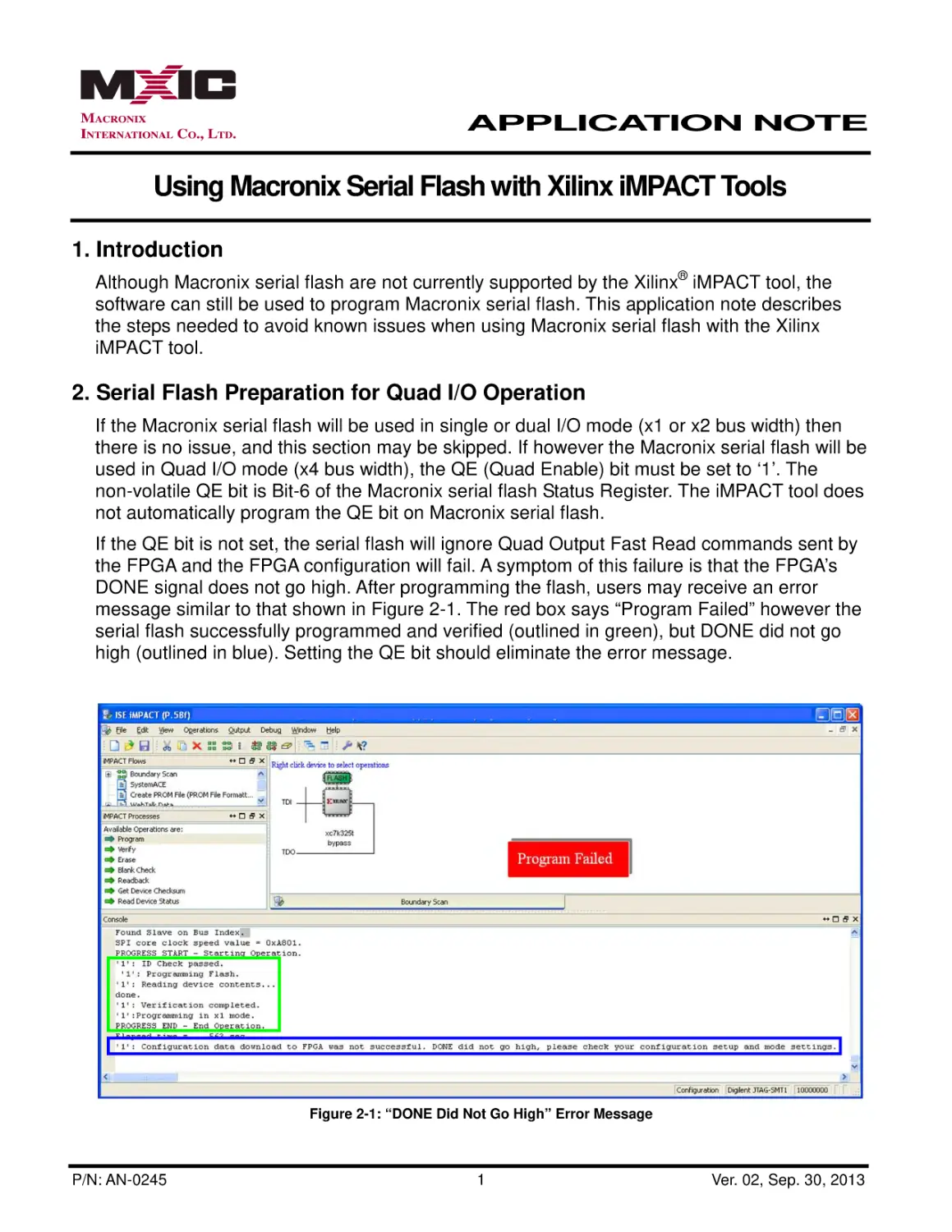
DONE signal does not go high. After programming the flash, users may receive an error
message similar to that shown in Figure 2-1. The red box says “Program Failed” however the
serial flash successfully programmed and verified (outlined in green), but DONE did not go
high (outlined in blue). Setting the QE bit should eliminate the error message.

Figure 2-1: “DONE Did Not Go High” Error Message

P/N: AN-0245

1

Ver. 02, Sep. 30, 2013

APPLICATION NOTE

Using Macronix Serial Flash with Xilinx iMPACT Tools

It is recommended that the QE bit be programmed to ‘1’ prior to installing the serial flash into
the system. The QE bit can be set by issuing the WREN command (06h) followed by the
WRSR command (01h) with 40h as the data. The RDSR command (05h) can be used to read
the Status Register to confirm that the QE bit has been set. Please refer to the product
datasheet for additional details. After the QE bit is set, all of the Fast Read (x1) and Dual
Output Fast Read (x2) commands are still supported along with the Quad Output (x4) Fast
Read command.
The step to set the QE bit can be avoided if the Macronix MX25Lxx73 series serial flash is
used, as the 73 series serial flash have the QE bit permanently set to ‘1’. At this time however,
the 73 series is only available in 3V and in densities from 8Mb to 128Mb (Table 2-1).

Table 2-1: Macronix Quad I/O Mode Serial Flash (32Mb to 512Mb)

Voltage

Density
32Mb

64Mb
3V
128Mb

1.8V

P/N: AN-0245

Part Number
MX25L3235E
MX25L3273E
MX25L6435E
MX25L6473E
MX25L12835F
MX25L12873F

256Mb

MX25L25635F

512Mb

MX66L51235F

32Mb

MX25U3235F

64Mb

MX25U6435F

128Mb

MX25U12835F

256Mb

MX25U25635F

512Mb

MX66U51235F

Ver. 02, Sep. 30, 2013

APPLICATION NOTE

Using Macronix Serial Flash with Xilinx iMPACT Tools
3. Operating System Preparation
Currently, the iMPACT tool does not recognize the Manufacturer ID of Macronix serial flash.
Users attempting use the iMPACT tool to program Macronix serial flash may encounter an
error message stating that the “ID Check failed” and that “the operation did not complete
successfully” (Figure 3-1).

Figure 3-1: “ID Check Failed” Error Message

To avoid the error message, set the following operating system environment variable
XIL_IMPACT_SKIPIDCODECHECK=1
which instructs the iMPACT tool to bypass the ID check, allowing the programming operation
to proceed.

P/N: AN-0245

Ver. 02, Sep. 30, 2013

APPLICATION NOTE

Using Macronix Serial Flash with Xilinx iMPACT Tools
The procedure for setting an environment variable varies by operating system. The following
sequence shows how to add an environment variable within the Microsoft Windows 7
Professional operating system:
a) Click the Windows Start Button and open the “Control Panel.”
b) Within the “Control Panel” click “System and Security” followed by “System,” which will
open the “Basic Information” window.
c) Click “Advanced system settings” to open the “System Properties” window.

Figure 3-2: Basic Information Window

P/N: AN-0245

Ver. 02, Sep. 30, 2013

APPLICATION NOTE

Using Macronix Serial Flash with Xilinx iMPACT Tools
d) In the “System Properties” window, select the “Advanced” tab and then click the
“Environment Variables” button which will open an “Environment Variables” window.

Figure 3-3: System Properties

e) In the “Environment Variables” window click one of the two “New…” buttons to create
either a User variable or a System variable. In Figure 3-4 below, a new User variable is
being created.
f) In the “New User Variable” window, enter “XIL_IMPACT_SKIPIDCODECHECK” for the
Variable name and “1” for the Variable value. Click the “OK” button to add the
environment variable.

Figure 3-4: Environment Variables Window and New User Variable Window

P/N: AN-0245

Ver. 02, Sep. 30, 2013

APPLICATION NOTE

Using Macronix Serial Flash with Xilinx iMPACT Tools
4. Serial Flash Selection inside the Xilinx iMPACT Tool
Macronix serial flash part numbers are not listed in the iMPACT tool. When prompted by the
iMPACT tool to select a serial flash device (Figure 4-1), choose the N25Q part number that
matches the density of the Macronix serial flash being used. This method will work for
densities from 32Mb through 256Mb. Currently there is no 512Mb selection within the
iMPACT tool that is compatible with Macronix 512Mb serial flash. If only 256Mb or less of the
512Mb memory array will be programmed, selecting the 256Mb option as shown in Figure
4-1 should work.

Figure 4-1: Serial Flash Selection

5. Summary
a) If using Quad I/O mode (x4 bus width), set the QE bit prior to installing the serial flash
into the system or use a Macronix 73 series serial flash that has QE preset to ‘1’.
b) Set the operating system environment variable XIL_IMPACT_SKIPIDCODECHECK=1
to avoid the “ID Check failed” error message.
c) To program a Macronix serial flash using the Xilinx iMPACT tool, select the N25Q part
number that matches the density of the Macronix serial flash being used.

6. Revision History
Table 6-1: Revision History
Revision

Description

Page

Date

REV. 1

Initial Release.

ALL

June 27, 2013

1, 4, 6, 7

September 30, 2013

REV. 2

P/N: AN-0245

Ver. 02, Sep. 30, 2013

APPLICATION NOTE

Using Macronix Serial Flash with Xilinx iMPACT Tools
Except for customized products which have been expressly identified in the applicable agreement,
Macronix's products are designed, developed, and/or manufactured for ordinary business, industrial,
personal, and/or household applications only, and not for use in any applications which may, directly
or indirectly, cause death, personal injury, or severe property damages. In the event Macronix
products are used in contradicted to their target usage above, the buyer shall take any and all actions
to ensure said Macronix's product qualified for its actual use in accordance with the applicable laws
and regulations; and Macronix as well as it’s suppliers and/or distributors shall be released from any
and all liability arisen therefrom.
Copyright© Macronix International Co., Ltd. 2013. All rights reserved, including the trademarks and
tradename thereof, such as Macronix, MXIC, MXIC Logo, MX Logo, Integrated Solutions Provider,
NBit, Nbit, NBiit, Macronix NBit, eLiteFlash, HybridNVM, HybridFlash, XtraROM, Phines, KH Logo,
BE-SONOS, KSMC, Kingtech, MXSMIO, Macronix vEE, Macronix MAP, Rich Au-dio, Rich Book, Rich
TV, and FitCAM. The names and brands of third party referred thereto (if any) are for identification
purposes only.
Xilinx and Xilinx iMPACT are trademarks of Xilinx in the United States and other countries.
For the contact and order information, please visit Macronix’s Web site at: http://www.macronix.com

P/N: AN-0245

Ver. 02, Sep. 30, 2013